
1. ບົດແນະນຳ
This manual provides essential information for the safe and efficient use of your OPPO K14 G smartphone. Please read it thoroughly before operating your device to ensure proper functionality and to understand its features.
The OPPO K14 G is designed for speed and performance, featuring advanced 5G connectivity, a powerful processor, 6GB RAM, and 256GB internal storage. It includes a versatile camera system, a high-capacity 7000mAh battery with 45W fast charging, and an IP69 water and dust resistance rating for enhanced durability.
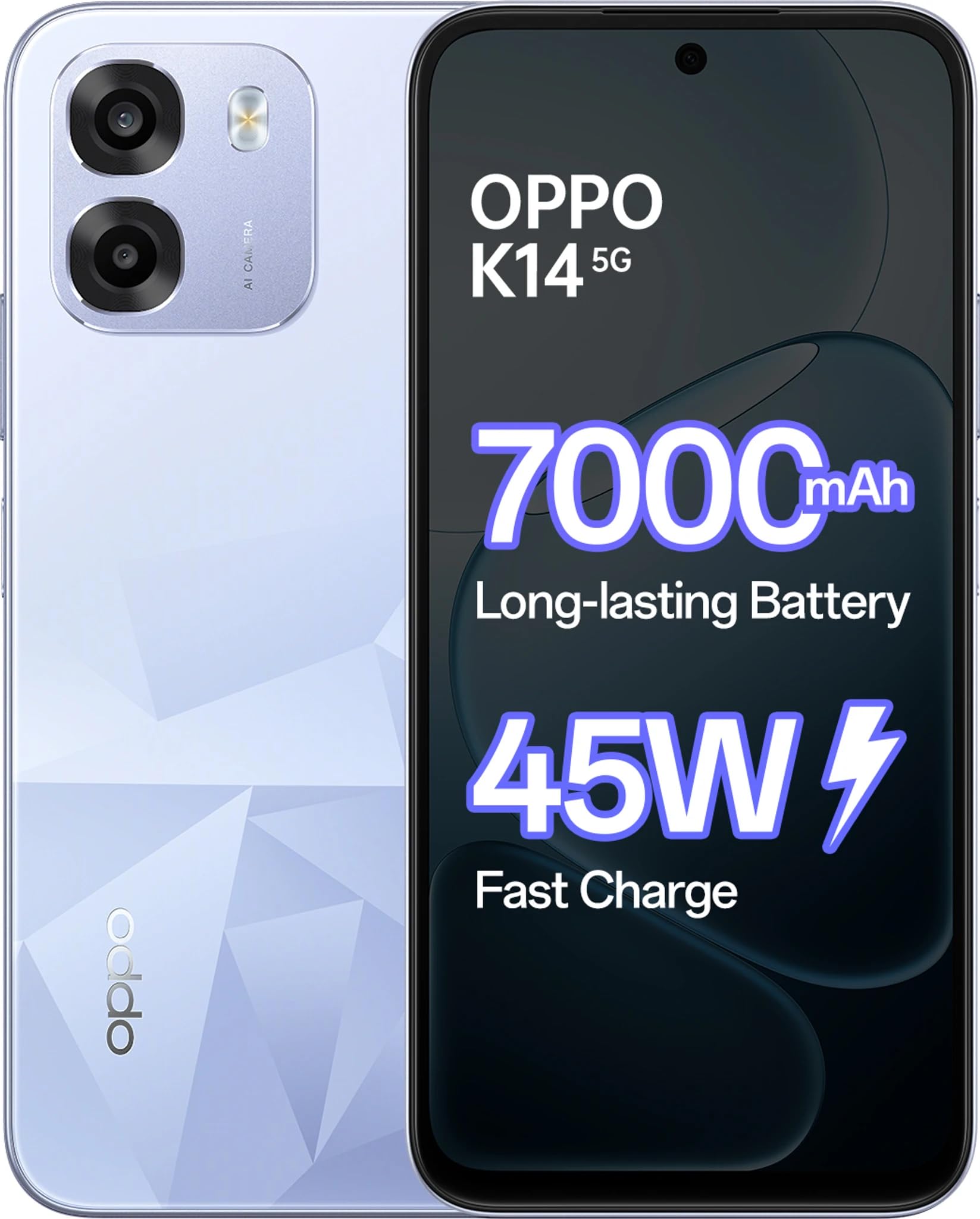
Figure 1: OPPO K14 G Smartphone in Icy Blue color, showcasing ການອອກແບບ sleek ຂອງຕົນ.
2. ສິ່ງທີ່ຢູ່ໃນກ່ອງ
ກວດສອບວ່າລາຍການທັງຫມົດແມ່ນມີຢູ່ໃນຊຸດ:
- OPPO K14 G Smartphone
- ກະເປົາໂທລະສັບ
- ອະແດັບເຕີພະລັງງານ (45W)
- ສາຍ USB (ປະເພດ-C)
- ຄູ່ມືເລີ່ມຕົ້ນດ່ວນ
- ຕົວຖອດຖາດຊິມ
3. ຕັ້ງຄ່າ
3.1. ການໃສ່ແຜ່ນ SIM ແລະບັດ microSD
- ຊອກຫາຖາດຊິມກາດຢູ່ດ້ານຂ້າງຂອງອຸປະກອນຂອງທ່ານ.
- ໃສ່ ຕົວຖອດຖາດຊິມ into the small hole next to the tray and press firmly until the tray pops out.
- ວາງແຜ່ນ Nano-SIM ແລະ/ຫຼືບັດ microSD ຂອງທ່ານໃສ່ໃນຖາດໂດຍໃຫ້ແຜ່ນຕິດຕໍ່ສີທອງຫັນລົງລົງ, ຮັບປະກັນວ່າພວກມັນສອດຄ່ອງກັນຢ່າງຖືກຕ້ອງ.
- ຍູ້ຖາດກັບໃສ່ຊ່ອງໃສ່ຊ່ອງຢ່າງລະມັດລະວັງຈົນກວ່າມັນຈະຊັກກັບອຸປະກອນ.
3.2. ເປີດ / ປິດພະລັງງານ
- ເພື່ອເປີດເຄື່ອງ: ກົດຄ້າງໄວ້ ປຸ່ມເປີດປິດ until the OPPO logo appears.
- ເພື່ອປິດເຄື່ອງ: ກົດຄ້າງໄວ້ ປຸ່ມເປີດປິດ, then tap "Power off" on the screen.
- ເພື່ອເລີ່ມໃໝ່: ກົດປຸ່ມຄ້າງໄວ້ ປຸ່ມເປີດປິດ, then tap "Restart" on the screen.
3.3. ການຕິດຕັ້ງເບື້ອງຕົ້ນ
ເມື່ອເປີດເຄື່ອງທໍາອິດ, ປະຕິບັດຕາມຄໍາແນະນໍາໃນຫນ້າຈໍເພື່ອ:
- ເລືອກພາສາຂອງທ່ານ.
- ເຊື່ອມຕໍ່ກັບເຄືອຂ່າຍ Wi-Fi.
- ຕັ້ງຄ່າບັນຊີ Google ຂອງທ່ານ.
- ຕັ້ງຄ່າການຕັ້ງຄ່າຄວາມປອດໄພ (ລາຍນິ້ວມື, ການປົດລັອກດ້ວຍໜ້າ, PIN/ຮູບແບບ).
3.4. ການສາກອຸປະກອນ
Connect the USB Type-C cable to the charging port on your phone and the other end to the provided 45W Power Adapter. Plug the adapter into a power outlet. The device supports 45W fast charging for quick power replenishment.
4. ຄໍາແນະນໍາການດໍາເນີນງານ
4.1. ການນໍາທາງພື້ນຖານ
- ທ່າທາງສໍາຜັດ: ແຕະເພື່ອເລືອກ, ປັດເພື່ອເລື່ອນ, ແຕະເພື່ອຊູມ.
- ໜ້າຈໍຫຼັກ: ເຂົ້າເຖິງແອັບ, ວິດເຈັດ ແລະການແຈ້ງເຕືອນ.
- ກະດານແຈ້ງການ: ປັດລົງຈາກເທິງສຸດຂອງໜ້າຈໍໄປທີ່ view ການແຈ້ງເຕືອນ ແລະການຕັ້ງຄ່າດ່ວນ.
4.2. ໂທອອກ ແລະສົ່ງຂໍ້ຄວາມ
- ໂທ: Open the Phone app, enter the number, or select a contact, then tap the call icon.
- ຂໍ້ຄວາມ: Open the Messages app, tap to start a new conversation, enter recipient and message, then send.
4.3. ການນໍາໃຊ້ກ້ອງຖ່າຍຮູບ
The OPPO K14 G features a versatile camera system for capturing photos and videos.
- ເປີດກ້ອງຖ່າຍຮູບ: ແຕະໄອຄອນແອັບກ້ອງຖ່າຍຮູບ.
- ສະຫຼັບໂໝດ: ປັດໄປທາງຊ້າຍ ຫຼື ຂວາເທິງ viewfinder to select modes like Photo, Video, Portrait, Night, etc.
- ຖ່າຍຮູບ/ບັນທຶກວິດີໂອ: ແຕະປຸ່ມຊັດເຕີເພື່ອຖ່າຍຮູບ ຫຼືເລີ່ມ/ຢຸດການບັນທຶກວິດີໂອ.
- ກ້ອງໜ້າ: Tap the camera switch icon to use the 8 MP front camera.
4.4. ການເຊື່ອມຕໍ່
- Wi-Fi: ໄປທີ່ການຕັ້ງຄ່າ > Wi-Fi ເພື່ອເຊື່ອມຕໍ່ກັບເຄືອຂ່າຍທີ່ມີໃຫ້.
- Bluetooth: Go to Settings > Bluetooth to pair with other devices like headphones or speakers.
- ຂໍ້ມູນມືຖື (5G): Ensure your SIM card has an active 5G plan. Enable mobile data in Quick Settings or Settings > Mobile Network.
5. ບໍາລຸງຮັກສາ
5.1. ການເຮັດຄວາມສະອາດອຸປະກອນຂອງທ່ານ
Use a soft, lint-free cloth to clean the screen and body of your phone. Avoid using harsh chemicals, abrasive cleaners, or compressed air, as these can damage the device's finish or internal components.
5.2. ການປັບປຸງຊອບແວ
Regularly check for and install software updates to ensure your device has the latest features, security patches, and performance improvements. Go to Settings > About device > Up to date to check for updates.
5.3. ການດູແລຫມໍ້ໄຟ
- Avoid exposing the device to extreme temperatures (very hot or very cold), as this can degrade battery life.
- Do not leave the device charging for extended periods after it has reached 100% to prolong battery health.
- For optimal performance, use the original OPPO 45W Power Adapter and USB cable.
5.4. ກັນນໍ້າ ແລະຝຸ່ນ (IP69)
The OPPO K14 G is rated IP69 for water and dust resistance. This means it is protected against high-pressure, high-temperature water jets and dust ingress. However, this resistance is not permanent and may decrease over time with normal wear. Avoid intentional submersion, exposure to seawater, chlorinated water, or liquids other than fresh water. If the device gets wet, dry it thoroughly before charging or using ports.
6. ການແກ້ໄຂບັນຫາ
6.1. ອຸປະກອນບໍ່ຕອບສະໜອງ
If your device freezes or becomes unresponsive, perform a force restart by pressing and holding the ປຸ່ມເປີດປິດ ແລະ ປຸ່ມ Volume Up simultaneously for about 10-15 seconds until the device restarts.
6.2. ບັນຫາການສາກໄຟ
- Ensure the charging cable and adapter are securely connected and undamaged.
- ລອງໃຊ້ປລັກສຽບໄຟອື່ນ.
- ເຮັດຄວາມສະອາດຊ່ອງສຽບສາຍສາກຄ່ອຍໆດ້ວຍແປງອ່ອນໆ, ແຫ້ງເພື່ອເອົາສິ່ງເສດເຫຼືອໃດໆອອກ.
6.3. Network Problems
- ກວດສອບວ່າໂໝດເຮືອບິນເປີດໃຊ້ງານຢູ່ຫຼືບໍ່. ປິດມັນຖ້າຍັງເປີດໃຊ້ຢູ່.
- Ensure your SIM card is properly inserted and active.
- Go to Settings > Mobile Network and check network settings. Try resetting network settings if issues persist.
6.4. App Crashing or Freezing
- ປິດ ແລະເປີດແອັບຄືນໃໝ່.
- ລຶບລ້າງແຄສ ແລະຂໍ້ມູນຂອງແອັບ (ການຕັ້ງຄ່າ > ແອັບ > [ຊື່ແອັບ] > ບ່ອນເກັບຂໍ້ມູນ > ລຶບແຄດ/ລຶບຂໍ້ມູນ).
- ຖອນການຕິດຕັ້ງ ແລະຕິດຕັ້ງແອັບຯຄືນໃໝ່.
7. ຂໍ້ມູນຈໍາເພາະ
| ຄຸນສົມບັດ | ລາຍລະອຽດ |
|---|---|
| ຍີ່ຫໍ້ | OPPO |
| ຕົວແບບ | K14 G |
| ລະບົບປະຕິບັດການ | Android 15 |
| RAM | 6 GB |
| ການເກັບຮັກສາພາຍໃນ | 256 GB |
| ຕົວແບບ CPU | Mediatek Dimensity 6300 |
| ຄວາມໄວ CPU | 2.4 GHz |
| ຂະຫນາດຈໍສະແດງຜົນ | 6.75 ນິ້ວ |
| ຄວາມລະອຽດ | 720 x 1600 |
| ຄວາມອາດສາມາດຫມໍ້ໄຟ | 7000 mAh |
| ກຳລັງສາກໄຟ | ສາກໄວ 45W |
| ກ້ອງໜ້າ | 8 MP |
| ການຕໍ່ຕ້ານນ້ໍາ | IP69 (ກັນນ້ຳ) |
| ການເຊື່ອມຕໍ່ | 5G, LTE |
| ປະເພດຕົວເຊື່ອມຕໍ່ | USB ປະເພດ C |
| ນ້ໍາຫນັກລາຍການ | 216 ກຣາມ |
| ຂະໜາດລາຍການ | 16.6 x 7.8 x 1 ຊັງຕີແມັດ |
8. ການຮັບປະກັນແລະການສະຫນັບສະຫນູນ
8.1. ຂໍ້ມູນການຮັບປະກັນ
Your OPPO K14 G smartphone comes with a 1 year manufacturer Warranty from the date of purchase. This warranty covers manufacturing defects under normal use. Please retain your proof of purchase for warranty claims. The warranty does not cover damage caused by misuse, accidents, unauthorized modifications, or normal wear and tear.
8.2. ການຊ່ວຍເຫຼືອລູກຄ້າ
For further assistance, technical support, or service inquiries, please visit the official OPPO website or contact an authorized OPPO service center. You can find contact details and service center locations on the official OPPO support page.
Official OPPO Store: ຮ້ານຄ້າຍີ່ຫໍ້ OPPO ໃນ Amazon