
SmallRig RF20C
SmallRig RF20C RGB Portable LED Photo Torch User Manual
Model: RF20C (5335)
ຍີ່ຫໍ້: SmallRig
1. ບົດແນະນຳ
The SmallRig RF20C RGB Portable LED Photo Torch is a versatile and powerful lighting tool designed for photographers, videographers, and content creators. It features 5-color LED beads, adjustable beam angle, and supports creative lighting effects with included gobos. This manual provides essential information for the safe and effective use of your device.
2. ຂໍ້ມູນຄວາມປອດໄພ
- ຢ່າປ່ອຍໃຫ້ອຸປະກອນຖືກນ້ໍາຫຼືຄວາມຊຸ່ມຊື່ນຫຼາຍເກີນໄປ.
- ຫຼີກເວັ້ນການສໍາຜັດກັບຕາໂດຍກົງກັບໄຟ LED.
- ຫ້າມຖອດປະກອບ ຫຼື ດັດແປງອຸປະກອນ. ການສ້ອມແປງຄວນປະຕິບັດໂດຍພະນັກງານທີ່ໄດ້ຮັບອະນຸຍາດເທົ່ານັ້ນ.
- ຮັກສາໃຫ້ໄກຈາກເດັກນ້ອຍ.
- Ensure proper ventilation during extended use, as the device may become warm.
- ໃຊ້ພຽງແຕ່ສາຍສາກ ແລະອະແດັບເຕີໄຟທີ່ລະບຸໄວ້ເທົ່ານັ້ນ.
3. ເນື້ອໃນຊຸດ
ກວດສອບວ່າລາຍການທັງຫມົດແມ່ນມີຢູ່ໃນຊຸດຂອງທ່ານ:
- RF20C Portable Focusable LED Video Light x 1
- Gobos x 20
- Silicone Gobo Holder x 1
- ກະເປົາຫິ້ວ x 1
- ຄູ່ມືຜູ້ໃຊ້ x 1 (ເອກະສານນີ້)
- ສາຍສາກ x 1
4. ຕັ້ງຄ່າ
4.1 ການສາກໄຟເບື້ອງຕົ້ນ
Before first use, fully charge the RF20C. Connect the provided USB-C charging cable to the device's charging port and to a compatible USB power adapter (PD 36W recommended). The device can be used while charging.

Figure 4.1: Internal battery illustration and runtime information.

Figure 4.2: Portable design, mounting options, cooling fan, and charging capability.
4.2 Attaching Gobos
To use the creative pattern gobos, first remove the plano-convex lens from the front of the light. Then, attach the silicone gobo holder and insert the desired gobo. This ensures optimal projection effects.

Figure 4.3: Gobo projection examples and installation tip.
5. ຄໍາແນະນໍາການດໍາເນີນງານ
5.1 ເປີດ/ປິດ ແລະການຄວບຄຸມພື້ນຖານ
The RF20C features a single multi-function button for control. To prevent accidental activation during transport, the device requires a specific action to turn on.
- ເປີດ: Rotate the control button to turn on the device.
- ປິດພະລັງງານ: Press and hold the control button for 3 seconds.
- ປ່ຽນສີ: Short press the control button to cycle through the available colors (Red, 5600K White, Purple, Orange, Cyan).
- ປັບຄວາມສະຫວ່າງ: Rotate the control button to increase or decrease the light brightness.
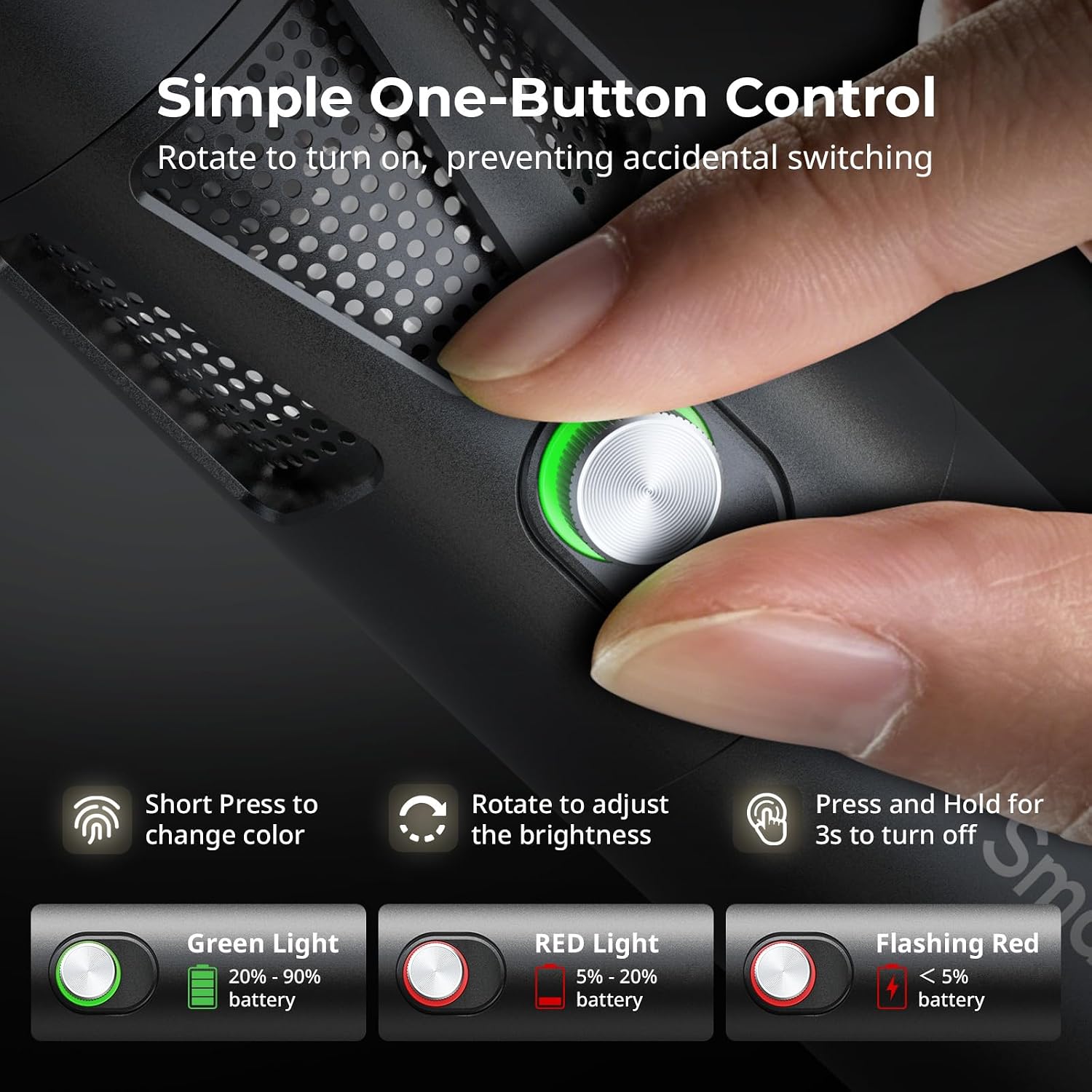
Figure 5.1: One-button control and battery indicator.

Figure 5.2: Available LED colors.
5.2 ການປັບມຸມຂອງລຳແສງ
The front plano-convex lens allows for adjustment of the beam angle. Push or pull the lens to change the focus of the light from a narrow 24° beam to a wider 60° diffusion.
- Extend the lens: Narrows the beam (e.g., 24°).
- Retract the lens: Diffuses the beam (e.g., 60°).

Figure 5.3: Beam angle adjustment mechanism.
5.3 ຕົວຊີ້ວັດແບັດເຕີຣີ
The control button's LED indicates the battery status:
- ແສງສີຂຽວ: 20% - 90% ຫມໍ້ໄຟຍັງເຫຼືອ.
- ໄຟແດງ: 5% - 20% ຫມໍ້ໄຟຍັງເຫຼືອ.
- ກະພິບໄຟແດງ: ແບັດເຕີຣີເຫຼືອໜ້ອຍກວ່າ 5%.

Figure 5.4: Brightness comparison of RF20C.
6. ບໍາລຸງຮັກສາ
- Clean the device regularly with a soft, dry cloth. Do not use harsh chemicals or abrasive materials.
- ເກັບຮັກສາອຸປະກອນໄວ້ໃນບ່ອນທີ່ເຢັນ, ແຫ້ງ, ຫ່າງຈາກແສງແດດໂດຍກົງ ແລະອຸນຫະພູມທີ່ຮ້າຍກາດ.
- When not in use for extended periods, charge the battery to approximately 50% every three months to prolong battery life.
- Keep the lens and LED surface free from dust and fingerprints for optimal light output.
7. ການແກ້ໄຂບັນຫາ
| ບັນຫາ | ສາເຫດທີ່ເປັນໄປໄດ້ | ການແກ້ໄຂ |
|---|---|---|
| ອຸປະກອນບໍ່ເປີດ. | ແບັດເຕີຣີຕໍ່າ; ຂັ້ນຕອນການເປີດເຄື່ອງບໍ່ຖືກຕ້ອງ. | Charge the device. Ensure you rotate the control button to power on. |
| ແສງອອກໜ້ອຍລົງ. | Low battery; brightness set too low; dirty lens. | Charge the device. Rotate the control button to increase brightness. Clean the lens. |
| Gobo projection is blurry. | Plano-convex lens not removed; gobo not seated correctly. | Remove the plano-convex lens before attaching the silicone gobo holder. Ensure gobo is properly inserted. |
| Device becomes warm during use. | Normal operation, especially at high power; fan obstruction. | This is normal. Ensure the fan vents are not obstructed for proper heat dissipation. If excessively hot, reduce brightness or allow to cool. |
| ສຽງພັດລົມແມ່ນສັງເກດເຫັນໄດ້. | Normal operation for cooling. | The device uses a high-speed fan for efficient heat dissipation. This noise is part of normal operation. Consider distance from audio recording equipment. |
8. ຂໍ້ມູນຈໍາເພາະ
| ຄຸນສົມບັດ | ລາຍລະອຽດ |
|---|---|
| ຕົວແບບ | RF20C (5335) |
| ພະລັງງານ | 20 ວ |
| ປ້ອນຂໍ້ມູນ | 20 V / 1.8 A (max. 36 W) |
| ສີ LED | Red, 5600K White, Purple, Orange, Cyan |
| ດັດຊະນີການສະແດງສີ (CRI) | ≥ 97 |
| ດັດຊະນີຄວາມສອດຄ່ອງຂອງແສງໂທລະທັດ (TLCI) | ≥ 99 (at 5600 K) |
| ຄວາມສະຫວ່າງ | 5400 Lux @ 1m / 5600K |
| ຄວາມອາດສາມາດຫມໍ້ໄຟ | 10000mAh (2 x 5000mAh / 7.4V / 37Wh) |
| Runtime (Full Power) | ສູງສຸດ 1.5 ຊົ່ວໂມງ |
| ກຳລັງສາກໄຟ | USB-C PD 36W Fast Charging, supports charging while operating |
| ການປັບມຸມ Beam | 24° ຫາ 60° |
| ວັດສະດຸ | ໂລຫະປະສົມອາລູມິນຽມ, ABS |
| ຂະໜາດສິນຄ້າ | φ49.0 x 200.0 mm / φ1.9 x 7.9 inches |
| ນ້ຳໜັກສິນຄ້າ | 520.0 ± 20.0 g / 18.3 ± 0.7 ອໍ |
| ເຕັກໂນໂລຊີການເຊື່ອມຕໍ່ | USB |
| ປະເທດຕົ້ນກໍາເນີດ | ຈີນ |
9. ການຮັບປະກັນແລະການສະຫນັບສະຫນູນ
SmallRig products are designed and manufactured to the highest quality standards. This product is covered by a limited warranty from the date of purchase. For detailed warranty terms, technical support, or service inquiries, please refer to the official SmallRig webສະຖານທີ່ຫຼືຕິດຕໍ່ຜູ້ຈັດຈໍາຫນ່າຍທ້ອງຖິ່ນຂອງທ່ານ.
ກະລຸນາຮັກສາຫຼັກຖານການຊື້ຂອງທ່ານສໍາລັບການຮຽກຮ້ອງການຮັບປະກັນ.
10. ສະຖານະການນຳໃຊ້
The SmallRig RF20C is suitable for various applications, including:
- ການຖ່າຍຮູບ
- ການບັນທຶກວິດີໂອ
- ຖ່າຍທອດສົດ
- Creative Accent Lighting
- Macro Work and Close-ups

ຮູບທີ 10.1: ຕົວຢ່າງamples of RF20C usage scenarios.
Ask a question about this manual
Ask about setup, troubleshooting, compatibility, parts, safety, or missing instructions. Manuals+ will review the question and use this page’s manual context to help answer it.