
ແນະນຳ
This manual provides essential information for the safe and efficient use of your ciciglow 4G Slide Phone. Please read these instructions carefully before operating the device and retain them for future reference. This phone combines a classic slide design with modern 4G connectivity and a touch screen interface.
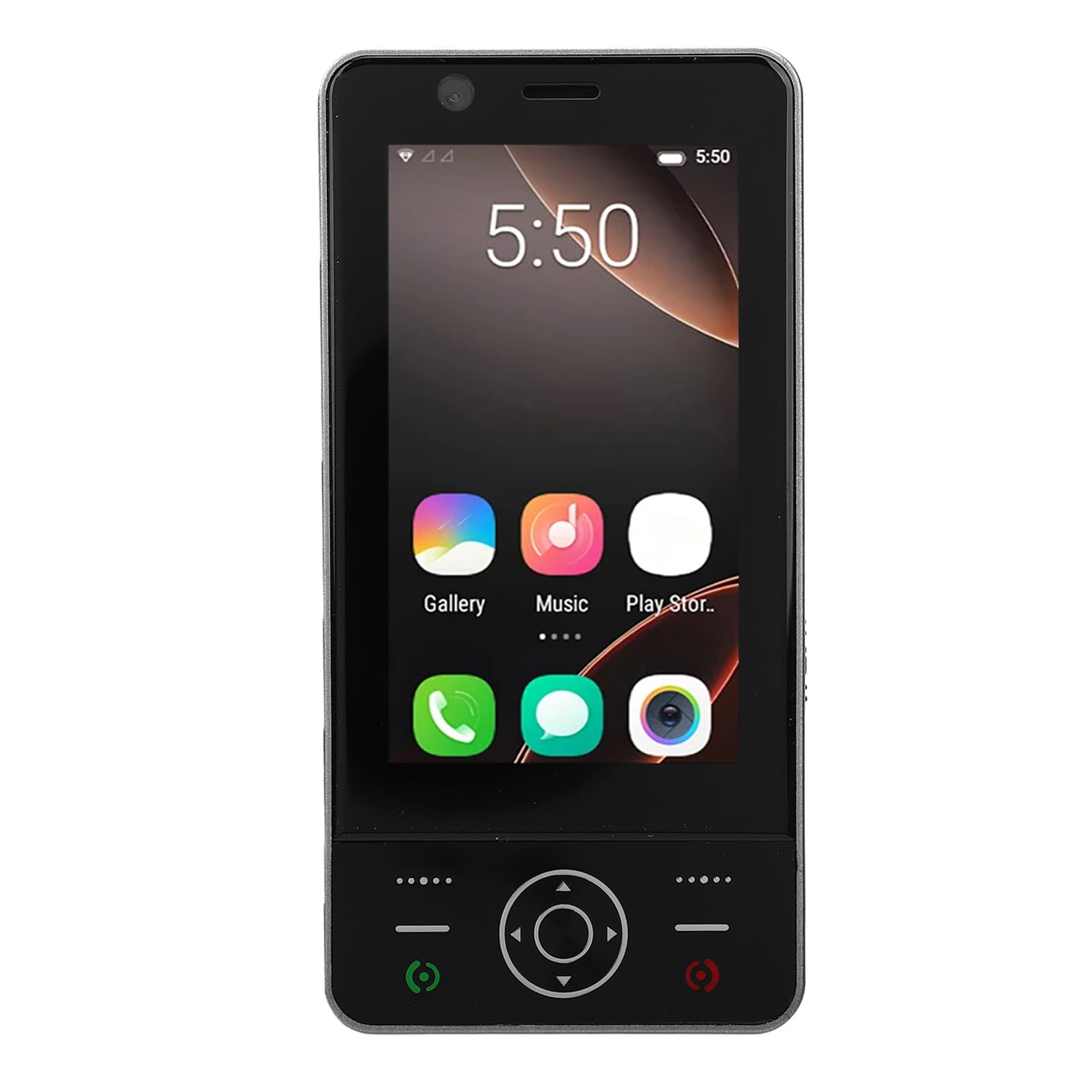
Image: The ciciglow 4G Slide Phone in its open position, displaying the touch screen interface and the physical keypad.
ສິນຄ້າເກີນview
ຄຸນນະສົມບັດທີ່ສໍາຄັນ
- Slide Design: Compact and portable form factor with a sliding physical keypad.
- ຈໍສະແດງຜົນ: 3.0-inch touch screen for intuitive navigation.
- ລະບົບປະຕິບັດການ: Android 8.1 (non-upgradable).
- ການເຊື່ອມຕໍ່ເຄືອຂ່າຍ: Supports 4G/3G/2G networks (GSM 850/900/1800/1900, WCDMA B1/B2/B4/B5/B8, FDD B1/2/3/5/7/8/20/28AB, TDD B38/40/B41).
- ຮອງຮັບຊິມ: Dual SIM slots for flexible network usage.
- ການເກັບຮັກສາ: 2GB RAM and 16GB internal storage, expandable up to 32GB via memory card (not included).
- ໄຮ້ສາຍ: Bluetooth V5.0 and Wi-Fi connectivity.
- ກ້ອງຖ່າຍຮູບ: 2MP front and rear cameras.
- ແບັດເຕີຣີ: ແບັດເຕີຣີໃນຕົວ 2000mAh.
- ພອດ: Type-C charging port and 3.5mm headphone jack.
ເນື້ອໃນຊຸດ
ກວດສອບວ່າລາຍການທັງຫມົດແມ່ນມີຢູ່ໃນຊຸດ:
- 1 x ciciglow 4G Slide Phone
- 1 x ສາຍສາກ (ປະເພດ-C)
- 1 x Lanyard
- 2 x ຄູ່ມືຜູ້ໃຊ້ (ເອກະສານນີ້)
- 1 x SIM Ejector Tool

Image: The ciciglow 4G Slide Phone, lanyard, charging cable, and SIM ejector tool, representing the package contents.
ຕັ້ງຄ່າ
1. Inserting SIM Card(s) and Memory Card
- ຊອກຫາຖາດຊິມກາດຢູ່ດ້ານຂ້າງຂອງໂທລະສັບ.
- ໃຊ້ເຄື່ອງມືຖອດຊິມທີ່ສະໜອງໃຫ້ເພື່ອເປີດຖາດ.
- Carefully place your Nano-SIM card(s) into the designated slots. Ensure the gold contacts face downwards.
- If using a memory card (MicroSD, up to 32GB), insert it into the dedicated memory card slot on the tray.
- ຄ່ອຍໆຍູ້ຖາດກັບໃສ່ໂທລະສັບຈົນກວ່າມັນຈະຖືກລ້າງກັບຕົວອຸປະກອນ.
2. ການສາກອຸປະກອນ
- Connect the Type-C charging cable to the charging port at the bottom of the phone.
- ເຊື່ອມຕໍ່ອີກສົ້ນຂອງສາຍກັບອະແດັບເຕີໄຟ USB ທີ່ເຂົ້າກັນໄດ້ (ບໍ່ລວມ) ຫຼືພອດ USB ຂອງຄອມພິວເຕີ.
- Allow the phone to charge fully before initial use. The battery indicator on the screen will show charging status.
3. ເປີດ / ປິດພະລັງງານ
- ເພື່ອເປີດເຄື່ອງ: ກົດປຸ່ມເປີດປິດຄ້າງໄວ້ (ປົກກະຕິແລ້ວຢູ່ດ້ານຂ້າງ) ຈົນກວ່າໜ້າຈໍຈະສະຫວ່າງຂຶ້ນ.
- ປິດເຄື່ອງ: ກົດປຸ່ມເປີດປິດຄ້າງໄວ້, ຈາກນັ້ນເລືອກ 'ປິດເຄື່ອງ' ຈາກຕົວເລືອກໃນໜ້າຈໍ.
ຄໍາແນະນໍາການດໍາເນີນງານ
ການນໍາທາງພື້ນຖານ
The ciciglow 4G Slide Phone offers dual navigation methods: the 3.0-inch touch screen and the physical keypad.
- ໜ້າຈໍສຳຜັດ: ແຕະເພື່ອເລືອກ, ປັດເພື່ອເລື່ອນ, ແຕະເພື່ອຊູມ.
- ປຸ່ມກົດທາງກາຍະພາບ: Use the directional pad for menu navigation and the numeric keys for dialing or text input when the keypad is extended.

Image: The phone with its keypad extended, illustrating the combination of touch screen and physical button controls.
ໂທອອກ ແລະຮັບສາຍ
- ໂທອອກ: Open the dialer application on the touch screen or slide open the phone to use the physical keypad. Enter the phone number and press the call button.
- ເພື່ອຮັບສາຍ: When a call comes in, swipe the answer icon on the touch screen or press the green call button on the keypad.

Image: A person using the ciciglow 4G Slide Phone for a call, demonstrating its ergonomic design.
ການສົ່ງຂໍ້ຄວາມ
Access the messaging application from the home screen. You can compose messages using the on-screen keyboard or the physical keypad when extended.
ກຳລັງເຊື່ອມຕໍ່ກັບ Wi-Fi
- ໄປທີ່ ການຕັ້ງຄ່າ > ເຄືອຂ່າຍ ແລະອິນເຕີເນັດ > Wi-Fi.
- ສະຫຼັບ Wi-Fi On.
- ເລືອກເຄືອຂ່າຍທີ່ທ່ານຕ້ອງການຈາກບັນຊີລາຍຊື່ແລະໃສ່ລະຫັດຜ່ານຖ້າຫາກວ່າ prompted.
ການຈັບຄູ່ Bluetooth
- ໄປທີ່ ການຕັ້ງຄ່າ > ອຸປະກອນທີ່ເຊື່ອມຕໍ່ > Bluetooth.
- ສະຫຼັບ Bluetooth On.
- Ensure the device you wish to pair with is in pairing mode.
- Select the device from the list of available devices and follow any on-screen prompts to complete pairing.
ການນໍາໃຊ້ກ້ອງຖ່າຍຮູບ
Open the Camera application from the home screen. Tap the screen to focus and press the shutter button to take a photo. You can switch between front and rear cameras within the app.
ບໍາລຸງຮັກສາ
ການເຮັດຄວາມສະອາດອຸປະກອນຂອງທ່ານ
- ໃຊ້ຜ້າແພທີ່ອ່ອນໆ, ບໍ່ມີສານດ່າງເພື່ອທຳຄວາມສະອາດໜ້າຈໍ ແລະຕົວເຄື່ອງຂອງໂທລະສັບ.
- ຫຼີກລ່ຽງການໃຊ້ສານເຄມີທີ່ຮຸນແຮງ, ເຄື່ອງຂັດຂັດ, ຫຼືສີດ aerosol.
- ຮັກສາທ່າເຮືອບໍ່ໃຫ້ມີຂີ້ຝຸ່ນ ແລະສິ່ງເສດເຫຼືອ.
ການດູແລຫມໍ້ໄຟ
- ຫຼີກເວັ້ນການເປີດເຜີຍໂທລະສັບກັບອຸນຫະພູມທີ່ຮຸນແຮງ.
- ຫ້າມເຈາະ ຫຼືຖອດສາກແບັດເຕີລີ.
- For optimal battery life, avoid frequently draining the battery completely or keeping it at 100% charge for extended periods.
ອັບເດດຊອບແວ
The operating system for this device is Android 8.1 and is not upgradable. Ensure you have the latest available applications from the Play Store for optimal performance.
ການແກ້ໄຂບັນຫາ
| ບັນຫາ | ການແກ້ໄຂທີ່ເປັນໄປໄດ້ |
|---|---|
| ໂທລະສັບບໍ່ເປີດ. | Ensure the battery is charged. Connect the phone to a charger for at least 30 minutes. If it still doesn't power on, contact support. |
| ບໍ່ມີສັນຍານເຄືອຂ່າຍ. | Check if the SIM card is correctly inserted. Verify that you are in an area with network coverage. Restart the phone. |
| ໜ້າຈໍສໍາຜັດບໍ່ຕອບສະໜອງ. | Restart the phone. Ensure the screen is clean and dry. If the issue persists, contact support. |
| ບໍ່ສາມາດເຊື່ອມຕໍ່ກັບ Wi-Fi ໄດ້. | Ensure Wi-Fi is enabled on the phone and the router is working. Re-enter the Wi-Fi password. Restart both the phone and the router. |
| ແອັບຯຊ້າ ຫຼືຂັດຂ້ອງ. | Close unnecessary background applications. Clear app cache (Settings > Apps > [App Name] > Storage > Clear cache). Restart the phone. |
ຂໍ້ມູນຈໍາເພາະ
| ຄຸນສົມບັດ | ລາຍລະອຽດ |
|---|---|
| ຍີ່ຫໍ້ | ciciglow |
| ຊື່ຕົວແບບ | ciciglowzsbnh152p6-13 |
| ລະບົບປະຕິບັດການ | Android 8.1 (Non-upgradable) |
| ໂຮງງານຜະລິດ | MTK6737 |
| ຂະໜາດໜ້າຈໍ | 3.0 ນິ້ວ |
| ປະເພດການສະແດງ | Touch Screen, LED |
| ໜ່ວຍຄວາມຈຳ (RAM) | 2GB |
| ບ່ອນຈັດເກັບຂໍ້ມູນ (ROM) | 16GB |
| ການເກັບຮັກສາທີ່ຂະຫຍາຍໄດ້ | Supports up to 32GB Memory Card (MicroSD) |
| ເຕັກໂນໂລຊີໂທລະສັບມືຖື | 4G/3G/2G |
| ແຖບຄວາມຖີ່ | 2G GSM 850/900/1800/1900, 3G WCDMA B1/B2/B4/B5/B8, 4G FDD B1/2/3/5/7/8/20/28AB, TDD B38/40/B41 |
| ຈຳນວນຊ່ອງໃສ່ຊິມກາດ | ຊິມສອງ |
| ການເຊື່ອມຕໍ່ໄຮ້ສາຍ | Wi-Fi, Bluetooth V5.0 |
| ກ້ອງຖ່າຍຮູບ | 2MP Front and Rear |
| ຄວາມອາດສາມາດຫມໍ້ໄຟ | 2000mAh (ໃນຕົວ) |
| ພອດສາກໄຟ | ປະເພດ-C |
| Jack ຫູຟັງ | 3.5ມມ |
| ຂະໜາດ (ປະມານ) | Height: 136mm (5.35in), Width: 52mm (2.05in), Thickness: 19mm (0.74in) |
| ນ້ຳໜັກ (ປະມານ) | 135g |

Image: Detailed dimensions and weight of the ciciglow 4G Slide Phone.

Image: An illustration of the phone's internal chipset, highlighting the MTK6737 processor, Android 8.1, 16GB ROM, and 2GB RAM.
ການຮັບປະກັນແລະການສະຫນັບສະຫນູນ
ຂໍ້ມູນການຮັບປະກັນ
This ciciglow 4G Slide Phone is covered by a manufacturer's warranty for 90 days from the date of purchase. Please retain your proof of purchase for warranty claims.
ການຊ່ວຍເຫຼືອລູກຄ້າ
For further assistance, technical support, or warranty inquiries, please refer to the contact information provided with your purchase or visit the official ciciglow brand store online. You can find more information at the ciciglow Store.