
1. ບົດແນະນຳ
This manual provides essential information for setting up, operating, maintaining, and troubleshooting your FIREBAT U6B 16-inch QHD Laptop. Please read this guide thoroughly to ensure optimal performance and longevity of your device.
2. ຜະລິດຕະພັນເກີນview
The FIREBAT U6B is a high-performance 16-inch laptop designed for various computing needs. It features a lightweight metal chassis and a vibrant QHD display.

ຮູບ 2.1: ດ້ານຫນ້າ view of the FIREBAT U6B laptop.

ຮູບ 2.2: ເກີນview of the FIREBAT U6B Ultrabook's main features.
2.1. ພອດ ແລະຕົວເຊື່ອມຕໍ່
The laptop is equipped with a variety of ports for connectivity:
- ຊ້າຍ: USB-A 3.2 Gen2 (10Gbps) x 1, USB-C 3.2 Gen2 (10Gbps) x 1 (with DP1.4 video output and 100W PD), HDMI 2.1 TMDS x 1
- ເບື້ອງຂວາ: Kensington Security Lock x 1, 3.5mm 2-in-1 Combo Audio Jack x 1, USB-A 2.0 x 1, TF Card Slot x 1, USB-A 3.2 Gen1 (5Gbps) x 1, USB-C 3.2 Gen1 (5Gbps) x 1 (with DP1.4 video output and 100W PD)
ຮູບທີ 2.3: ລາຍລະອຽດ view of the laptop's ports and their functions.
3. ຕັ້ງຄ່າ
3.1. Unboxing ແລະການກວດກາເບື້ອງຕົ້ນ
- Carefully remove the laptop and accessories from the packaging.
- ກວດສອບຄອມພິວເຕີໂນດບຸກວ່າເສຍຫາຍທາງຮ່າງກາຍຫຼືບໍ່.
- Ensure all included accessories (power adapter, manual) are present.
3.2. ການເຊື່ອມຕໍ່ອະແດບເຕີພະລັງງານ
Connect the provided 100W GaN power adapter to the USB-C port on the laptop and then to a power outlet. It is recommended to fully charge the battery before first use.
3.3. ການບູດຄັ້ງທຳອິດ ແລະ ການຕັ້ງຄ່າລະບົບປະຕິບັດການ
Press the dedicated power button to turn on the laptop. Follow the on-screen instructions to complete the Windows 11 initial setup, including language, network connection, and user account creation.
4. ຄໍາແນະນໍາການດໍາເນີນງານ
4.1. ເປີດ/ປິດ
- ເປີດ: Press the dedicated power button located on the keyboard.
- ປິດພະລັງງານ: ຄລິກທີ່ປຸ່ມ Windows Start, ຈາກນັ້ນເລືອກ Power > Shut down.
- ຮູບແບບການນອນ: Close the laptop lid or click the Windows Start button, then select Power > Sleep.
4.2. ແປ້ນພິມ ແລະ Touchpad
The laptop features a full-size backlit keyboard and a high-precision touchpad.
- ແປ້ນພິມ Backlit: Use the dedicated function key (usually Fn + a specific F-key) to adjust the backlight brightness or turn it on/off.
- ແຜ່ນສໍາຜັດ: Supports multi-touch gestures for navigation and control. Refer to Windows settings for customization.

Figure 4.1: The backlit keyboard and touchpad.
4.3. ຮູບແບບການປະຕິບັດ
You can switch between different performance modes by pressing Fn + ຖາມ to optimize for battery life or performance:
- ໂໝດ Eco: Maximizes battery life by reducing power consumption. Ideal for light tasks and extended use.
- ຮູບແບບການດຸ່ນດ່ຽງ: Offers a balance between performance and power efficiency. Suitable for everyday tasks.
- High Performance Mode: Provides maximum power for demanding applications and gaming.

Figure 4.2: Switching between performance modes using Fn+Q.
5. ຄຸນສົມບັດການປະຕິບັດ
5.1. ໜ່ວຍປະມວນຜົນ
The FIREBAT U6B is powered by a robust AMD Ryzen 5 6600H processor, featuring 6 cores and 12 threads, with a maximum boost clock of 4.5GHz. This ZEN 3+ architecture-based CPU delivers strong performance for multitasking, productivity, and entertainment.

Figure 5.1: AMD Ryzen 5 6600H processor specifications.
5.2. Graphics
ປະສົມປະສານ ກຣາບຟິກ AMD Radeon 660M with 1900MHz clock speed handle visual tasks, supporting complex design software, UHD video editing, and casual gaming.
5.3. ຈໍສະແດງຜົນ
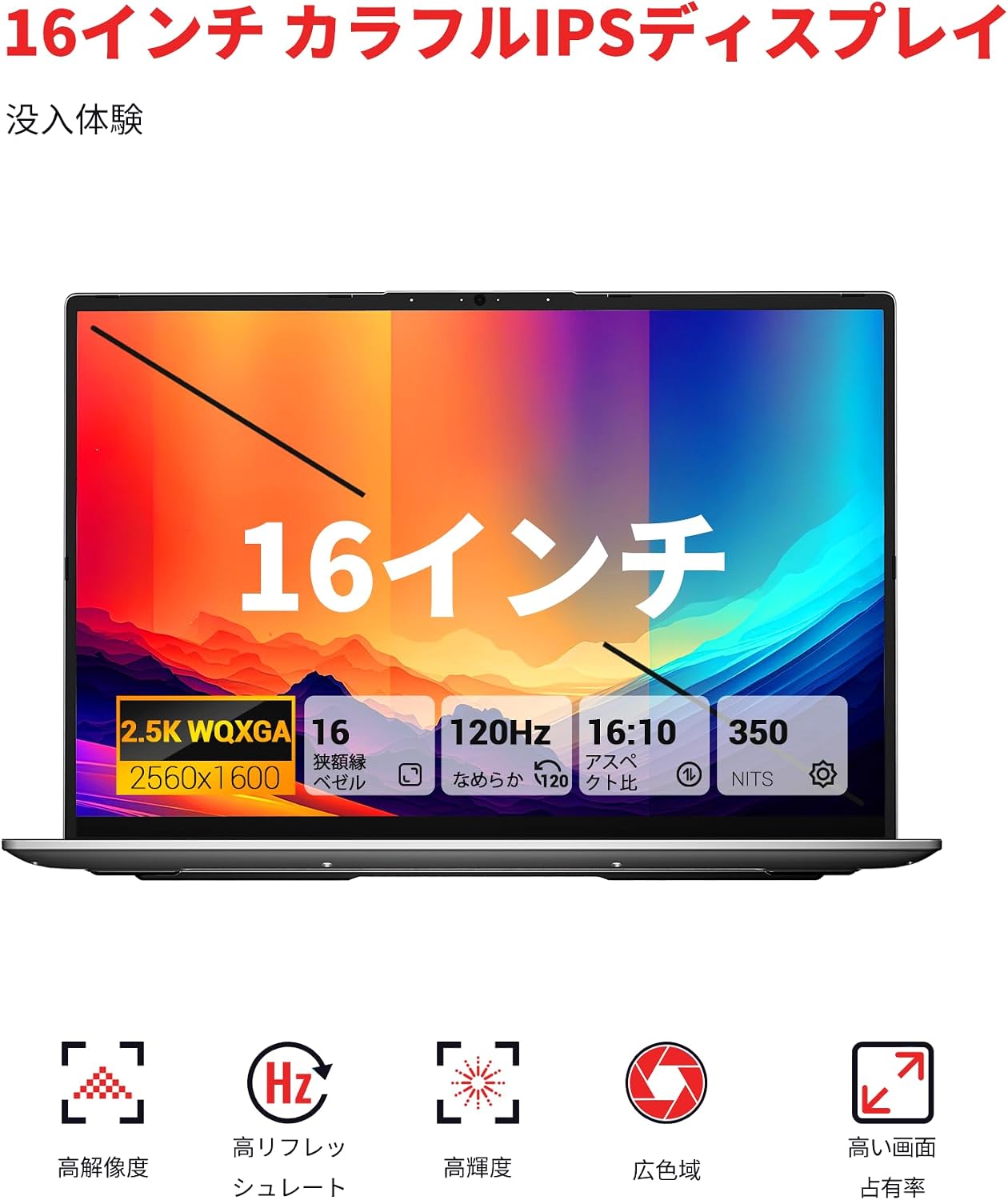
Experience superior visuals on the 16-inch QHD+ (2560x1600) IPS display. It offers a smooth 120Hz refresh rate and 100% sRGB color accuracy for vivid and detailed images.

Figure 5.2: Key display features for an immersive visual experience.

Figure 5.3: The 16:10 aspect ratio and 2560x1600 high resolution.
5.4. ລະບົບເຮັດຄວາມເຢັນ
The laptop incorporates an efficient cooling system with dual fans and dual heat pipes. This design maintains stable temperatures and minimizes noise, ensuring quiet operation even under load.
6. ການເກັບຮັກສາແລະຄວາມຊົງຈໍາ
The FIREBAT U6B is equipped with high-speed memory and expandable storage:
- RAM: 16GB LPDDR5 6400MHz RAM provides instant responsiveness for applications.
- ການເກັບຮັກສາ: A 512GB PCIe 3.0 SSD is pre-installed. The laptop features dual M.2 2280 NVMe PCIe 4.0 slots, allowing for easy storage upgrades.

Figure 6.1: High-speed memory and expandable storage options.
7. ການເຊື່ອມຕໍ່
ຕິດຕໍ່ພົວພັນກັບຄຸນສົມບັດຕໍ່ໄປນີ້:
- ໄຮ້ສາຍ: Wi-Fi 6 (802.11ax) for fast and stable internet, and Bluetooth 5.2 for connecting peripherals.
- ພອດສາຍ: As detailed in Section 2.1, including HDMI 2.1 and dual USB-C ports with DisplayPort and Power Delivery capabilities.
- ຮອງຮັບຫຼາຍຈໍພາບ: The laptop supports connecting up to three external monitors simultaneously via HDMI 2.1 and the two USB-C (DP) ports.

Figure 7.1: Connecting up to three external monitors for expanded workspace.
8. ການຄຸ້ມຄອງພະລັງງານ
The FIREBAT U6B is designed for portability and efficient power usage:
- ແບັດເຕີຣີ: Equipped with a 58Wh (5050mAh) lithium-ion battery.
- ການສາກໄຟ: Comes with a compact 100W GaN fast charger for quick power replenishment.
- ໂໝດພະລັງງານ: Utilize the Eco, Balance, and High Performance modes (Fn+Q) to manage power consumption according to your needs.

Figure 8.1: Battery capacity information.
9. ບໍາລຸງຮັກສາ
Regular maintenance helps prolong the life and performance of your laptop:
- ທໍາຄວາມສະອາດ: Gently wipe the screen with a microfiber cloth. Use a soft brush or compressed air to clean the keyboard and ventilation grilles. Avoid harsh chemicals.
- ອັບເດດຊອບແວ: Keep your Windows operating system and device drivers updated to ensure security and optimal performance.
- ການຈັດການການເກັບຮັກສາ: ລຶບສິ່ງບໍ່ຈຳເປັນອອກເປັນໄລຍະໆ files and empty the recycle bin to free up storage space.
- ການດູແລຫມໍ້ໄຟ: Avoid fully discharging the battery frequently. For long-term storage, charge the battery to about 50-60%.
10. ການແກ້ໄຂບັນຫາ
ພາກສ່ວນນີ້ແກ້ໄຂບັນຫາທົ່ວໄປທີ່ທ່ານອາດຈະພົບ:
| ບັນຫາ | ການແກ້ໄຂທີ່ເປັນໄປໄດ້ |
|---|---|
| ແລັບທັອບບໍ່ເປີດ. | ໃຫ້ແນ່ໃຈວ່າອະແດບເຕີໄຟຟ້າໄດ້ເຊື່ອມຕໍ່ຢ່າງແໜ້ນໜາ ແລະ ແບັດເຕີຣີໄດ້ສາກແລ້ວ. ລອງໃຊ້ປລັກສຽບໄຟຟ້າອື່ນ. |
| ຈໍສະແດງຜົນຫວ່າງເປົ່າ ຫຼື flickering. | Check display settings in Windows. If using an external monitor, ensure cables are connected correctly. Try updating graphics drivers. |
| ການປະຕິບັດລະບົບຊ້າ. | Close unnecessary applications. Check for background processes. Ensure the cooling vents are not obstructed. Switch to High Performance mode (Fn+Q). |
| Wi-Fi ຫຼື Bluetooth ບໍ່ເຮັດວຽກ. | Toggle Wi-Fi/Bluetooth on/off in Windows settings. Restart the laptop. Update wireless drivers. |
| ໄຟຫຼັງແປ້ນພິມບໍ່ເຮັດວຽກ. | Press the dedicated function key (e.g., Fn + F-key) to activate or adjust the backlight. |
11. ຂໍ້ມູນຈໍາເພາະ
| ຄຸນສົມບັດ | ລາຍລະອຽດ |
|---|---|
| ຍີ່ຫໍ້ | FIREBAT |
| ຊື່ຕົວແບບ | ອູ 6 |
| ຂະໜາດໜ້າຈໍ | 16 ນິ້ວ |
| ສີ | ສີເທົາ |
| ຄວາມອາດສາມາດຂອງຮາດດິດ | 512 GB |
| ຕົວແບບ CPU | Ryzen 5 (6600H) |
| ຂະໜາດ RAM ທີ່ຕິດຕັ້ງແລ້ວ | 16 GB LPDDR5 6400MHz |
| ລະບົບປະຕິບັດການ | Windows 11 |
| ຄຸນນະສົມບັດພິເສດ | HD Audio, Backlit Keyboard, Lightweight |
| ລາຍລະອຽດບັດກາຟິກ | Integrated (AMD Radeon 660M) |
| ນ້ຳໜັກສິນຄ້າ | 1.7 ກິໂລກຣາມ |
| ຂະໜາດສິນຄ້າ (LxWxH) | 36 x 25 x 1.9 cm |
| Display Max Resolution | 2560x1600 ພິກເຊລ |
| ອັດຕາການໂຫຼດຂໍ້ມູນຄືນໃໝ່ | 120 Hz |
| ສີ Gamut | 100% sRGB |
| ການສື່ສານໄຮ້ສາຍ | Bluetooth 5.2, Wi-Fi 6 (802.11ax) |
| ພອດ USB | 5 (including USB-C with DP/PD) |
| ພອດ HDMI | 1 (HDMI 2.1) |
| M.2 ສະລັອດຕິງ | 2 (NVMe PCIe 4.0) |
| ປະເພດຫມໍ້ໄຟ | Lithium Metal (58.33 Wh) |
| ອົງປະກອບລວມ | Laptop x1, Power Adapter x1 |
12. ການຮັບປະກັນແລະການສະຫນັບສະຫນູນ
Your FIREBAT U6B laptop comes with a ຮັບປະກັນ 12 ເດືອນ ຈາກວັນທີ່ຊື້.
ສຳລັບການຊ່ວຍເຫຼືອດ້ານເຕັກນິກ, ການຮຽກຮ້ອງການຮັບປະກັນ ຫຼື ການສອບຖາມໃດໆ, ກະລຸນາຕິດຕໍ່ພວກເຮົາ:
- ອີເມວ: support@firebatpc.com
- Webເວັບໄຊ: www.firebatpc.com
Please have your product model (U6B) and purchase information ready when contacting support.