
1. ບົດແນະນຳ
This manual provides essential instructions for setting up, operating, and maintaining your Nothing Phone (4a) Pro. Please read this guide thoroughly to ensure proper use and to maximize the performance of your device.
2. ການຕິດຕັ້ງເບື້ອງຕົ້ນ
2.1. Unboxing ແລະອົງປະກອບ
ເມື່ອເປີດແພັກເກັດ, ໃຫ້ກວດເບິ່ງວ່າອົງປະກອບທັງໝົດມີຢູ່:
- Nothing Phone (4a) Pro device
- ຊຸດຫູຟັງ
Note: A USB Type-C cable and SIM ejector tool may be sold separately or included depending on region. A power adapter is typically sold separately.
2.2. ການໃສ່ SIM Card
- ຊອກຫາຖາດຊິມກາດຢູ່ດ້ານຂ້າງຂອງໂທລະສັບຂອງທ່ານ.
- Insert a SIM ejector tool (not always included) into the small hole next to the tray and press gently until the tray pops out.
- ວາງ Nano-SIM card ຂອງເຈົ້າໃສ່ຖາດໂດຍໃຫ້ແຖບຕິດຕໍ່ສີທອງຫັນລົງລຸ່ມ.
- ໃສ່ຖາດໃສ່ໂທລະສັບຄືນໃໝ່ຢ່າງລະມັດລະວັງຈົນກວ່າມັນຈະກົດໃສ່ບ່ອນ.
2.3. ການເປີດເຄື່ອງ ແລະການຕັ້ງຄ່າເບື້ອງຕົ້ນ
- Press and hold the Power button until the Nothing logo appears.
- ປະຕິບັດຕາມການເຕືອນໃນຫນ້າຈໍເພື່ອເລືອກພາສາຂອງທ່ານ, ເຊື່ອມຕໍ່ກັບເຄືອຂ່າຍ Wi-Fi, ແລະເຂົ້າສູ່ລະບົບດ້ວຍບັນຊີ Google ຂອງທ່ານ.
- Complete the setup process, including data transfer (if applicable) and security settings.
3. ການປະຕິບັດໂທລະສັບຂອງທ່ານ
3.1. ຈໍສະແດງຜົນແລະການໂຕ້ຕອບຜູ້ໃຊ້
The Nothing Phone (4a) Pro features a 6.83-inch 1.5K Flexible AMOLED Display ກັບ ກ ອັດຕາການໂຫຼດຫນ້າຈໍຄືນ 144Hz, providing vibrant colors and smooth scrolling. Navigate the interface using touch gestures.
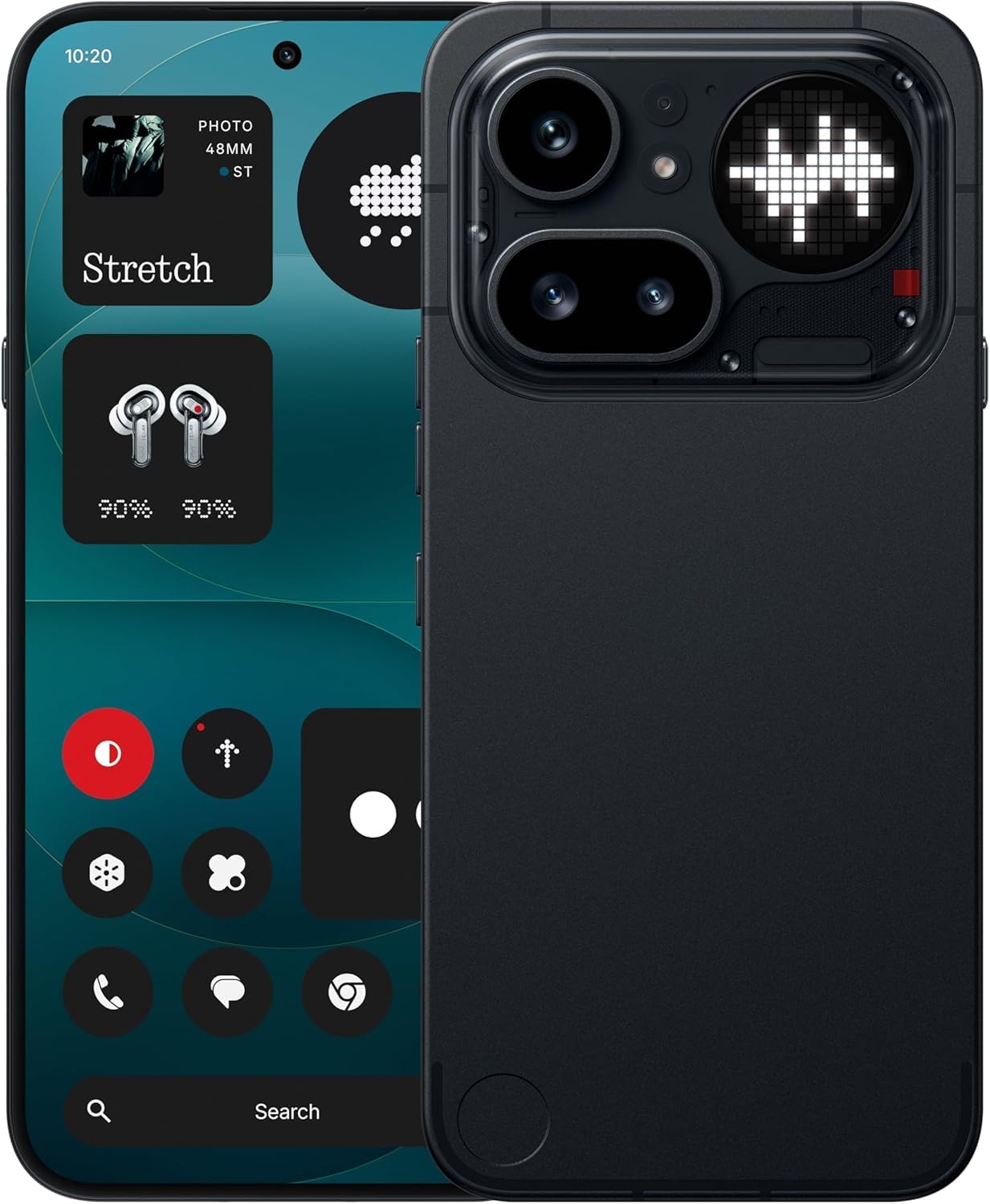
Image: The Nothing Phone (4a) Pro showcasing its flexible AMOLED display and sleek design.
3.2. ລະບົບກ້ອງຖ່າຍຮູບ
Your device is equipped with a ລະບົບກ້ອງສາມ, allowing for versatile photography. The camera supports up to 140x ultra zoom for capturing distant subjects.
Image: Detail of the triple camera module and a screen showing 140x zoom capability.
3.3. ການປະຕິບັດ
The Nothing Phone (4a) Pro is powered by the Snapdragon 7 Gen 4 processor, ensuring smooth multitasking and efficient performance for demanding applications and games. It comes with RAM 12GB for enhanced responsiveness.
Image: A visual representation of the Snapdragon 7 Gen 4 processor, highlighting the device's core performance component.
3.4. ຫມໍ້ໄຟແລະການສາກໄຟ
ອຸປະກອນປະກອບມີ a ແບດເຕີຣີ້ມາດຕະຖານ 5080 mAh, providing extended usage times. It supports ສາກໄວ 50W technology, allowing for quick recharging.
ຮູບພາບ: ພາຍໃນ view of the phone, showing the battery component with its specifications.
3.5. ຄຸນສົມບັດຊອບແວ ແລະ AI
Your Nothing Phone (4a) Pro runs on Nothing OS, based on Android 14, offering a clean and intuitive user experience. It integrates Essential AI tools ແລະຄຸນສົມບັດ Google Gemini + ChatGPT Integration for advanced assistance and productivity.
Image: Screenshots depicting the Nothing OS home screen, an AI tools interface, and the Google Gemini + ChatGPT integration menu.
3.6. ການເຊື່ອມຕໍ່
ອຸປະກອນສະຫນັບສະຫນູນ 5G cellular technology for high-speed internet access. It uses a USB Type-C (USB 2.0) connector for charging and data transfer.
4. ບໍາລຸງຮັກສາ
4.1. ການເຮັດຄວາມສະອາດອຸປະກອນຂອງທ່ານ
To clean your phone, use a soft, lint-free cloth. Avoid abrasive materials or harsh chemicals. For stubborn smudges, slightly dampen ຜ້າທີ່ມີນ້ໍາຫຼືເຄື່ອງເຮັດຄວາມສະອາດຫນ້າຈໍທີ່ຖືກອອກແບບມາສໍາລັບເອເລັກໂຕຣນິກ.
4.2. ການປັບປຸງຊອບແວ
ກວດສອບ ແລະຕິດຕັ້ງການອັບເດດຊອບແວເປັນປະຈຳເພື່ອຮັບປະກັນວ່າອຸປະກອນຂອງທ່ານມີຄຸນສົມບັດຫຼ້າສຸດ, ແຜ່ນປ້ອງກັນຄວາມປອດໄພ ແລະການປັບປຸງປະສິດທິພາບ. ໄປທີ່ ການຕັ້ງຄ່າ > ລະບົບ > ອັບເດດຊອບແວ ເພື່ອກວດສອບການອັບເດດທີ່ມີຢູ່.
4.3. ການດູແລຫມໍ້ໄຟ
To prolong battery life, avoid exposing your phone to extreme temperatures. It is recommended to keep the battery charge between 20% and 80% for optimal long-term health.
5. ການແກ້ໄຂບັນຫາ
5.1. ບັນຫາທົ່ວໄປ ແລະການແກ້ໄຂ
- ອຸປະກອນບໍ່ເປີດ: ໃຫ້ແນ່ໃຈວ່າແບັດເຕີຣີສາກແລ້ວ. ເຊື່ອມຕໍ່ກັບເຄື່ອງສາກຢ່າງໜ້ອຍ 15 ນາທີ, ຈາກນັ້ນລອງເປີດເຄື່ອງອີກຄັ້ງ.
- ແອັບຂັດຂ້ອງ: Clear the cache of the problematic app (Settings > Apps > [App Name] > Storage & cache > Clear cache). If the issue persists, reinstall the app.
- ສັນຍານເຄືອຂ່າຍບໍ່ດີ: Check if your SIM card is properly inserted. Try restarting the phone or toggling Airplane Mode on and off.
- ແບັດເຕີຣີໝົດໄວ: ຫຼຸດຄວາມສະຫວ່າງໜ້າຈໍ, ປິດການນຳໃຊ້ແອັບພື້ນຫຼັງທີ່ບໍ່ຈຳເປັນ ແລະ ຈຳກັດການບໍລິການສະຖານທີ່.
5.2. ຣີເຊັດເປັນຄ່າໂຮງງານ
ຖ້າທ່ານພົບບັນຫາຊອບແວຢ່າງຕໍ່ເນື່ອງ, ການຣີເຊັດເປັນຄ່າໂຮງງານອາດຈະແກ້ໄຂພວກມັນໄດ້. ຄຳເຕືອນ: ນີ້ຈະລຶບຂໍ້ມູນທັງໝົດໃນໂທລະສັບຂອງທ່ານ. ສໍາຮອງຂໍ້ມູນທີ່ສໍາຄັນກ່ອນທີ່ຈະດໍາເນີນການ. ໄປທີ່ ການຕັ້ງຄ່າ > ລະບົບ > ຕົວເລືອກຣີເຊັດ > ລຶບຂໍ້ມູນທັງໝົດ (ຣີເຊັດເປັນຄ່າໂຮງງານ).
6. ຂໍ້ມູນຈໍາເພາະ
| ຄຸນສົມບັດ | ລາຍລະອຽດ |
|---|---|
| ຕົວແບບ | Nothing Phone (4a) Pro |
| ລະບົບປະຕິບັດການ | Android 14 (Nothing OS) |
| ໂຮງງານຜະລິດ | Snapdragon 7 Gen 4, 2.5 GHz |
| RAM | 12 GB |
| ການເກັບຮັກສາພາຍໃນ | 256 GB |
| ຈໍສະແດງຜົນ | 6.83" 1.5K Flexible AMOLED, 144Hz refresh rate |
| ຄວາມອາດສາມາດຫມໍ້ໄຟ | 5080 mAh Lithium-ion |
| ກຳລັງສາກໄຟ | 50W Fast Charge, USB Type-C (USB 2.0) |
| ກ້ອງຖ່າຍຮູບ | Triple Camera System, up to 140x ultra zoom |
| ການເຊື່ອມຕໍ່ | 5G, GSM, LTE |
| ຂະໜາດ | 16.4 x 7.8 x 0.8 ຊັງຕີແມັດ |
| ນ້ຳໜັກ | 250 ກຣາມ |
| ເນື້ອໃນກ່ອງ | ຊຸດຫູຟັງ |
7. ການຮັບປະກັນແລະການສະຫນັບສະຫນູນ
7.1. ການຮັບປະກັນຜະລິດຕະພັນ
The Nothing Phone (4a) Pro comes with a ການຮັບປະກັນຂອງຜູ້ຜະລິດ 1 ປີ from the date of purchase. This warranty covers manufacturing defects and workmanship under normal use. It does not cover damage caused by accidents, misuse, unauthorized modifications, or normal wear and tear.
7.2. ການຊ່ວຍເຫຼືອລູກຄ້າ
For technical assistance, warranty claims, or service inquiries, please contact Nothing customer support. Refer to the official Nothing webເວັບໄຊສຳລັບຂໍ້ມູນຕິດຕໍ່ທີ່ທັນສະໄໝທີ່ສຸດ.
Manufacturer: Nothing
Packer/Importer Contact: Essentially Nothing