
1. ບົດແນະນຳ
This manual provides comprehensive instructions for the safe and efficient use of your Samsung 1.5 Ton 5 Star Bespoke AI Inverter Smart Split AC, Model AR60H18D15W. Please read this manual thoroughly before operating the appliance and retain it for future reference. This air conditioner features advanced technologies such as AI Energy Mode, WindFree cooling, and smart control options for enhanced comfort and energy efficiency.
2. ຂໍ້ມູນຄວາມປອດໄພ
ເພື່ອປ້ອງກັນການບາດເຈັບຕໍ່ຜູ້ໃຊ້ ຫຼື ຜູ້ອື່ນ ແລະ ຄວາມເສຍຫາຍຕໍ່ຊັບສິນ, ຕ້ອງປະຕິບັດຕາມຄໍາແນະນໍາຕໍ່ໄປນີ້. ການດໍາເນີນງານທີ່ບໍ່ຖືກຕ້ອງເນື່ອງຈາກການບໍ່ສົນໃຈຄໍາແນະນໍາອາດຈະເຮັດໃຫ້ເກີດອັນຕະລາຍ ຫຼື ຄວາມເສຍຫາຍ.
- ການຕິດຕັ້ງ: Installation must be performed by qualified service personnel in accordance with the National Wiring Standards. Do not attempt to install the unit yourself.
- ການສະຫນອງພະລັງງານ: ໃຫ້ແນ່ໃຈວ່າການສະຫນອງພະລັງງານກົງກັບຂໍ້ກໍານົດຂອງຫນ່ວຍງານ. ຢ່າໃຊ້ສາຍໄຟ ຫຼືປລັກສຽບທີ່ເສຍຫາຍ.
- ຕູ້ເຢັນ: This unit uses R32 refrigerant. Only qualified personnel should handle refrigerant.
- ທໍາຄວາມສະອາດ: ຕັດການເຊື່ອມຕໍ່ໄຟຟ້າກ່ອນທຳຄວາມສະອາດ. ຢ່າໃຊ້ຜົງຊັກຟອກ ຫຼື ສານລະລາຍທີ່ຮຸນແຮງ.
- ການດໍາເນີນງານ: Do not insert fingers or objects into the air inlet/outlet. Do not spray water directly onto the unit.
- ເດັກນ້ອຍ: ໃຫ້ເດັກນ້ອຍຢູ່ຫ່າງຈາກຫນ່ວຍບໍລິການແລະການຄວບຄຸມຫ່າງໄກສອກຫຼີກ.
3. ຜະລິດຕະພັນເກີນview
3.1 ອົງປະກອບ
- ໜ່ວຍ ໃນອາຄານ: Distributes cooled or heated air into the room.
- ໜ່ວຍ ນອກ: Houses the compressor and condenser.
- ການຄວບຄຸມໄລຍະໄກ: For convenient operation of the AC unit.
- ແບັດເຕີຣີ: Two batteries for the remote control.
3.2 ລັກສະນະທີ່ສໍາຄັນ
- BESPOKE AI WindFree: Provides comfortable cooling without direct wind.
- ໂໝດພະລັງງານ AI: Offers up to 30% additional energy savings by optimizing operation.
- 5 Step Convertible: Adjust cooling capacity as per your needs.
- 4 Way Swing: Ensures uniform air distribution throughout the room.
- Wi-Fi & Voice Control: Control the unit via SmartThings app, Alexa, Google Assistant, or Bixby.
- ເທກໂນໂລຍີ Digital Inverter: For efficient and consistent cooling.
- Coil Condenser Coil: Enhances cooling performance and durability.
- Antimicrobial Air Filter: Helps maintain air quality.
- 3 Step Auto Clean: Automatically dries the heat exchanger to prevent bacteria and odor.
3.3 ຮູບພາບຜະລິດຕະພັນ
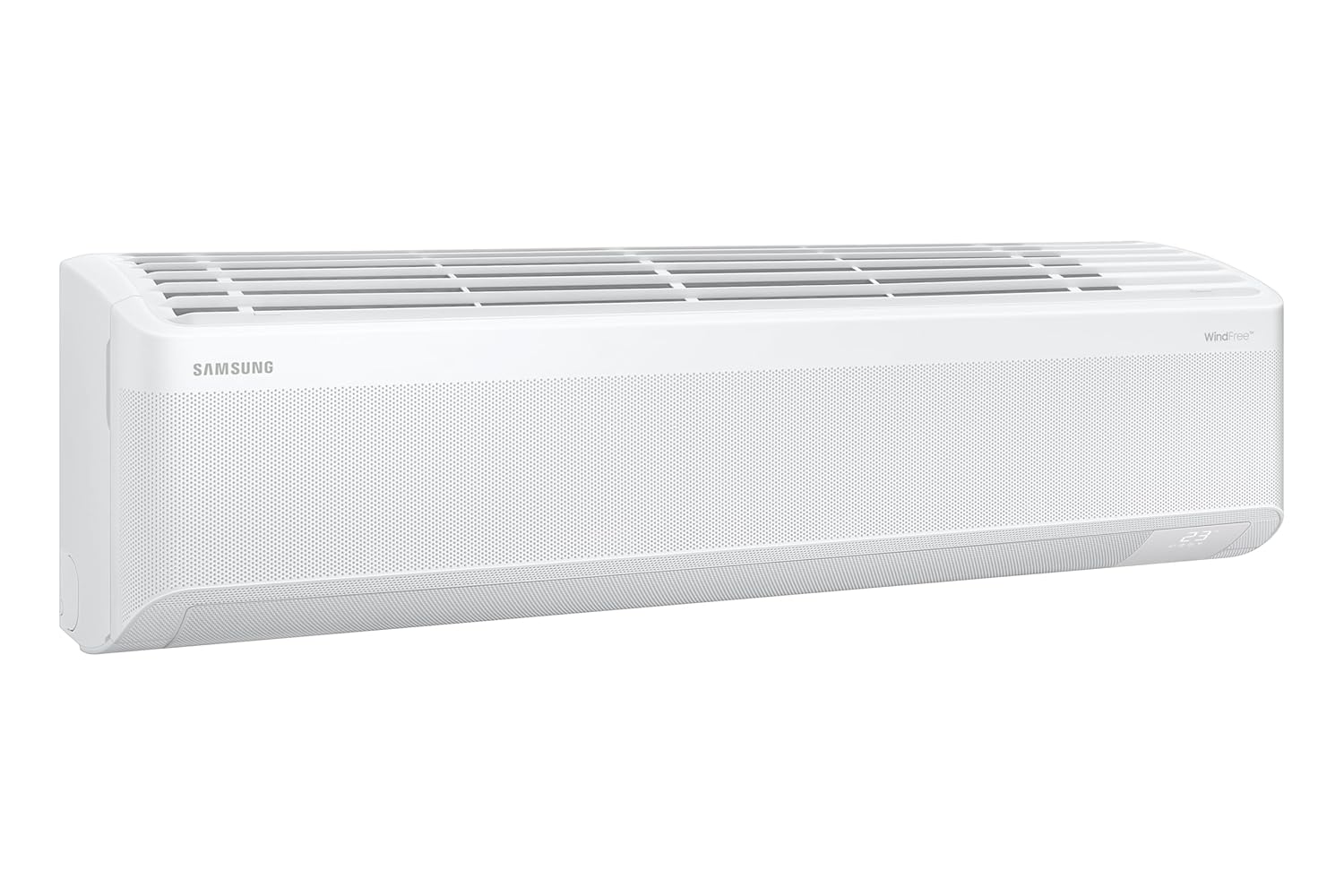
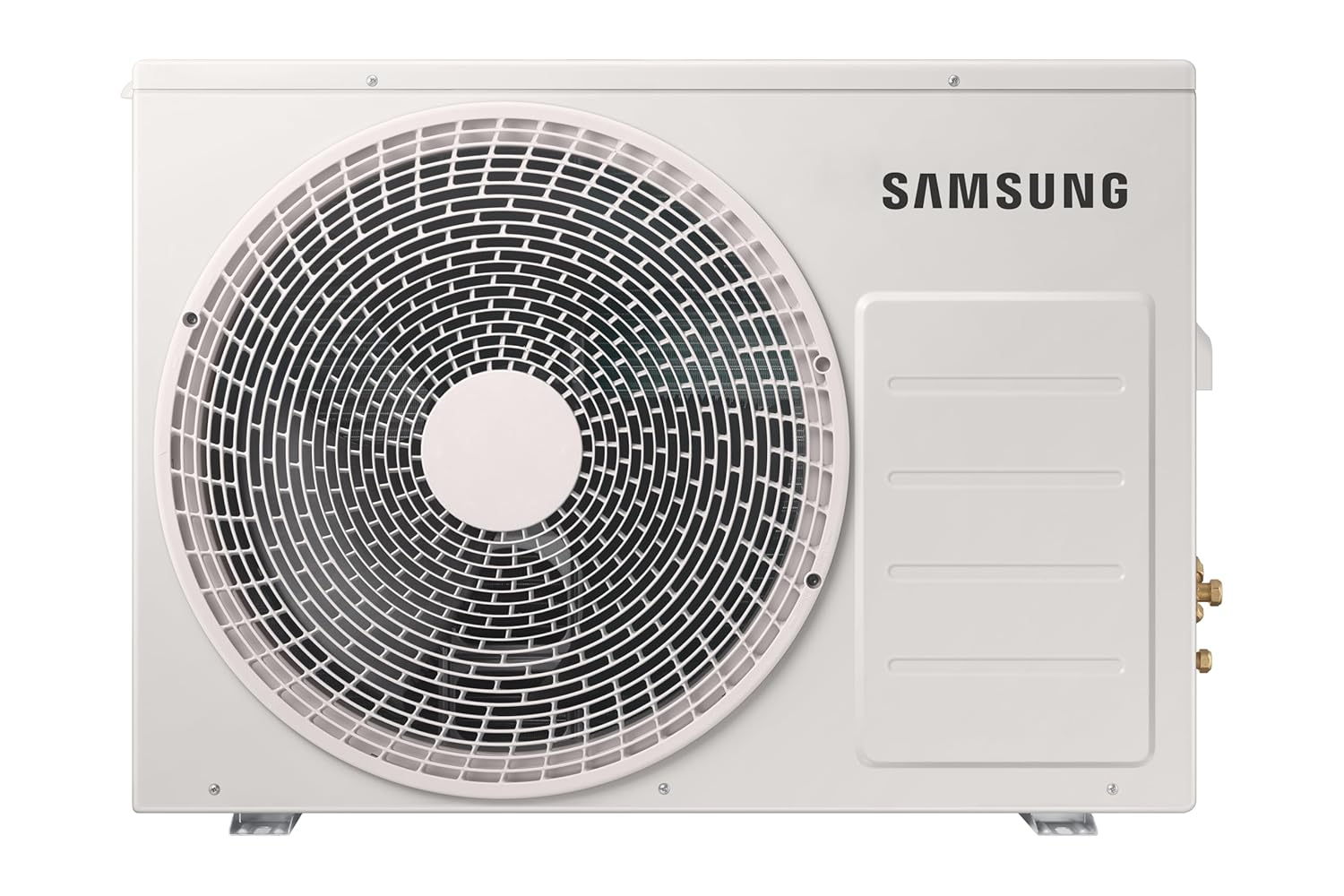


4. ການຕິດຕັ້ງແລະການຕິດຕັ້ງ
Professional installation by a qualified technician is highly recommended to ensure proper functioning and safety. Incorrect installation can lead to electric shock, fire, or water leakage.
- ສະຖານທີ່: Choose a location for the indoor unit that allows for even air distribution and is away from direct sunlight or heat sources. The outdoor unit should be placed in a well-ventilated area.
- ການຕິດຕັ້ງ: Ensure both indoor and outdoor units are securely mounted on a stable surface.
- ການເຊື່ອມຕໍ່ໄຟຟ້າ: Connect the unit to a dedicated power circuit as per local electrical codes.
- ທໍ່: Ensure refrigerant piping is correctly installed and leak-tested.
- ການລະບາຍນໍ້າ: Verify that the condensate drain pipe is properly installed to allow for efficient water removal.
For detailed installation steps, please refer to the separate installation guide provided with the product or consult a certified technician.
5. ຄໍາແນະນໍາການດໍາເນີນງານ
Your Samsung AC can be operated using the provided remote control, the SmartThings app, or voice commands.
5.1 ການດໍາເນີນງານການຄວບຄຸມໄລຍະໄກ
Insert the two provided batteries into the remote control. Point the remote control towards the indoor unit when operating.
- ປຸ່ມເປີດປິດ (⑁): ກົດເພື່ອເປີດ ຫຼືປິດເຄື່ອງ.
- ປຸ່ມໂໝດ: Cycle through operating modes: Cool, Fan, Dry, Auto.
- Temp Buttons (+ / -): ປັບອຸນຫະພູມທີ່ຕ້ອງການ.
- ປຸ່ມພັດລົມ: Adjust fan speed (Auto, Low, Med, High).
- ປຸ່ມ Swing: Activate or deactivate the 4-way swing function.
- Options Button (Clean/5sec): Access special functions like 3 Step Auto Clean (press and hold for 5 seconds).
- ປຸ່ມ WindFree: Activate WindFree cooling for gentle air distribution.
- ໂໝດພະລັງງານ AI: Refer to the remote's display or specific button for AI Energy Mode activation, which optimizes energy consumption.
- 5 Step Convertible: Use the remote to select desired cooling capacity levels.
5.2 ການຄວບຄຸມອັດສະລິຍະ (Wi-Fi ແລະ ສຽງ)
The AC unit can be controlled remotely via the Samsung SmartThings app or through voice assistants like Alexa, Google Assistant, and Bixby.
- ແອັບ SmartThings: Download the Samsung SmartThings app on your smartphone. Follow the in-app instructions to connect your AC unit to your home Wi-Fi network. Once connected, you can control all functions, monitor energy usage, and set schedules from anywhere.
- ການຄວບຄຸມດ້ວຍສຽງ: Link your SmartThings account with your preferred voice assistant (Alexa, Google Assistant, Bixby). Use voice commands such as "Turn on the AC," "Set temperature to 24 degrees," or "Activate WindFree mode."
6. ບໍາລຸງຮັກສາ
ການບຳລຸງຮັກສາເປັນປະຈຳຮັບປະກັນປະສິດທິພາບທີ່ດີທີ່ສຸດ ແລະ ຍືດອາຍຸການໃຊ້ງານຂອງເຄື່ອງປັບອາກາດຂອງທ່ານ. ຖອດສາຍໄຟອອກສະເໝີກ່ອນປະຕິບັດການບຳລຸງຮັກສາໃດໆ.
- ການເຮັດຄວາມສະອາດການກັ່ນຕອງອາກາດ: The Antimicrobial Air Filter should be cleaned every two weeks or more frequently depending on usage.
- ເປີດແຜງດ້ານຫນ້າຂອງຫນ່ວຍງານພາຍໃນ.
- ເອົາເຄື່ອງກອງອາກາດອອກ.
- Clean the filter with a vacuum cleaner or wash it with lukewarm water and a mild detergent.
- Allow the filter to dry completely in a shaded area before reinstalling.
- 3 Step Auto Clean: Utilize the 3 Step Auto Clean function (accessible via the remote control) to automatically dry the heat exchanger, preventing mold and odors.
- ໜ່ວຍ ນອກ: Keep the area around the outdoor unit clear of obstructions, leaves, and debris to ensure proper airflow. Periodically clean the outdoor coil with a soft brush.
- ການບໍລິການແບບມືອາຊີບ: It is recommended to have your AC unit professionally serviced at least once a year by a qualified technician.
7. ການແກ້ໄຂບັນຫາ
Before contacting service, check the following common issues.
| ບັນຫາ | ສາເຫດທີ່ເປັນໄປໄດ້ | ການແກ້ໄຂ |
|---|---|---|
| ຫນ່ວຍບໍລິການບໍ່ເປີດ. | ບໍ່ມີການສະຫນອງພະລັງງານ; ຫມໍ້ໄຟຄວບຄຸມໄລຍະໄກແມ່ນຕາຍ. | ກວດສອບເຄື່ອງຕັດວົງຈອນ; ປ່ຽນແບັດເຕີຣີຣີໂໝດຄວບຄຸມ. |
| ຄວາມເຢັນບໍ່ພຽງພໍ. | Dirty air filter; Obstruction in outdoor unit; Room too large. | ການກັ່ນຕອງອາກາດສະອາດ; ເອົາສິ່ງກີດຂວາງ; ໃຫ້ແນ່ໃຈວ່າຄວາມອາດສາມາດຂອງຫນ່ວຍງານກົງກັບຂະຫນາດຂອງຫ້ອງ. |
| ສຽງຜິດປົກກະຕິ. | ຊິ້ນສ່ວນທີ່ວ່າງ; ເຄື່ອງບໍ່ຮາບພຽງ; ມີວັດຖຸແປກປອມຢູ່ໃນພັດລົມ. | Contact service if noise persists after checking for obvious obstructions. |
| ນ້ໍາຮົ່ວໄຫຼຈາກຫນ່ວຍບໍລິການພາຍໃນ. | ທໍ່ລະບາຍນ້ຳອຸດຕັນ; ການຕິດຕັ້ງທີ່ບໍ່ຖືກຕ້ອງ. | Check and clear drain pipe; Contact service for inspection. |
The unit also features Auto Error Diagnosis, which may display error codes on the indoor unit or remote. Refer to the SmartThings app or contact customer support with the error code for further assistance.
8. ຂໍ້ມູນຈໍາເພາະ
| ຄຸນສົມບັດ | ລາຍລະອຽດ |
|---|---|
| ຍີ່ຫໍ້ | Samsung |
| ຊື່ຕົວແບບ | AR60H18D15W |
| ຄວາມອາດສາມາດ | 1.5 ໂຕນ |
| ການໃຫ້ຄະແນນພະລັງງານ | ຄະແນນ BEE 5 ດາວ |
| ISEER | 5.77 ວ/ວ |
| ການບໍລິໂພກພະລັງງານປະຈໍາປີ | 636.71 ກິໂລວັດຊົ່ວໂມງຕໍ່ປີ |
| ພະລັງງານຄວາມເຢັນ | 6.7 ກິໂລວັດ |
| ຕູ້ເຢັນ | R32 (Environmental Friendly) |
| ລະດັບສຽງລົບກວນ (ພາຍໃນ) | 24 Decibels |
| ປະເພດເຄື່ອງບີບອັດ | Rotary Scroll (Digital Inverter) |
| ຂະໜາດຫົວໜ່ວຍພາຍໃນ (WxHxD) | 105.5 x 29.9 x 21.5 cm |
| ຂະໜາດຫົວໜ່ວຍກາງແຈ້ງ (WxHxD) | 88 x 63.8 x 31 cm |
| ນ້ໍາຫນັກລາຍການ | 45.8 Kilograms (Total) |
| ຄຸນນະສົມບັດພິເສດ | Anti Bacterial Filter, Dehumidifier, Inverter Compressor, Remote Controlled, WiFi Enabled, WindFree, AI Energy Savings, 5 Step Convertible, 4 Way Swing, Voice Control (Alexa, Google, Bixby), SmartThings app, 3 Step Auto Clean, Durafin Ultra, Triple Protection Plus, Coated Copper tubes. |
| ແຫຼ່ງພະລັງງານ | ໄຟຟ້າສາຍ (230 ໂວນ, 1050 ວັດ) |
| ຂະໜາດຫ້ອງທີ່ແນະນຳ | 150 to 180 sq ft |
9. ການຮັບປະກັນແລະການສະຫນັບສະຫນູນ
9.1 ຂໍ້ມູນການຮັບປະກັນ
Your Samsung Air Conditioner comes with the following warranty:
- ການຮັບປະກັນຜະລິດຕະພັນ: 5 year comprehensive warranty.
- ການຮັບປະກັນເຄື່ອງອັດ: 10 ປີໃນ Digital Inverter Compressor.
ຂໍ້ກຳນົດ ແລະເງື່ອນໄຂນຳໃຊ້. To avail warranty service, please provide the product's model name and seller's details mentioned on your invoice.
9.2 ສະຫນັບສະຫນູນລູກຄ້າ
For any queries, assistance, or service requests, please contact Samsung Customer Care:
- Telephone (Toll Free): 1800 40 7267864 (1800 40 SAMSUNG)
- WhatsApp: 1800-57-267864
- ອີເມວ: support.india@samsung.com
- ຫ້ອງການລົງທະບຽນ: Samsung India Electronics Pvt. Ltd., 6th Floor, DLF Centre, Sansad Marg, New Delhi-110001.
The brand's service center will allot a convenient slot for service upon contact.