
WOLFANG WS03
WOLFANG WS03 2K Indoor Security Camera User Manual
Model: WS03 | Brand: WOLFANG
1. ບົດແນະນຳ
This user manual provides detailed instructions for the installation, operation, and maintenance of your WOLFANG WS03 2K Indoor Security Camera. Please read this manual thoroughly before using the product to ensure proper functionality and safety. The WOLFANG WS03 camera offers 2K (3MP) resolution, 360° pan/tilt/zoom (PTZ) capabilities, automatic motion tracking, infrared night vision, two-way audio, and compatibility with smart home systems like Alexa and Google Assistant.
2. ເນື້ອໃນຊຸດ
ກວດສອບວ່າລາຍການທັງຫມົດແມ່ນມີຢູ່ໃນຊຸດ:
- WOLFANG WS03 2K Indoor Security Camera (Quantity: 1 or 2, depending on pack)
- Power Adapter
- ສາຍໄຟ USB
- ວົງເລັບຕິດຕັ້ງ
- screws mounting ແລະ plugs ຝາ
- ຄູ່ມືຜູ້ໃຊ້ (ເອກະສານນີ້)

Image: WOLFANG WS03 camera and its included accessories.
3. ຕັ້ງຄ່າ
3.1 ການຕິດຕັ້ງທາງດ້ານຮ່າງກາຍ
The WOLFANG WS03 camera can be placed on a flat surface or mounted to a wall or ceiling. Ensure the camera is positioned within range of your 2.4GHz Wi-Fi network.
- ເລືອກສະຖານທີ່: ເລືອກສະຖານທີ່ທີ່ໃຫ້ຄວາມຕ້ອງການ viewing angle and is close to a power outlet.
- ການຕິດຕັ້ງ (ທາງເລືອກ): If mounting, use the provided bracket, screws, and wall plugs. Mark the drill holes, drill, insert wall plugs, and secure the bracket. Attach the camera to the bracket.
- ການເຊື່ອມຕໍ່ພະລັງງານ: Connect the USB power cable to the camera and the power adapter. Plug the adapter into a power outlet. The camera will power on and initiate a self-test, indicated by its rotation.

Image: WOLFANG WS03 camera placed on a surface, connected to power, with a smartphone displaying its live feed.
3.2 ການຕິດຕັ້ງແອັບ ແລະ ການເຊື່ອມຕໍ່
The WOLFANG WS03 camera operates via the Osaio app. Download and install the app on your smartphone.
- ດາວໂຫລດແອັບ:: ຊອກຫາ "Osaio" in your mobile app store (App Store for iOS or Google Play Store for Android) and install it.
- ສ້າງບັນຊີ: Open the Osaio app and register for a new account or log in if you already have one.
- ເພີ່ມອຸປະກອນ: Tap the "+" icon in the app to add a new device. Select your camera model (WS03).
- ການເຊື່ອມຕໍ່ Wi-Fi: Follow the in-app instructions to connect the camera to your 2.4GHz Wi-Fi network. Ensure your phone is also connected to the same 2.4GHz network during setup. The camera's LED indicator will flash red when ready for pairing.
- ສະແກນລະຫັດ QR: The app will display a QR code. Hold your camera approximately 15-20 cm (6-8 inches) in front of your phone screen until you hear a confirmation sound from the camera.
- ສໍາເລັດ: Once connected, the camera's LED indicator will turn solid blue, and you can view the live feed in the app.

Image: WOLFANG WS03 camera with a smartphone indicating 2.4GHz Wi-Fi connectivity.
4. ການດໍາເນີນງານ
4.1 ດໍາລົງຊີວິດ View ແລະການຄວບຄຸມ PTZ
Access the live video feed from your camera through the Osaio app. You can remotely control the camera's pan and tilt functions.
- ຟີດສົດ: Open the Osaio app and select your camera to view the real-time video stream.
- ການຄວບຄຸມ PTZ: Use the directional controls within the app interface to rotate the camera horizontally (360°) and vertically (110°) to adjust the viewມຸມ ing.

ຮູບພາບ: ຫຼາຍກວ່າview of WOLFANG WS03 features, including 360° horizontal and 110° vertical rotation.
4.2 Motion Tracking and Alerts
The camera can detect motion and sound, automatically track subjects, and send alerts to your phone.
- ເປີດໃຊ້ການກວດຫາ: In the Osaio app settings for your camera, enable motion detection and sound detection.
- ການຕິດຕາມອັດຕະໂນມັດ: ເມື່ອກວດພົບການເຄື່ອນໄຫວ, ກ້ອງຖ່າຍຮູບຈະເລື່ອນ ແລະ ອຽງໂດຍອັດຕະໂນມັດເພື່ອຕິດຕາມວັດຖຸທີ່ເຄື່ອນທີ່.
- ການແຈ້ງເຕືອນ: Configure push notifications in the app to receive instant alerts on your mobile device when motion or sound is detected.

Image: WOLFANG WS03 camera monitoring a sleeping baby in night vision mode.
4.3 ສຽງສອງທາງ
ສື່ສານຜ່ານກ້ອງຖ່າຍຮູບໂດຍໃຊ້ໄມໂຄຣໂຟນ ແລະ ລຳໂພງໃນຕົວ.
- ຟັງ: ໃນສົດ view, tap the speaker icon to listen to audio from the camera's location.
- ເວົ້າ: Tap and hold the microphone icon to speak through the camera. Release to stop speaking.

Image: WOLFANG WS03 camera demonstrating two-way audio with a dog in a living room, controlled via smartphone.
4.4 ວິໄສທັດກາງຄືນ
The camera is equipped with infrared LEDs for clear vision in low-light or complete darkness, up to 8 meters.
- ການເປີດໃຊ້ໂດຍອັດຕະໂນມັດ: Night vision activates automatically in low light conditions.
- ການຄວບຄຸມຄູ່ມື: You can manually toggle night vision on/off or set it to automatic mode within the app settings.
4.5 ຕົວເລືອກການເກັບຮັກສາ
The WOLFANG WS03 offers flexible storage solutions for recorded video.
- ບັດ Micro SD: The camera supports a Micro SD card up to 128GB (not included). Insert the card into the designated slot on the camera. Continuous recording or event-based recording can be configured in the app.
- Cloud Storage: Encrypted cloud storage is available, often with a free trial period (e.g., 14 days). This provides off-site backup for your recordings. Details and subscription options are available within the Osaio app.
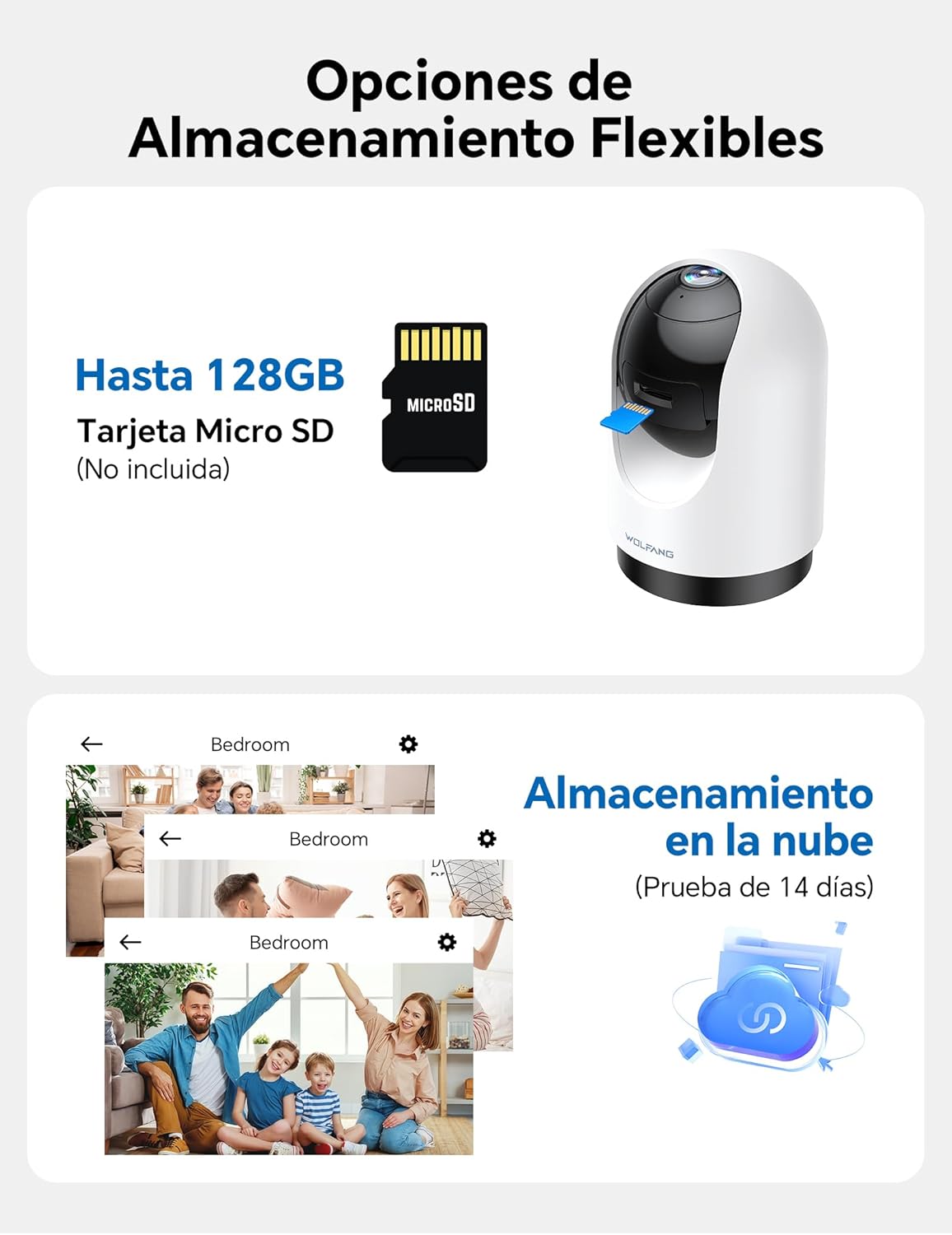
Image: WOLFANG WS03 camera illustrating MicroSD card and cloud storage options.
4.6 Multi-User Access and Multi-View
Share camera access with family members and view multiple cameras simultaneously.
- ແບ່ງປັນການເຂົ້າເຖິງ: In the Osaio app, you can invite up to 3 additional users to view your camera feed.
- ຫຼາຍView: If you have multiple WOLFANG cameras, the app allows you to view live feeds from several cameras on a single screen.

Image: WOLFANG WS03 camera demonstrating multi-user sharing and multi-view functionality on a smartphone.
4.7 ການຄວບຄຸມດ້ວຍສຽງ (Alexa & Google Assistant)
Integrate your WOLFANG WS03 camera with Amazon Alexa or Google Assistant for convenient voice control.
- ເປີດໃຊ້ທັກສະ/ການກະທຳ: In the Alexa or Google Home app, search for and enable the "Osaio" skill or action.
- ເຊື່ອມໂຍງບັນຊີ: Link your Osaio account with your Alexa or Google account.
- ຄົ້ນພົບອຸປະກອນ: Ask your smart assistant to discover new devices.
- ຄຳສັ່ງສຽງ: Use commands such as "Alexa, show me the living room camera" or "Hey Google, show me the baby monitor" to view ຟີດສົດໃນຈໍສະແດງຜົນອັດສະລິຍະທີ່ເຂົ້າກັນໄດ້.

Image: A woman using a voice command with Alexa to display the WOLFANG WS03 camera feed on a tablet.
5. ບໍາລຸງຮັກສາ
5.1 ການທໍາຄວາມສະອາດ
ການເຮັດຄວາມສະອາດເປັນປົກກະຕິຊ່ວຍຮັກສາປະສິດທິພາບທີ່ດີທີ່ສຸດ.
- ເລນກ້ອງຖ່າຍຮູບ: Gently wipe the camera lens with a soft, dry, lint-free cloth. Avoid abrasive cleaners or solvents.
- ຮ່າງກາຍກ້ອງຖ່າຍຮູບ: Clean the camera body with a slightly damp cloth. Ensure no moisture enters the device.
- ປິດພະລັງງານ: Always disconnect the camera from power before cleaning.
5.2 ການອັບເດດເຟີມແວ
Keep your camera's firmware updated to ensure the latest features, security patches, and performance improvements.
- ກວດສອບການປັບປຸງ: The Osaio app will typically notify you when a new firmware update is available. You can also manually check in the camera's settings within the app.
- ຂັ້ນຕອນການປັບປຸງ: Follow the on-screen instructions in the app to perform the update. Ensure the camera remains powered on and connected to Wi-Fi during the entire update process. Do not disconnect power or close the app until the update is complete.
6. ການແກ້ໄຂບັນຫາ
6.1 ບັນຫາທົ່ວໄປ ແລະການແກ້ໄຂ
| ສະບັບ | ການແກ້ໄຂທີ່ເປັນໄປໄດ້ |
|---|---|
| ກ້ອງຖ່າຍຮູບບໍ່ສາມາດເຊື່ອມຕໍ່ກັບ Wi-Fi ໄດ້. |
|
| ຄຸນນະພາບວິດີໂອບໍ່ດີ ຫຼື ມີຄວາມຊັກຊ້າ. |
|
| ການແຈ້ງເຕືອນການເຄື່ອນໄຫວເລື້ອຍໆເກີນໄປ ຫຼື ບໍ່ເຮັດວຽກ. |
|
| ສຽງສອງທາງບໍ່ຊັດເຈນ ຫຼື ບໍ່ເຮັດວຽກ. |
|
| ບໍ່ບັນທຶກບັດ Micro SD. |
|
7. ຂໍ້ມູນຈໍາເພາະ
| ຄຸນສົມບັດ | ລາຍລະອຽດ |
|---|---|
| ຊື່ຕົວແບບ | WS03 |
| ຍີ່ຫໍ້ | WOLFANG |
| ຄວາມລະອຽດ | 2K (3MP) |
| ການເຊື່ອມຕໍ່ | Wi-Fi (2.4GHz ເທົ່ານັ້ນ) |
| ຊ່ວງເລື່ອນ/ອຽງ | ລວງນອນ 360°, ລວງຕັ້ງ 110° |
| ວິໄສທັດກາງຄືນ | Infrared, up to 8m |
| ສຽງ | ສຽງສອງທາງ (ໄມໂຄຣໂຟນ ແລະ ລຳໂພງໃນຕົວ) |
| ການເກັບຮັກສາ | Micro SD card (up to 128GB, not included), Cloud Storage (optional) |
| ຄວາມເຂົ້າກັນໄດ້ຂອງຜູ້ຊ່ວຍສຽງ | Amazon Alexa, ຜູ້ຊ່ວຍ Google |
| ແຫຼ່ງພະລັງງານ | Wired (USB cable and power adapter) |
| ຂະໜາດ (L x W x H) | 7.5 x 14.9 x 7.5 cm |
| ຮູບແບບການຖ່າຍຮູບວິດີໂອ | MP4 |
| UPC | 850067892434 |
8. ການຮັບປະກັນແລະການສະຫນັບສະຫນູນ
WOLFANG provides a 2-year after-sales guarantee for this product. For any questions or assistance regarding your WOLFANG WS03 Indoor Security Camera, please contact our customer service.
- ສະຫນັບສະຫນູນອີເມວ: support.vc@wolfang.co
- ໄລຍະເວລາຮັບປະກັນ: 2 ປີນັບແຕ່ມື້ຊື້.

Image: WOLFANG customer support details, including 24-hour response, 30-day return, 365-day replacement, and lifetime after-sales service.
Ask a question about this manual
Ask about setup, troubleshooting, compatibility, parts, safety, or missing instructions. Manuals+ will review the question and use this page’s manual context to help answer it.