
1. ບົດແນະນຳ
ຂອບໃຈສໍາລັບການຊື້asing the OXS Thunder Duo Speaker System. This manual provides essential information for the safe and efficient use of your new speaker system. Please read this manual thoroughly before operating the device and retain it for future reference.
The OXS Thunder Duo is a 3.1.2 channel bookshelf speaker system designed for an immersive audio experience, compatible with various devices including TVs, PCs, gaming consoles, and mobile devices.
2. ຂໍ້ມູນຄວາມປອດໄພ
- ແຫຼ່ງພະລັງງານ: ໃຊ້ພຽງແຕ່ອະແດບເຕີໄຟຟ້າທີ່ສະໜອງໃຫ້ເທົ່ານັ້ນ. ໃຫ້ແນ່ໃຈວ່າລະດັບສຽງtage ກົງກັບການສະຫນອງພະລັງງານໃນທ້ອງຖິ່ນຂອງທ່ານ.
- ການຈັດວາງ: Place the speakers on a stable, flat surface. Avoid placing near heat sources, direct sunlight, or in areas with high humidity or dust.
- ການລະບາຍອາກາດ: Do not block any ventilation openings. Ensure adequate space around the speakers for proper airflow.
- ນ້ໍາແລະຄວາມຊຸ່ມ: Do not expose the device to water, rain, or moisture. This product is not waterproof.
- ທໍາຄວາມສະອາດ: Disconnect from power before cleaning. Use a soft, dry cloth. Do not use liquid cleaners or aerosols.
- ການບໍລິການ: ຢ່າພະຍາຍາມສ້ອມແປງຫຼືຖອດອຸປະກອນດ້ວຍຕົນເອງ. ອ້າງອີງການບໍລິການທັງໝົດໃຫ້ກັບບຸກຄະລາກອນທີ່ມີຄຸນວຸດທິ.
- ແບັດເຕີຣີ: The remote control uses AAA batteries. Ensure correct polarity when inserting. Do not mix old and new batteries.
3. ເນື້ອໃນຊຸດ
ກວດສອບວ່າລາຍການທັງຫມົດທີ່ລະບຸໄວ້ຂ້າງລຸ່ມນີ້ແມ່ນລວມຢູ່ໃນຊຸດຂອງທ່ານ:
- OXS Thunder Duo Speakers (2 units)
- ຣີໂມດຄວບຄຸມ (ມີແບັດ AAA 2 ອັນ)
- ສາຍ HDMI
- ສາຍໄຟ optical
- Power Adapter
- ຄູ່ມືຜູ້ໃຊ້ (ເອກະສານນີ້)
4. ຜະລິດຕະພັນເກີນview
The OXS Thunder Duo speaker system consists of two bookshelf speakers designed for tabletop placement. Below is a general representation of the product and its typical components.
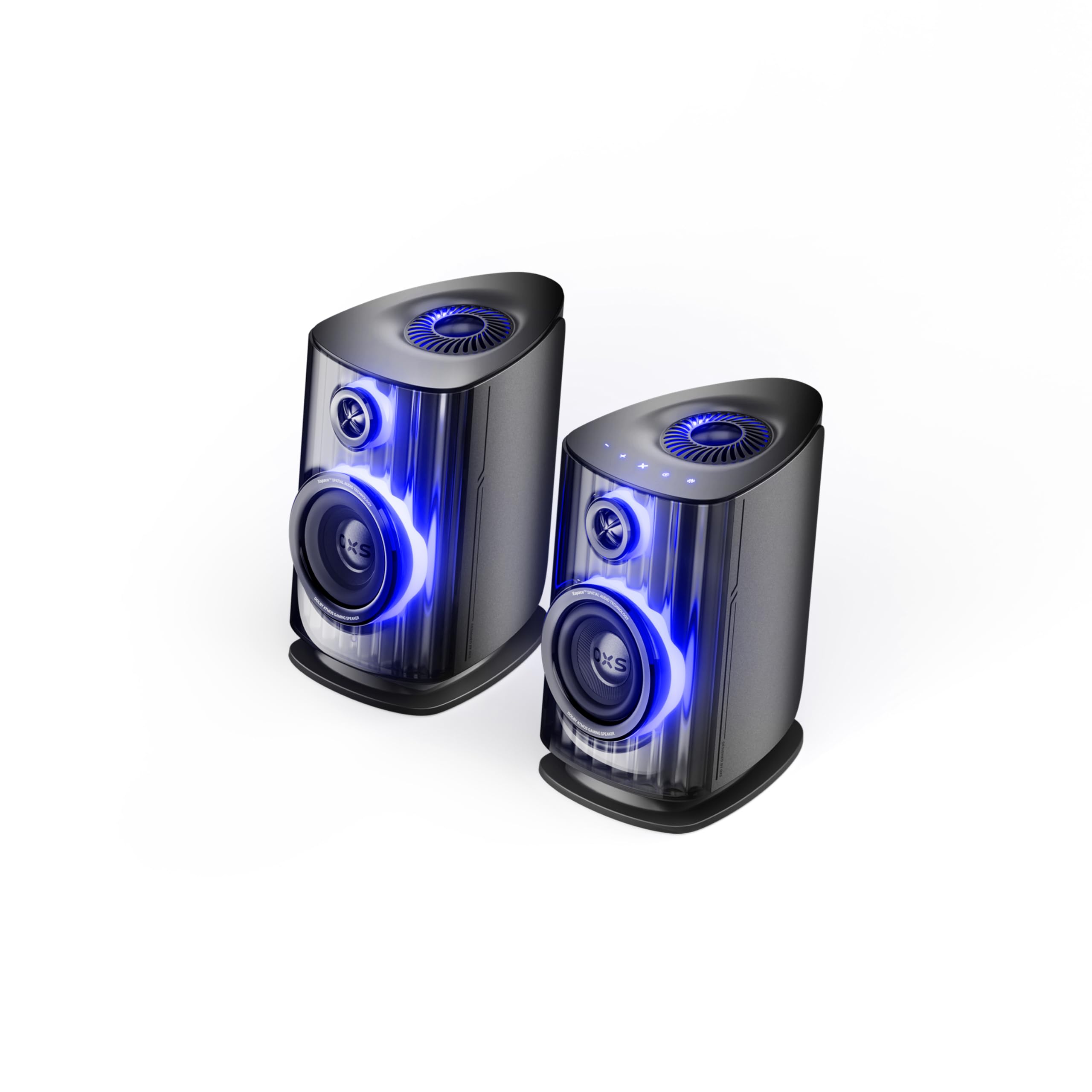
Image: OXS Thunder Duo Speaker System. This image shows the two main speaker units, typically placed on a tabletop. The design features a sleek, modern aesthetic with speaker grilles visible on the front.
4.1. ອົງປະກອບຂອງລໍາໂພງ
- ລຳໂພງຫຼັກ: Houses the primary audio drivers and control circuitry.
- Satellite Speaker Unit: Connects to the main unit to provide a wider soundstage.
- ການປ້ອນຂໍ້ມູນພະລັງງານ: ສໍາລັບການເຊື່ອມຕໍ່ອະແດບເຕີພະລັງງານ.
- ການປ້ອນຂໍ້ມູນສຽງ: HDMI IN, USB-C, eARC, Optical for various source connections.
4.2. ການຄວບຄຸມໄລຍະໄກ
The included remote control allows for convenient operation of the speaker system from a distance. It typically includes buttons for:
- ເປີດ/ປິດ
- ປະລິມານຂຶ້ນ/ລົງ
- Input Source Selection (HDMI, USB-C, eARC, Optical)
- ປິດສຽງ
- Audio Mode Selection (e.g., Surround)
5. ຕັ້ງຄ່າ
5.1. ການຈັດວາງລຳໂພງ
Place the OXS Thunder Duo speakers on a stable, flat tabletop surface. For optimal sound, position them equidistant from your listening position and at ear level. Ensure there are no obstructions between the speakers and your listening area.
5.2. ການເຊື່ອມຕໍ່ພະລັງງານ
- Connect the power adapter to the power input port on the main speaker unit.
- ສຽບອະແດບເຕີໄຟໃສ່ກັບປລັກສຽບໃສ່ຝາ.
- The power indicator on the speaker will illuminate, indicating it is in standby mode.
5.3. ການເຊື່ອມຕໍ່ແຫຼ່ງສຽງ
The OXS Thunder Duo offers multiple connectivity options:
- HDMI (eARC): For connecting to TVs with an HDMI eARC/ARC port. Use the provided HDMI cable. This connection supports high-quality audio and allows TV remote control of speaker volume.
- HDMI ເຂົ້າ: For connecting other HDMI-enabled devices like gaming consoles or Blu-ray players.
- Optical: For connecting to TVs or other devices with an optical audio output. Use the provided optical cable.
- USB-C: For connecting to PCs, laptops, or compatible mobile devices.
Connect your desired audio source to the corresponding input port on the main speaker unit.
6. ຄໍາແນະນໍາການດໍາເນີນງານ
6.1. ເປີດ / ປິດພະລັງງານ
Press the Power button on the remote control or the main speaker unit to turn the system on or off. The power indicator will change status accordingly.
6.2. ການເລືອກແຫຼ່ງປ້ອນຂໍ້ມູນ
Press the 'Input' or dedicated source buttons (e.g., HDMI, Optical, USB-C) on the remote control to switch between connected audio sources. The current input source will typically be indicated by an LED or display on the main speaker unit.
6.3. ການຄວບຄຸມປະລິມານ
Use the 'Volume Up' (+) and 'Volume Down' (-) buttons on the remote control to adjust the audio level. Press the 'Mute' button to temporarily silence the audio.
6.4. ຮູບແບບສຽງ
The OXS Thunder Duo supports surround sound audio output. Use the 'Mode' button on the remote control to cycle through available audio modes, if applicable, to optimize your listening experience for different content types.
7. ການເຊື່ອມຕໍ່
The OXS Thunder Duo offers versatile connectivity for a wide range of devices:
- HDMI ເຂົ້າ: Connects to various HDMI-enabled devices.
- USB-C: Ideal for direct digital audio connection to computers (PC), laptops, and mobile devices running Windows, Android, or iOS.
- eARC (ຊ່ອງທາງການສົ່ງຄືນສຽງທີ່ປັບປຸງ): Connects to compatible TVs for high-fidelity audio transmission and simplified control.
- Optical: Provides a digital audio connection for TVs, game consoles (PlayStation, XBOX, Switch), and other devices with an optical output.
8. ບໍາລຸງຮັກສາ
Proper maintenance ensures the longevity and performance of your OXS Thunder Duo speaker system.
- ທໍາຄວາມສະອາດ: Regularly wipe the speaker surfaces with a soft, dry, lint-free cloth. Do not use abrasive cleaners, waxes, or solvents.
- ຂີ້ຝຸ່ນ: Keep the speaker grilles free from dust accumulation. Use a soft brush or a vacuum cleaner with a brush attachment on a low setting.
- ການເກັບຮັກສາ: ຖ້າເກັບຮັກສາລໍາໂພງໄວ້ເປັນເວລາດົນ, ຖອດພວກມັນອອກຈາກພະລັງງານແລະເກັບຮັກສາໄວ້ໃນບ່ອນທີ່ເຢັນ, ແຫ້ງ, ດີກວ່າຢູ່ໃນບັນຈຸພັນຕົ້ນສະບັບ.
9. ການແກ້ໄຂບັນຫາ
If you encounter issues with your OXS Thunder Duo, refer to the following common problems and solutions:
| ບັນຫາ | ສາເຫດທີ່ເປັນໄປໄດ້ | ການແກ້ໄຂ |
|---|---|---|
| ບໍ່ມີພະລັງງານ | Power cable not connected; Power outlet not active; Speaker is off. | Ensure power cable is securely connected. Test the outlet with another device. Press the Power button on the remote or speaker. |
| ບໍ່ມີສຽງ | Incorrect input source selected; Volume too low or muted; Audio cable not connected properly; Source device not outputting audio. | Select the correct input source. Increase volume and check if muted. Reconnect audio cables. Check audio settings on your source device. |
| ການຄວບຄຸມໄລຍະໄກບໍ່ເຮັດວຽກ | Batteries are dead or incorrectly inserted; Obstruction between remote and speaker. | Replace batteries, ensuring correct polarity. Remove any obstructions. Ensure remote is pointed at the main speaker unit. |
| ສຽງບິດເບືອນ | Volume too high; Poor audio source quality; Loose cable connection. | Lower the volume. Check the audio quality from the source. Ensure all cables are securely connected. |
If the problem persists after trying these solutions, please contact OXS customer support.
10. ຂໍ້ມູນຈໍາເພາະ
| ຄຸນສົມບັດ | ຂໍ້ມູນຈໍາເພາະ |
|---|---|
| ຍີ່ຫໍ້ | OXS |
| ໝາຍເລກຕົວແບບ | Thunder DUO |
| Speaker Max Output | 220 ວັດ |
| ການຕອບສະໜອງຄວາມຖີ່ | 20 KHz |
| ເຕັກໂນໂລຊີການເຊື່ອມຕໍ່ | HDMI IN, USB-C, eARC, Optical |
| ຮູບແບບການອອກສຽງ | ອ້ອມຮອບ |
| ປະເພດການຕິດຕັ້ງ | ພູຕັ້ງໂຕະ |
| Product Exterior Material | ABS & PVC |
| ປະເພດລຳໂພງ | ຊັ້ນວາງປຶ້ມ |
| ການນໍາໃຊ້ທີ່ແນະນໍາ | Computer, TV, Gaming Consoles |
| ສີ | Titan |
| ກັນນ້ຳ | ບໍ່ຖືກຕ້ອງ |
| ປະເພດການຮັບປະກັນ | ການຮັບປະກັນຈໍາກັດ |
| ຂະຫນາດລໍາໂພງ | 1.5 ນິ້ວ |
| Speaker Channel Configuration | 3.1.2 |
| ອັດຕາສ່ວນ S/N | 96 dB |
| ໝໍ້ໄຟ | ແບດເຕີຣີ້ AAA 2 ອັນ (ລວມສໍາລັບໄລຍະໄກ) |
| ຂະໜາດລາຍການ (D x W x H) | 17.8 x 21.5 x 27.6 cm |
| ນ້ໍາຫນັກລາຍການ | 11.02 ປອນ |
| ອຸປະກອນທີ່ເຂົ້າກັນໄດ້ | TV, PC, PlayStation, XBOX, Mobile devices (Windows, Android, iOS), Switch |
| UPC | 199284067936 |
| ASIN | B0GDFVBVB3 |
11. ການຮັບປະກັນແລະການສະຫນັບສະຫນູນ
The OXS Thunder Duo Speaker System comes with a Limited Warranty. Please refer to the warranty card included in your package for specific terms and conditions, including the duration and coverage details.
For technical support, troubleshooting assistance, or warranty claims, please contact OXS customer service through the contact information provided on the official OXS website or your purchase documentation. Please have your model number (Thunder DUO) and proof of purchase ready when contacting support.