
1. ບົດແນະນຳ
ຂອບໃຈສໍາລັບການຊື້asing the Sharp PS-916 Bluetooth Party Speaker System. This system includes two identical portable Bluetooth speakers designed to deliver powerful audio with versatile connectivity options. Please read this manual carefully before using the product to ensure proper operation and to maximize your listening experience.
ເນື້ອໃນຊຸດ:
- 2 x Sharp PS-916 Party Speakers
- 1 x ສາຍສາກ
- 1 x ການຄວບຄຸມໄລຍະໄກ
- 1 x ຄູ່ມືຜູ້ໃຊ້

Image: The Sharp PS-916 system includes two speakers for a complete stereo experience.
2. ຕັ້ງຄ່າ
2.1 ການສາກລຳໂພງ
The PS-916 speakers are equipped with rechargeable batteries, providing up to 12 hours of playback. Before initial use, fully charge both speakers.
- Connect the charging cable to the DC IN port on the rear of each speaker.
- Plug the other end of the charging cable into a suitable power adapter (not included) or USB power source.
- The charging indicator light will illuminate. It will change color or turn off once charging is complete.
2.2 ການເປີດ/ປິດ
To power on or off each speaker, press and hold the ON/STAND BY INPUT ປຸ່ມຕັ້ງຢູ່ເທິງແຜງຄວບຄຸມ.
ການຈັບຄູ່ Bluetooth 2.3 (ລຳໂພງດຽວ)
- Ensure the speaker is powered on and in Bluetooth mode. The Bluetooth indicator will flash, indicating it is ready for pairing.
- ໃນອຸປະກອນມືຖືຂອງທ່ານ, ເປີດໃຊ້ Bluetooth ແລະຊອກຫາອຸປະກອນທີ່ມີຢູ່.
- Select "Sharp PS-916" from the list of devices.
- ເມື່ອເຊື່ອມຕໍ່ແລ້ວ, ຕົວຊີ້ບອກ Bluetooth ຈະຢຸດກະພິບ ແລະຍັງແຂງຢູ່.
ການຈັບຄູ່ສະເຕີລິໂອໄຮ້ສາຍແທ້ 2.4 (TWS) (ລຳໂພງສອງຕົວ)
TWS allows you to connect two PS-916 speakers wirelessly for a stereo sound experience.
- Power on both PS-916 speakers.
- Ensure neither speaker is currently connected to a Bluetooth device.
- On one of the speakers (this will be the primary speaker), press the TWS button. The speaker will enter TWS pairing mode.
- The primary speaker will automatically search for the secondary speaker. Once connected, you will hear an audible confirmation, and the TWS indicator lights on both speakers will illuminate.
- ຕອນນີ້, ເຊື່ອມຕໍ່ອຸປະກອນມືຖືຂອງທ່ານກັບລຳໂພງຫຼັກຜ່ານ Bluetooth ຕາມທີ່ໄດ້ອະທິບາຍໄວ້ໃນພາກ 2.3. ສຽງຈະຫຼິ້ນຜ່ານລຳໂພງທັງສອງໃນແບບສະເຕີລິໂອ.
3. ການເຮັດວຽກ
3.1 ກະດານຄວບຄຸມຫຼາຍກວ່າview

Image: Main control panel for the Sharp PS-916 speaker.
- ON/STAND BY INPUT: Power on/off, switch input modes (Bluetooth, USB, TF, AUX, FM).
- PLAY/PAUSE (►/∕∕): ຫຼິ້ນ ຫຼືຢຸດການຫຼິ້ນສຽງໄວ້ຊົ່ວຄາວ.
- PREVIOUS (◀◀): ຂ້າມໄປເພງກ່ອນໜ້າ.
- NEXT (▶▶): ຂ້າມໄປເພງຕໍ່ໄປ.
- ລະດັບສຽງ: ໝຸນເພື່ອປັບລະດັບສຽງຕົ້ນສະບັບ.
- TWS: Initiate or disconnect True Wireless Stereo pairing.
- EQUALISER: Cycle through preset equalizer modes.
- ເບສ: Activate or deactivate bass boost.
- ແສງ: Change or turn off the LED light effects.
- MIC CONTROL: Adjust microphone volume or echo (if applicable).
3.2 ຜອດປ້ອນຂໍ້ມູນ
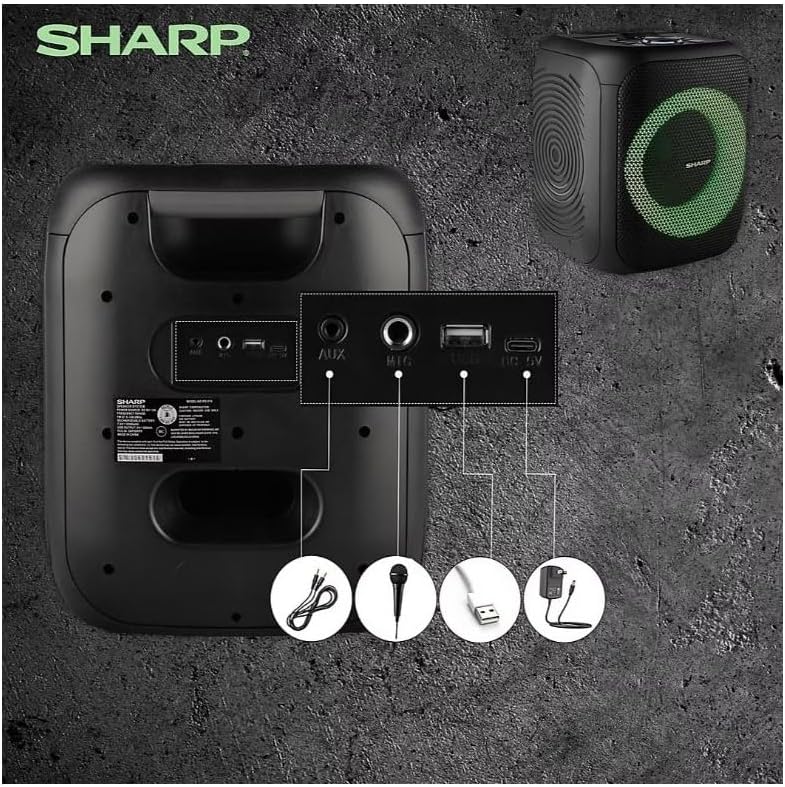
Image: Rear panel with various input and charging ports.
- AUX ໃນ: ເຊື່ອມຕໍ່ອຸປະກອນສຽງພາຍນອກໂດຍໃຊ້ສາຍສຽງ 3.5 ມມ.
- MIC ໃນ: Connect a microphone (sold separately) for karaoke or announcements.
- USB: ໃສ່ແຟລດໄດຣຟ໌ USB ສຳລັບຫຼິ້ນສຽງ.
- ບັດ TF: ໃສ່ກາດ TF (microSD) ສຳລັບຫຼິ້ນສຽງ.
- DC ໃນ: Connect the charging cable to power and charge the speaker.
3.3 Playing Audio from USB/TF Card
- Insert a USB flash drive or TF card into the corresponding port.
- ກົດ ON/STAND BY INPUT button repeatedly until the display shows the USB or TF mode.
- ການຫຼິ້ນຈະເລີ່ມອັດຕະໂນມັດ. ໃຊ້ ຫຼິ້ນ/ຢຸດຊົ່ວຄາວ, ກ່ອນໜ້ານີ້, ແລະ ຕໍ່ໄປ ປຸ່ມເພື່ອຄວບຄຸມການຫຼິ້ນ.
3.4 ການໃຊ້ອິນພຸດ AUX
- Connect one end of a 3.5mm audio cable to the AUX IN port on the speaker.
- ເຊື່ອມຕໍ່ສົ້ນອື່ນກັບຊ່ອງສຽບຫູຟັງ ຫຼືສຽງອອກຂອງອຸປະກອນພາຍນອກຂອງທ່ານ.
- ກົດ ON/STAND BY INPUT button repeatedly until the display shows AUX mode.
- ຄວບຄຸມການຫຼິ້ນ ແລະລະດັບສຽງຈາກອຸປະກອນພາຍນອກຂອງທ່ານ.
3.5 ການດໍາເນີນງານວິທະຍຸ FM

Image: The PS-916 features an integrated FM Tuner.
- ກົດ ON/STAND BY INPUT button repeatedly until the display shows FM mode.
- ກົດຄ້າງໄວ້ ຫຼິ້ນ/ຢຸດຊົ່ວຄາວ ປຸ່ມເພື່ອສະແກນອັດຕະໂນມັດ ແລະບັນທຶກສະຖານີ FM ທີ່ມີຢູ່.
- ໃຊ້ ກ່ອນໜ້ານີ້ ແລະ ຕໍ່ໄປ ປຸ່ມເພື່ອ ນຳ ທາງຜ່ານສະຖານີທີ່ບັນທືກ.
3.6 ຜົນກະທົບແສງໄຟ LED
ກົດ ແສງສະຫວ່າງ button to cycle through different LED light modes or to turn the lights off.
4. ບໍາລຸງຮັກສາ
4.1 ການທໍາຄວາມສະອາດ
- ປິດລຳໂພງ ແລະ ຖອດສາຍອອກຈາກແຫຼ່ງພະລັງງານກ່ອນທຳຄວາມສະອາດສະເໝີ.
- ໃຊ້ຜ້າປຽກອ່ອນໆເຊັດພື້ນຜິວພາຍນອກ.
- ຢ່າໃຊ້ນໍ້າຢາທໍາຄວາມສະອາດທີ່ເປັນຂອງແຫຼວ, ນໍ້າຢາສະເປຣ ຫຼື ຕົວລະລາຍ ເພາະວ່າສິ່ງເຫຼົ່ານີ້ອາດຈະທໍາລາຍສີ ຫຼື ອົງປະກອບພາຍໃນໄດ້.
4.2 ການເກັບຮັກສາ
- ເກັບຮັກສາລໍາໂພງໄວ້ໃນບ່ອນທີ່ເຢັນ, ແຫ້ງ, ຫ່າງຈາກແສງແດດໂດຍກົງແລະອຸນຫະພູມທີ່ສຸດ.
- ຖ້າເກັບຮັກສາໄວ້ເປັນໄລຍະເວລາ, ສາກແບັດເຕີຣີໃຫ້ເຫຼືອປະມານ 50% ທຸກໆສອງສາມເດືອນເພື່ອຮັກສາສຸຂະພາບຂອງແບັດເຕີຣີ.
5. ການແກ້ໄຂບັນຫາ
If you encounter issues with your Sharp PS-916 speakers, please refer to the following common problems and solutions:
| ບັນຫາ | ການແກ້ໄຂທີ່ເປັນໄປໄດ້ |
|---|---|
| ລຳໂພງບໍ່ເປີດ. | ໃຫ້ແນ່ໃຈວ່າໄດ້ສາກໄຟແລ້ວ. ເຊື່ອມຕໍ່ສາຍສາກແລ້ວລອງອີກຄັ້ງ. |
| ບໍ່ມີສຽງຈາກ ລຳ ໂພງ. | ກວດສອບລະດັບສຽງໃນທັງລຳໂພງ ແລະ ອຸປະກອນທີ່ເຊື່ອມຕໍ່ຂອງທ່ານ. ໃຫ້ແນ່ໃຈວ່າໄດ້ເລືອກໂໝດປ້ອນຂໍ້ມູນທີ່ຖືກຕ້ອງແລ້ວ. |
| ອຸປະກອນ Bluetooth ບໍ່ສາມາດຈັບຄູ່ໄດ້. | Ensure the speaker is in Bluetooth pairing mode (indicator flashing). Move your device closer to the speaker. Disconnect from other Bluetooth devices. |
| ການຈັບຄູ່ TWS ລົ້ມເຫລວ. | Ensure both speakers are powered on and not connected to any other Bluetooth devices. Try initiating TWS pairing again. |
| ສຽງບິດເບືອນ. | Reduce the volume on both the speaker and your connected device. Ensure the audio source is not distorted. |
6. ຂໍ້ມູນຈໍາເພາະ
| ຄຸນສົມບັດ | ລາຍລະອຽດ |
|---|---|
| ຍີ່ຫໍ້ | ແຫຼມ |
| ຊື່ຕົວແບບ | PS-916 |
| ການຕັ້ງຄ່າລໍາໂພງ | 8" Woofer, 1" Tweeter (per speaker) |
| ພະລັງງານຜົນຜະລິດສູງສຸດ | 400 ວັດ (ຕໍ່ລໍາໂພງ) |
| ພະລັງງານຜົນຜະລິດ RMS | 40 ວັດ (ຕໍ່ລໍາໂພງ) |
| ເຕັກໂນໂລຊີການເຊື່ອມຕໍ່ | Bluetooth |
| ວັດສະດຸປ້ອນເພີ່ມເຕີມ | USB, TF Card, 3.5mm AUX, Microphone Input |
| ຊີວິດຫມໍ້ໄຟ | ສູງສຸດ 12 ຊົ່ວໂມງ |
| ຄຸນນະສົມບັດພິເສດ | True Wireless Stereo (TWS) Pairing, Bass Boost, LED Light Effects, FM Tuner |
| ສີ | ດຳ |
| ນ້ໍາຫນັກລາຍການ | 6.5 ປອນ (ຕໍ່ລໍາໂພງ) |
| UPC | 728434122111 |
| GTIN | 728434122111 |
7. ການຮັບປະກັນແລະການສະ ໜັບ ສະ ໜູນ
7.1 ຂໍ້ມູນການຮັບປະກັນ
This Sharp PS-916 product comes with a 90-day limited warranty. This warranty covers manufacturing defects under normal use. It does not cover damage caused by misuse, accidents, unauthorized modifications, or normal wear and tear.
7.2 ສະຫນັບສະຫນູນລູກຄ້າ
For technical assistance, warranty claims, or further inquiries, please refer to the contact information provided with your purchase documentation or visit the official Sharp support webເວັບໄຊ.