
1. ບົດແນະນຳ
This manual provides essential information for the proper use and maintenance of your realme 16 Pro 5G Unlocked Smartphone. Please read this guide thoroughly before operating your device to ensure optimal performance and longevity. Keep this manual for future reference.
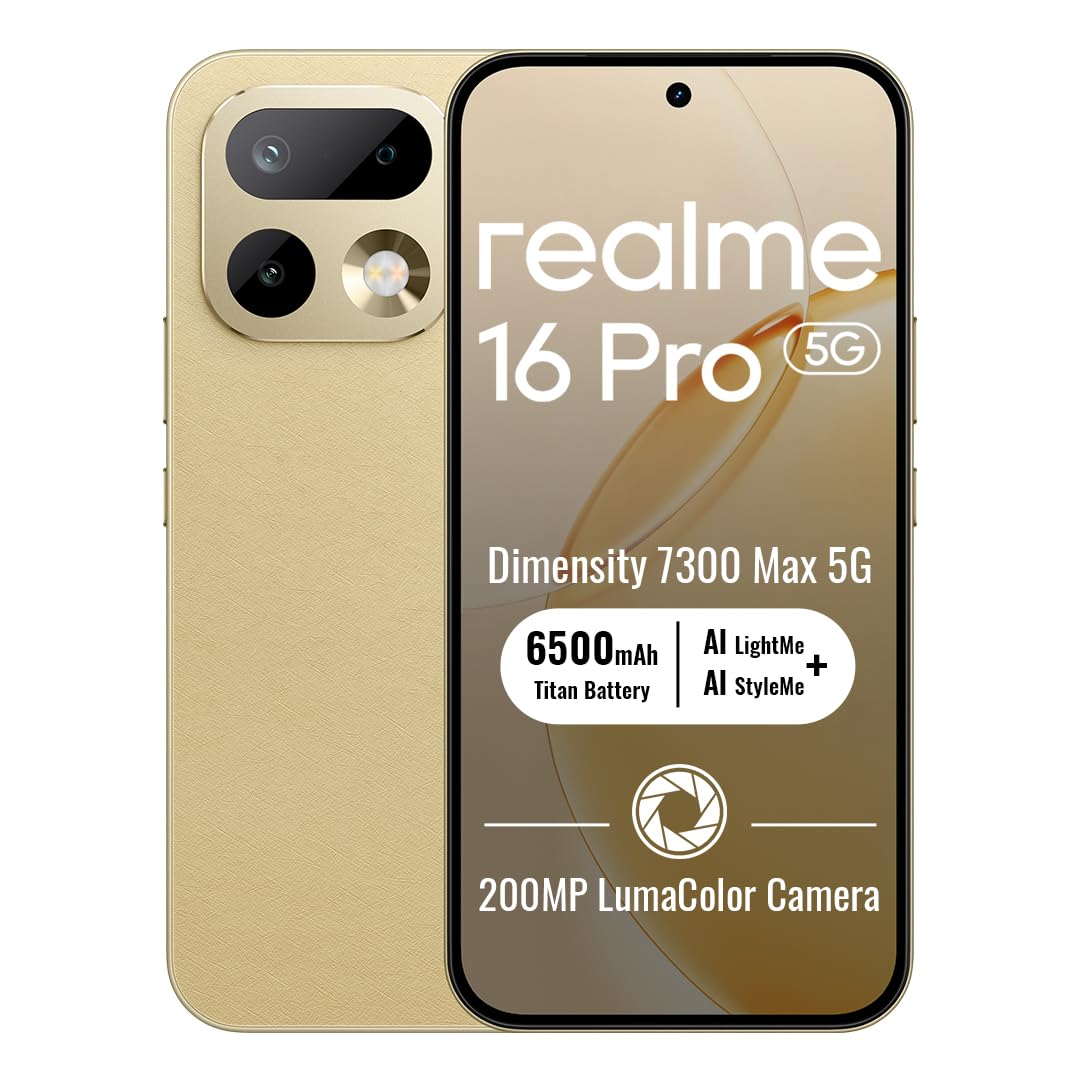
Image: The realme 16 Pro 5G smartphone, showcasing ການອອກແບບ sleek ແລະໂມດູນກ້ອງຖ່າຍຮູບຂອງຕົນ.
2. ສິ່ງທີ່ຢູ່ໃນກ່ອງ
ກວດສອບວ່າລາຍການທັງຫມົດແມ່ນມີຢູ່ໃນຊຸດ:
- ໂທລະສັບສະຫຼາດ realme 16 Pro 5G
- ສາຍ USB
- ກະເປົາໂທລະສັບ
- ຄູ່ມືເລີ່ມຕົ້ນດ່ວນ
- ຕົວຖອດຖາດຊິມ
3. ຕັ້ງຄ່າ
3.1. ການຕິດຕັ້ງຊິມກາດ
- ຊອກຫາຖາດຊິມກາດຢູ່ດ້ານຂ້າງຂອງອຸປະກອນຂອງທ່ານ.
- ສຽບເຄື່ອງມືຖອດຖາດ SIM ເຂົ້າໄປໃນຮູນ້ອຍໆຂ້າງຖາດ ແລະກົດຄ່ອຍໆຈົນກ່ວາຖາດຈະອອກມາ.
- Place your Nano-SIM card(s) and/or microSD card (if supported) into the tray with the gold contacts facing down. Ensure proper orientation.
- ໃສ່ຖາດໃສ່ອຸປະກອນຄືນໃໝ່ຢ່າງລະມັດລະວັງຈົນກວ່າມັນຈະກົດໃສ່ບ່ອນ.
3.2. ເປີດ / ປິດພະລັງງານ
- ເພື່ອເປີດເຄື່ອງ: ກົດປຸ່ມເປີດປິດຄ້າງໄວ້ຈົນກ່ວາໂລໂກ້ realme ປະກົດຂຶ້ນ.
- ປິດເຄື່ອງ: ກົດປຸ່ມເປີດປິດຄ້າງໄວ້, ຈາກນັ້ນເລືອກ 'ປິດເຄື່ອງ' ຈາກຕົວເລືອກໃນໜ້າຈໍ.
- ເພື່ອເລີ່ມຕົ້ນໃໝ່: ກົດປຸ່ມເປີດປິດຄ້າງໄວ້, ຈາກນັ້ນເລືອກ 'ຣີສະຕາດ' ຈາກຕົວເລືອກຕ່າງໆ.
3.3. ການຕິດຕັ້ງເບື້ອງຕົ້ນ
Upon first power-on, follow the on-screen instructions to configure your device. This includes selecting your language, connecting to Wi-Fi, setting up your Google account, and configuring security features like face recognition.
4. ຄໍາແນະນໍາການດໍາເນີນງານ
4.1. ການນໍາທາງພື້ນຖານ
- ແຕະ: ແຕະທີ່ໄອຄອນເພື່ອເປີດແອັບຯ ຫຼືເລືອກລາຍການໃດໜຶ່ງ.
- ປັດ: Slide your finger across the screen to scroll, switch screens, or access quick settings.
- ເມື່ອເຂົ້າຕາຈົນ: ໃຊ້ສອງນິ້ວເພື່ອຊູມເຂົ້າ ຫຼືອອກໃນຮູບ ແລະ web ໜ້າ.
- ຂ່າວຍາວ: ກົດປຸ່ມຄ້າງໄວ້ສຳລັບຕົວເລືອກເພີ່ມເຕີມ ຫຼືເພື່ອຍ້າຍມັນ.
4.2. Buttons Overview
- ປຸ່ມເປີດປິດ: Located on the right side. Press to turn the screen on/off, long press for power options.
- ປຸ່ມລະດັບສຽງ: Located on the left side. Press to adjust media volume, call volume, or notification volume.
4.3. ການເຊື່ອມຕໍ່
- Wi-Fi: ໄປທີ່ການຕັ້ງຄ່າ > ເຄືອຂ່າຍ ແລະອິນເຕີເນັດ > Wi-Fi ເພື່ອເຊື່ອມຕໍ່ກັບເຄືອຂ່າຍທີ່ມີຢູ່.
- Bluetooth: ໄປທີ່ການຕັ້ງຄ່າ > ອຸປະກອນທີ່ເຊື່ອມຕໍ່ > Bluetooth ເພື່ອຈັບຄູ່ກັບອຸປະກອນເສີມ Bluetooth.
- ຂໍ້ມູນມືຖື: ໃຫ້ແນ່ໃຈວ່າຊິມກາດຂອງທ່ານເປີດຢູ່ ແລະຂໍ້ມູນມືຖືຖືກເປີດໃຊ້ໃນການຕັ້ງຄ່າ > ເຄືອຂ່າຍ ແລະອິນເຕີເນັດ > ເຄືອຂ່າຍມືຖື.
4.4. ຄຸນນະສົມບັດກ້ອງຖ່າຍຮູບ
The realme 16 Pro 5G features an advanced camera system designed for high-quality photography and videography.
- ກ້ອງຫຼັກ 200MP: Capture highly detailed photos with the primary rear sensor.
- ກ້ອງໜ້າ 50MP: For crisp, natural selfies with HDR support.
- AI Imaging: Advanced algorithms enhance image quality, dynamic range, and low-light performance.
- ວິດີໂອ 4K HDR: Record ultra-clear videos with enhanced dynamic range.

ຮູບພາບ: ລາຍລະອຽດ view of the realme 16 Pro 5G camera system, emphasizing the 200MP main camera and 50MP selfie camera capabilities.
Image: The realme 16 Pro 5G camera system, showcasing its 200MP main camera and 50MP front camera, with details on LumaColor IMAGE processing for skin tone, light, shadow, portrait, and background optimization.
4.5. ຄຸນສົມບັດການສະແດງ
Experience an immersive visual experience with the realme 16 Pro 5G's advanced display.
- 144Hz AMOLED Display: Enjoy smooth scrolling, gaming, and vibrant colors.
- ຄວາມສະຫວ່າງສູງ: Ensures clear visibility even in direct sunlight.
- ຄວາມລະອຽດສູງ: 2772 x 1272 pixels for sharp images and text.

Image: The realme 16 Pro 5G display, highlighting its 144Hz AMOLED technology, 6500nit peak brightness, DC Mode Dimming, 94% screen-to-body ratio, Netflix HDR, HDR 10+ certification, and 3000Hz instantaneous touch response.
4.6. ຫມໍ້ໄຟແລະການສາກໄຟ
The realme 16 Pro 5G is equipped with a large battery and fast charging technology.
- ແບດເຕີຣີ້ມາດຕະຖານ 7000mAh: Provides extended usage time for daily activities.
- 80W SuperVOOC Fast Charging: Charge from 0 to 48% in approximately 10 minutes, and fully charge in about 35 minutes.

Image: Illustration of the realme 16 Pro 5G's battery, showing 45W Fast Charge, Reverse Charge, Bypass Charge, and 6 Years Battery Health. Note: Product specifications state 80W SuperVOOC charging and 7000mAh battery capacity.
4.7. ປະສິດທິພາບ ແລະ ຄວາມທົນທານ
The device is built for powerful performance and robust durability.
- MediaTek Dimensity 7300 Max 5G Chipset: Ensures smooth multitasking, gaming, and overall efficient performance.
- IP69 Water & Dust Resistance: Provides high-level protection against water jets and dust, ensuring durability in various environments.

Image: Close-up of the MediaTek Dimensity 7300 Max 5G chipset, highlighting its performance capabilities with an AnTuTu Benchmark score of 971755, 120FPS for mainstream games, and GT Boost for peak gaming performance.

Image: The realme 16 Pro 5G submerged in water, illustrating its IP69 Pro-level Water Resistance, capable of withstanding 8-10 MPa maximum water pressure and 80°C extreme water temperature.
5. ບໍາລຸງຮັກສາ
5.1. ທຳ ຄວາມສະອາດອຸປະກອນ
- ໃຊ້ຜ້າທີ່ອ່ອນໆ, ບໍ່ມີສານດ່າງເພື່ອເຮັດຄວາມສະອາດຫນ້າຈໍແລະຮ່າງກາຍ.
- ຫຼີກເວັ້ນການນໍາໃຊ້ສານເຄມີທີ່ຮຸນແຮງ, ວັດສະດຸຂັດ, ຫຼືສີດ aerosol.
- ສໍາລັບ smudges stubborn, ເລັກນ້ອຍ dampen ຜ້າທີ່ມີນ້ໍາຫຼືເຄື່ອງເຮັດຄວາມສະອາດຫນ້າຈໍທີ່ຖືກອອກແບບມາສໍາລັບເອເລັກໂຕຣນິກ.
5.2. ການປັບປຸງຊອບແວ
Regularly check for and install software updates to ensure your device has the latest features, security patches, and performance improvements. Go to Settings > About phone > Software update.
5.3. ການດູແລຫມໍ້ໄຟ
- ຫຼີກເວັ້ນອຸນຫະພູມທີ່ຮຸນແຮງ, ຍ້ອນວ່າພວກມັນສາມາດເຮັດໃຫ້ອາຍຸຫມໍ້ໄຟຫຼຸດລົງ.
- ໃຊ້ສະເພາະສາຍສາກ ແລະສາຍສາກຕົ້ນສະບັບທີ່ສະໜອງໃຫ້ກັບອຸປະກອນຂອງທ່ານ.
- ຢ່າປ່ອຍໃຫ້ອຸປະກອນສາກໄຟເປັນເວລາດົນເກີນໄປ ຫຼັງຈາກທີ່ມັນຮອດ 100%.
6. ການແກ້ໄຂບັນຫາ
6.1. ອຸປະກອນບໍ່ເປີດ
- ໃຫ້ແນ່ໃຈວ່າໄດ້ສາກໄຟແລ້ວ. ເຊື່ອມຕໍ່ສາຍສາກແລ້ວລໍຖ້າສອງສາມນາທີກ່ອນທີ່ຈະພະຍາຍາມເປີດເຄື່ອງ.
- ກົດປຸ່ມເປີດປິດຄ້າງໄວ້ຢ່າງໜ້ອຍ 10-15 ວິນາທີເພື່ອບັງຄັບໃຫ້ຣີສະຕາດ.
6.2. ໜ້າຈໍບໍ່ຕອບສະໜອງ
- ຣີສະຕາດອຸປະກອນໂດຍການກົດປຸ່ມເປີດປິດ.
- ຖ້າໜ້າຈໍຍັງບໍ່ຕອບສະໜອງ, ໃຫ້ລອງຣີເຊັດເປັນຄ່າໂຮງງານ (ໝາຍເຫດ: ນີ້ຈະລຶບຂໍ້ມູນທັງໝົດ).
6.3. Network Issues
- ກວດເບິ່ງວ່າຊິມກາດຂອງທ່ານໃສ່ຢ່າງຖືກຕ້ອງຫຼືບໍ່.
- ປິດ/ເປີດ ໂໝດຢູ່ໃນຍົນ.
- ປິດເປີດອຸປະກອນຂອງທ່ານຄືນໃໝ່.
- Verify your network settings (Settings > Network & internet > Mobile network).
6.4. ແອັບຂັດຂ້ອງ ຫຼື ຄ້າງ
- ປິດ ແລະເປີດແອັບຄືນໃໝ່.
- ລຶບລ້າງແຄສ ແລະຂໍ້ມູນຂອງແອັບ (ການຕັ້ງຄ່າ > ແອັບ > [ຊື່ແອັບ] > ບ່ອນເກັບຂໍ້ມູນ ແລະແຄດ).
- ອັບເດດແອັບຯເປັນເວີຊັນຫຼ້າສຸດຂອງມັນຈາກ Google Play Store.
7. ຂໍ້ມູນຈໍາເພາະ
| ຄຸນສົມບັດ | ລາຍລະອຽດ |
|---|---|
| ຍີ່ຫໍ້ | realme |
| ຊື່ຕົວແບບ | realme 16 Pro |
| ລະບົບປະຕິບັດການ | Android 16 |
| RAM ຂະຫນາດທີ່ຕິດຕັ້ງ | 8 GB |
| ຄວາມອາດສາມາດເກັບຮັກສາຫນ່ວຍຄວາມຈໍາ | 256 GB |
| ຕົວແບບ CPU | MediaTek Dimensity 7300 Max 5G Chipset |
| ຄວາມໄວ CPU | 2.5 GHz |
| ປະເພດການສະແດງ | AMOLED |
| ອັດຕາການໂຫຼດຂໍ້ມູນຄືນໃໝ່ | 144 Hz |
| ຄວາມລະອຽດ | 2772 x 1272 Pixels Per Inch |
| Rear Facing Camera Photo Sensor Resolution | 200 MP |
| Front Photo Sensor Resolution | 50 MP |
| ຄວາມອາດສາມາດຫມໍ້ໄຟ | 7000 ລ້ານamp ຊົ່ວໂມງ |
| ເທັກໂນໂລຍີການສາກໄຟ | ການສາກໄວ 80W SuperVOOC |
| ລະດັບຄວາມຕ້ານທານນ້ໍາ | ກັນນ້ຳ IP69 |
| ເຕັກໂນໂລຊີໂທລະສັບມືຖື | 5G |
| ເຕັກໂນໂລຊີການເຊື່ອມຕໍ່ | Bluetooth, USB Type C, Wi-Fi |
| ຈຳນວນຊ່ອງໃສ່ຊິມກາດ | ຊິມສອງ |
| ນ້ໍາຫນັກລາຍການ | 120 ກຣາມ |
8. ການຮັບປະກັນແລະການສະຫນັບສະຫນູນ
8.1. ຂໍ້ມູນການຮັບປະກັນ
Your realme 16 Pro 5G smartphone comes with a 1 ປີຮັບປະກັນຜູ້ຜະລິດ. This warranty covers defects in materials and workmanship under normal use. For specific terms and conditions, please refer to the warranty card included in your product packaging or visit the official realme webເວັບໄຊ.
8.2. ການຊ່ວຍເຫຼືອລູກຄ້າ
For further assistance, technical support, or service inquiries, please contact realme customer service or visit the official realme support channels:
- ສະຫນັບສະຫນູນອອນໄລນ໌: ຢ້ຽມຢາມ realme Store ໃນ Amazon or the official realme webເວັບໄຊ.
- ສູນບໍລິການ: Locate authorized realme service centers in your region for in-person support.