
1. ບົດແນະນຳ
The GESKS O Kam Pro CS621FR is an advanced 8MP 4-lens security camera designed for comprehensive outdoor surveillance. It features a revolutionary quad-lens design, including one pan & tilt lens and three manually adjustable lenses, providing a complete 360° visual coverage.
ຄຸນນະສົມບັດທີ່ສໍາຄັນປະກອບມີ:
- Quad-Lens Design: One pan & tilt lens with 270° horizontal and 90° vertical rotation, plus three manually adjustable lenses with 180° rotation each, ensuring 360° visual coverage.
- Active Deterrence System: Real-time sound and light alarms activate upon motion detection, featuring powerful white LED lights and an audible siren to deter intruders. Instant push notifications are sent via the O-KAM Pro app.
- ການບັນທຶກຄວາມລະອຽດສູງ: Captures 20MP screenshots and 2MP video with colorful night vision capability for clear footage ມື້ແລະກາງຄືນ.
- ການເຊື່ອມຕໍ່ເຄືອຂ່າຍ: Supports both 2.4GHz WiFi and RJ-45 Ethernet Cable for stable connection.
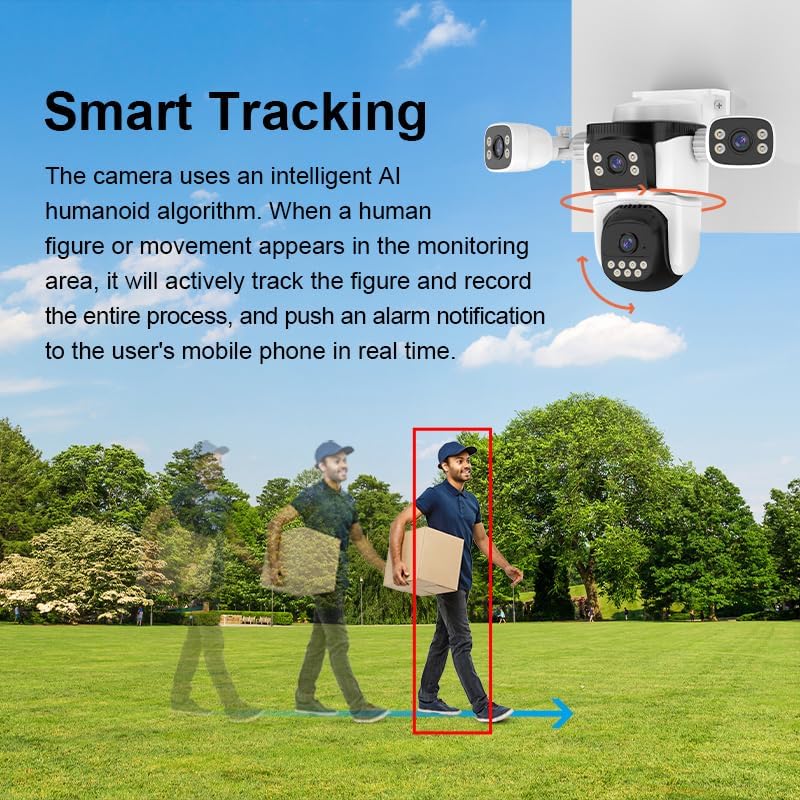
- Smart Tracking Features: Equipped with human and pet tracking technology and two-way audio communication for remote interaction.
2. ຄູ່ມືການຕິດຕັ້ງ
2.1 ເນື້ອໃນຊຸດ
ກວດສອບວ່າອົງປະກອບທັງໝົດມີຢູ່ໃນຊຸດ:
- GESKS O Kam Pro CS621FR Camera
- Power Adapter
- Screws ແລະ Anchors
- ຄູ່ມືຜູ້ໃຊ້
2.2 ການຕິດຕັ້ງ App
- ດາວນ໌ໂຫລດ O-KAM Pro ແອັບຈາກຮ້ານແອັບໃນໂທລະສັບສະຫຼາດຂອງທ່ານ (iOS App Store ຫຼື Google Play Store).
- ລົງທະບຽນສໍາລັບບັນຊີແລະເຂົ້າສູ່ລະບົບ.
2.3 ການຕິດຕັ້ງກ້ອງຖ່າຍຮູບ
- Choose a suitable outdoor location for mounting the camera, ensuring a clear view of the desired surveillance area and access to a power source.
- Use the provided mounting screws and anchors to securely attach the camera to a wall or ceiling.
- Connect the power adapter to the camera and plug it into an electrical outlet.
- For wired network connection, connect an RJ-45 Ethernet cable to the camera's network interface. For wireless connection, ensure your WiFi network is 2.4G.
2.4 ການຕັ້ງຄ່າເບື້ອງຕົ້ນ
- Open the O-KAM Pro app and follow the on-screen instructions to add your new device.
- Select the appropriate connection method (WiFi or wired) and complete the network setup.
- Manually adjust the three fixed lenses to cover your desired areas. Each fixed lens offers 180° horizontal/vertical rotation.

3. ຄໍາແນະນໍາການດໍາເນີນງານ
3.1 ດໍາລົງຊີວິດ View and Multi-Screen Display
Access the live feed from your camera through the O-KAM Pro app. The app supports simultaneous display of all four camera views on a single screen, allowing for comprehensive monitoring.

3.2 ການຄວບຄຸມ Pan & Tilt
The bottom tracking lens can be remotely controlled via the app. Use the directional controls within the O-KAM Pro app to pan (270° horizontal) and tilt (90° vertical) the lens to adjust its viewມຸມ ing.
3.3 ຊູມດິຈິຕອນ
The app allows for 5X digital zoom on the live footage, enabling closer inspection of details within the monitored area.
3.4 ການກວດຈັບການເຄື່ອນໄຫວ ແລະສັນຍານເຕືອນ
The camera utilizes intelligent AI algorithms for human and pet detection. You can customize specific detection zones within the app. When an alarm is triggered, the camera will activate its sound and light alarm system and send real-time push notifications to your mobile device.
3.5 ໂໝດວິໄສທັດກາງຄືນ
The CS621FR offers various night vision modes:
- ວິໄສທັດກາງຄືນສີດຳ ແລະ ສີຂາວ: ວິໄສທັດກາງຄືນອິນຟາເຣດມາດຕະຖານ.
- ວິໄສທັດກາງຄືນເຕັມສີ: Utilizes white LED lights to provide color images even in low-light conditions.
- ວິໄສທັດກາງຄືນອັດສະລິຍະ: Automatically switches between black and white and full-color modes based on detected motion or light conditions.
3.6 ສຽງສອງທາງ
The built-in microphone and speaker enable real-time two-way voice communication through the O-KAM Pro app. This allows you to interact with visitors or deter potential intruders remotely.
3.7 ຕົວເລືອກການເກັບຮັກສາ
The camera supports local storage via a T-Flash card (up to 256GB) and cloud storage services (subscription may be required).
4. ບໍາລຸງຮັກສາ
4.1 ການທໍາຄວາມສະອາດ
Regularly clean the camera lenses and housing with a soft, damp ຜ້າເພື່ອຮັບປະກັນຄວາມຊັດເຈນຂອງຮູບພາບທີ່ດີທີ່ສຸດ. ຫຼີກລ່ຽງການໃຊ້ສານເຄມີທີ່ຮຸນແຮງ ຫຼື ວັດສະດຸຂັດ.
4.2 ການຕໍ່ຕ້ານສະພາບອາກາດ
The camera is IP66 weatherproof, designed to withstand various outdoor conditions including wind and rain. However, avoid directing high-pressure water jets directly at the camera.
4.3 ການອັບເດດເຟີມແວ
Periodically check the O-KAM Pro app for available firmware updates. Keeping the camera's firmware up-to-date ensures optimal performance, security, and access to new features.
5. ການແກ້ໄຂບັນຫາ
5.1 ບໍ່ມີ Live View / Offline Camera
- ໃຫ້ແນ່ໃຈວ່າກ້ອງຖ່າຍຮູບເປີດຢູ່ ແລະ ອະແດບເຕີໄຟໄດ້ເຊື່ອມຕໍ່ຢ່າງປອດໄພແລ້ວ.
- Check your internet connection and ensure the 2.4G WiFi network is stable.
- Verify the camera is within range of your WiFi router.
- ຣີສະຕາດກ້ອງຖ່າຍຮູບ ແລະເຣົາເຕີຂອງທ່ານ.
5.2 ປຸກບໍ່ດັງ
- Check the detection zone settings in the O-KAM Pro app to ensure they cover the desired area.
- ປັບການຕັ້ງຄ່າຄວາມອ່ອນໄຫວຕໍ່ການເຄື່ອນໄຫວໃນແອັບ.
- ໃຫ້ແນ່ໃຈວ່າການແຈ້ງເຕືອນຂອງແອັບຖືກເປີດໃຊ້ງານຢູ່ໃນໂທລະສັບສະຫຼາດຂອງທ່ານ.
5.3 ຄຸນນະພາບຮູບພາບທີ່ບໍ່ດີ
- Clean the camera lenses to remove any dirt or smudges.
- ຮັບປະກັນວ່າມີແສງສະຫວ່າງພຽງພໍໃນພື້ນທີ່ທີ່ໄດ້ຮັບການຕິດຕາມກວດກາ, ໂດຍສະເພາະສຳລັບການເບິ່ງເຫັນສີໃນຕອນກາງຄືນ.
- Check your network bandwidth; a poor connection can affect streaming quality.
6. ຂໍ້ມູນຈໍາເພາະ
| ຄຸນສົມບັດ | ລາຍລະອຽດ |
|---|---|
| ລະບົບປະຕິບັດການ | Linux |
| APP | O-KAM Pro |
| CPU | Ingenic |
| ຄວາມຊົງຈໍາ | 512Mb |
| ການຕັ້ງຄ່າເລນ | 4mm+4mm+4mm+4mm (4 lenses) |
| ເຊັນເຊີຮູບພາບ | 1/3" 1080p progressive scan CMOS sensor |
| ຕ່ຳສຸດ ແສງໄຟ | 0.5Lux (color mode), 0.1Lux (b&w mode) |
| ວິໄສທັດກາງຄືນ | Black and white, full-color, intelligent night vision (20-50 meters) |
| Viewໃນມຸມ | 91° for each lens |
| ຄວາມລະອຽດ | 1080P (1920x1080/12FPS) |
| ການບີບອັດວິດີໂອ | H.264 main profile/Motion-JPEG/JPEG |
| ການປ້ອນຂໍ້ມູນສຽງ | Built-in -38dB microphone |
| ສຽງອອກ | ລຳໂພງ 8Ω1W ໃນຕົວ |
| ໝຸນແບບເລື່ອນ/ອຽງ | Pan: 270°, ອຽງ: 90° |
| ການເຊື່ອມໂຍງເຄືອຂ່າຍ | 10Mbps/100Mbps Ethernet |
| ເຄືອຂ່າຍໄຮ້ສາຍ | IEEE802.11b/g/n (2.4G) |
| ການເກັບຮັກສາ | External TF card (up to 256GB), Cloud storage |
| ການກວດຫາສັນຍານເຕືອນ | Motion detection, human detection, human framing, human tracking, siren alarm, area set |
| ອັນດັບທີtage | DC12V ± 5% |
| ການບໍລິໂພກພະລັງງານ | 8.64W (0.72A) / Max: 11.16W (0.93A) |
| ອຸນຫະພູມເຮັດວຽກ | -10~55 ℃ |
| ຄວາມຊຸ່ມຊື່ນທີ່ເຮັດວຽກ | <90% |
| ຂະໜາດ (L x W x H) | 9 x 7 x 5.8 ນິ້ວ |
| ນ້ຳໜັກ | 1.4 ປອນ |
| ສີ | ສີຂາວ |
| ຜູ້ຜະລິດ | Shenzhen Vstarcam Technology Ltd |
7. ວິດີໂອສາທິດ
ວິດີໂອນີ້ສະຫນອງການເບິ່ງview of the CS621FR 4-Lens PTZ Camera, demonstrating its features such as the quad-lens design, pan-tilt capabilities, smart tracking, and two-way audio communication. It showcases the camera's appearance and various functionalities in an outdoor setting.
8. ການຮັບປະກັນແລະການສະຫນັບສະຫນູນ
For warranty information and technical support, please refer to the documentation provided with your purchase or visit the official GESKS webເວັບໄຊ. ຮັກສາໃບຮັບເງິນການຊື້ຂອງທ່ານໄວ້ເປັນຫຼັກຖານການຊື້ສໍາລັບການຮ້ອງຂໍການຮັບປະກັນ.