
1. ບົດແນະນຳ
This manual provides detailed instructions for the installation, operation, and maintenance of your JOOAN 4G Solar Security Camera. This outdoor wireless surveillance camera is designed for areas without traditional power or network infrastructure, utilizing 4G cellular connectivity and solar power for continuous operation. Please read this manual thoroughly before use to ensure proper setup and functionality.

Image 1.1: JOOAN 4G Solar Security Camera with its solar panel and a smartphone displaying the camera's live feed, highlighting its 4MP/5MP HD resolution capability.
2. ຄຸນລັກສະນະຂອງຜະລິດຕະພັນ
- ການເຊື່ອມຕໍ່ 4G: Operates independently using a SIM card, ideal for remote locations.
- ພະລັງງານແສງອາທິດ: Equipped with a solar panel for continuous charging, reducing the need for external power sources.
- ຄວາມລະອຽດສູງ: ຖ່າຍວິດີໂອໄດ້ຊັດເຈນtage for effective surveillance.
- ວິໄສທັດກາງຄືນສີ: Offers multiple night vision modes including infrared, full-color, and smart color night vision for enhanced visibility in low-light conditions up to 10 meters.
- Local & Cloud Storage: Supports up to 256GB SD card storage and optional cloud storage for recorded footage.
- ການຕິດຕັ້ງງ່າຍດາຍ: Designed for straightforward setup and mounting.
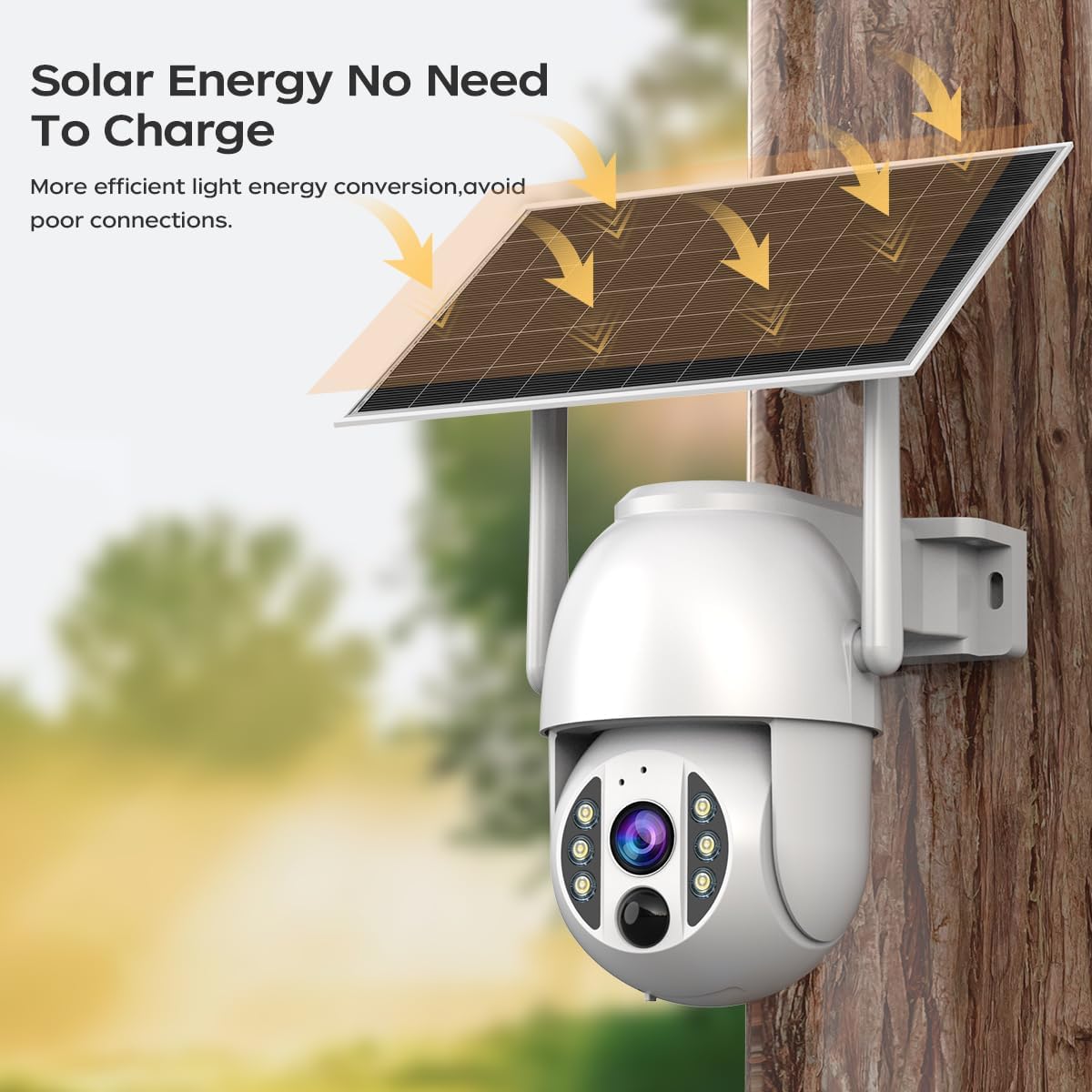
Image 2.1: The JOOAN 4G Solar Security Camera mounted with its solar panel, illustrating its solar energy capability for efficient light energy conversion and avoiding poor connections.
3. ການຕິດຕັ້ງແລະການຕິດຕັ້ງ
3.1. ການຕິດຕັ້ງແຜ່ນ SIM ແລະ SD Card
Before mounting, install a 4G SIM card (not included) and an SD card (up to 256GB, not included) into the designated slots on the camera. Ensure the camera is powered off before inserting or removing cards.

ຮູບພາບທີ 3.1: ເປັນການປິດ view of the JOOAN camera's SD card slot, indicating support for cloud storage and a maximum 256GB SD card.
3.2. ຂັ້ນຕອນການຕິດຕັ້ງ
- ການວາງຕຳແໜ່ງ ແລະ ການເຈາະ: Select a suitable location for the camera and solar panel. Mark the drilling points on the wall. Use a drill to create holes at the marked positions.
- ໃສ່ສະກູຂະຫຍາຍ: Gently tap the expansion screws into the drilled holes until they are flush with the surface.
- ຕິດກ້ອງ: Align the camera bracket with the expansion screws and secure it using the provided screws.
- ການຕິດຕັ້ງສໍາເລັດ: Attach the solar panel to the camera bracket or mount it separately in a location with ample sunlight. Ensure all connections are secure.

Image 3.2: Visual guide showing the four installation steps: 1. Positioning and punching, 2. Inserting expansion screws, 3. Mounting the camera with screws, and 4. Completing the installation with the solar panel.
3.3. ການເຊື່ອມຕໍ່ແອັບຯ
Download the official JOOAN app from your smartphone's app store. Follow the in-app instructions to add your camera. There are typically two methods:
- Add APP Phone Code: Scan the QR code displayed on your mobile phone APP with the camera lens from a distance of 20-30cm to add the distribution network.
- Add Camera Body Code: Scan the QR code located on the camera body using the mobile phone APP to add the distribution network.

Image 3.3: Illustration of the two connection methods: scanning the APP phone code or scanning the camera body code to establish a network connection.
4. ການດໍາເນີນງານ
4.1. ເປີດ / ປິດພະລັງງານ
The camera automatically powers on when sufficient solar power is available or when connected to a power source. To power off, disconnect the power source and allow the battery to deplete, or use the app if a power-off function is available.
4.2. ມີຊີວິດ View ແລະການບັນທຶກ
Once connected to the app, you can access the live video feed. The camera supports continuous recording to the SD card or cloud storage (subscription may be required). You can also manually record video or capture screenshots from the live view.
4.3. ກວດຈັບການເຄື່ອນໄຫວ ແລະການແຈ້ງເຕືອນ
Configure motion detection sensitivity and alert settings within the app. The camera will send notifications to your smartphone when motion is detected. Recorded events can be reviewed in the app's playback section.
4.4. ໂໝດວິໄສທັດກາງຄືນ
The camera offers three night vision modes, selectable via the app:
- ວິໄສທັດກາງຄືນອິນຟາເຣດ: ໃຫ້ຮູບພາບສີດໍາ ແລະ ສີຂາວທີ່ຊັດເຈນໃນຄວາມມືດສະນິດ.
- Full Color Night Vision: ໃຊ້ໄຟສະປອດໄລ້ໃນຕົວເພື່ອໃຫ້ຮູບພາບສີໃນສະພາບແສງສະຫວ່າງໜ້ອຍ.
- ວິໄສທັດກາງຄືນສີອັດສະລິຍະ: Automatically switches from infrared to full-color vision upon detection of motion or specific events.

Image 4.1: Comparison of the three night vision modes: Infrared night vision, Full color night vision, and Smart color night vision, demonstrating the camera's ability to pick out details in darkness up to 10 meters away.
5. ບໍາລຸງຮັກສາ
- ທໍາຄວາມສະອາດ Lens: ເຮັດຄວາມສະອາດເລນກ້ອງຖ່າຍຮູບເປັນປະຈຳດ້ວຍຜ້າອ່ອນໆແຫ້ງເພື່ອຮັບປະກັນຄຸນນະພາບຂອງຮູບພາບທີ່ຊັດເຈນ. ຫຼີກລ່ຽງນໍ້າຢາເຮັດຄວາມສະອາດທີ່ມີສານຂັດ.
- ການອະນາໄມແຜງແສງອາທິດ: Keep the solar panel free from dust, dirt, and debris to maximize charging efficiency. Clean with a damp ຜ້າຕາມຄວາມຕ້ອງການ.
- ການອັບເດດເຟີມແວ: Check the app periodically for available firmware updates to ensure optimal performance and security.
- ສຸຂະພາບຫມໍ້ໄຟ: Ensure the solar panel receives adequate sunlight to maintain battery charge. Prolonged periods without sunlight may require temporary charging via a USB power adapter (not included).
6. ການແກ້ໄຂບັນຫາ
6.1. Camera Not Connecting to 4G Network
- Ensure the SIM card is correctly inserted and activated with a valid data plan.
- ກວດເບິ່ງຄວາມແຮງຂອງສັນຍານ 4G ຢູ່ບ່ອນຕັ້ງຂອງກ້ອງ.
- Restart the camera by briefly disconnecting and reconnecting its power.
6.2. No Video Feed or Poor Quality
- Verify the camera has sufficient power.
- Check the 4G signal strength.
- ເຮັດຄວາມສະອາດເລນກ້ອງຖ່າຍຮູບ.
6.3. ແຜງໂຊລາເຊວບໍ່ສາກໄຟ
- ໃຫ້ແນ່ໃຈວ່າແຜງພະລັງງານແສງຕາເວັນຢູ່ໃນຕຳແໜ່ງທີ່ຮັບແສງແດດໂດຍກົງເປັນເວລາຫຼາຍຊົ່ວໂມງຕໍ່ມື້.
- Clean any dirt or obstructions from the solar panel surface.
- ກວດສອບສາຍເຊື່ອມຕໍ່ລະຫວ່າງແຜງໂຊລາເຊວ ແລະ ກ້ອງຖ່າຍຮູບ.
6.4. SD Card Not Recording
- Ensure the SD card is correctly inserted and formatted within the app.
- ກວດເບິ່ງວ່າ SD card ມີພື້ນທີ່ຫວ່າງພຽງພໍຫຼືບໍ່.
- ຢືນຢັນການຕັ້ງຄ່າການບັນທຶກໃນແອັບ.
7. ຂໍ້ມູນຈໍາເພາະ
| ຄຸນສົມບັດ | ລາຍລະອຽດ |
|---|---|
| ຍີ່ຫໍ້ | JOOAN |
| ຕົວແບບ | B0GCFGYCLX |
| ແຫຼ່ງພະລັງງານ | ພະລັງງານແສງອາທິດ |
| ອະນຸສັນຍາການເຊື່ອມຕໍ່ | 4G Cellular (SIM card required), Wi-Fi (for initial setup/local access if applicable) |
| ການນໍາໃຊ້ທີ່ແນະນໍາ | Indoor/Outdoor Surveillance |
| ຄຸນນະສົມບັດພິເສດ | ງ່າຍທີ່ຈະຕິດຕັ້ງ |
| ການເກັບຮັກສາ | Supports up to 256GB SD card, Cloud Storage (subscription may apply) |
8. ການຮັບປະກັນແລະການສະຫນັບສະຫນູນ
For warranty information and technical support, please refer to the JOOAN official webເວັບໄຊ ຫຼືຕິດຕໍ່ບໍລິການລູກຄ້າຂອງເຂົາເຈົ້າໂດຍກົງ. ຮັກສາໃບຮັບເງິນການຊື້ຂອງທ່ານໄວ້ເປັນຫຼັກຖານການຊື້.
ສໍາລັບການຊ່ວຍເຫຼືອເພີ່ມເຕີມ, ກະລຸນາເຂົ້າໄປທີ່: JOOAN Store ໃນ Amazon