
1. ບົດແນະນຳ
The Daitsu Velar ceiling fan combines design, technology, and sustainability to provide comfort throughout the year. Its natural FSC-certified wooden blades, sourced from responsibly managed forests, add warmth to any room while committing to the protection of the planet's forest resources.
This manual provides detailed instructions for the safe installation, operation, and maintenance of your Daitsu Velar ceiling fan. Please read it thoroughly before installation and keep it for future reference.
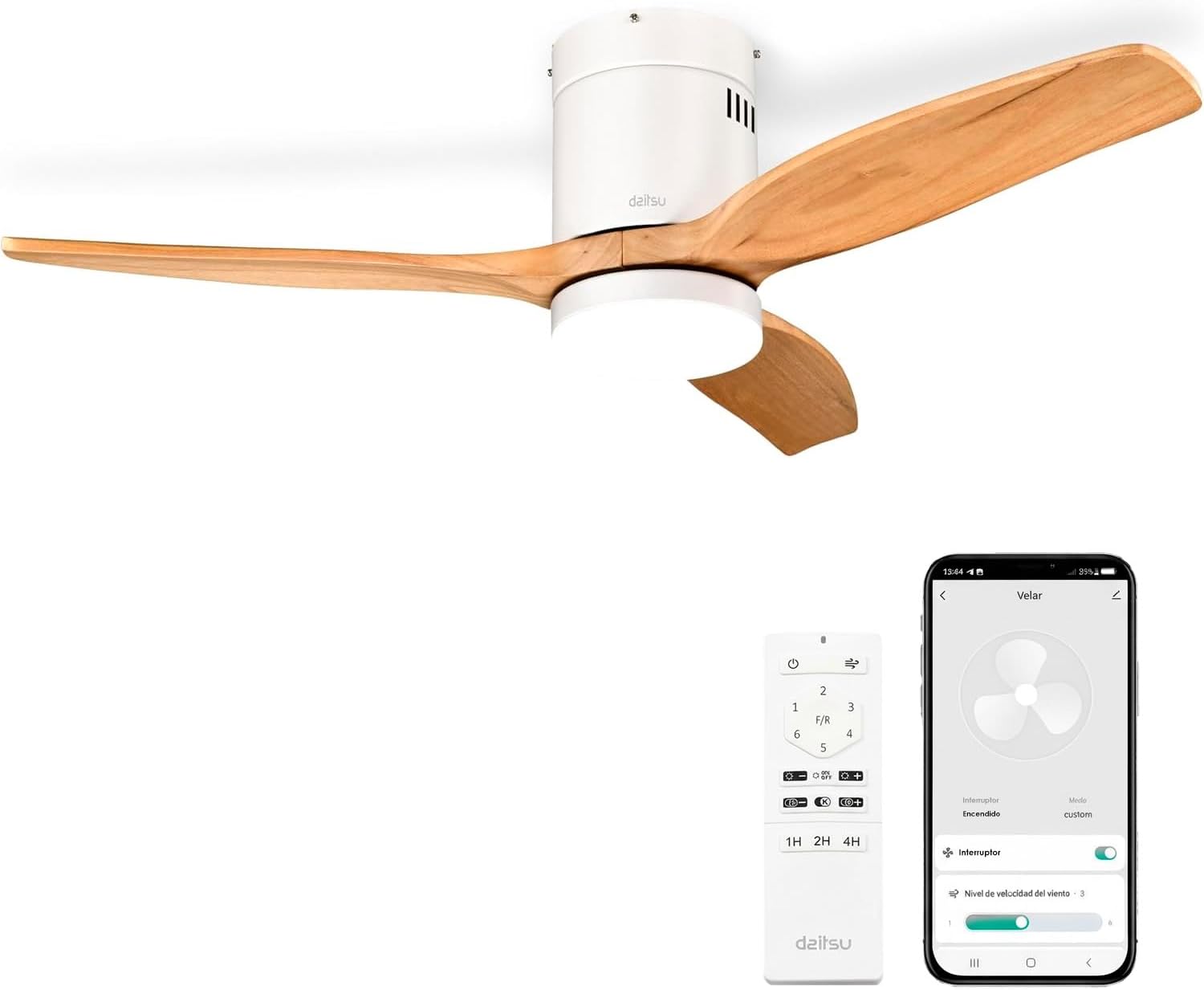
Image 1.1: Daitsu Velar Ceiling Fan in a living room setting.
2. ຂໍ້ມູນຄວາມປອດໄພ
ຄໍາແນະນໍາຄວາມປອດໄພທີ່ສໍາຄັນ:
- ອ່ານຄໍາແນະນໍາທັງຫມົດຢ່າງລະອຽດກ່ອນທີ່ຈະຕິດຕັ້ງແລະນໍາໃຊ້.
- ໃຫ້ແນ່ໃຈວ່າແຫຼ່ງຈ່າຍໄຟໄດ້ຖືກຕັດການເຊື່ອມຕໍ່ຢູ່ທີ່ເບຣກເກີຫຼັກກ່ອນການຕິດຕັ້ງ ຫຼື ການບຳລຸງຮັກສາ.
- ການຕິດຕັ້ງຕ້ອງໄດ້ປະຕິບັດໂດຍຊ່າງໄຟຟ້າທີ່ມີຄຸນວຸດທິຕາມລະຫັດໄຟຟ້າທ້ອງຖິ່ນ.
- ໂຄງສ້າງຕິດຕັ້ງຕ້ອງສາມາດຮອງຮັບນໍ້າໜັກຂອງພັດລົມໄດ້ (ປະມານ 4.6 ກິໂລກຣາມ).
- Ensure the fan blades are at least 2.3 meters (7.5 feet) from the floor and have at least 0.5 meters (1.6 feet) clearance from walls or other obstructions.
- ຢ່າໃສ່ວັດຖຸເຂົ້າໄປໃນເສັ້ນທາງຂອງໃບມີດທີ່ໝູນວຽນ.
- Do not attempt to repair or modify the fan yourself. Contact qualified service personnel.
- ເຄື່ອງໃຊ້ນີ້ແມ່ນໃຊ້ໃນເຮືອນເທົ່ານັ້ນ.
3. ເນື້ອໃນຊຸດ
Before beginning installation, verify that all components are present and undamaged:
- ໃບພັດລົມ (3x)
- Motor and Ceiling Mount Bracket
- LED Light Kit (plate + diffuser)
- Wireless Remote Control and Wall Mount Holder
- Mounting Screws (for ceiling and blades)
- ຄູ່ມືແນະ ນຳ (ເອກະສານນີ້)

ຮູບພາບ 3.1: ຕົວຢ່າງample of product packaging, indicating included components.
4. ການຕິດຕັ້ງແລະການຕິດຕັ້ງ
ເຄື່ອງມືທີ່ຕ້ອງການ: Screwdriver, wire strippers, electrical tape, ladder, drill (if necessary).
- ການຕັດການເຊື່ອມຕໍ່ໄຟຟ້າ: Turn off power at the main circuit breaker to prevent electrical shock.
- ການຕິດຕັ້ງຕົວຍຶດຕິດ: Securely attach the ceiling mount bracket to a ceiling joist or a suitable electrical junction box capable of supporting the fan's weight. Use the provided mounting screws.
- ສາຍໄຟ: Connect the fan's electrical wires to the household wiring according to the wiring diagram in the full installation guide (not provided here, but typically included with the product). Ensure all connections are secure and insulated.
- ເຄື່ອງຈັກປະກອບ: Carefully lift the fan motor assembly and hang it onto the mounting bracket.
- ເອກະສານຕິດຂັດ: Attach the three wooden blades to the motor housing using the provided screws. Ensure they are securely fastened.
- LED Light Kit Installation: Connect the LED light kit wiring and attach the light plate and diffuser to the bottom of the fan motor housing.
- ການຕິດຕັ້ງ Canopy: Slide the canopy up to the ceiling and secure it to cover the wiring and mounting bracket.
- ການຟື້ນຟູພະລັງງານ: ຟື້ນຟູພະລັງງານຢູ່ທີ່ຕົວຕັດວົງຈອນຕົ້ນຕໍ.
- ຕັ້ງຄ່າການຄວບຄຸມໄລຍະໄກ: Insert batteries into the remote control. The fan should be ready for operation.
- Wi-Fi App Setup (Daitsu Connect):
- Download the "Daitsu Connect" app from your smartphone's app store.
- Follow the in-app instructions to pair your fan with your mobile device. This typically involves putting the fan into pairing mode (refer to the full app manual for specific steps).
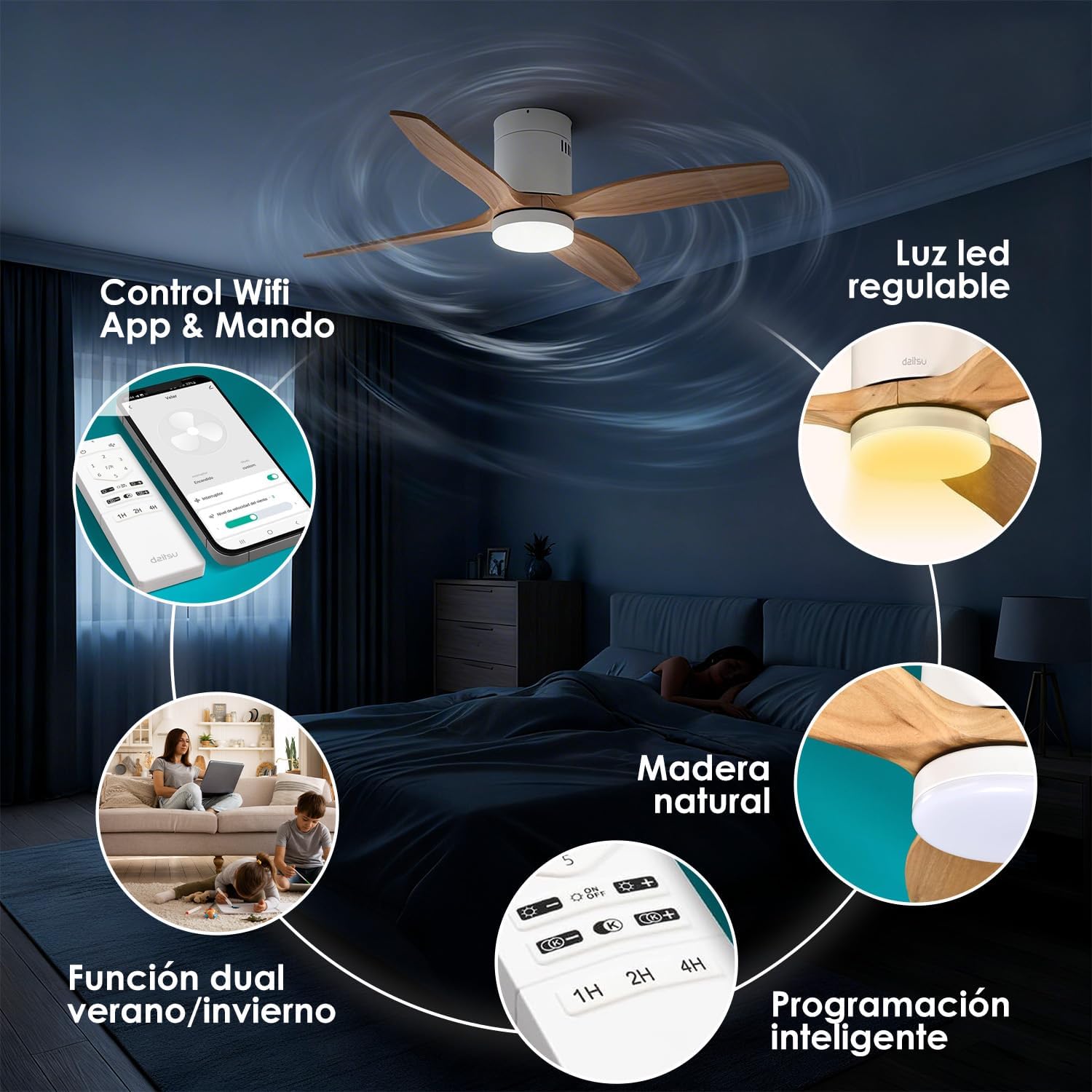
ຮູບພາບ 4.1: ຫຼາຍກວ່າview of fan features, including Wi-Fi App & Remote Control.
5. ຄໍາແນະນໍາການດໍາເນີນງານ
Your Daitsu Velar ceiling fan can be controlled using the included wireless remote control or the Daitsu Connect mobile application.
5.1. ຟັງຊັນຄວບຄຸມໄລຍະໄກ

Image 5.1: Remote control and Daitsu Connect App interface.
- ເປີດ/ປິດ: ກົດ ພະລັງງານ ປຸ່ມເພື່ອເປີດພັດລົມ ແລະເປີດ ຫຼືປິດໄຟ.
- ຄວາມໄວພັດລົມ: Use the speed buttons (1-6) to select one of the six available fan speeds. There is also a variable mode that alternates between low levels for a more natural air sensation.
- Summer/Winter Function (F/R): ກົດ F/R button to switch between summer and winter modes.
- ໂໝດລະດູຮ້ອນ: ແຜ່ນໃບຫມູນວຽນຕາມເຂັມໂມງ, ດັນອາກາດລົງລຸ່ມເພື່ອສ້າງລົມເຢັນ.
- ໂໝດລະດູໜາວ: Blades rotate clockwise, drawing cool air up and pushing warm air down from the ceiling, optimizing heating efficiency.
- ການຄວບຄຸມແສງ:
- ແສງເປີດ/ປິດ: ກົດປຸ່ມໄຟເພື່ອເປີດ ຫຼື ປິດໄຟ LED.
- ການປັບຄວາມສະຫວ່າງ: ໃຊ້ + ແລະ - buttons to adjust the light intensity (9 levels).
- ການປັບອຸນຫະພູມສີ: ໃຊ້ K+ ແລະ K- buttons to change the color temperature from cool to warm (9 levels).
- ຟັງຊັນຈັບເວລາ: Set the fan to automatically turn off after 1, 2, or 4 hours using the respective timer buttons (1H, 2H, 4H).

Image 5.2: Summer/Winter function diagram for optimal air circulation.

Image 5.3: LED light adjustability with 9 intensity and color temperature levels.
5.2. Daitsu Connect App Control
The Daitsu Connect app provides full control over all fan functions, including speed, light, mode, and timer, directly from your mobile device. It also allows for personalized hourly programming to automate operation based on your daily or weekly routines.
- ຟັງຊັນເຕັມ: Access all remote control features and more.
- ການກຳນົດເວລາຂັ້ນສູງ: Program specific on/off times and settings for different days.
- ຟັງຊັນຫນ່ວຍຄວາມຈໍາ: The fan automatically remembers its last state (speed, light, color temperature, and mode) if power is interrupted or turned off from the switch. Upon power restoration, it will resume the last settings.

Image 5.4: Key features including 6 speeds, programming, light levels, and dual control.
6. ບໍາລຸງຮັກສາ
ການບໍາລຸງຮັກສາເປັນປົກກະຕິຮັບປະກັນປະສິດທິພາບທີ່ດີທີ່ສຸດແລະຍືດອາຍຸຂອງພັດລົມຂອງທ່ານ.
- ທໍາຄວາມສະອາດ:
- ສະເຫມີຕັດການເຊື່ອມຕໍ່ໄຟຟ້າກ່ອນທີ່ຈະທໍາຄວາມສະອາດ.
- ເຊັດເຮືອນພັດລົມ ແລະ ໃບພັດດ້ວຍຜ້າອ່ອນໆ.amp ຜ້າ. ຢ່າໃຊ້ເຄື່ອງເຮັດຄວາມສະອາດຂັດຫຼືສານລະລາຍ.
- Dust the blades regularly to maintain balance and efficiency.
- ການກວດກາແຜ່ນໃບ: ກວດສອບເປັນໄລຍະວ່າສະກູໃບມີດທັງໝົດແໜ້ນດີ. ສະກູທີ່ວ່າງສາມາດເຮັດໃຫ້ເກີດການສັ່ນ ແລະ ມີສຽງດັງໄດ້.
- ແຫຼ່ງແສງ: The integrated LED light is designed for long life. If it requires replacement, contact customer support.
7. ການແກ້ໄຂບັນຫາ
ຖ້າເຈົ້າປະສົບບັນຫາກັບພັດລົມຂອງເຈົ້າ, ໃຫ້ອ້າງອີງເຖິງບັນຫາ ແລະວິທີແກ້ໄຂບັນຫາທົ່ວໄປຕໍ່ໄປນີ້:
| ບັນຫາ | ສາເຫດທີ່ເປັນໄປໄດ້ | ການແກ້ໄຂ |
|---|---|---|
| ພັດລົມບໍ່ເລີ່ມຕົ້ນ. | No power, loose wiring, remote control battery dead. | Check circuit breaker. Ensure wiring is secure. Replace remote control batteries. |
| ພັດລົມກະວົນກະວາຍ. | ສະກູໃບມີດວ່າງ, ໃບມີດບໍ່ສົມດຸນ, ການຕິດຕັ້ງທີ່ບໍ່ຖືກຕ້ອງ. | Tighten all blade screws. Ensure blades are balanced (a balancing kit may be required). Recheck mounting bracket security. |
| ແສງສະຫວ່າງບໍ່ເຮັດວຽກ. | Loose wiring, LED module failure. | Check light kit wiring connections. If issue persists, contact customer support for LED module replacement. |
| ການຄວບຄຸມໄລຍະໄກບໍ່ຕອບສະຫນອງ. | Dead batteries, interference, remote not paired. | Replace batteries. Ensure no obstructions. Re-pair remote if necessary (refer to full manual). |
| Wi-Fi app connection issues. | Incorrect Wi-Fi password, poor signal, fan not in pairing mode. | Verify Wi-Fi password. Ensure fan is within Wi-Fi range. Follow app instructions to put fan in pairing mode. |
If the problem persists after attempting these solutions, please contact Daitsu customer support.
8. ຂໍ້ມູນຈໍາເພາະ
| ຄຸນສົມບັດ | ລາຍລະອຽດ |
|---|---|
| ຍີ່ຫໍ້ | Daitsu |
| ໝາຍເລກຕົວແບບ | ວີລາ |
| ຂະໜາດ | Ø122cm (suitable for rooms up to 25m²) |
| ຂະ ໜາດ (D x W x H) | 106.5 cm x 106.5 cm x 31.5 cm (Note: The Ø122cm refers to the blade span, while 106.5cm might be the housing dimensions or a different measurement.) |
| ນ້ຳໜັກ | 4.6 ກິໂລກຣາມ |
| ສີ | White with Wooden Blades |
| ຈໍານວນແຜ່ນໃບ | 3 |
| ແຫຼ່ງພະລັງງານ | ໄຟຟ້າສາຍ |
| ສະບັບtage | 240 ໂວນ |
| ການບໍລິໂພກພະລັງງານ | 30 ວັດ |
| ຄວາມອາດສາມາດຂອງກະແສລົມ | 121 ແມັດກ້ອນຕໍ່ນາທີ |
| ຈໍານວນຄວາມໄວ | 6 |
| ລະດັບສຽງ | 34 Decibels (Ultra-silent DC motor) |
| ຄຸນນະສົມບັດພິເສດ | Natural wooden blades, Remote control, App control (Wi-Fi), Dimmable LED light (18W, 9 intensity levels, 9 color temperatures), Summer/Winter function, Smart memory function, Programmable auto-off. |
| ການນໍາໃຊ້ທີ່ແນະນໍາ | Air circulation, Ventilation (Indoor use only) |

Image 8.1: Dimensions for the Ø122cm model.
9. ການຮັບປະກັນແລະການສະຫນັບສະຫນູນ
ການຮັບປະກັນ: ຜະລິດຕະພັນນີ້ມາພ້ອມກັບການຮັບປະກັນຈາກຜູ້ຜະລິດ 3 ປີ.
ການຊ່ວຍເຫຼືອລູກຄ້າ: For technical assistance, warranty claims, or any questions regarding your Daitsu Velar ceiling fan, please contact Daitsu customer service through their official webເວັບໄຊ ຫຼືຂໍ້ມູນການຕິດຕໍ່ທີ່ສະໜອງໃຫ້ໃນເອກະສານການຊື້ຂອງທ່ານ.
Please have your model number (VELAR) and proof of purchase ready when contacting support.