
1. ຜະລິດຕະພັນເກີນview
The plplaaoo FS8233 is an ultra-thin, full-screen intelligent automatic digital multimeter designed for electricians, engineers, and technicians. It features intelligent auto-ranging technology for precise detection of voltage, current, resistance, and continuity without manual adjustments. Built with durable ABS and silicone materials, it offers reliable performance in various environments.
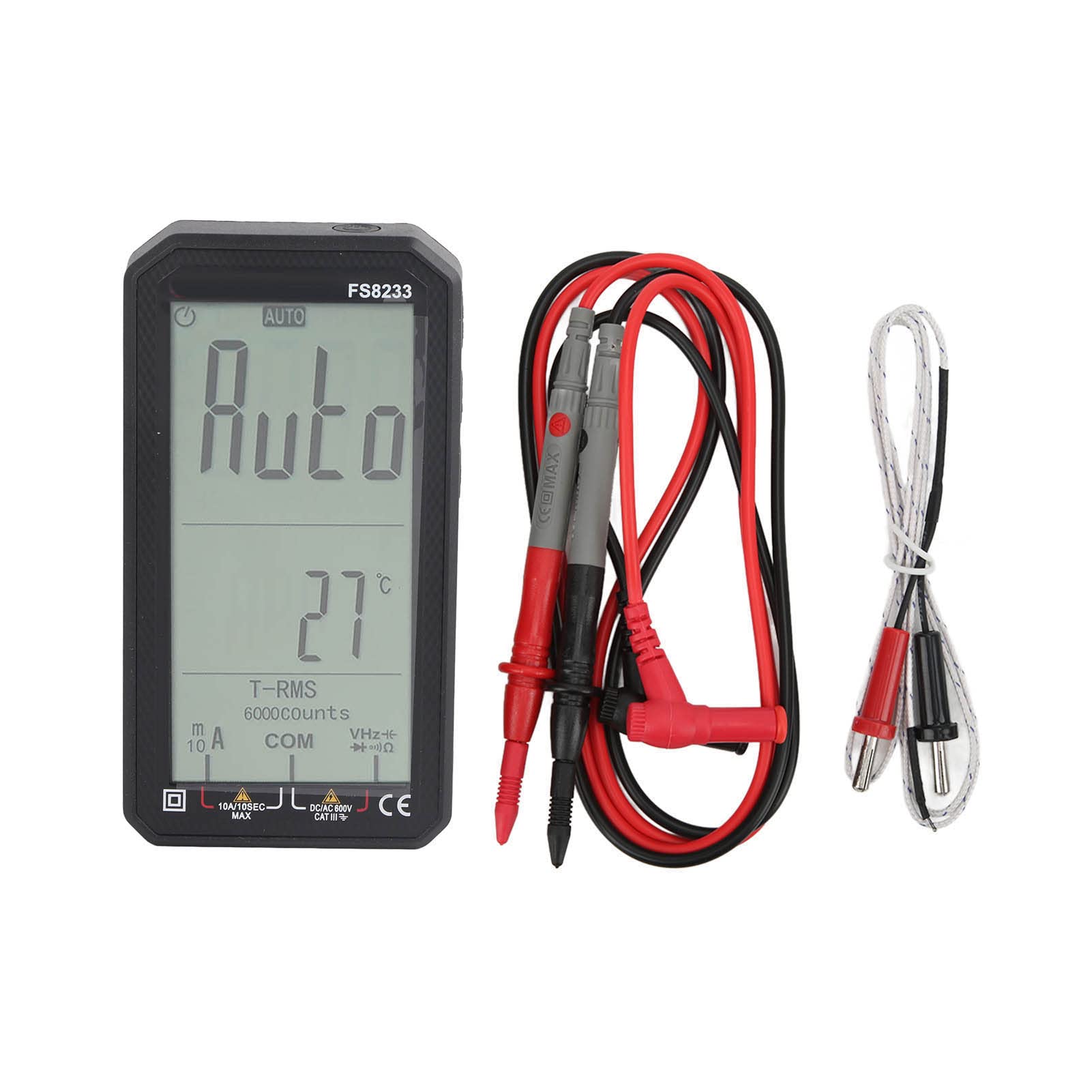
ຮູບພາບ 1.1: ດ້ານຫນ້າ view of the plplaaoo FS8233 Digital Multimeter, showcasing ການສະແດງຜົນເຕັມຈໍຂອງມັນ.
ຄຸນນະສົມບັດທີ່ສໍາຄັນ:
- Automatic Testing: Intelligent auto-ranging for voltage, ປະຈຸບັນ, ຄວາມຕ້ານທານ, ແລະຄວາມຕໍ່ເນື່ອງ.
- ຄວາມຖືກຕ້ອງສູງ: Advanced chip ensures ±0.5% DC voltage ຄວາມຖືກຕ້ອງ.
- ການກໍ່ສ້າງທົນທານ: Made from premium ABS and wear-resistant silicone for industrial-grade durability.
- Multifunctional: ມາດຕະການ AC/DC voltage (up to 600V), current (10A max), resistance (60MΩ), capacitance (60mF), and temperature.
- ຄຸນນະສົມບັດຄວາມປອດໄພ: Anti-burn protection and 600V CAT III safety rating.
- ການອອກແບບທີ່ເປັນມິດກັບຜູ້ໃຊ້: Large backlit screen for clear readings in low-light conditions.
2. ຂໍ້ມູນຄວາມປອດໄພ
Always adhere to safety precautions when using electrical testing equipment. Failure to do so may result in injury or damage to the device or equipment being tested.
- ໃຫ້ແນ່ໃຈວ່າມັນຕິມີເຕີຢູ່ໃນສະພາບດີກ່ອນການນຳໃຊ້.
- ຢ່າໃຊ້ຄ່າປ້ອນຂໍ້ມູນສູງສຸດທີ່ລະບຸໄວ້ສຳລັບແຕ່ລະຟັງຊັນ.
- Verify the correct function and range are selected before making measurements.
- ໃຊ້ອຸປະກອນປ້ອງກັນສ່ວນບຸກຄົນທີ່ເຫມາະສົມ (PPE) ເຊັ່ນ: ຖົງມື insulated ແລະແວ່ນຕາຄວາມປອດໄພ.
- Avoid touching exposed conductors or circuit components during measurements.
- ປ່ຽນແບັດເຕີລີທັນທີເມື່ອຕົວຊີ້ບອກແບດເຕີລີ່ຕ່ຳປະກົດຂຶ້ນເພື່ອຮັບປະກັນການອ່ານທີ່ຖືກຕ້ອງ.
- The device has a 600V CAT III safety rating. Always respect this rating and do not use it in circuits exceeding this category.
3. ຕັ້ງຄ່າ
3.1 ການຕິດຕັ້ງຫມໍ້ໄຟ
The FS8233 multimeter requires two 1.5V AAA batteries (not included) for operation.
- ຊອກຫາຝາປິດຊ່ອງໃສ່ແບັດເຕີຣີຢູ່ດ້ານຫຼັງຂອງເຄື່ອງວັດມັນຕິມີເຕີ.
- ໃຊ້ screwdriver ເພື່ອເປີດຊ່ອງຫມໍ້ໄຟ.
- ໃສ່ໝໍ້ໄຟ AAA ສອງໜ່ວຍ, ຮັບປະກັນການຂົ້ວທີ່ຖືກຕ້ອງ (+ ແລະ -).
- ປິດຝາປິດຝາຫມໍ້ໄຟ.
3.2 ການເຊື່ອມຕໍ່ຜູ້ນໍາການທົດສອບ
The multimeter comes with two test leads. Connect them to the appropriate input jacks:
- ໃສ່ ສີດໍາ ສາຍທົດສອບເຂົ້າໄປໃນ COM (ທົ່ວໄປ) ແຈັກ.
- ໃສ່ ສີແດງ ສາຍທົດສອບເຂົ້າໄປໃນ VHzΩmA jack for most voltage, resistance, frequency, capacitance, and current measurements (up to 600mA).
- For high current measurements (up to 10A), insert the ສີແດງ ສາຍທົດສອບເຂົ້າໄປໃນ 10A jack.

ຮູບພາບ 3.2: ດ້ານລຸ່ມ view of the multimeter, illustrating the input jacks for test lead connection.
4. ຄໍາແນະນໍາການດໍາເນີນງານ
The FS8233 features intelligent auto-ranging, simplifying most measurements. Power on the device and it will automatically detect the measurement type.
4.1 ເປີດ/ປິດ
- Press the power button (usually marked with a circle and a vertical line) to turn the multimeter on.
- ກົດປຸ່ມເປີດປິດຄ້າງໄວ້ເພື່ອປິດມັລຕິມີເຕີ.

Image 4.1: The multimeter display indicating 'AUTO' mode, ready for automatic measurement.
4.2 Automatic Measurement
In auto mode, the multimeter will automatically identify and measure AC/DC voltage, resistance, and continuity. Simply connect the test leads to the circuit or component you wish to measure.
4.3 Specific Measurements
While the device is largely auto-ranging, it supports specific measurements:
- ສະບັບtagອີ (AC/DC): Connect test leads in parallel to the circuit. The multimeter will automatically detect AC or DC voltage.
- ກະແສໄຟຟ້າ (AC/DC): Connect test leads in series with the circuit. Ensure the red lead is in the correct current jack (mA or 10A).
- ຄວາມຕ້ານທານ: Connect test leads across the component. Ensure the component is de-energized.
- ຄວາມອາດສາມາດ: Connect test leads across the capacitor. Ensure the capacitor is discharged before testing.
- ອຸນຫະພູມ: Connect the included temperature probe to the appropriate jacks (usually VΩmA and COM) and place the probe tip on the object to be measured.

Image 4.3: An electrician using the FS8233 multimeter to perform tests on an electrical panel, demonstrating practical application.
4.4 ການອ່ານຈໍສະແດງຜົນ
The large backlit screen displays readings clearly. The unit of measurement (V, A, Ω, F, °C) will be shown alongside the numerical value. The 'AUTO' indicator confirms auto-ranging is active.

ຮູບພາບທີ 4.4: ໄລຍະໃກ້ view of the multimeter's display, showing a clear numerical reading and measurement units.
5. ບໍາລຸງຮັກສາ
5.1 ການທໍາຄວາມສະອາດ
To maintain the multimeter's performance and appearance:
- ເຊັດຄasing ກັບການໂຄສະນາamp ຜ້າແລະຢາຊັກຜ້າອ່ອນໆ. ຢ່າໃຊ້ເຄື່ອງເຮັດຄວາມສະອາດຂັດຫຼືສານລະລາຍ.
- Ensure no moisture enters the device through the input jacks or seams.
5.2 ການທົດແທນຫມໍ້ໄຟ
When the low battery indicator appears on the display, replace the batteries as described in Section 3.1. Always use fresh 1.5V AAA batteries.
5.3 ການເກັບຮັກສາ
ເກັບຮັກສາເຄື່ອງວັດໄຟຟ້າໄວ້ໃນບ່ອນທີ່ເຢັນ, ແຫ້ງ, ຫ່າງຈາກແສງແດດໂດຍກົງ ແລະ ອຸນຫະພູມສູງເກີນໄປ. ຖ້າເກັບຮັກສາໄວ້ເປັນເວລາດົນ, ໃຫ້ຖອດແບັດເຕີຣີອອກເພື່ອປ້ອງກັນການຮົ່ວໄຫຼ.
6. ການແກ້ໄຂບັນຫາ
If you encounter issues with your FS8233 Digital Multimeter, refer to the following common troubleshooting steps:
- ບໍ່ມີຈໍສະແດງຜົນ/ອຸປະກອນບໍ່ເປີດ:
- ກວດເບິ່ງວ່າແບດເຕີຣີຖືກຕິດຕັ້ງຢ່າງຖືກຕ້ອງແລະມີການສາກໄຟພຽງພໍ. ປ່ຽນແທນຖ້າຈໍາເປັນ.
- ໃຫ້ແນ່ໃຈວ່າກົດປຸ່ມເປີດປິດຢ່າງແຫນ້ນຫນາ.
- ການອ່ານທີ່ບໍ່ຖືກຕ້ອງ ຫຼື ບໍ່ໝັ້ນຄົງ:
- Verify that the test leads are securely connected to the correct input jacks.
- Ensure good contact between the test probes and the circuit/component being measured.
- Check for damaged test leads and replace if necessary.
- Ensure the component being measured is within the multimeter's specified range.
- 'OL' or Overload Indication:
- This indicates the measured value exceeds the current range. Ensure the red test lead is in the appropriate high-current jack (10A) if measuring high current, or that the voltage/resistance is within the device's maximum limits.
7. ຂໍ້ມູນຈໍາເພາະ
| ພາລາມິເຕີ | ຂໍ້ມູນຈໍາເພາະ |
|---|---|
| ຕົວແບບ | FS8233 |
| ວັດສະດຸ | ABS + ຊິລິໂຄນ |
| ແບັດເຕີຣີ | 2 x 1.5V AAA Battery (Not Included) |
| ຊ່ວງ AC ໃນປະຈຸບັນ | 6000mA (1mA, ±(1.0% + 8 digits)), 10A (0.01A) |
| Range DC ໃນປະຈຸບັນ | 6000mA (1mA, ±(1.0% + 5 digits)), 10A (0.01A) |
| ຊິງຕັນດີຊີ Voltage ຂອບເຂດ | 6V (0.001V, ±(0.5% + 3 digits)), 60V (0.01V), 600V (0.1V) |
| ຊ່ວງຄວາມຕ້ານທານ | ສູງສຸດ 60MΩ |
| ຂອບເຂດຄວາມອາດສາມາດ | ສູງເຖິງ 60 mF |
| ການຈັດອັນດັບຄວາມປອດໄພ | 600V CAT III |
| ອົງປະກອບລວມ | 2 Test Leads, 1 Temperature Probe, User Manual |