
1. ບົດແນະນຳ
The ACECONN Pi2 Linux 4K HD Super Box TV Box is a versatile streaming device designed for high-definition media consumption. It operates on a Linux system, offering a customizable, stable, and secure platform for your entertainment needs. This device supports 4K UHD resolution and a wide array of video formats, ensuring a premium viewປະສົບການ.
ຄຸນນະສົມບັດທີ່ສໍາຄັນປະກອບມີ:
- Linux system for high customization, stability, and security.
- Supports 4K UHD resolution and multiple video formats for high-definition quality.
- Compatible with various connection methods such as HDMI and RCA.
- Multiple USB ports for media playback and software updates.
- Supports network and USB dual upgrades for convenient software maintenance.

Image: The ACECONN Pi2 Linux 4K HD Super Box TV Box and its remote control.
2. ຄູ່ມືການຕິດຕັ້ງ
2.1 ເນື້ອໃນຊຸດ
ກ່ອນທີ່ທ່ານຈະເລີ່ມຕົ້ນ, ກະລຸນາກວດສອບວ່າລາຍການທັງໝົດມີຢູ່ໃນຊຸດ:
- ACECONN Pi2 TV Box
- ໜ່ວຍຄວບຄຸມໄລຍະໄກ (RCU)
- Power Adapter (US type)
- ສາຍ HDMI
- IR Extender
- ຄູ່ມືຜູ້ໃຊ້

Image: All components included in the ACECONN Pi2 package.
2.2 ການເຊື່ອມຕໍ່ອຸປະກອນ
- ການເຊື່ອມຕໍ່ພະລັງງານ: Connect the provided power adapter to the DC IN port on the TV Box and then plug it into a power outlet.
- ການເຊື່ອມຕໍ່ HDMI: Use the HDMI cable to connect the HDMI OUT port on the TV Box to an HDMI IN port on your television or display. Note the HDMI input number on your TV.
- ການເຊື່ອມຕໍ່ເຄືອຂ່າຍ (ທາງເລືອກ):
- ອີເທີເນັດ: ສຳລັບການເຊື່ອມຕໍ່ແບບມີສາຍ, ໃຫ້ເຊື່ອມຕໍ່ສາຍ Ethernet ຈາກເຣົາເຕີຂອງທ່ານເຂົ້າກັບພອດ LAN ໃນກ່ອງໂທລະພາບ.
- Wi-Fi: For a wireless connection, you will configure Wi-Fi settings after the initial power-on.
- USB Devices (Optional): You can connect USB storage devices or other peripherals to the available USB ports.
2.3 ເປີດເຄື່ອງທຳອິດ
After connecting all necessary cables, turn on your television and select the correct HDMI input. The ACECONN Pi2 TV Box should power on automatically or can be powered on using the remote control. Follow any on-screen prompts for initial setup, such as language selection and network configuration.
3. ຄໍາແນະນໍາການດໍາເນີນງານ
3.1 ການໂຕ້ຕອບຜູ້ໃຊ້ຫຼາຍກວ່າview
Upon startup, you will see the main user interface, which provides access to various applications and settings. The interface is designed for easy navigation using the provided remote control.
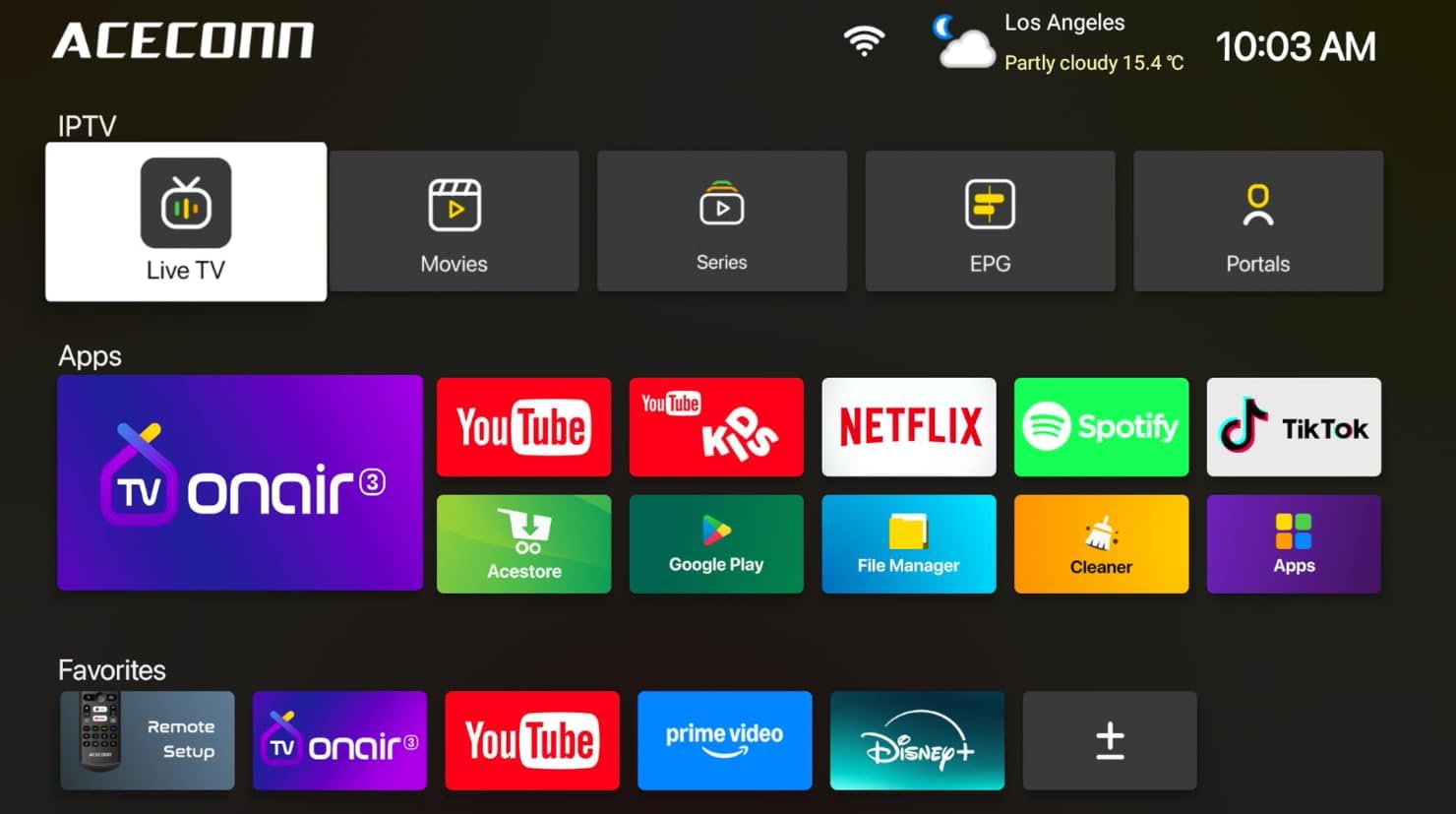
Image: Main user interface of the ACECONN Pi2, displaying various content categories and applications.
3.2 Navigation and Remote Control
Use the directional buttons on the remote control to navigate through menus and select items. The 'OK' button confirms selections, and the 'Back' button returns to the previous screen. Familiarize yourself with the remote's layout for optimal control.
3.3 ການຫຼິ້ນສື່
The Pi2 supports various media playback options:
- ການຖ່າຍທອດ: Access pre-installed or downloaded streaming applications for online content.
- ການຫຼິ້ນທ້ອງຖິ່ນ: Connect a USB hard drive or flash drive to play downloaded 4K content directly. The device supports full format compatibility including MKV, MP4, and AVI.
- Personal Media Library: Utilize applications like Kodi to organize and play your media collection.

Image: The ACECONN Pi2 supports various media consumption scenarios, including family streaming, personal media organization, and local file ຫຼິ້ນຄືນ.
3.4 ການຕັ້ງຄ່າເຄືອຂ່າຍ
ເພື່ອເຊື່ອມຕໍ່ກັບເຄືອຂ່າຍ:
- Navigate to the 'Settings' menu from the home screen.
- Select 'Network' or 'Wi-Fi' settings.
- For Wi-Fi, select your network from the list and enter the password. For Ethernet, ensure the cable is connected; the device should automatically connect.
3.5 ການຕັ້ງຄ່າລະບົບ
The 'Settings' menu allows you to customize various aspects of your device:
- ຈໍສະແດງຜົນ: Adjust resolution, screen scaling, and HDR settings. The device supports 4K@60fps with HDR 10+ for an enhanced visual experience.
- ສຽງ: ຕັ້ງຄ່າຕົວເລືອກການອອກສຽງ.
- Language & Input: Change the system language and keyboard settings.
- ການຄວບຄຸມຂອງພໍ່ແມ່: Utilize the built-in parental control features to manage content access.
- ກ່ຽວກັບ: View device information, including the Linux 4.9 kernel version.

Image: The ACECONN Pi2 offers advanced 4K decoding, HDR 10+ dynamic color, and broad media format compatibility.
4. ບໍາລຸງຮັກສາ
4.1 ການທໍາຄວາມສະອາດ
To maintain the device's appearance and performance, gently wipe the exterior with a soft, dry cloth. Avoid using liquid cleaners or abrasive materials.
4.2 Software Updates (OTA Updates)
The ACECONN Pi2 supports Over-The-Air (OTA) updates, as well as updates via USB. Regularly checking for and installing updates ensures you have the latest features, drivers, and security enhancements. This contributes to the device's rugged 24/7 stability.
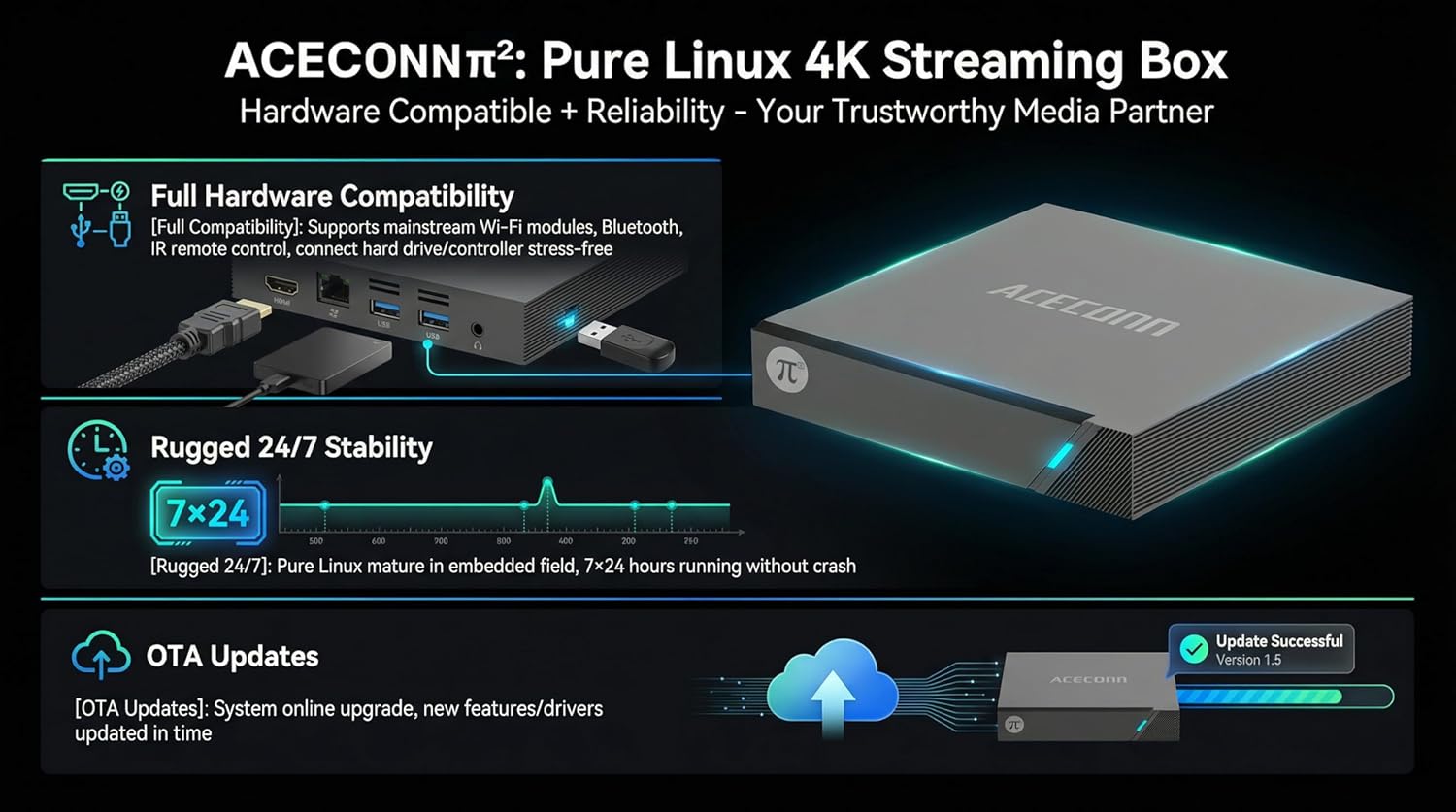
Image: The ACECONN Pi2 features full hardware compatibility, robust stability, and convenient OTA updates.
5. ການແກ້ໄຂບັນຫາ
If you encounter issues with your ACECONN Pi2, refer to the following common problems and solutions:
- ບໍ່ມີພະລັງງານ:
- ໃຫ້ແນ່ໃຈວ່າອະແດັບເຕີໄຟເຊື່ອມຕໍ່ຢ່າງປອດໄພກັບອຸປະກອນ ແລະປລັກສຽບໄຟທີ່ເຮັດວຽກໄດ້.
- ລອງປລັກສຽບໄຟອື່ນ.
- ບໍ່ມີສັນຍານໃນໂທລະພາບ:
- ກວດສອບວ່າສາຍ HDMI ໄດ້ເຊື່ອມຕໍ່ກັບທັງກ່ອງໂທລະພາບ ແລະ ໂທລະພາບຢ່າງແໜ້ນໜາແລ້ວ.
- ກວດເບິ່ງວ່າໂທລະພາບຂອງທ່ານຖືກຕັ້ງເປັນແຫຼ່ງປ້ອນ HDMI ທີ່ຖືກຕ້ອງ.
- ລອງໃຊ້ສາຍ HDMI ຫຼືພອດ HDMI ອື່ນຢູ່ໂທລະທັດຂອງເຈົ້າ.
- ການຄວບຄຸມໄລຍະໄກບໍ່ຕອບສະຫນອງ:
- Ensure the batteries in the remote control are correctly inserted and not depleted. Replace if necessary.
- Point the remote directly at the TV Box's IR receiver.
- ບັນຫາການເຊື່ອມຕໍ່ເຄືອຂ່າຍ:
- For Wi-Fi, re-enter the password in network settings. Ensure your router is working correctly.
- For Ethernet, check the cable connection to both the TV Box and the router.
- Restart your router and the TV Box.
- System Lag or Freezing:
- ຣີສະຕາດກ່ອງໂທລະທັດ.
- ໃຫ້ແນ່ໃຈວ່າອຸປະກອນມີການລະບາຍອາກາດພຽງພໍ.
- ກວດເບິ່ງ ແລະຕິດຕັ້ງການອັບເດດຊອບແວທີ່ມີຢູ່.
6. ຂໍ້ມູນຈໍາເພາະ
| ຄຸນສົມບັດ | ຂໍ້ມູນຈໍາເພາະ |
|---|---|
| ໝາຍເລກຕົວແບບ | ປີ2 |
| ຍີ່ຫໍ້ | ACECONN |
| ຂະໜາດສິນຄ້າ | 11 x 11 x 2 cm |
| ນ້ໍາຫນັກລາຍການ | 0.5 ກິໂລກຣາມ |
| ເຕັກໂນໂລຊີການເຊື່ອມຕໍ່ | Bluetooth, Ethernet, HDMI, USB, Wi-Fi |
| ປະເພດຕົວເຊື່ອມຕໍ່ | HDMI |
| ຄວາມລະອຽດ | 4K |
| ວິດີໂອການແກ້ໄຂຜົນໄດ້ຮັບ | 3840 ພິກເຊລ |
| ປະເພດການຄວບຄຸມ | ການຄວບຄຸມແອັບ, ການຄວບຄຸມໄລຍະໄກ |
| ຄວາມອາດສາມາດເກັບຮັກສາຫນ່ວຍຄວາມຈໍາ | 8 GB |
| ຄຸນນະສົມບັດພິເສດ | ການຄວບຄຸມຂອງພໍ່ແມ່ |
| ລະບົບປະຕິບັດການ | Linux 4.9 Kernel |
7. ການຮັບປະກັນແລະການສະຫນັບສະຫນູນ
7.1 ຂໍ້ມູນການຮັບປະກັນ
This ACECONN Pi2 Linux 4K HD Super Box TV Box comes with a 1 ປີຮັບປະກັນຜູ້ຜະລິດ ຈາກວັນທີ່ຊື້. ກະລຸນາຮັກສາຫຼັກຖານການຊື້ຂອງທ່ານສໍາລັບການຮຽກຮ້ອງການຮັບປະກັນ.
7.2 ສະຫນັບສະຫນູນລູກຄ້າ
For technical assistance or warranty inquiries, please contact the manufacturer:
- ຜູ້ຜະລິດ: shenzhenshiniulinkejiyouxiangongsi
- ອີເມວ: zengkkoo@gmail.com