
1. ບົດແນະນຳ
This manual provides essential information for the safe and efficient operation, installation, and maintenance of your Candy Pro Wash&Dry 300 GWD 4968-S washer dryer. Please read these instructions carefully before using the appliance and keep them for future reference.
2. ຂໍ້ມູນຄວາມປອດໄພ
ປະຕິບັດຕາມຄວາມລະມັດລະວັງດ້ານຄວາມປອດໄພຂັ້ນພື້ນຖານສະເໝີ ເມື່ອນຳໃຊ້ເຄື່ອງໃຊ້ໄຟຟ້າເພື່ອຫຼຸດຜ່ອນຄວາມສ່ຽງຕໍ່ການເກີດອັກຄີໄພ, ໄຟຟ້າຊອດ ແລະ ການບາດເຈັບຕໍ່ຄົນ. ເຄື່ອງໃຊ້ນີ້ມີຈຸດປະສົງເພື່ອໃຊ້ໃນຄົວເຮືອນເທົ່ານັ້ນ.
- ຮັບປະກັນວ່າເຄື່ອງມີຮາກຖານຢ່າງຖືກຕ້ອງ.
- ຫ້າມເດັກນ້ອຍຫຼິ້ນ ຫຼື ນຳໃຊ້ເຄື່ອງໃຊ້.
- ຮັກສາອຸປະກອນການຫຸ້ມຫໍ່ໃຫ້ໄກຈາກເດັກນ້ອຍ.
- ຢ່າແຕະຕ້ອງເຄື່ອງໃຊ້ດ້ວຍມືປຽກ.
- ຖອດປລັກເຄື່ອງອອກກ່ອນທຳຄວາມສະອາດ ຫຼືເຮັດການບຳລຸງຮັກສາ.
- Do not overload the washer dryer. Refer to load capacities.
- ໃຫ້ແນ່ໃຈວ່າການເຊື່ອມຕໍ່ນ້ໍາທັງຫມົດແມ່ນປອດໄພແລະບໍ່ຮົ່ວໄຫຼ.
3. ຜະລິດຕະພັນເກີນview
The Candy Pro Wash&Dry 300 GWD 4968-S is a combined washer and dryer designed for efficient laundry care. It features a 9 kg washing capacity and a 6 kg drying capacity, powered by an Inverter Speed Drive motor for quiet and durable performance.
ຄຸນນະສົມບັດທີ່ສໍາຄັນ:
- ProActive Wash: Deep cleaning system that removes up to 99% of daily stains without pre-treatment.
- Inverter SpeedDrive Motor: Offers enhanced durability, reduced vibrations, and optimized performance with a low noise level of 70 dB during spin.
- Smart Spray and Clean Shield System: Improves hygiene by cleaning detergent residues and protecting against bacteria and mold.
- Fresh Vapor Function: Steam function to relax fibers and reduce wrinkles, simplifying ironing.
- 16 Wash and Dry Cycles: A variety of programs to suit different fabric types and laundry needs.
- ການເລີ່ມຕົ້ນຊັກຊ້າ 24 ຊົ່ວໂມງ: Allows you to program the start of a cycle for convenience.
- ລັອກເດັກ: ປ້ອງກັນການປ່ຽນແປງການຕັ້ງຄ່າໂດຍບັງເອີນໃນລະຫວ່າງການປະຕິບັດງານ.
ຂະໜາດຜະລິດຕະພັນ:
- ຄວາມສູງ: 850 ມມ
- ກວ້າງ: 595 mm
- ຄວາມເລິກ: 601 mm
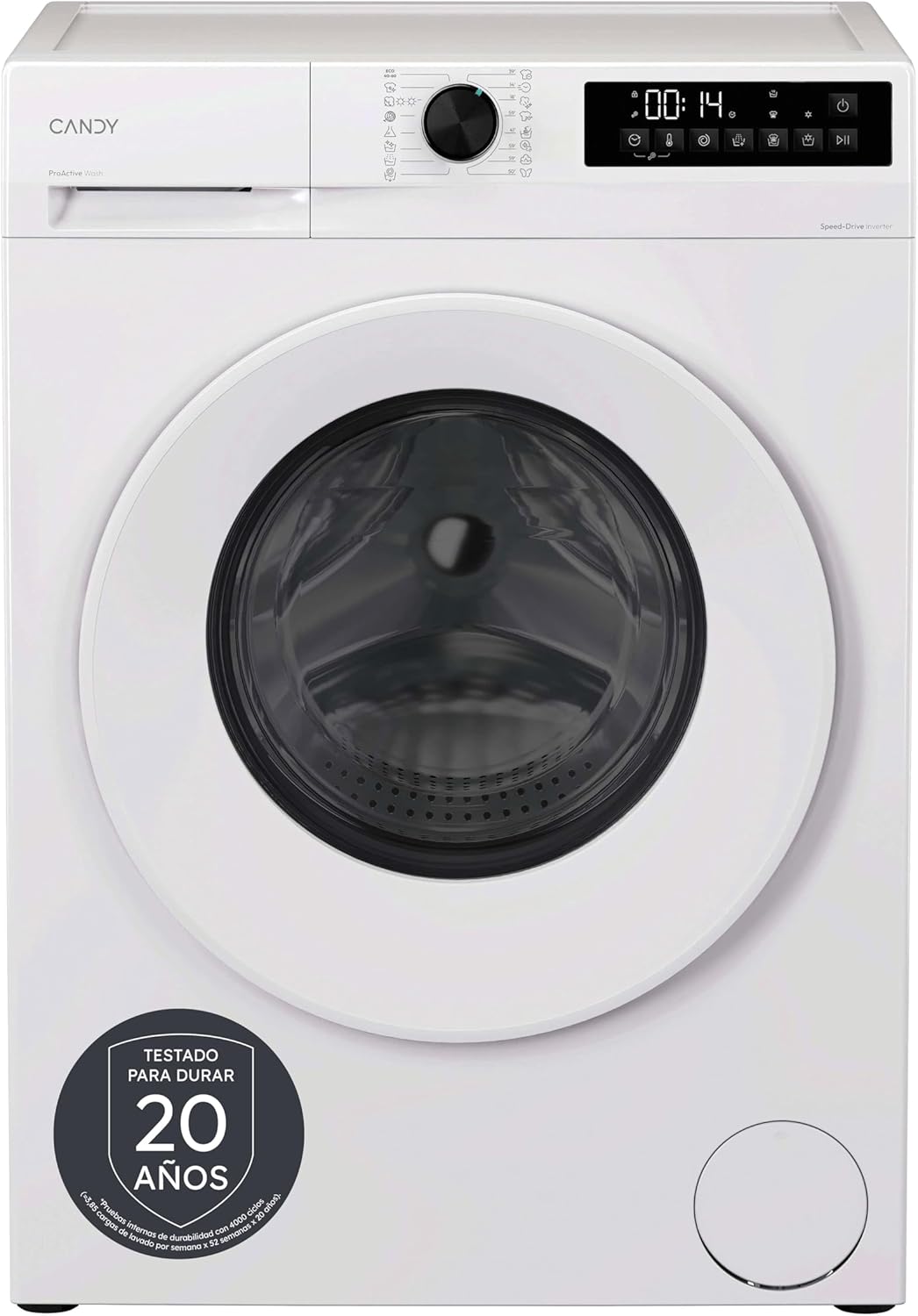
ຮູບທີ 3.1: ດ້ານໜ້າ view of the Candy Pro Wash&Dry 300 GWD 4968-S washer dryer, showcasing ສີຂາວສໍາເລັດຮູບແລະແຜງຄວບຄຸມຂອງຕົນ.

ຮູບທີ 3.2: Diagram illustrating the height (85 cm), width (59.5 cm), and depth (60.1 cm) of the washer dryer.
4. ການຕິດຕັ້ງແລະການຕິດຕັ້ງ
The Candy Pro Wash&Dry 300 GWD 4968-S is a freestanding appliance. Proper installation is crucial for its performance and safety.
ການຫຸ້ມຫໍ່:
- ເອົາວັດສະດຸຫຸ້ມຫໍ່ທັງຫມົດ, ລວມທັງພື້ນຖານ polystyrene ແລະແຜ່ນປ້ອງກັນໃດໆ.
- ຖອດປ໋ອງຂົນສົ່ງທີ່ຕັ້ງຢູ່ດ້ານຫຼັງຂອງເຄື່ອງໃຊ້. ຮັກສາປະຕູເຫຼົ່ານີ້ເພື່ອການຂົນສົ່ງໃນອະນາຄົດຖ້າຈໍາເປັນ.
ຕຳແໜ່ງ:
- Place the appliance on a firm, flat floor.
- ປັບຕີນເພື່ອຮັບປະກັນເຄື່ອງຢູ່ໃນລະດັບຢ່າງສົມບູນ. ນີ້ປ້ອງກັນການສັ່ນສະເທືອນແລະສິ່ງລົບກວນຫຼາຍເກີນໄປໃນລະຫວ່າງການປະຕິບັດງານ.
ການເຊື່ອມຕໍ່ນ້ໍາ:
- ເຊື່ອມຕໍ່ທໍ່ນ້ຳເຂົ້າກັບກ໊ອກນ້ຳເຢັນດ້ວຍເກລียวຂະໜາດ 3/4 ນິ້ວ.
- Ensure the drain hose is correctly positioned in a standpipe or connected to a sink trap, preventing siphoning.
ການເຊື່ອມຕໍ່ໄຟຟ້າ:
- Connect the power cord to a properly grounded electrical outlet (230 Volts).
- ຫ້າມໃຊ້ສາຍຕໍ່ ຫຼືອະແດັບເຕີ.
5. ຄໍາແນະນໍາການດໍາເນີນງານ
Operating your Candy Pro Wash&Dry 300 GWD 4968-S is intuitive with its touch screen and rotary knob controls.
ກຳລັງໂຫຼດເຄື່ອງຊັກລີດ:
- Open the door and load laundry, ensuring not to exceed the maximum capacity (9 kg for wash, 6 kg for dry).
- ປິດປະຕູໃຫ້ແຫນ້ນ.
Adding Detergent and Additives:
- ດຶງເອົາລີ້ນຊັກຊັກອອກ.
- Add detergent to the main wash compartment and fabric softener to its designated compartment.
- ປິດລີ້ນຊັກຊັກ.

ຮູບທີ 5.1: Close-up of the control panel, showing the rotary program selector and digital display with touch buttons.
ເລືອກໂຄງການ:
- Turn the rotary knob to select one of the 16 available programs (e.g., Cotton, Synthetics, Eco 40-60, Rapid 15', Wash+Dry, Steam Function).
- The digital display will show the default time and settings for the selected program.
ປັບແຕ່ງການຕັ້ງຄ່າ:
- Use the touch buttons to adjust temperature, spin speed, delay start (up to 24 hours), or activate special functions like Fresh Vapor.
- To activate the Child Lock, press and hold the designated button for a few seconds until the indicator appears.

ຮູບທີ 5.2: Illustration of the ProActive Wash technology, showing water droplets penetrating fabric to remove stains effectively.

ຮູບທີ 5.3: Before and after comparison of a shirt, demonstrating the wrinkle-reducing effect of the Fresh Vapor steam function.
ການເລີ່ມຕົ້ນຮອບວຽນ:
- ກົດປຸ່ມເລີ່ມຕົ້ນ / ຢຸດຊົ່ວຄາວເພື່ອເລີ່ມຕົ້ນໂຄງການທີ່ເລືອກ.
ສິ້ນສຸດຮອບວຽນ:
- The appliance will signal the end of the cycle.
- ເປີດປະຕູ ແລະ ເອົາເຄື່ອງຊັກຜ້າຂອງເຈົ້າອອກ.
6. ບໍາລຸງຮັກສາ
ການບໍາລຸງຮັກສາເປັນປົກກະຕິຮັບປະກັນອາຍຸຍືນແລະການປະຕິບັດທີ່ດີທີ່ສຸດຂອງເຄື່ອງເປົ່າເຄື່ອງຊັກຜ້າຂອງທ່ານ.
ການເຮັດຄວາມສະອາດລິ້ນຊັກຊັກ:
- Remove the detergent drawer and rinse it under running water to remove any residue.
- ທຳຄວາມສະອາດເຮືອນຂອງລິ້ນຊັກດ້ວຍແປງ.
ທໍາຄວາມສະອາດ Drum:
- Use the dedicated drum cleaning program (if available) or run an empty cycle with a descaling agent.
- The Smart Spray and Clean Shield system helps maintain drum hygiene by preventing detergent buildup.
ທໍາຄວາມສະອາດຕົວກັ່ນຕອງ:
- Regularly check and clean the filter located at the bottom front of the appliance. This prevents blockages and ensures efficient drainage.
ການອະນາໄມພາຍນອກ:
- ເຊັດພື້ນຜິວພາຍນອກດ້ວຍຜ້າອ່ອນໆ, ງamp ຜ້າ. ຢ່າໃຊ້ເຄື່ອງເຮັດຄວາມສະອາດຂັດຫຼືສານລະລາຍ.
7. ການແກ້ໄຂບັນຫາ
If you encounter issues with your washer dryer, refer to the following common troubleshooting steps. For more detailed solutions, consult the full user manual.
Appliance Does Not Start:
- ກວດເບິ່ງວ່າສາຍໄຟຖືກສຽບຢ່າງປອດໄພຫຼືບໍ່.
- ໃຫ້ແນ່ໃຈວ່າປະຕູປິດຢ່າງສົມບູນ.
- Verify that the water tap is open.
- Check if a program has been selected and the Start/Pause button pressed.
ການສັ່ນສະເທືອນ ຫຼືສຽງລົບກວນຫຼາຍເກີນໄປ:
- Ensure the appliance is level by adjusting its feet.
- ກວດເບິ່ງວ່າ bolts ຂົນສົ່ງໄດ້ຖືກໂຍກຍ້າຍອອກ.
- Verify that the load is balanced inside the drum.
ປະສິດທິພາບການອົບແຫ້ງບໍ່ດີ:
- Do not overload the dryer. Ensure the load size is appropriate for the 6 kg drying capacity.
- ເຮັດຄວາມສະອາດຕົວກອງ.
- ເລືອກໂຄງການອົບແຫ້ງທີ່ຖືກຕ້ອງສໍາລັບປະເພດຜ້າ.
8. ຂໍ້ມູນຈໍາເພາະ
| ຄຸນສົມບັດ | ຂໍ້ມູນຈໍາເພາະ |
|---|---|
| ຍີ່ຫໍ້ | ເຂົ້າຫນົມ |
| ໝາຍເລກຕົວແບບ | 31020955 (GWD 4968-S) |
| ຂະໜາດສິນຄ້າ (H x W x D) | 85ຊມ x 59.5ຊມ x 60.1ຊມ |
| ນ້ຳໜັກ | 66 ກິໂລ |
| ຄວາມສາມາດໃນການຊັກ | 9 ກິໂລ |
| ຄວາມສາມາດໃນການອົບແຫ້ງ | 6 ກິໂລ |
| ຄວາມໄວ spin ສູງສຸດ | 1400 RPM |
| ຈໍານວນໂຄງການ | 16 |
| ປະເພດມໍເຕີ | Inverter SpeedDrive |
| ລະດັບສຽງລົບກວນ (ສະປິນ) | 70 Decibels |
| ສະບັບtage | 230 ໂວນ |
| ປະເພດການຕິດຕັ້ງ | ອິດສະລະ |
| ປະເພດການຄວບຄຸມ | Touch and Rotary Knob |
| ຄຸນນະສົມບັດພິເສດ | Steam Function, ProActive Wash, Smart Spray, Clean Shield, Child Lock, Delay Start |

ຮູບທີ 8.1: Energy efficiency label for the Candy GWD 4968-S washer dryer, detailing energy consumption, capacities, and noise levels. For more information, visit the official EPREL database: ຂໍ້ມູນຜະລິດຕະພັນ EPREL
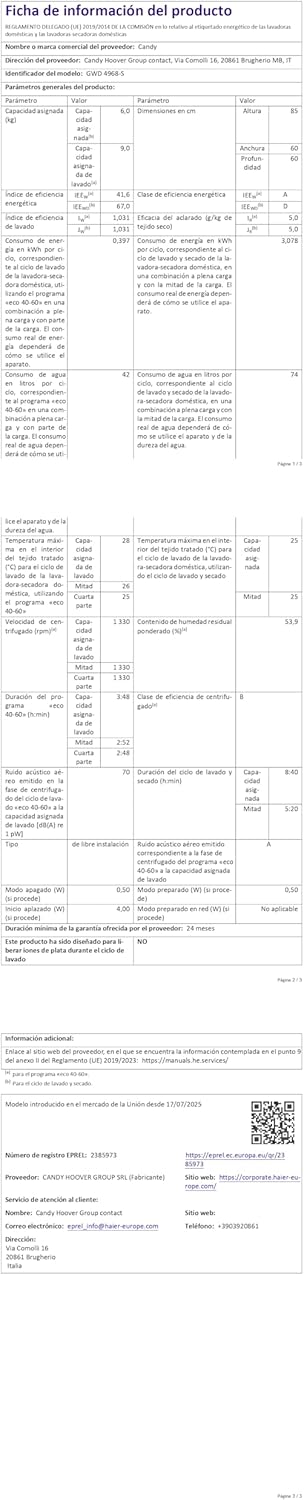
ຮູບທີ 8.2: Detailed product information sheet, providing comprehensive technical data and compliance details for the appliance.
9. ການຮັບປະກັນແລະການສະຫນັບສະຫນູນ
Your Candy Pro Wash&Dry 300 GWD 4968-S comes with a standard manufacturer's warranty. Please refer to the warranty card included with your purchase for specific terms and conditions.
ການຊ່ວຍເຫຼືອລູກຄ້າ:
For technical assistance, spare parts, or service requests, please contact Candy customer support. Ensure you have your appliance's model number (GWD 4968-S) and serial number ready when contacting support.
A detailed user manual is included with the appliance for further information.