
1. ບົດແນະນຳ
This manual provides essential information for the safe and efficient operation of your THOMSON Go TV HD (Google OS) portable smart television. Please read it thoroughly before using the device and retain it for future reference.
The THOMSON Go TV HD offers a comfortable and flexible viewing experience with its 32-inch HD display. Powered by Google TV 5.0, it integrates content from your streaming applications and subscriptions into an intuitive interface. Create personalized user profiles and receive tailored recommendations. With access to over 400,000 movies and series, plus Google Cast for wireless content streaming, your entertainment is always accessible. The integrated battery provides up to 4 hours of enjoyment without needing a power connection. Its base wheels allow for easy movement, and adjustable height, tilt, and rotation customize your viewing angle. Enjoy high-quality sound with Dolby Audio and 16W speakers.
2. ຂໍ້ມູນຄວາມປອດໄພ
ປະຕິບັດຕາມຄວາມລະມັດລະວັງດ້ານຄວາມປອດໄພຕໍ່ໄປນີ້ສະເໝີເພື່ອປ້ອງກັນການເກີດໄຟຟ້າຊັອດ, ໄຟໄໝ້, ຫຼືການບາດເຈັບ:
- ຢ່າເຮັດໃຫ້ໂທລະທັດຖືກຝົນຫຼືຄວາມຊຸ່ມຊື່ນ.
- ຫ້າມເປີດໂທລະທັດ ຄasing; ສົ່ງການບໍລິການທັງໝົດໃຫ້ກັບບຸກຄະລາກອນທີ່ມີຄຸນວຸດທິ.
- ຮັບປະກັນການລະບາຍອາກາດທີ່ເຫມາະສົມຮອບໂທລະທັດ.
- ໃຊ້ພຽງແຕ່ອະແດັບເຕີໄຟທີ່ໃຫ້ມາ.
- ຮັກສາໂທລະທັດໃຫ້ຫ່າງຈາກແຫຼ່ງຄວາມຮ້ອນ ແລະແສງແດດໂດຍກົງ.
- Handle the TV with care, especially when moving it, to avoid damage.
3. ສິ່ງທີ່ຢູ່ໃນກ່ອງ
ຖອດກ່ອງຢ່າງລະມັດລະວັງ ແລະຮັບປະກັນວ່າສິນຄ້າທັງໝົດມີຢູ່:
- THOMSON Go TV HD (Google OS) 32-inch Portable Smart TV
- Power Adapter
- ການຄວບຄຸມໄລຍະໄກ
- ຄູ່ມືຜູ້ໃຊ້ (ເອກະສານນີ້)
- ບັດຮັບປະກັນ
4. ຜະລິດຕະພັນເກີນview
4.1. TV Dimensions and Adjustability

ຮູບພາບ: ດ້ານໜ້າ, ດ້ານຂ້າງ, ແລະ ດ້ານຫຼັງ views of the THOMSON Go TV with detailed dimensions (734mm width, 429mm height, 1323mm max height, 227mm depth).

Image: The THOMSON Go TV demonstrating its adjustable tilt and rotation features for optimal viewສະດວກສະບາຍ.
The THOMSON Go TV features a robust stand with wheels for easy mobility. The screen can be adjusted in height, tilted, and rotated to achieve the perfect viewing angle in any room.
4.2. ການເຊື່ອມຕໍ່ແຜງດ້ານຫລັງ
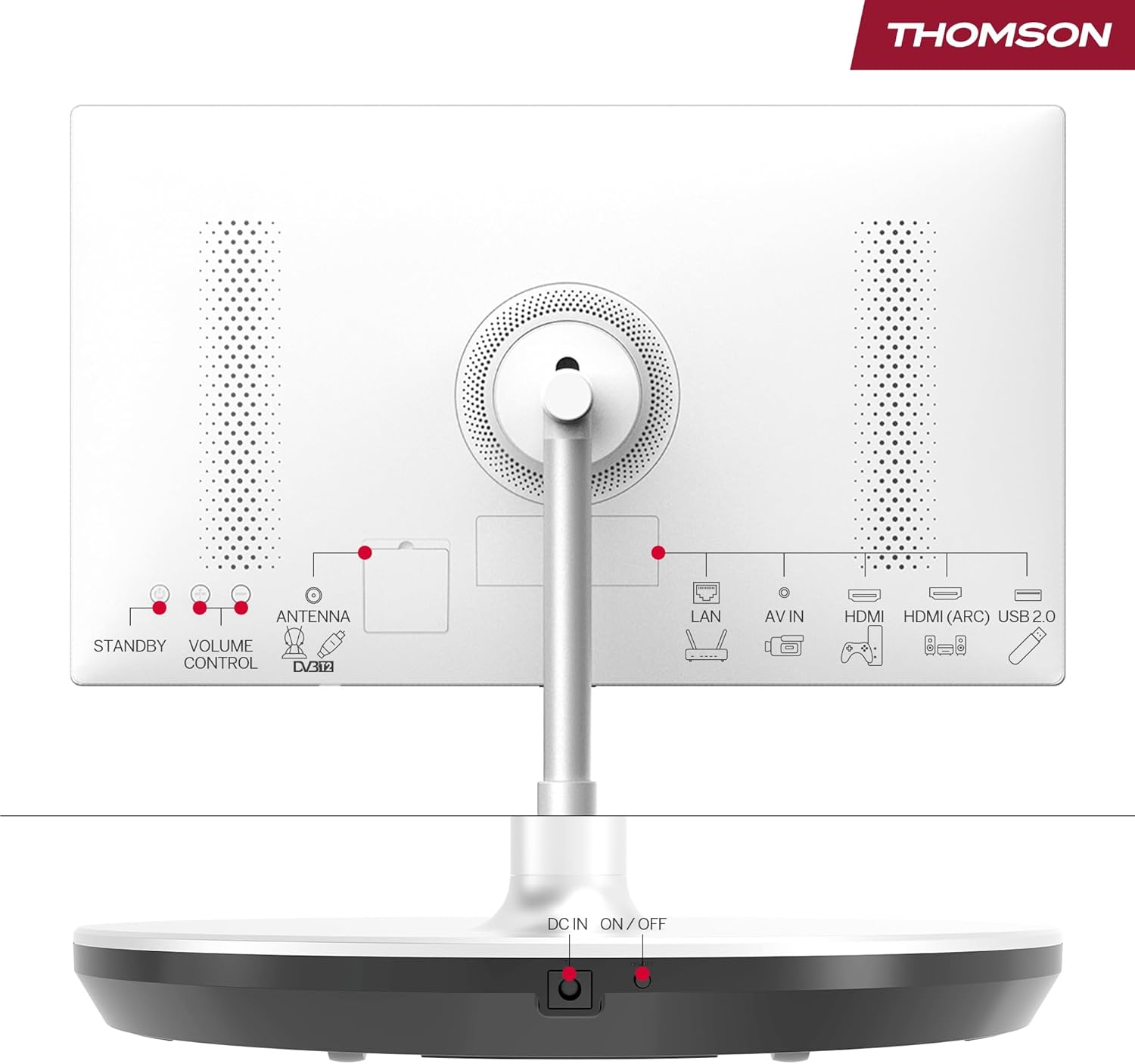
Image: Rear panel of the THOMSON Go TV, highlighting various input ports and controls.
The rear panel provides access to essential connectivity options:
- LAN: ພອດອີເທີເນັດສໍາລັບການເຊື່ອມຕໍ່ອິນເຕີເນັດແບບມີສາຍ.
- AV ໃນ: Audio/Video input for older devices.
- HDMI (ARC): High-Definition Multimedia Interface with Audio Return Channel support.
- USB 2.0: USB port for media playback or connecting peripherals.
- ANTENNA (DVB-T2): Antenna input for terrestrial digital TV.
- DC ໃນ: Power input for the adapter.
- ເປີດ/ປິດ: ສະຫຼັບພະລັງງານຫຼັກ.
- STANDBY / VOLUME CONTROL: Physical buttons for basic control.
4.3. ການຄວບຄຸມໄລຍະໄກ

Image: The remote control for the THOMSON Go TV, showing numeric keys, Google Assistant button, illuminated keys, and direct access buttons for streaming services.
The remote control allows full navigation and control of your TV. It features:
- ກະແຈຕົວເລກ: ສໍາລັບການເລືອກຊ່ອງທາງໂດຍກົງ.
- ປຸ່ມຜູ້ຊ່ວຍ Google: Activate voice control.
- ກະແຈທີ່ສະຫວ່າງ: For easy use in low-light conditions.
- ປຸ່ມເຂົ້າເຖິງໂດຍກົງ: Quick launch for popular streaming apps like Netflix, Prime Video, and YouTube.
5. ຕັ້ງຄ່າ
5.1. ການຈັດວາງເບື້ອງຕົ້ນແລະການເຊື່ອມຕໍ່ພະລັງງານ
Place the TV on a stable, level surface. Thanks to its integrated wheels, you can easily move it to your desired location. Connect the power adapter to the DC IN port on the TV and then to a power outlet. Ensure the main ON/OFF switch is in the 'ON' position.
5.2. ການຕັ້ງຄ່າຄັ້ງທໍາອິດ
ເມື່ອເປີດເຄື່ອງທຳອິດ, ໂທລະພາບຈະແນະນຳທ່ານຜ່ານຂັ້ນຕອນການຕັ້ງຄ່າເບື້ອງຕົ້ນ:
- ການເລືອກພາສາ: ເລືອກພາສາທີ່ເຈົ້າມັກ.
- ການເຊື່ອມຕໍ່ເຄືອຂ່າຍ: ເຊື່ອມຕໍ່ກັບເຄືອຂ່າຍ Wi-Fi ຂອງທ່ານຫຼືນໍາໃຊ້ສາຍ Ethernet ສໍາລັບການເຊື່ອມຕໍ່ມີສາຍ.
- ບັນຊີ Google ເຂົ້າສູ່ລະບົບ: Sign in with your Google account to access Google TV features, personalized recommendations, and app downloads.
- ສະແກນຊ່ອງ: If connecting an antenna, the TV will scan for available terrestrial channels.
- ການຕັ້ງຄ່າຄວາມເປັນສ່ວນຕົວ: ຕັ້ງຄ່າຄວາມເປັນສ່ວນຕົວຂອງທ່ານ.
6. ຄໍາແນະນໍາການດໍາເນີນງານ
6.1. ການໂຕ້ຕອບ Google TV
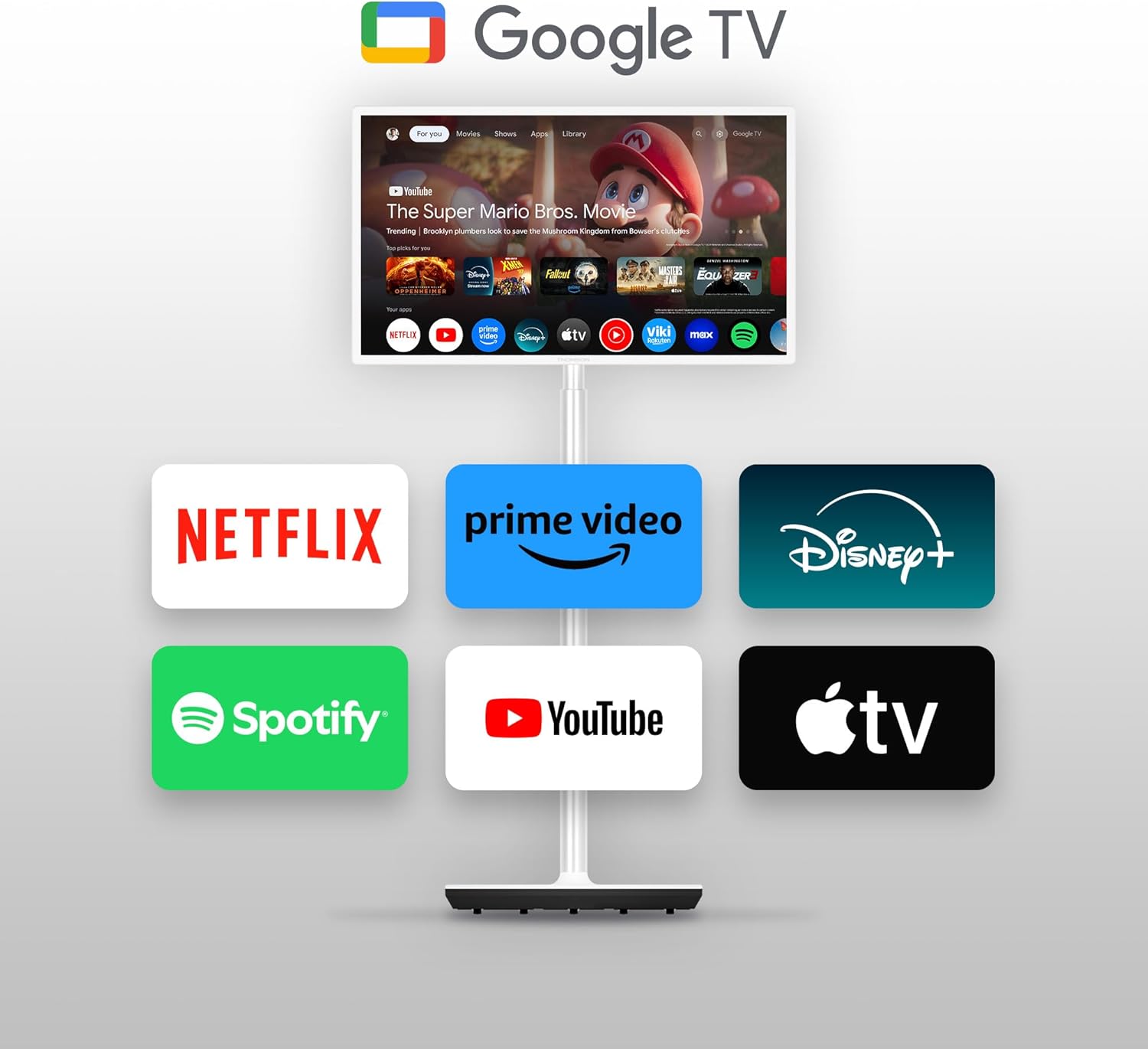
Image: The THOMSON Go TV screen showing the Google TV home screen with various streaming service icons like Netflix, Prime Video, Disney+, Spotify, YouTube, and Apple TV.
Google TV organizes content from your streaming services into a unified, personalized interface. You can create multiple user profiles, each with customized recommendations.
6.2. ການຄວບຄຸມດ້ວຍສຽງດ້ວຍຜູ້ຊ່ວຍ Google
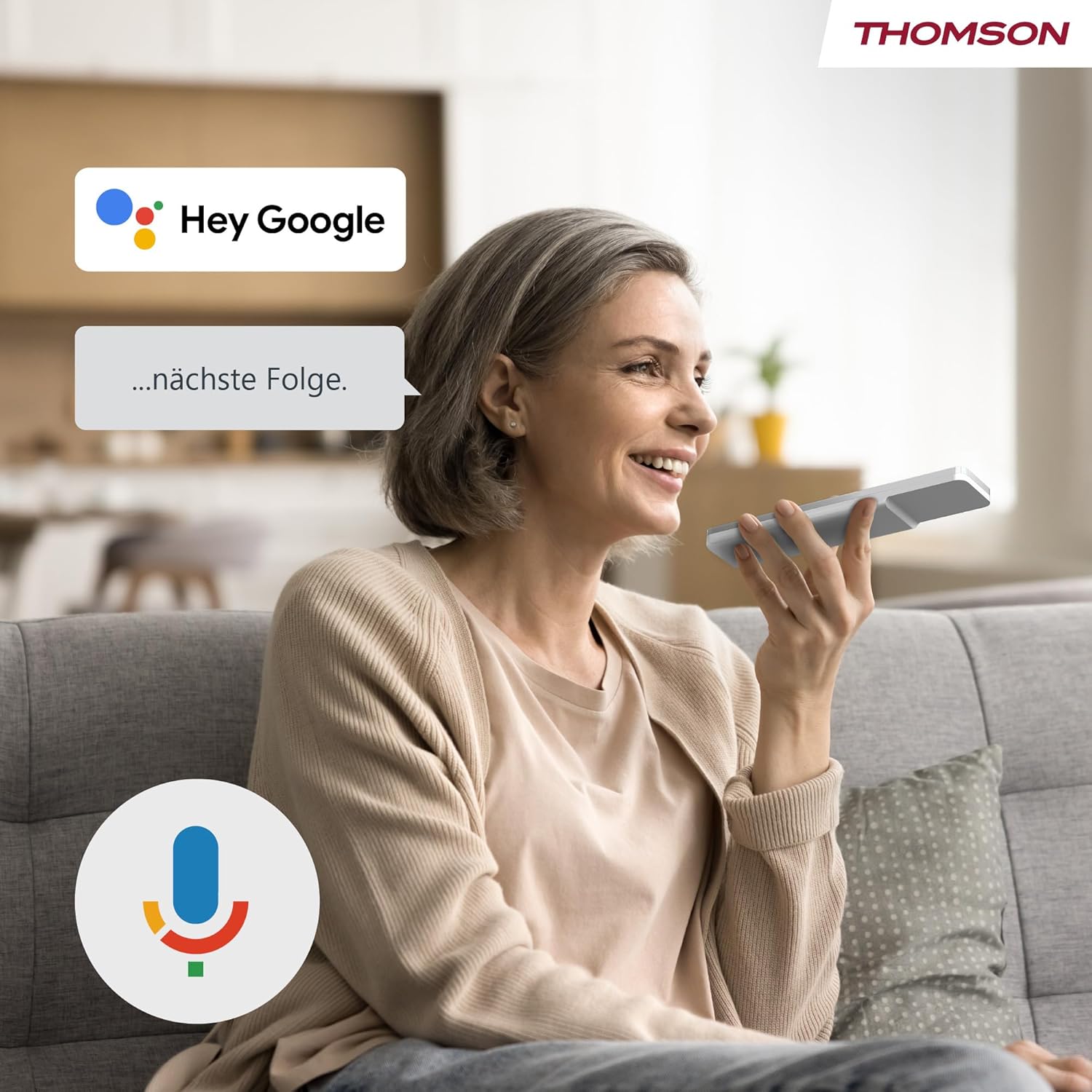
Image: A woman speaking into the remote control, with a 'Hey Google' speech bubble and the Google Assistant logo, demonstrating voice control functionality.
Press the Google Assistant button on your remote control and speak your commands. You can search for content, ask for recommendations, control smart home devices, and more.
6.3. Google Cast Functionality

Image: A smartphone screen showing content being cast to the THOMSON Go TV, with the Google Cast logo indicating the feature.
Use Google Cast to wirelessly stream content from compatible devices (smartphones, tablets, computers) directly to your TV screen.
6.4. Battery Usage and Mobility

Image: A woman performing yoga, with the THOMSON Go TV in the background displaying an exercise video. An overlay indicates '5000 mAh' and 'up to 4 hours life', highlighting the TV's portability and battery duration.
The integrated battery provides up to 4 hours of viewing time, allowing you to enjoy entertainment anywhere without a power outlet. The base wheels facilitate easy movement between rooms.
6.5. ຄຸນສົມບັດສຽງ

Image: The THOMSON Go TV displaying a beach scene, with the Dolby Audio logo and animated sound waves emanating from the screen, illustrating its audio capabilities.
Experience high-quality sound with integrated 16W speakers and Dolby Audio support.
7. ບໍາລຸງຮັກສາ
7.1. ການທໍາຄວາມສະອາດຫນ້າຈໍ
ເຊັດໜ້າຈໍຢ່າງອ່ອນໂຍນດ້ວຍຜ້າອ່ອນໆ, ບໍ່ມີເຈັ້ຍ. ສໍາລັບຮອຍແຂງ, ເລັກນ້ອຍ dampໃສ່ຜ້າດ້ວຍນ້ໍາຫຼືເຄື່ອງເຮັດຄວາມສະອາດຫນ້າຈໍພິເສດ. ຢ່າສີດຂອງແຫຼວໂດຍກົງໃສ່ຫນ້າຈໍ.
7.2. ການດູແລທົ່ວໄປ
- ຮັກສາໂທລະທັດໃຫ້ບໍ່ມີຝຸ່ນໂດຍການເຊັດກະຈົກເປັນປະຈຳ.asing ແຫ້ງ, ຜ້າອ່ອນ.
- ຫຼີກລ້ຽງການວາງສິ່ງຂອງຫນັກຢູ່ໃນໂທລະພາບ.
- ໃຫ້ແນ່ໃຈວ່າຊ່ອງລະບາຍອາກາດບໍ່ໄດ້ຖືກບລັອກ.
8. ການແກ້ໄຂບັນຫາ
ຖ້າຫາກທ່ານພົບບັນຫາ, ເບິ່ງບັນຫາທົ່ວໄປດັ່ງຕໍ່ໄປນີ້ແລະການແກ້ໄຂ:
| ບັນຫາ | ສາເຫດທີ່ເປັນໄປໄດ້ | ການແກ້ໄຂ |
|---|---|---|
| ບໍ່ມີພະລັງງານ | Power cable disconnected; Main switch off | Check power connections; Ensure main ON/OFF switch is on |
| ບໍ່ມີຮູບ, ແຕ່ສຽງແມ່ນປະຈຸບັນ | ແຫຼ່ງປ້ອນຂໍ້ມູນບໍ່ຖືກຕ້ອງ; ສາຍ HDMI ວ່າງ | Select correct input source; Reconnect HDMI cable securely |
| ບໍ່ມີສຽງ, ແຕ່ມີຮູບພາບ | Volume muted or too low; Audio settings incorrect | Increase volume; Check audio output settings |
| ການຄວບຄຸມໄລຍະໄກບໍ່ເຮັດວຽກ | ແບັດເຕີຣີໝົດ; ການຂັດຂວາງລະຫວ່າງທາງໄກແລະໂທລະພາບ | ປ່ຽນແບັດ; ເອົາສິ່ງກີດຂວາງຕ່າງໆອອກ |
| ບໍ່ສາມາດເຊື່ອມຕໍ່ກັບ Wi-Fi ໄດ້ | ລະຫັດຜ່ານບໍ່ຖືກຕ້ອງ; ບັນຫາເຣົາເຕີ; ໂທລະພາບໄກຈາກເຣົາເຕີເກີນໄປ | Verify password; Restart router; Move TV closer to router |
9. ຂໍ້ມູນຈໍາເພາະ
9.1. ທົ່ວໄປ
- ຍີ່ຫໍ້: ທອມສັນ
- ໝາຍເລກຕົວແບບ: 32HG4M45
- ຂະໜາດໜ້າຈໍ: 32 ນິ້ວ (80 ຊມ)
- ເທັກໂນໂລຍີການສະແດງ: HD LED
- ຄວາມລະອຽດ: 1366 x 768 (768p)
- ອັດຕາການໂຫຼດຂໍ້ມູນຄືນໃໝ່: 60 Hz
- ອັດຕາສ່ວນ: 16:9
- ກົງກັນຂ້າມ: 3000:1
- ລະບົບປະຕິບັດການ: Android (Google TV)
- ຄວາມອາດສາມາດເກັບຮັກສາຫນ່ວຍຄວາມຈໍາ: 1 GB
- ຄຸນນະສົມບັດພິເສດ: Google TV, Voice Control, Bluetooth 5.1, Portable (up to 4 hours battery life)
- ຂະໜາດສິນຄ້າ (DxWxH): 22.7 x 73.4 x 132.3 cm
- Product Weight (without stand): 18.1 ກິໂລ
- ສະຫນັບສະຫນູນ VESA: Wall mount, Table stand
9.2. ການເຊື່ອມຕໍ່
- ເຕັກໂນໂລຍີການເຊື່ອມຕໍ່: Bluetooth, Ethernet, USB, Wi-Fi
- ຜອດ HDMI: 2
- ພອດ USB: 1 (Total USB 2.0: 1, Total USB 3.0: 1 - Note: JSON lists both 1 USB and 1 USB 2.0 and 1 USB 3.0, assuming 1 physical port supporting both standards or a typo.)
- ການປ້ອນຂໍ້ມູນສຽງ: HDMI, USB
- ເຕັກໂນໂລຊີໄຮ້ສາຍ: Wi-Fi
- Internet Applications: Disney Plus, Netflix, Prime Video, YouTube
9.3. ສຽງ
- Speaker Description: Integrated speakers with Dolby Audio and 16 W power
- Integrated Surround Sound Format: ສຽງ Dolby
9.4. Power and Energy Efficiency

Image: EU Energy Label for the THOMSON 32HG4M45, showing energy efficiency class E and 26 kWh/1000h consumption.
- ປະເພດປະສິດທິພາບພະລັງງານ: E
- ການບໍລິໂພກພະລັງງານ (SDR): 26.0 ວ
- ການບໍລິໂພກພະລັງງານ (HDR): 26.0 ວ
- ແບັດເຕີຣີ: 1 Non-standard battery (type required)
For more detailed energy information, please refer to the official EU EPREL database: https://eprel.ec.europa.eu/qr/2242286
10. ການຮັບປະກັນແລະການສະຫນັບສະຫນູນ
10.1. ການຮັບປະກັນຜະລິດຕະພັນ
ຜະລິດຕະພັນນີ້ມາພ້ອມກັບ a ການຮັບປະກັນ 3 ປີຈໍາກັດ. Please refer to the included Warranty Card for full terms and conditions.
10.2. Manufacturer and Support
For technical support or service inquiries, please contact the manufacturer:
- ຜູ້ຜະລິດ: ກະແສView GmbH
- Webເວັບໄຊ: www.streamview.com
- ອີເມວ: contact@streamview.com
- ໂທລະສັບ: +4318900066
- ທີ່ຢູ່: Franz-Josefs-Kai 1, 1010 Vienna, Austria