
1. ບົດແນະນຳ
The KONNWEI MAXOBD OBD2 Scanner is a professional diagnostic tool designed to read and clear diagnostic trouble codes (DTCs) from your vehicle's engine control unit (ECU). It provides access to various vehicle systems, allowing users to monitor live data, perform I/M readiness tests, and retrieve vehicle information. This manual provides detailed instructions for the proper use and maintenance of your MAXOBD scanner.
2. ຂໍ້ມູນຄວາມປອດໄພ
Before operating the MAXOBD OBD2 Scanner, please read and understand all safety messages and instructions in this manual. Failure to do so may result in personal injury or damage to the vehicle or the scanner.
- ສະເຫມີປະຕິບັດການທົດສອບລົດຍົນໃນສະພາບແວດລ້ອມທີ່ປອດໄພ.
- ໃສ່ການປ້ອງກັນຕາທີ່ສອດຄ່ອງກັບມາດຕະຖານ ANSI.
- ຮັກສາເຄື່ອງນຸ່ງຫົ່ມ, ຜົມ, ມື, ເຄື່ອງມື, ອຸປະກອນທົດສອບ, ແລະອື່ນໆ, ຫ່າງຈາກທຸກພາກສ່ວນເຄື່ອງຈັກທີ່ເຄື່ອນຍ້າຍຫຼືຮ້ອນ.
- ປະຕິບັດການຍານພາຫະນະໃນພື້ນທີ່ເຮັດວຽກທີ່ມີລະບາຍອາກາດໄດ້ດີ; ທາດອາຍຜິດແມ່ນເປັນພິດ.
- ວາງລະບົບສາຍສົ່ງໃນ PARK (ສໍາລັບການສົ່ງອັດຕະໂນມັດ) ຫຼື NEUTRAL (ສໍາລັບການສົ່ງຄູ່ມື) ແລະໃຫ້ແນ່ໃຈວ່າເບກບ່ອນຈອດລົດຕິດຢູ່.
- Keep a fire extinguisher suitable for gasoline/electrical fires nearby.
- ຫ້າມເຊື່ອມຕໍ່ ຫຼືຕັດການເຊື່ອມຕໍ່ອຸປະກອນທົດສອບໃດໆ ໃນຂະນະທີ່ໄຟໄໝ້ ຫຼືເຄື່ອງຈັກກຳລັງແລ່ນຢູ່.
3. ຜະລິດຕະພັນເກີນview
The MAXOBD scanner features a clear display and intuitive button layout for easy navigation and operation. It connects directly to your vehicle's OBD-II port to retrieve diagnostic information.
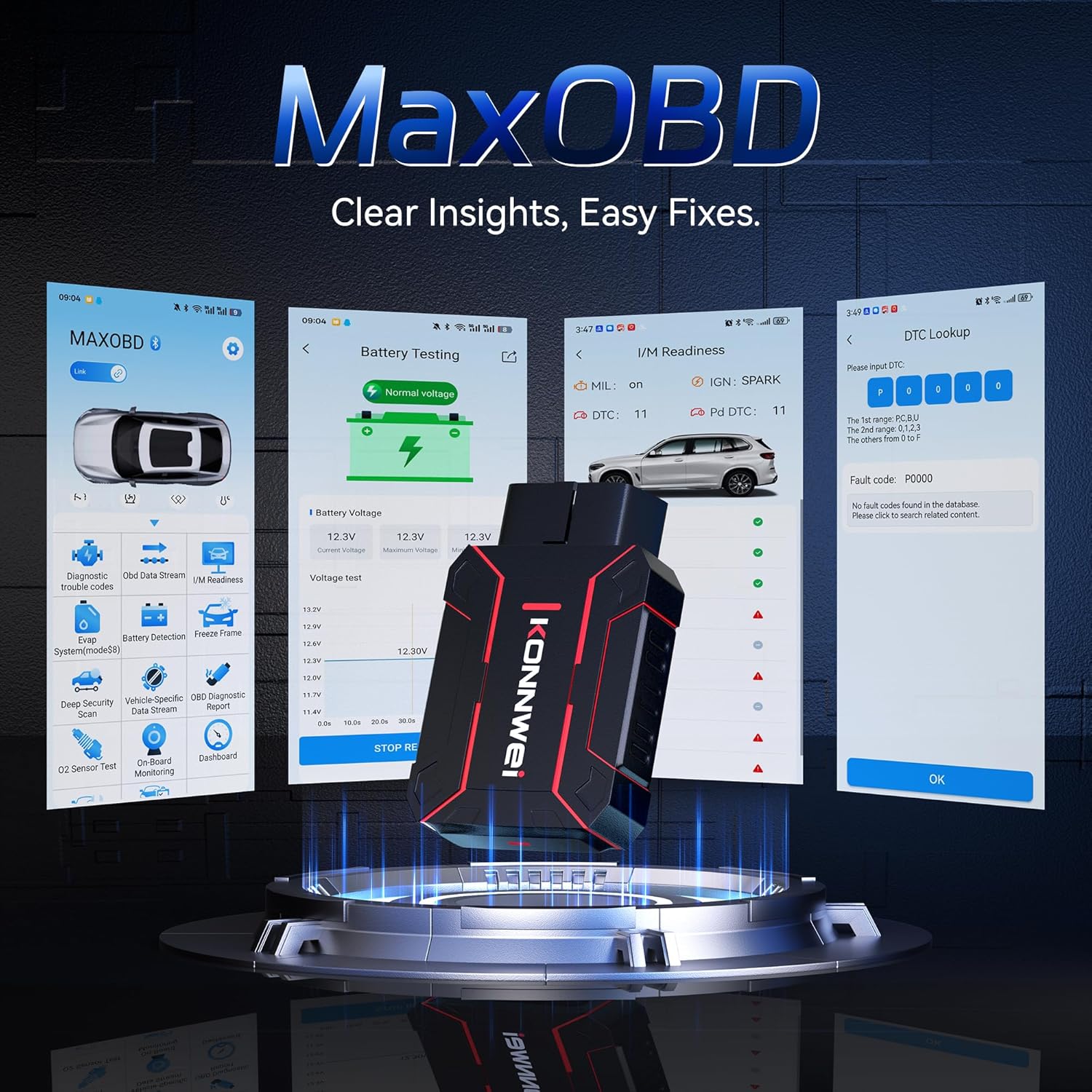
Image: The KONNWEI MAXOBD OBD2 Scanner device, illustrating its physical form and various diagnostic screen interfaces such as battery testing, I/M readiness, and DTC lookup.
ອົງປະກອບທີ່ສໍາຄັນ:
- OBD-II Connector: Connects to the vehicle's Data Link Connector (DLC).
- ຈໍ LCD: Shows test results and menu options.
- ປຸ່ມນຳທາງ: ໃຊ້ເພື່ອເລື່ອນຜ່ານເມນູ ແລະ ເລືອກຕົວເລືອກຕ່າງໆ.
- Enter/Exit Buttons: Confirm selections or return to previous screens.
4. ຕັ້ງຄ່າ
Follow these steps to set up your MAXOBD OBD2 Scanner:
- Locate the Vehicle's OBD-II Port: The 16-pin Data Link Connector (DLC) is usually located under the dashboard on the driver's side of the vehicle. Refer to your vehicle's service manual for the exact location if you cannot find it.
- ເຊື່ອມຕໍ່ເຄື່ອງສະແກນ: Plug the MAXOBD scanner's OBD-II connector firmly into the vehicle's DLC. Ensure a secure connection.
- ເປີດ: Once connected, the scanner will automatically power on. If it does not, turn the vehicle's ignition to the 'ON' position (engine off).
5. ຄໍາແນະນໍາການດໍາເນີນງານ
The MAXOBD scanner offers various diagnostic functions. Use the navigation buttons to move through menus and the Enter button to select options.

Image: A visual representation of a vehicle highlighting various systems (Engine, ABS, SAS, SRS, DPF, TPMS) that the MAXOBD scanner can perform a full system scan on.
ຟັງຊັນເມນູຫຼັກ:
- ອ່ານລະຫັດ: Retrieves Diagnostic Trouble Codes (DTCs) from the vehicle's ECU. These codes indicate specific issues detected by the vehicle's onboard diagnostic system.
- ລຶບລະຫັດ: Clears all DTCs from the vehicle's ECU and turns off the Malfunction Indicator Lamp (MIL). Ensure the underlying issue is resolved before clearing codes.
- ຄວາມພ້ອມ I/M: Checks the status of emission-related monitoring systems to determine if they are ready for an emissions test.
- ກະແສຂໍ້ມູນ: Displays real-time operational parameters from the vehicle's sensors and components. This can include engine RPM, vehicle speed, oxygen sensor readings, and more.
- ຂອບ Freeze: Captures a snapshot of sensor data at the moment a DTC was set. This data can help identify the conditions under which a fault occurred.
- ການທົດສອບເຊັນເຊີ O2: Retrieves O2 sensor monitoring test results for the most recently completed tests from the vehicle's onboard computer.
- ການທົດສອບການຕິດຕາມເຮືອບິນ: ດຶງເອົາຜົນໄດ້ຮັບສຳລັບອົງປະກອບ ແລະ ລະບົບລະບົບສົ່ງກຳລັງທີ່ກ່ຽວຂ້ອງກັບການປ່ອຍອາຍພິດທີ່ບໍ່ໄດ້ຮັບການຕິດຕາມກວດກາຢ່າງຕໍ່ເນື່ອງ.
- ການທົດສອບລະບົບ EVAP: ເລີ່ມການທົດສອບການຮົ່ວໄຫຼສຳລັບລະບົບຄວບຄຸມການປ່ອຍອາຍພິດລະເຫີຍຂອງຍານພາຫະນະ.
- ຂໍ້ມູນພາຫະນະ: Displays the vehicle identification number (VIN), calibration ID (CALID), and calibration verification number (CVN).
Performing a Diagnostic Scan:
- Connect the scanner to the vehicle's DLC and turn the ignition to 'ON'.
- From the main menu, select 'Read Codes' and press Enter.
- The scanner will communicate with the vehicle and display any detected DTCs.
- Use the navigation buttons to scroll through the codes and their descriptions.
- To clear codes, return to the main menu, select 'Erase Codes', and confirm.
6. ບໍາລຸງຮັກສາ
Proper maintenance ensures the longevity and reliable operation of your MAXOBD scanner.
- ທໍາຄວາມສະອາດ: ໃຊ້ອ່ອນ, ງamp ຜ້າເຊັດເພື່ອທຳຄວາມສະອາດພາຍນອກຂອງເຄື່ອງສະແກນ. ຢ່າໃຊ້ນ້ຳຢາທຳຄວາມສະອາດທີ່ມີສີຂັດ ຫຼື ຕົວລະລາຍ.
- ການເກັບຮັກສາ: Store the scanner in a dry, clean environment away from extreme temperatures and direct sunlight. Keep it in its original packaging or a protective case when not in use.
- ອັບເດດຊອບແວ: Periodically check the KONNWEI official website for available software updates to ensure your scanner has the latest vehicle compatibility and features. Follow the instructions provided on the website for updating the device.
7. ການແກ້ໄຂບັນຫາ
If you encounter issues with your MAXOBD scanner, refer to the following common problems and solutions:
| ບັນຫາ | ສາເຫດທີ່ເປັນໄປໄດ້ | ການແກ້ໄຂ |
|---|---|---|
| ເຄື່ອງສະແກນບໍ່ເປີດ. | Loose connection; vehicle ignition off; faulty OBD-II port. | Ensure the scanner is securely plugged into the DLC. Turn vehicle ignition to 'ON'. Test on another vehicle if possible. |
| ຂໍ້ຄວາມ "ການເຊື່ອມຕໍ່ຜິດພາດ" ຫຼື "ການສື່ສານຜິດພາດ". | Loose connection; vehicle not OBD-II compliant; ignition off; communication protocol issue. | Verify connection. Ensure vehicle is OBD-II compliant (most vehicles 1996 and newer). Turn ignition to 'ON'. Try a different vehicle if available. |
| ໜ້າຈໍຫວ່າງເປົ່າ ຫຼື ຈຶ້ງ. | ຊອບແວ glitch; ການຂັດຂວາງພະລັງງານ. | Disconnect and reconnect the scanner. If the issue persists, contact customer support. |
If the problem persists after attempting these solutions, please contact KONNWEI customer support for further assistance.
8. ຂໍ້ມູນຈໍາເພາະ
- ຍີ່ຫໍ້: KONNWEI
- ຕົວແບບ: maxobdTM
- ແຫຼ່ງພະລັງງານ: Battery Powered (via OBD-II port)
- ລະບົບປະຕິບັດການ: Linux
- ຂະໜາດໜ້າຈໍ: 2.8 ນິ້ວ
- ປະເພດການປະກອບລົດຍົນ: Universal Fit (for OBD-II compliant vehicles)
- ຂະໜາດແພັກເກດ: 10.04 x 7.28 x 2.76 ນິ້ວ
9. ການຮັບປະກັນແລະການສະຫນັບສະຫນູນ
KONNWEI products are designed for reliability and performance. For warranty information, please refer to the documentation included with your purchase or visit the official KONNWEI website. For technical support, troubleshooting assistance, or any other inquiries, please contact KONNWEI customer service through their official channels.
KONNWEI Official Webເວັບໄຊ: Visit the KONNWEI Store on Amazon