
IIWEY Q7
IIWEY Q7 Dual 4K Dash Cam with CPL Filter User Manual
ແບບ: Q7
1. ຜະລິດຕະພັນເກີນview
The IIWEY Q7 is a dual-channel dash camera system designed to record both front and rear views of your vehicle in 4K resolution. It features advanced STARVIS sensors and High Dynamic Range (HDR) for enhanced low-light performance. The system includes a 40mm Circular Polarizing Lens (CPL) filter to reduce glare and improve video clarity, along with a 128GB microSD card for immediate use.
ຄຸນນະສົມບັດທີ່ສໍາຄັນ:
- Dual 4K Recording: Captures front and rear video at 3840x2160p resolution simultaneously.
- Dual STARVIS + HDR Night Vision: Utilizes 2nd-generation STARVIS sensors and f/1.6 lenses with dual-channel HDR for clear recordings in various lighting conditions.
- Integrated CPL Filter: A 40mm polarizing lens reduces glare from reflections and enhances color saturation for clearer video.
- 128GB MicroSD Card Included: Ready for immediate use with ample ການເກັບຮັກສາ.
- ການບັນທຶກວົງຈອນ ແລະ ເຊັນເຊີ G: ຂຽນທັບ foo ເກົ່າໂດຍອັດຕະໂນມັດtage and locks important incident videos to a protected folder.
- ກວ້າງ View & IPS Screen: 170 ມຸມກວ້າງ view for comprehensive coverage and a 3.18" IPS screen for live view ແລະການຫຼິ້ນ.

ຮູບພາບ: ຫຼາຍກວ່າview of the IIWEY Q7 Dual 4K Dash Cam system, illustrating front and rear camera views and STARVIS technology.
2. ການຕິດຕັ້ງແລະການຕິດຕັ້ງ
2.1 ການໃສ່ບັດ MicroSD
- ກວດໃຫ້ແນ່ໃຈວ່າກ້ອງຕິດປິດ.
- Locate the microSD card slot on the dash cam.
- Insert the provided 128GB microSD card with the contacts facing the correct direction until it clicks into place.
- It is recommended to format the microSD card within the dash cam settings before first use.
2.2 ການຕິດຕັ້ງກ້ອງຖ່າຍຮູບ
- ກ້ອງໜ້າ: ເລືອກສະຖານທີ່ເທິງກະຈົກໜ້າລົດທີ່ບໍ່ບັງກະຈົກໜ້າລົດຂອງທ່ານ view, ໂດຍປົກກະຕິແລ້ວຢູ່ທາງຫຼັງview mirror. Clean the area thoroughly. Attach the suction cup mount or adhesive mount firmly.
- ກ້ອງຫຼັງ: ຕິດຕັ້ງກ້ອງຫຼັງໃສ່ກະຈົກໜ້າລົດດ້ານຫຼັງ, ຮັບປະກັນຄວາມຊັດເຈນ view of the road behind. Route the cable discreetly to the front camera.
- Adjust the lens angles of both cameras to cover the desired field of view (170° for each).
2.3 ການເຊື່ອມຕໍ່ພະລັງງານ
- Connect the power cable to the dash cam and plug the other end into your vehicle's 12V power outlet (cigarette lighter socket).
- Route the power cable along the edges of the windshield and dashboard to keep it tidy and out of the way.
2.4 CPL Filter Attachment
The CPL filter is designed to be easily attached and removed from the front camera lens.
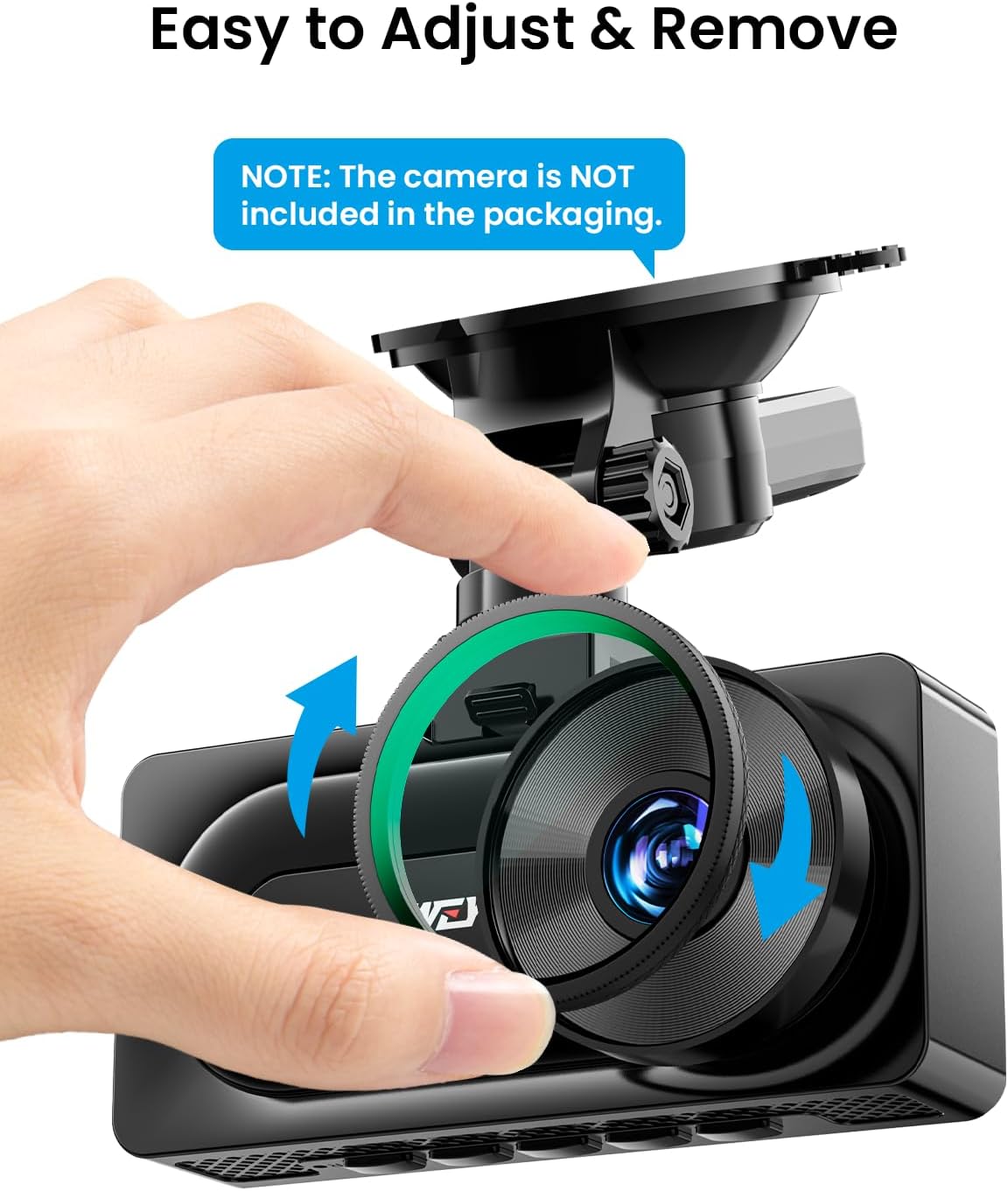
Image: Illustration of how to easily attach and remove the CPL filter from the dash cam lens.
- Ensure your IIWEY Q7 dash cam has pre-threaded lens for CPL filter attachment.
- Gently screw the 40mm CPL filter onto the front camera lens until secure.
- Rotate the CPL filter while observing the screen to achieve the desired glare reduction and color enhancement.

Image: Compatibility check for the CPL filter, confirming it fits the IIWEY Q7 model with pre-threaded lenses.
3. ຄໍາແນະນໍາການດໍາເນີນງານ
3.1 ເປີດ/ປິດ
- ກ້ອງ dash ຈະເປີດອັດຕະໂນມັດ ແລະເລີ່ມບັນທຶກເມື່ອການຕິດໄຟຂອງລົດທ່ານເປີດຢູ່.
- ມັນຈະປິດອັດຕະໂນມັດໃນບໍ່ດົນຫລັງຈາກປິດໄຟ.
- ເພື່ອເປີດ/ປິດດ້ວຍຕົນເອງ, ໃຫ້ກົດປຸ່ມເປີດ/ປິດຄ້າງໄວ້.
3.2 ຮູບແບບການບັນທຶກ
- ການບັນທຶກວົງ: The dash cam continuously records video in short segments (e.g., 1, 3, or 5 minutes). When the microSD card is full, the oldest unprotected files ຖືກຂຽນທັບ.
- G-Sensor (ການບັນທຶກສຸກເສີນ): ໃນກໍລະນີທີ່ມີການກະທົບ ຫຼື ການປະທະກັນຢ່າງກະທັນຫັນ, ເຊັນເຊີ G ໃນຕົວຈະກວດຈັບເຫດການ ແລະ ລັອກສ່ວນວິດີໂອປັດຈຸບັນໂດຍອັດຕະໂນມັດ, ປ້ອງກັນບໍ່ໃຫ້ມັນຖືກຂຽນທັບໂດຍການບັນທຶກ loop. ສິ່ງເຫຼົ່ານີ້ files are stored in a separate, protected folder.
- Parking Monitor (Optional): If supported and properly wired (requires a hardwire kit, sold separately), the dash cam can record when motion or impact is detected while the vehicle is parked.
3.3 CPL Filter Adjustment
The CPL filter can be rotated to optimize its effect. Rotate the filter until reflections on the windshield or dashboard are minimized, and colors appear more vibrant on the dash cam's screen.

Image: Visual comparison demonstrating how the CPL filter reduces reflections and glare on the road.

Image: Explanation of CPL filter benefits, including enhanced color tone, improved details, and reduced light reflection.
4. ບໍາລຸງຮັກສາ
4.1 MicroSD Card Care
- Format the microSD card regularly (e.g., once a month) within the dash cam's settings to ensure optimal performance and prevent data corruption.
- Use only high-quality, high-endurance microSD cards recommended for dash cam use.
4.2 ການອະນາໄມເລນ
- Gently wipe the camera lenses (front, rear, and CPL filter) with a soft, lint-free cloth.
- Avoid using abrasive cleaners or solvents that could damage the lens coating.
4.3 ການເບິ່ງແຍງທົ່ວໄປ
- ຫຼີກລ່ຽງການໃຫ້ກ້ອງວົງຈອນປິດຢູ່ໃນອຸນຫະພູມທີ່ຮຸນແຮງເປັນເວລາດົນ.
- Do not attempt to disassemble or modify the dash cam, as this will void the warranty.
5. ການແກ້ໄຂບັນຫາ
5.1 ກ້ອງວົງຈອນປິດບໍ່ເປີດ
- Check the power connection to ensure it is securely plugged into both the dash cam and the vehicle's 12V outlet.
- Verify that the vehicle's 12V outlet is functioning correctly.
- ລອງໃຊ້ສາຍໄຟ ຫຼື ປລັກສຽບອັນອື່ນຖ້າມີ.
5.2 ບັນຫາການບັນທຶກ
- Video not recording: Ensure a microSD card is inserted and properly formatted. Check if the card is full (if loop recording is off or protected files occupy too much space).
- ຄຸນນະພາບວິດີໂອບໍ່ດີ: Clean the camera lenses. Ensure the CPL filter is correctly adjusted. Check dash cam settings for resolution and exposure.
- G-sensor too sensitive/not sensitive enough: Adjust the G-sensor sensitivity setting in the dash cam menu.
5.3 ບັນຫາການສະແດງໜ້າຈໍ
- If the screen is black, check if the screen saver function is enabled in the settings.
- Restart the dash cam.
5.4 ການຕັ້ງຄ່າທົ່ວໄປຄືນໃໝ່
If issues persist, try performing a factory reset through the dash cam's menu settings. This will revert all settings to their default values.
6. ຂໍ້ມູນຈໍາເພາະ
| ຕົວແບບ | IIWEY Q7 |
| ຄວາມລະອຽດວິດີໂອ | Front: 4K (3840x2160p), Rear: 4K (3840x2160p) |
| ເຊັນເຊີຮູບພາບ | 2nd-gen STARVIS |
| ເລນ Aperture | f/1.6 |
| ພາກສະຫນາມຂອງ View | 170° (Front & Rear) |
| ຈໍສະແດງຜົນ | ໜ້າຈໍ IPS ຂະໜາດ 3.18 ນິ້ວ |
| ການເກັບຮັກສາ | Supports up to 128GB microSD card (128GB included) |
| ຄຸນນະສົມບັດພິເສດ | CPL Filter (40mm), HDR, G-Sensor, Loop Recording |
7. ການຮັບປະກັນແລະການສະຫນັບສະຫນູນ
For warranty information and technical support, please refer to the documentation included with your product packaging or visit the official IIWEY webເວັບໄຊ. ທ່ານອາດຈະຕິດຕໍ່ຜູ້ຂາຍໂດຍກົງເພື່ອຂໍຄວາມຊ່ວຍເຫຼືອ.
Ask a question about this manual
Ask about setup, troubleshooting, compatibility, parts, safety, or missing instructions. Manuals+ will review the question and use this page’s manual context to help answer it.