
1. ບົດແນະນຳ
ຂອບໃຈສໍາລັບການຊື້asing the DEPSTECH DS620-TL Triple Lens Endoscope Camera. This device is designed for visual inspection in hard-to-reach areas, featuring a 1080P triple-lens camera, a 5-inch IPS monitor, and an IP67 waterproof semi-rigid cable. This manual provides essential information for safe and effective use of your endoscope camera.
2. ຜະລິດຕະພັນເກີນview
2.1 ລັກສະນະທີ່ສໍາຄັນ
- 1080P Triple Lens Camera: Equipped with three cameras (front, side B, side C) for multi-angle inspection.
- 5-inch IPS Monitor: Provides clear, real-time images with excellent color reproduction.
- IP67 Waterproof Probe: The 7.9mm diameter semi-rigid cable is waterproof, suitable for wet environments.
- ໄຟ LED ທີ່ສາມາດປັບໄດ້: Features 8+1+1 high-brightness LED chips with adjustable intensity for optimal illumination.
- 5M Semi-Rigid Cable: Offers flexibility and durability for navigating various spaces.
- ແບັດເຕີຣີທີ່ສາມາດສາກໄດ້: Built-in battery provides approximately 2-3 hours of continuous operation.
2.2 ເນື້ອໃນຊຸດ
ໃຫ້ແນ່ໃຈວ່າທຸກລາຍການຢູ່ໃນຊຸດ:
- DEPSTECH DS620-TL Endoscope Camera
- ສາຍໄຟແບບ Type-C
- ອຸປະກອນຕິດຕະຂໍ ແລະ ແມ່ເຫຼັກ
- ຖົງເກັບມ້ຽນດ້ວຍເຊືອກຜູກ
- ຄູ່ມືຜູ້ໃຊ້

ຮູບທີ 2.2: ລວມອຸປະກອນເສີມ ແລະ ຫນ່ວຍງານຫຼັກ.
3. ຂໍ້ມູນຄວາມປອດໄພ
- ຢ່າໃຊ້ອຸປະກອນໃນສະພາບແວດລ້ອມທີ່ມີອາຍແກັສໄວໄຟ ຫຼື ລະເບີດໄດ້.
- ຮັກສາອຸປະກອນໃຫ້ຫ່າງຈາກສະຫນາມແມ່ເຫຼັກໄຟຟ້າທີ່ເຂັ້ມແຂງ.
- Avoid direct exposure of the camera lens to strong light sources.
- ຢ່າພະຍາຍາມຖອດປະກອບ ຫຼື ດັດແປງອຸປະກອນ. ການສ້ອມແປງຄວນປະຕິບັດໂດຍພະນັກງານທີ່ໄດ້ຮັບອະນຸຍາດເທົ່ານັ້ນ.
- Ensure the device is fully charged before use to avoid interruptions during inspection.
- Clean the probe and lens after each use, especially after contact with liquids or corrosive substances.
4. ຕັ້ງຄ່າ
4.1 ການສາກອຸປະກອນ
Connect the provided Type-C charging cable to the device's charging port and a suitable USB power adapter (not included). The charging indicator will show the charging status. A full charge typically takes 2-3 hours.
4.2 ການໃສ່ Micro SD Card
To save photos and videos, a Micro SD card (Class 10/Class 10 or higher, 8-32GB) is required (not included). Locate the Micro SD card slot on the side of the monitor unit and insert the card until it clicks into place.
4.3 ການຕິດອຸປະກອນເສີມ
The endoscope comes with hook and magnet attachments. These can be screwed onto the tip of the camera probe for retrieving small objects or maneuvering in tight spaces.

Figure 4.3: Magnet and hook attachments for the probe.
5. ຄໍາແນະນໍາການດໍາເນີນງານ
5.1 ການເປີດ/ປິດ
Press and hold the power button (usually located on the side or front panel) for a few seconds to turn the device on. The screen will display the DEPSTECH logo. To power off, press and hold the power button again.

Figure 5.1: Monitor button layout and functions.
5.2 Switching Lenses
The DS620-TL features a triple-lens system. Press the lens switch button (often labeled with a camera icon or 'M') to cycle between Front Camera A, Side Camera B, and Side Camera C. This allows for comprehensive viewing without repositioning the probe.

Figure 5.2: Triple lens camera detail.
5.3 ການປັບຄວາມສະຫວ່າງຂອງ LED
Use the up/down arrow buttons on the monitor to adjust the brightness of the LED lights on the camera probe. There are multiple levels of brightness to suit different inspection environments.
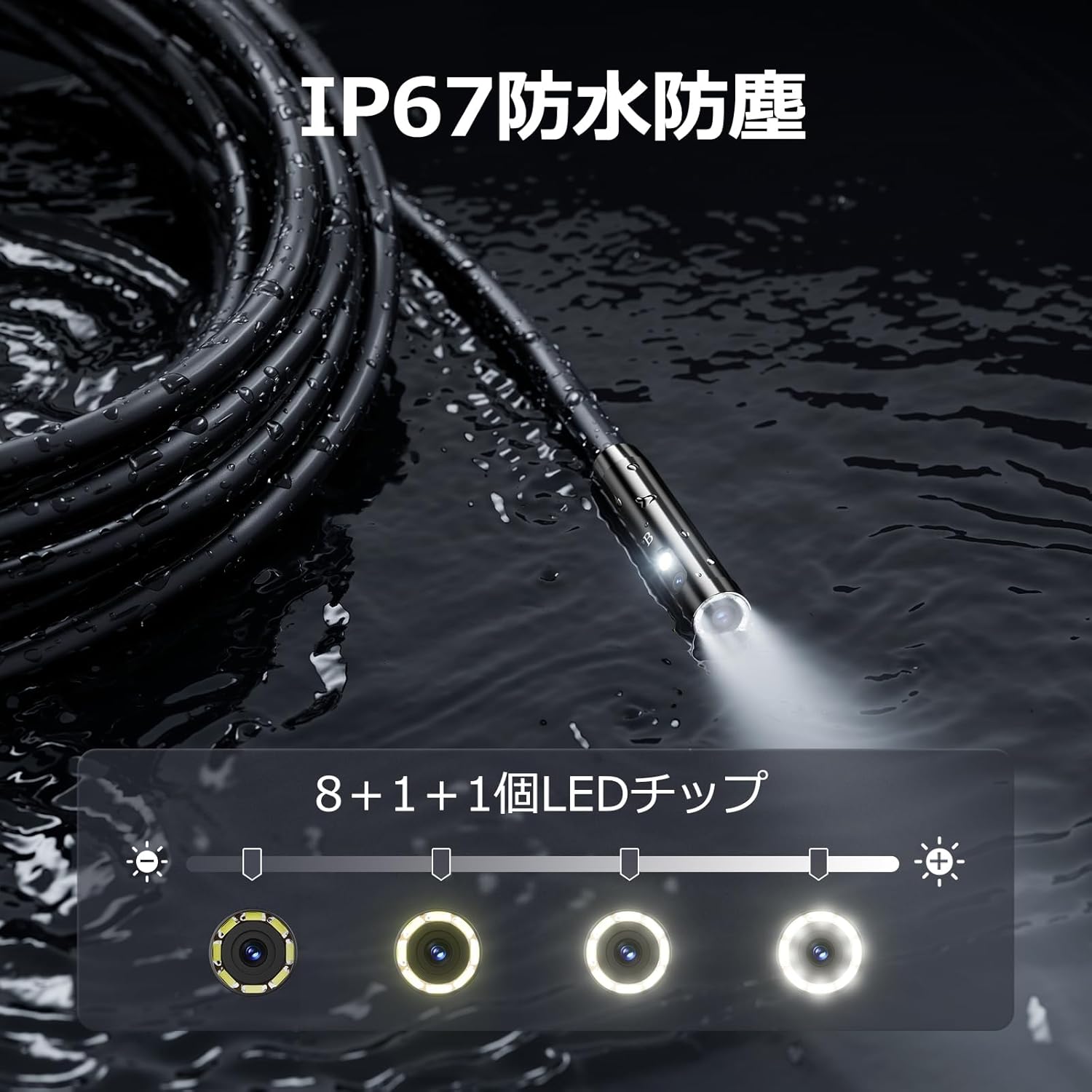
Figure 5.3: IP67 waterproof probe with adjustable LED illumination.
5.4 ການຖ່າຍຮູບ ແລະ ການບັນທຶກວິດີໂອ
Press the photo/video button (usually a camera icon) to capture a still image. To record video, press and hold the photo/video button; press again to stop recording. Ensure a Micro SD card is inserted to save your media.

Figure 5.4: Monitor interface for photo and video capture.
5.5 ການໝຸນໜ້າຈໍ
Press the screen rotation button (often a circular arrow icon) to rotate the image on the monitor by 180 degrees. This is useful when the probe is in an inverted position.
5.6 ການນຳໃຊ້ຕົວຈິງ
The DS620-TL is suitable for various tasks including home appliance maintenance, pipe inspection, wall wiring checks, and automotive repairs.

Figure 5.6: Various inspection scenarios for the endoscope.
5.7 ວິດີໂອສາທິດຜະລິດຕະພັນ
Video 5.7: A demonstration of the DEPSTECH DS620-TL endoscope camera in use, showcasing ຄຸນສົມບັດ ແລະ ແອັບພລິເຄຊັນຕ່າງໆ.
6. ບໍາລຸງຮັກສາ
6.1 Cleaning the Probe and Lens
After each use, especially in dirty or wet conditions, gently wipe the camera probe and lens with a soft, dry cloth. For stubborn dirt, a slightly damp cloth can be used, followed by drying. Do not use abrasive cleaners or solvents.
6.2 ການເກັບຮັກສາ
Store the endoscope camera in a cool, dry place, away from direct sunlight and extreme temperatures. Use the provided drawstring bag for protection. Ensure the cable is coiled neatly without sharp bends.
6.3 ການດູແລຫມໍ້ໄຟ
To prolong battery life, avoid fully discharging the device frequently. If storing for an extended period, charge the battery to approximately 50% every three months.
7. ການແກ້ໄຂບັນຫາ
7.1 ບໍ່ມີຮູບພາບໃນຫນ້າຈໍ
- ກວດໃຫ້ແນ່ໃຈວ່າອຸປະກອນເປີດ ແລະສາກເຕັມແລ້ວ.
- Check if the camera cable is securely connected to the monitor unit.
- Adjust the LED brightness to ensure adequate lighting in the inspection area.
7.2 Cannot Record Photos/Videos
- Verify that a compatible Micro SD card (Class 10/Class 10 or higher, 8-32GB) is inserted correctly.
- Check if the Micro SD card has sufficient free space.
- Ensure the Micro SD card is not locked (read-only).
- Try formatting the Micro SD card (this will erase all data).
7.3 ອຸປະກອນບໍ່ສາກໄຟ
- Ensure the Type-C charging cable is properly connected to both the device and the power source.
- Try using a different USB power adapter or charging cable.
- ກວດເບິ່ງພອດສາກໄຟສໍາລັບສິ່ງເສດເຫຼືອຫຼືຄວາມເສຍຫາຍໃດໆ.
If you encounter issues not listed here or if the problem persists, please contact DEPSTECH customer support.
8. ຂໍ້ມູນຈໍາເພາະ
| ຄຸນສົມບັດ | ຂໍ້ມູນຈໍາເພາະ |
|---|---|
| ຍີ່ຫໍ້ | DEPSTECH |
| ຊື່ຕົວແບບ | DS620TL-JP |
| ສີ | ດຳ |
| ລະດັບກັນນໍ້າ | IP67 |
| ປະເພດສື່ | SD Memory Card (8-32GB, Class 10/Class 10 or higher recommended) |
| File ຮູບແບບ | MP4, MOV, AVI, JPEG, RAW |
| ຮູບແບບການຖ່າຍຮູບວິດີໂອ | MP4 |
| Viewປະເພດ finder | IPS |
| ປະເພດເຊັນເຊີ | CMOS |
| ຄວາມລະອຽດເຊັນເຊີຮູບພາບ | 2.1 MP |
| ຟັງຊັນໂຟກັສ | ຈຸດສຸມຄົງທີ່ |
| ໂຟກັສອັດຕະໂນມັດ | ບໍ່ |
| ຊີວິດສະເລ່ຍຂອງຫມໍ້ໄຟ | 2 ຊົ່ວໂມງ |
| ອົງປະກອບລວມ | Type-C Cable, Attachments, Storage Drawstring Bag |
| ການຮັບປະກັນຜູ້ຜະລິດ | 2 ປີ |
| ປະເທດຕົ້ນກໍາເນີດ | ຈີນ |
9. ການຮັບປະກັນແລະການສະຫນັບສະຫນູນ
9.1 ການຮັບປະກັນຈາກຜູ້ຜະລິດ
The DEPSTECH DS620-TL comes with a 24-month manufacturer warranty. Your order number serves as proof of purchase for warranty claims.
9.2 ສະຫນັບສະຫນູນລູກຄ້າ
For any inquiries, technical assistance, or warranty claims, please contact our dedicated support team:
- ອີເມວ: support@depstech.com
- ເວລາຕອບສະໜອງ: We aim to respond to all inquiries within 24 hours. For requests submitted on weekends or holidays, a response will be provided on the next business day.

Figure 9.2: DEPSTECH support details.