
ແນະນຳ
Thank you for choosing the JOMAA Ergonomic Folding Bluetooth Keyboard. This manual provides detailed instructions for setting up, operating, and maintaining your keyboard to ensure optimal performance and longevity. Please read this manual thoroughly before use.
ເນື້ອໃນຊຸດ
- JOMAA Ergonomic Folding Bluetooth Keyboard (Model DF047)
- ສາຍສາກ USB-C
- ຄູ່ມືຜູ້ໃຊ້
ຕັ້ງຄ່າ
1. ກຳລັງສາກແປ້ນພິມ
Before first use, fully charge the keyboard. Connect the provided USB-C cable to the charging port on the keyboard and to a USB power source. The charging indicator light will illuminate during charging and turn off when fully charged.

Image: The keyboard connected to a USB-C charging cable, with LED indicators showing charging status.
2. ເປີດ / ປິດພະລັງງານ
Locate the power switch on the side of the keyboard. Slide the switch to the 'ON' position to power on the keyboard. Slide it to the 'OFF' position to power off.

Video: This video demonstrates the initial power-on sequence and connection methods for the keyboard.
3. ຮູບແບບການເຊື່ອມຕໍ່
The keyboard supports both Bluetooth and Wired USB connections.
Bluetooth Pairing (BT1/BT2/BT3)
- ກວດໃຫ້ແນ່ໃຈວ່າແປ້ນພິມເປີດຢູ່.
- ກົດຄ້າງໄວ້ Fn ກະແຈ ແລະ ໜຶ່ງໃນກະແຈຊ່ອງ Bluetooth (BT1, BT2, ຫຼື BT3) for 3-5 seconds until the corresponding Bluetooth indicator light flashes rapidly. This indicates pairing mode.
- On your device (PC, tablet, phone), enable Bluetooth and search for "Jomaa Keyboard" in the list of available devices.
- Select "Jomaa Keyboard" to connect. The indicator light will stop flashing and remain solid for a few seconds, then turn off, indicating a successful connection.
- ເພື່ອສະຫຼັບລະຫວ່າງອຸປະກອນທີ່ຈັບຄູ່ແລ້ວ, ພຽງແຕ່ກົດ Fn + BT1/BT2/BT3.
ໂໝດ USB ແບບມີສາຍ
The keyboard can also be used in wired mode. Connect the USB-C cable to the keyboard and the other end to your computer's USB port. The keyboard will automatically switch to wired mode.
Video: This video illustrates the process of connecting the keyboard using a wired USB connection.
ຄໍາແນະນໍາການດໍາເນີນງານ
1. Ergonomic Design and Usage
The keyboard features a split, ergonomic design to promote a more natural hand and wrist posture, reducing strain during extended typing sessions. When unfolded, ensure the keyboard is placed on a flat, stable surface.
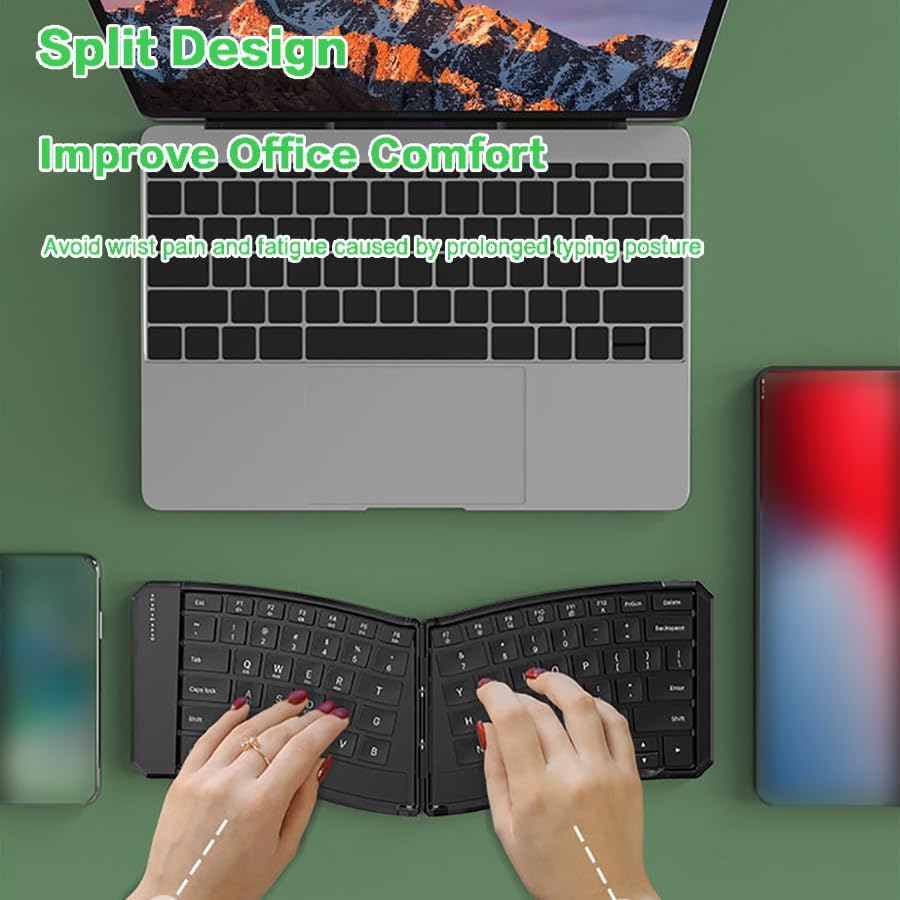
Image: A user typing on the split ergonomic keyboard, demonstrating comfortable hand placement.
2. ການສະຫຼັບຫຼາຍອຸປະກອນ
The keyboard allows seamless switching between up to three paired Bluetooth devices. Simply press Fn + BT1, Fn + BT2, ຫຼື Fn + BT3 ເພື່ອສະຫຼັບໄປຫາອຸປະກອນທີ່ສອດຄ້ອງກັນ.
Video: This video shows how to switch between multiple devices connected to the keyboard via Bluetooth.
3. Function Keys and Shortcuts
The top row of keys (F1-F12) includes multimedia and system control functions. These functions are accessed by pressing the Fn ປຸ່ມຮ່ວມກັບປຸ່ມ F ທີ່ຕ້ອງການ.
- Fn+F1-F12: Multimedia controls (e.g., volume, play/pause, brightness).
- ຕົວຊີ້ວັດ Caps Lock: An LED indicator above the Caps Lock key illuminates when Caps Lock is active.
- ການປ່ຽນວິທີການປ້ອນຂໍ້ມູນ: ໃຊ້ Ctrl+Space or Alt+Shift for seamless input method switching on compatible operating systems.
4. ຄວາມເຂົ້າກັນໄດ້
The JOMAA keyboard is compatible with a wide range of operating systems:
- Windows
- iOS
- Android
- Mac
ບໍາລຸງຮັກສາ
1. ທໍາຄວາມສະອາດ
ເພື່ອທຳຄວາມສະອາດແປ້ນພິມ, ໃຫ້ປິດມັນ ແລະ ຖອດສາຍໄຟອອກ. ໃຊ້ຜ້າອ່ອນໆທີ່ບໍ່ມີຂົນເຊັດເບົາໆ.ampened with water or a mild cleaning solution. Avoid excessive moisture and abrasive cleaners. Do not spray cleaners directly onto the keyboard.
2. ການເກັບຮັກສາແລະ Portability
The keyboard's folding design makes it highly portable. When not in use, fold the keyboard to protect the keys and reduce its footprint. The keyboard includes a locking mechanism to keep it flat when unfolded for stable use.

Image: The folded keyboard being stored in a backpack, highlighting its compact size for travel.
3. ການດູແລຫມໍ້ໄຟ
The keyboard features a built-in rechargeable battery and an auto-sleep mode (after 10 minutes of inactivity) to conserve power. For optimal battery life, avoid fully discharging the battery frequently and store the keyboard in a cool, dry place.
ການແກ້ໄຂບັນຫາ
| ບັນຫາ | ການແກ້ໄຂ |
|---|---|
| ແປ້ນພິມບໍ່ເປີດ. | Ensure the power switch is in the 'ON' position. Charge the keyboard for at least 2 hours. |
| ບໍ່ສາມາດເຊື່ອມຕໍ່ຜ່ານ Bluetooth ໄດ້. | Ensure the keyboard is in pairing mode (flashing BT indicator). Check your device's Bluetooth settings. Forget and re-pair the keyboard if necessary. Ensure no other devices are actively connected to the selected BT channel. |
| ຄີບໍ່ຕອບສະໜອງ. | Check battery level. Reconnect the keyboard (Bluetooth or wired). Restart your device. |
| ແປ້ນພິມມັກຈະຕັດການເຊື່ອມຕໍ່. | Ensure the keyboard is within range of your device. Check for interference from other wireless devices. Charge the keyboard. |
ຂໍ້ມູນຈໍາເພາະ
- ຕົວແບບ: DF047
- ການເຊື່ອມຕໍ່: Bluetooth (BT1, BT2, BT3), Wired USB
- ຄວາມເຂົ້າກັນໄດ້: Windows, iOS, Android, Mac
- ແບັດເຕີຣີ: 140mAh Rechargeable (1 9V battery included)
- ປະຈຸບັນປະຕິບັດການ: <3.5 mA
- ໂໝດການນອນອັດຕະໂນມັດ: ຫຼັງຈາກ 10 ນາທີທີ່ບໍ່ມີການເຄື່ອນໄຫວ
- ຂະໜາດຜະລິດຕະພັນ (ເມື່ອບໍ່ໄດ້ພັບ): ຂະໜາດປະມານ 14.05 x 4.80 x 0.73 ນິ້ວ (35.7 x 12.2 x 1.85 cm)
- ນ້ໍາຫນັກລາຍການ: 9.2 ອອນສ໌ (256g)
- ວັດສະດຸ: ພາດສະຕິກ

Image: A diagram illustrating the physical dimensions of the keyboard when unfolded.
ການຮັບປະກັນແລະການສະຫນັບສະຫນູນ
JOMAA products come with a standard manufacturer's warranty. For detailed warranty information, technical support, or service inquiries, please refer to the warranty card included with your product or visit the official JOMAA webເວັບໄຊ. ກະລຸນາຮັກສາຫຼັກຖານການຊື້ຂອງທ່ານສໍາລັບການຮຽກຮ້ອງການຮັບປະກັນ.