
1. ບົດແນະນຳ
The LAMTTO 2-in-1 Wireless CarPlay and Android Auto Adapter converts your vehicle's wired CarPlay or Android Auto system into a wireless solution. This device allows for convenient access to navigation, music, phone calls, and voice assistants like Siri or Google Assistant without the need for a physical cable connection to your smartphone.
ເນື້ອໃນຊຸດ:
- 1 x 2-in-1 Wireless CarPlay and Android Auto Adapter
- 1 x USB-A ກັບ USB-C ອະແດບເຕີ
- 1 x ຄູ່ມືຜູ້ໃຊ້
2. ຂໍ້ມູນຄວາມປອດໄພ
ຄໍາແນະນໍາຄວາມປອດໄພທີ່ສໍາຄັນ:
- When operating this wireless adapter, interference with other nearby wireless devices may occur.
- Ensure compliance with battery handling instructions (if applicable to connected devices).
- ຢ່າເຮັດໃຫ້ອຸປະກອນຢູ່ໃນອຸນຫະພູມ ຫຼືຄວາມຊຸ່ມຊື່ນທີ່ສຸດ.
3. ຜະລິດຕະພັນເກີນview
The LAMTTO 2-in-1 adapter features a high-performance 5.8 GHz chip for faster processing and a stable connection. Its compact design allows for discreet installation, maintaining a tidy vehicle interior. The device supports both USB-A and USB-C ports for flexible connectivity.

Figure 3.1: Compact design of the LAMTTO adapter.

Figure 3.2: Internal components and connection speed.
4. ຄູ່ມືການຕິດຕັ້ງ
The adapter offers a simple Plug & Play setup process. No applications or drivers are required.
- ເຊື່ອມຕໍ່ອະແດບເຕີ: Plug the adapter into your car's USB data port (either USB-A or USB-C, using the provided adapter if necessary).
- Activate Bluetooth and Wi-Fi: ໃນໂທລະສັບສະຫຼາດຂອງທ່ານ, ເປີດໃຊ້ທັງ Wi-Fi ແລະ Bluetooth.
- ຈັບຄູ່ກັບ Bluetooth: Open your smartphone's Bluetooth interface, search for the adapter's Bluetooth name, and select "Connect."
- ເຊື່ອມຕໍ່ຄືນໃໝ່ອັດຕະໂນມັດ: After the initial connection, the device will automatically connect to your vehicle each time you start the car.
ໝາຍເຫດ: The connection method for both CarPlay and Android Auto is identical.

Figure 4.1: Step-by-step setup and control methods.
5. ຄໍາແນະນໍາການດໍາເນີນງານ
Once connected, the adapter enables wireless access to your smartphone's features through your car's infotainment system. You can control functions using the car's original controls.
- ການຄວບຄຸມດ້ວຍສຽງ: ໃຊ້ Siri ຫຼື Google Assistant ສຳລັບການໃຊ້ງານແບບບໍ່ຕ້ອງໃຊ້ມື.
- ການນໍາທາງ: Access map applications like Waze or Apple Maps.
- ການຫຼິ້ນເພງ: Stream music from apps like Spotify.
- ໂທລະສັບ: Make and receive calls directly through the car's system.
- Vehicle Controls: The adapter integrates seamlessly with your car's steering wheel buttons, touchscreen, and factory knobs.
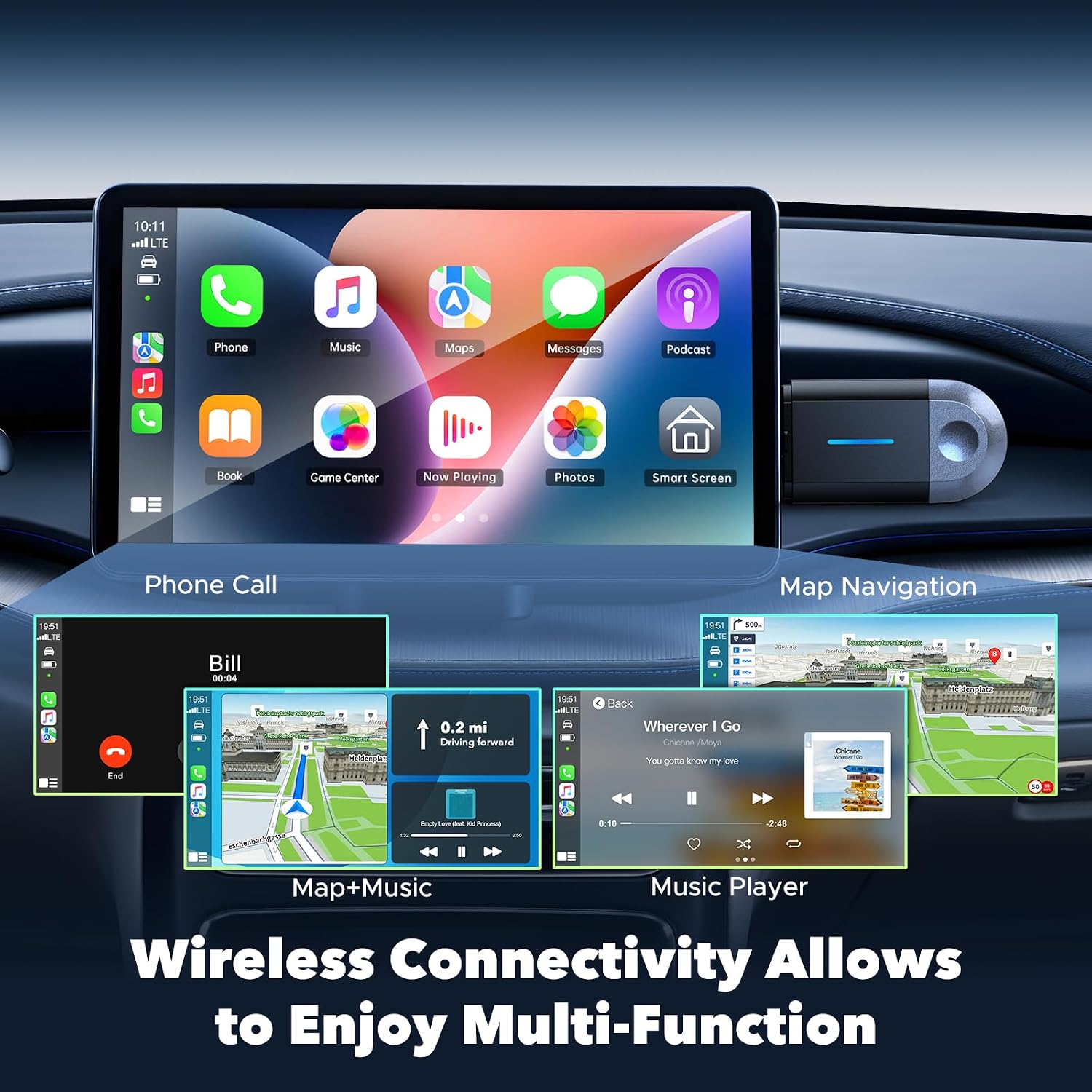
Figure 5.1: Wireless multi-function display on car screen.
6. Firmware Update (OTA)
The adapter supports Over-The-Air (OTA) firmware updates to ensure optimal performance and compatibility. To update the firmware:
- Connect your smartphone to the adapter's Wi-Fi network.
- Open a mobile browser on your smartphone.
- ໃສ່ທີ່ຢູ່ 192.168.1.101 in the browser's address bar.
- ປະຕິບັດຕາມຄໍາແນະນໍາໃນຫນ້າຈໍເພື່ອກວດເບິ່ງແລະຕິດຕັ້ງການອັບເດດທີ່ມີຢູ່.

Figure 6.1: OTA firmware update interface.
7. ຄວາມເຂົ້າກັນໄດ້
The LAMTTO 2-in-1 Wireless CarPlay and Android Auto Adapter is designed for wide compatibility.
- ຄວາມເຂົ້າກັນໄດ້ຂອງສະມາດໂຟນ: Supports iPhone 8 or newer (iOS 11+) and Android phones with Android 11+.
- ຄວາມເຂົ້າກັນໄດ້ຂອງຍານພາຫະນະ: Compatible with over 98% of vehicles equipped with factory-wired Apple CarPlay and Android Auto from the year 2016 onwards. This includes brands such as Ford, Audi, Toyota, VW, and more.
- Incompatible Vehicles: Not compatible with BM-W, Ben-z, or Tes-la vehicles. Not compatible with Huawei phones.

Figure 7.1: Device and vehicle compatibility overview.
8. ການແກ້ໄຂບັນຫາ
If the device experiences abnormal operation:
- Perform a restart by unplugging the adapter and then reinserting it into the car's USB port.
- Ensure your smartphone's Wi-Fi and Bluetooth are active and properly paired.
- Check for any available firmware updates as described in Section 6.
9. ຂໍ້ມູນຈໍາເພາະ
| ຄຸນສົມບັດ | ຂໍ້ມູນຈໍາເພາະ |
|---|---|
| ຍີ່ຫໍ້ | LAMTTO |
| ຊື່ຕົວແບບ | carplay wireless adapter |
| ເຕັກໂນໂລຊີການເຊື່ອມຕໍ່ | Bluetooth, 802.11ac (5.8 GHz WLAN) |
| ແຫຼ່ງພະລັງງານ | Corded Electric (via car's USB port) |
| ວັດສະດຸ | ພາດສະຕິກ |
| ນ້ຳໜັກສິນຄ້າ | 20 ກຣາມ |
| ສີ | ດຳ |
| ອຸປະກອນທີ່ເຂົ້າກັນໄດ້ | Smartphones with iOS 10+ and Android 11+ |
| ປະເພດການຕິດຕັ້ງ | Wall Mount (refers to compact, discreet placement) |
| ປະເພດການຕິດຕັ້ງ | ໄຮ້ສາຍ |
| ປະເພດຕົວເຊື່ອມຕໍ່ | USB Type C (with included USB-A adapter) |
| ວິທີການຄວບຄຸມ | ສຽງ |
| ປະເພດສຽງອອກ | Bluetooth, ຕົວຊ່ວຍ |
| ຮູບແບບການອອກສຽງ | ສະເຕຣິໂອ |
| ຮູບແບບທີ່ຮອງຮັບ | Bluetooth 5.3, IEEE 802.11ac |
| ຄໍາຮ້ອງສະຫມັກທີ່ສະຫນັບສະຫນູນ | Spotify, Waze, Apple Maps, other CarPlay/Android Auto compatible audio apps |
10. ການຮັບປະກັນແລະການສະຫນັບສະຫນູນ
The LAMTTO 2-in-1 Wireless CarPlay and Android Auto Adapter comes with a 24-month warranty. For any product inquiries or technical assistance, please contact customer support. Support is available 24/7.