
ແນະນຳ
Thank you for choosing the ProtoArc KM310 Wireless Mechanical Keyboard and Mouse. This combo offers a responsive typing experience with low-profile linear red switches and versatile multi-device connectivity. The ergonomic mouse is designed for comfort and precision. This manual provides detailed instructions for setup, operation, maintenance, and troubleshooting to ensure optimal performance.
ແມ່ນຫຍັງຢູ່ໃນກ່ອງ

Image: Contents of the ProtoArc KM310 package, including the keyboard, mouse, charging cable, and user manual.
- ແປ້ນພິມກົນຈັກໄຮ້ສາຍ ProtoArc KM310
- ເມົ້າໄຮ້ສາຍ ProtoArc
- ສາຍສາກ USB-C
- ຄູ່ມືຜູ້ໃຊ້
ສິນຄ້າເກີນview
ຄຸນນະສົມບັດແປ້ນພິມ

ຮູບພາບ: A close-up view of the ProtoArc KM310 keyboard, highlighting its low-profile keys and linear red switches.
- Pro ຕ່ ຳfile ກະແຈກົນຈັກ: Equipped with linear red switches for a smooth, quiet, and responsive typing experience.
- Aluminum Top Case: Provides durability and a sleek, modern aesthetic.
- ຂາອຽງທີ່ສາມາດປັບໄດ້: Ergonomically designed with 2-stage foot mats offering 6° and 9° tilt options for comfortable typing.
- ໂຄງຮ່າງຂະໜາດເຕັມ: A 108-key layout suitable for office and business use.
ຄຸນນະສົມບັດຫນູ

Image: The ProtoArc KM310 mouse being held, showcasing its ergonomic design for a natural grip.
- 63G Ultra-Lightweight: Reduces hand fatigue during extended use and enhances portability.
- ການອອກແບບ Ergonomic: Contoured shape for a comfortable and natural grip.
- DPI ທີ່ສາມາດປັບໄດ້: Three DPI levels (1000/1600/2400) for tailored control and precision.
- Silent Click: ຖືກອອກແບບມາສໍາລັບການດໍາເນີນງານທີ່ງຽບສະຫງົບ.
- ປຸ່ມໄປໜ້າ/ກັບຫຼັງ: Integrated for seamless browsing.
ການເຊື່ອມຕໍ່ ແລະພະລັງງານ
- ການເຊື່ອມຕໍ່ຫຼາຍອຸປະກອນ: Connects up to 3 devices via 2.4G USB receiver or Dual Bluetooth (BT1, BT2).
- ສາມາດສາກໄຟໄດ້: Both keyboard and mouse feature Type-C charging. The mouse's USB receiver is stored on its bottom.
- ຊີວິດຫມໍ້ໄຟຍາວ: Up to 150-200 days standby time; 2-3 hours for a full charge.
ຄໍາແນະນໍາການຕິດຕັ້ງ
1. ການສາກໄຟອຸປະກອນ

Image: The keyboard and mouse are shown connected to power sources via USB-C cables for charging.
- ເຊື່ອມຕໍ່ສາຍສາກໄຟ USB-C ທີ່ໃຫ້ມາເຂົ້າກັບພອດສາກໄຟຢູ່ເທິງແປ້ນພິມ (ຕັ້ງຢູ່ແຄມດ້ານເທິງ) ແລະເມົ້າ (ຕັ້ງຢູ່ແຄມດ້ານໜ້າ).
- Plug the other end of the cable into a USB power source (e.g., computer USB port, USB wall adapter).
- The indicator lights will show charging status. Allow 2-3 hours for a full charge.
2. ການເຊື່ອມຕໍ່ກັບອຸປະກອນ

Image: A desk setup showing the ProtoArc KM310 keyboard and mouse connected to a laptop, monitor, and tablet, illustrating multi-device capability.
The KM310 combo supports three connection modes: 2.4G wireless via USB receiver, Bluetooth 1 (BT1), and Bluetooth 2 (BT2).
2.1. ການເຊື່ອມຕໍ່ໄຮ້ສາຍ 2.4G
- ຊອກຫາຕົວຮັບສັນຍານ USB ທີ່ເກັບໄວ້ໃນຊ່ອງທີ່ຢູ່ດ້ານລຸ່ມຂອງເມົ້າ.
- ສຽບຕົວຮັບ USB ເຂົ້າໄປໃນຜອດ USB ທີ່ມີຢູ່ໃນຄອມພິວເຕີຂອງທ່ານ.
- ເປີດແປ້ນພິມ ແລະເມົ້າໂດຍໃຊ້ສະວິດໄຟຕາມລໍາດັບ.
- The devices should connect automatically.
2.2. ການເຊື່ອມຕໍ່ Bluetooth (BT1 / BT2)
- ເປີດແປ້ນພິມແລະຫນູ.
- ໃນແປ້ນພິມ, ກົດປຸ່ມ BT1 or BT2 key (usually located on the number pad, indicated by orange keycaps) to select the desired Bluetooth channel. The indicator light will flash.
- On your device (computer, tablet, etc.), go to Bluetooth settings and search for "ProtoArc KM310 Keyboard" and "ProtoArc KM310 Mouse".
- Select the devices to pair. The indicator light will stop flashing once connected.
- ເຮັດຊ້ຳອີກສຳລັບອຸປະກອນ Bluetooth ທີສອງໂດຍໃຊ້ຊ່ອງ BT ອື່ນ.
2.3. ສະຫຼັບລະຫວ່າງອຸປະກອນ
To switch between connected devices, simply press the corresponding connection key on the keyboard (2.4G, BT1, or BT2) and the channel switch button on the bottom of the mouse.
ຄໍາແນະນໍາການດໍາເນີນງານ
ການນໍາໃຊ້ແປ້ນພິມ
- ພິມ: ຕ່ຳສຸດfile linear red switches provide a responsive and quiet typing experience.
- ຄວາມເຂົ້າກັນໄດ້ຂອງລະບົບປະຕິບັດການ: The keyboard is compatible with Windows and Mac OS. Keys like 'Win' and 'Alt' also show 'Option' and 'Cmd' for Mac users.
- ການປັບອຽງ: Use the adjustable tilt legs on the underside of the keyboard to set your preferred typing angle (6° or 9°).
ການນໍາໃຊ້ຫນູ
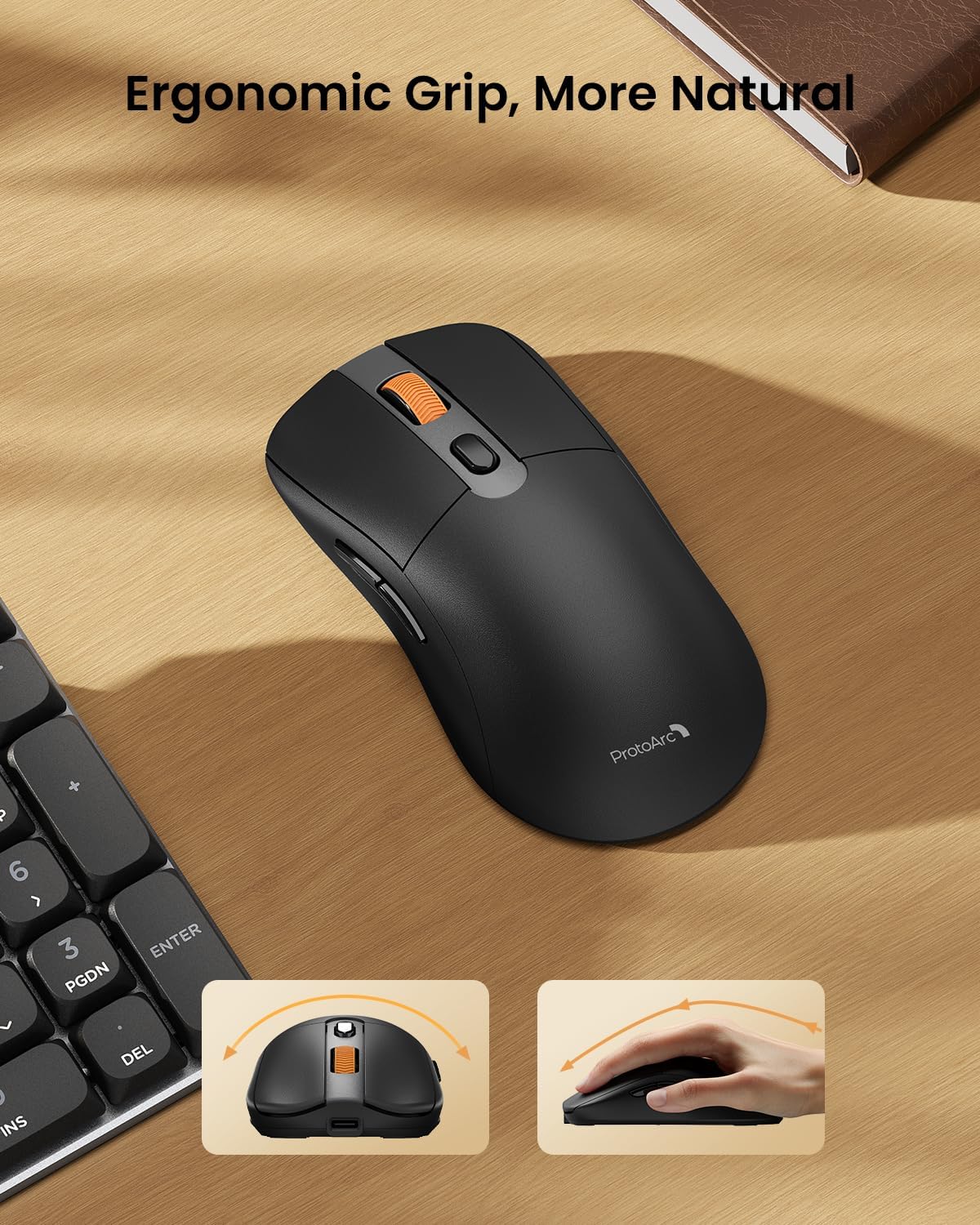
Image: A close-up of the ProtoArc KM310 mouse, illustrating the three adjustable DPI settings (1000, 1600, 2400).
- ການປັບ DPI: Press the DPI switch button (usually located near the scroll wheel) to cycle through the 3 DPI levels (1000/1600/2400) to match your preference for cursor speed and precision.
- ປຸ່ມນຳທາງ: ໃຊ້ປຸ່ມໄປໜ້າ ແລະ ກັບຫຼັງຢູ່ດ້ານຂ້າງຂອງເມົ້າເພື່ອການນຳທາງໄວໃນ web ຕົວທ່ອງເວັບຫຼື file ນັກສຳຫຼວດ.
- ການຄລິກທີ່ງຽບໆ: The mouse features silent click buttons for a quiet working environment.
ບໍາລຸງຮັກສາ
- ທໍາຄວາມສະອາດ: ໃຊ້ຜ້າອ່ອນໆແຫ້ງເຊັດແປ້ນພິມ ແລະ ເມົ້າສ໌. ສຳລັບຝຸ່ນທີ່ຝັງແໜ້ນ, ໃຫ້ເຊັດອອກເລັກນ້ອຍamp ຜ້າທີ່ມີສະບູອ່ອນສາມາດໃຊ້ໄດ້, ຮັບປະກັນວ່າບໍ່ມີຂອງແຫຼວເຂົ້າໄປໃນອຸປະກອນ.
- ການດູແລຫມໍ້ໄຟ: Recharge the devices when the battery indicator is low. Avoid prolonged exposure to extreme temperatures.
- ການເກັບຮັກສາ: When not in use for extended periods, turn off the devices to conserve battery life. Store the USB receiver inside the mouse to prevent loss.
ການແກ້ໄຂບັນຫາ
Keyboard/Mouse Not Turning On or Stopping Working
- ກວດສອບຫມໍ້ໄຟ: Ensure both the keyboard and mouse are sufficiently charged. Connect them to a power source using the USB-C cable.
- ສ້ອມແປງອຸປະກອນຄືນໃໝ່:
- For 2.4G connection, ensure the USB receiver is securely plugged in and the devices are set to 2.4G mode.
- For Bluetooth connection, ensure the devices are set to the correct BT channel (BT1 or BT2) and re-pair them through your device's Bluetooth settings.
- ລອງໃຊ້ສາຍຕ່າງກັນ: If charging issues persist, try using a different USB-C cable to rule out a faulty cable.
- ແຊກແຊງ: Move the devices closer to your computer or away from other wireless devices that might cause interference.
- ຕິດຕໍ່ສະຫນັບສະຫນູນ: If the issue persists, please contact ProtoArc customer support for further assistance.
ຂໍ້ມູນຈໍາເພາະ
| ໝາຍເລກຕົວແບບ | KM310 |
| ຍີ່ຫໍ້ | ProtoArc |
| ສີ | Space Grey |
| ເຕັກໂນໂລຊີການເຊື່ອມຕໍ່ | Bluetooth, USB (2.4G Wireless) |
| ຄຸນນະສົມບັດພິເສດ | Pro ຕໍ່າfile Keys, Linear Red Switches, Ergonomic Design, Ultra-Light Mouse, Ergonomic Mouse |
| ອຸປະກອນທີ່ເຂົ້າກັນໄດ້ | Laptop, Personal Computer, Tablet (Windows 7/8/10, Mac OS X 10.12, Android 4.3 or higher) |
| ນ້ໍາຫນັກລາຍການ | 2.31 ປອນ |
| ຂະໜາດແພັກເກັດ | 17.68 x 8.07 x 2.05 ນິ້ວ |
ການຮັບປະກັນ & ສະຫນັບສະຫນູນ
The ProtoArc KM310 Mechanical Keyboard and Mouse combo comes with a ຮັບປະກັນ 2 ປີ.
For any questions, technical support, or warranty claims, please contact ProtoArc customer service:
- ອີເມວ: support@protoarc.com
- ໂທລະສັບ: +1 866-287-8188
ວິດີໂອຜະລິດຕະພັນຢ່າງເປັນທາງການ
ວິດີໂອ: ວິດີໂອຜະລິດຕະພັນຢ່າງເປັນທາງການ showcasing the features and design of the ProtoArc KM310 Aluminum Mechanical Keyboard and Mouse.