
ແນະນຳ
The Fender Mustang LTX50 is a versatile 50-watt modeling combo amplifier designed for guitarists seeking a wide range of authentic Fender tones and modern features. Equipped with a 12-inch Celestion G12P-80 speaker, it delivers dynamic sound suitable for practice, rehearsal, and performance. This amplifier offers 25 amp models and 25 effects, covering various musical styles from clean to high-gain. Its intuitive color display, onboard tuner, and 100 user preset slots provide easy customization and quick access to your preferred sounds. The Mustang LTX50 also features Bluetooth audio streaming for playing along with tracks and USB-C connectivity for direct recording and monitoring.
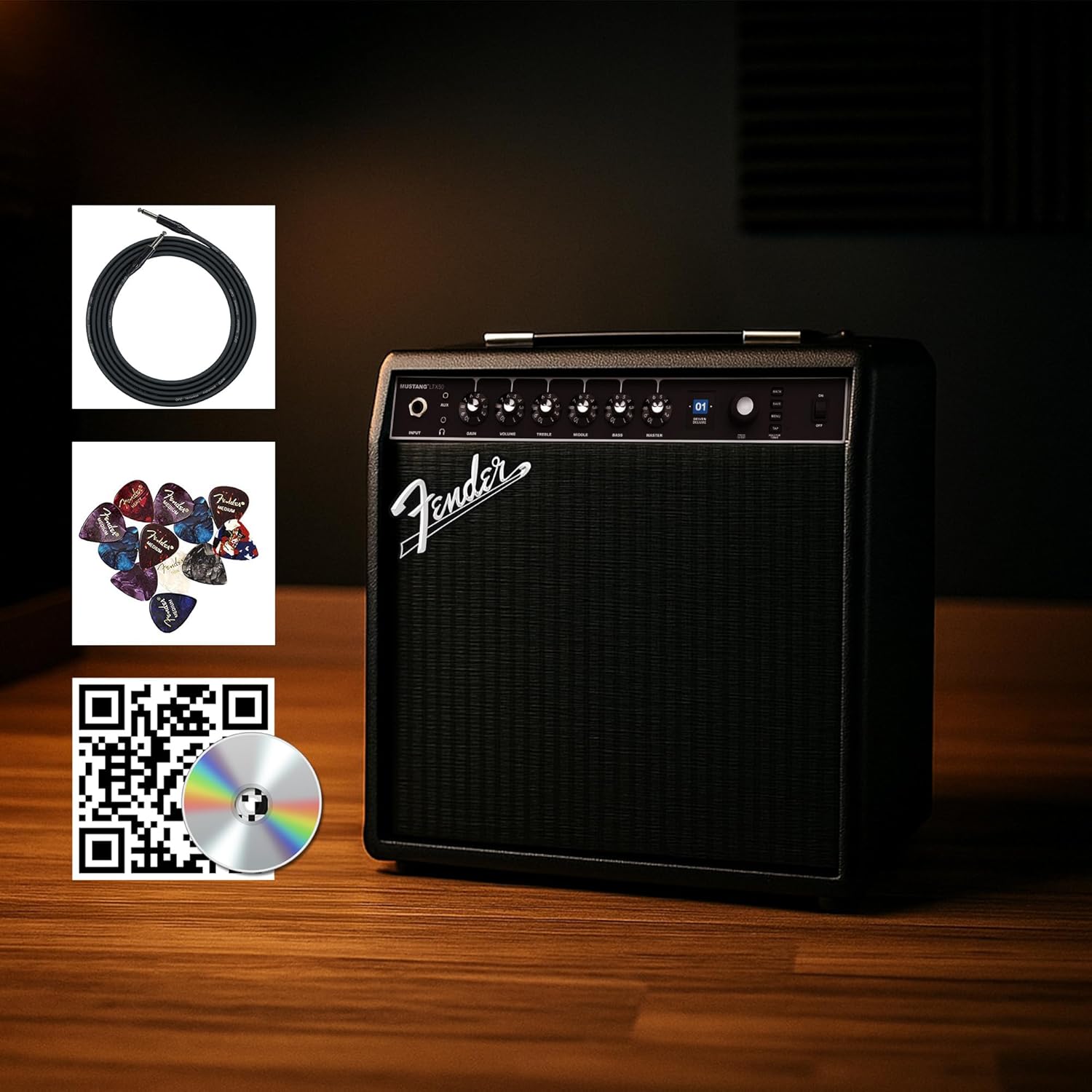
Figure 1: Fender Mustang LTX50 Guitar Combo Ampເຄື່ອງໃຊ້ໄຟຟ້າພ້ອມອຸປະກອນເສີມທີ່ລວມຢູ່.
ຕັ້ງຄ່າ
1. Unboxing ແລະການກວດກາເບື້ອງຕົ້ນ
- ລະມັດລະວັງເອົາ amplifier and all accessories from the packaging.
- ກວດກາ amplifier for any signs of damage that may have occurred during shipping.
- Confirm all included items are present: Mustang LTX50 amplifier, power cord, instrument cable, 12-pack guitar picks, and instructional DVD.
2. ການເຊື່ອມຕໍ່ພະລັງງານ
- ຮັບປະກັນ ampສະວິດໄຟຂອງເຄື່ອງປັບອາກາດຢູ່ໃນຕຳແໜ່ງປິດ.
- Connect the included power cord to the AC input on the rear panel of the ampມີຊີວິດຊີວາ.
- ສຽບສາຍໄຟອີກດ້ານໜຶ່ງເຂົ້າໄປໃນປ້ຳໄຟຟ້າທີ່ມີສາຍດິນ.
3. Connecting Your Guitar
- Use the included instrument cable to connect your guitar to the ປ້ອນຂໍ້ມູນ jack on the front panel of the ampມີຊີວິດຊີວາ.
4. ການຄວບຄຸມພື້ນຖານview
Familiarize yourself with the front panel controls before powering on the ampມີຊີວິດຊີວາ.
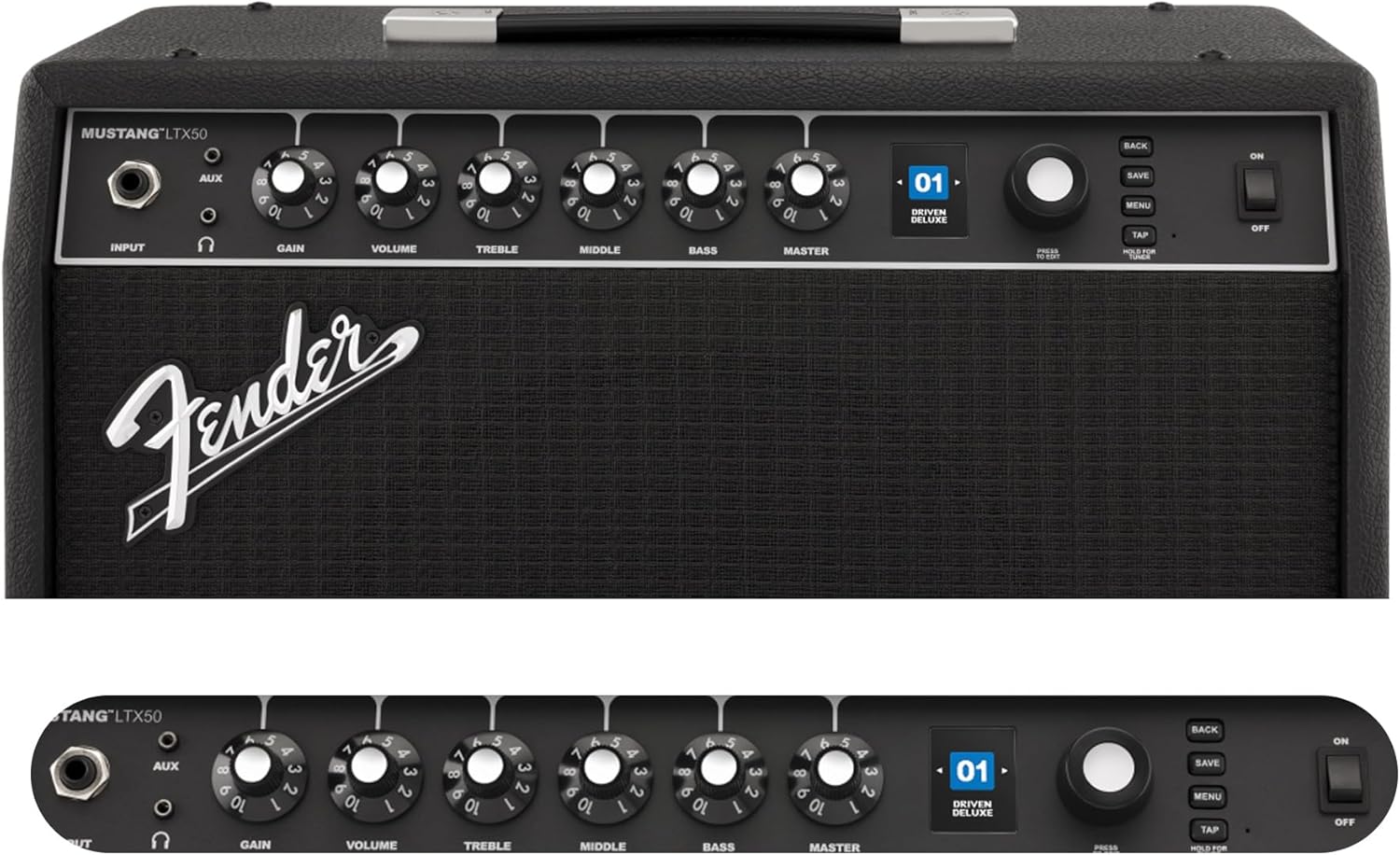
Figure 2: Front Panel Controls of the Mustang LTX50.
ຄໍາແນະນໍາການດໍາເນີນງານ
1. ເປີດ / ປິດພະລັງງານ
- To power on, ensure all volume controls are set to minimum, then flip the ພະລັງງານ ປ່ຽນໄປ ຕຳ ແໜ່ງ ON.
- ເພື່ອປິດເຄື່ອງ, ໃຫ້ພິກປຸ່ມ ພະລັງງານ ສະຫຼັບກັບຕໍາແຫນ່ງ OFF.
2. Navigating Presets
- ໃຊ້ ຕົວເຂົ້າລະຫັດ knob (large rotary knob) to scroll through the 100 available presets (70 factory, 30 user).
- ກົດ ຕົວເຂົ້າລະຫັດ knob to select a preset.
- The color LCD displays the current preset number and name.
3. Adjusting Amp ແບບຈໍາລອງແລະຜົນກະທົບ
- ກົດ ເມນູ ປຸ່ມເພື່ອເຂົ້າເຖິງ ampການຕັ້ງຄ່າຂອງ lififier.
- Navigate through options like AMP, STOMP, MOD, DELAY, REVERB using the ຕົວເຂົ້າລະຫັດ.
- Select an option and use the ຕົວເຂົ້າລະຫັດ to choose different amp models or effects.
- Adjust parameters for each effect using the smaller control knobs (GAIN, VOLUME, TREBLE, MIDDLE, BASS, MASTER) or by selecting parameters on the display.
- ກົດ ບັນທຶກ to store your customized preset.
4. ການນໍາໃຊ້ຕົວ Tuner ໃນຕົວ
- ກົດຄ້າງໄວ້ ແຕະ button to activate the chromatic tuner.
- Play a single note on your guitar; the display will show the note and indicate if it is sharp, flat, or in tune.
- Press any button or play for a few seconds to exit tuner mode.
5. Fender Tone 3.0 App Control
- Download the Fender Tone 3.0 app from your device's app store (iOS/Android).
- ເປີດໃຊ້ Bluetooth ໃນອຸປະກອນມືຖືຂອງທ່ານ.
- ສຸດ ampເຄື່ອງເປີດ, ກົດ ເມນູ button, navigate to "Bluetooth," and select "Pair."
- Select "Mustang LTX50" from your device's Bluetooth settings to connect.
- Use the app to wirelessly create, edit, save, and share presets, and to manage your ampການຕັ້ງຄ່າ lifier.
6. Playing Along with Audio (Bluetooth)
- Once paired via Bluetooth, you can stream audio from your mobile device directly to the ampມີຊີວິດຊີວາ.
- Adjust the volume of the streamed audio from your mobile device.
- Alternatively, connect an external audio source to the AUX ໃນ jack on the front panel using a 3.5mm stereo cable.
7. Recording via USB-C
- Connect a USB-C cable from the amplifier's USB-C port to your computer (Mac or PC).
- ໄດ້ amplifier functions as a bidirectional audio interface, allowing direct recording and monitoring.
- Refer to your Digital Audio Workstation (DAW) software's manual for specific setup instructions.
ບໍາລຸງຮັກສາ
1. ທໍາຄວາມສະອາດ
- ຕັດການເຊື່ອມຕໍ່ amplifier from power before cleaning.
- ໃຊ້ຜ້າອ່ອນແລະແຫ້ງເຊັດພື້ນຜິວພາຍນອກ.
- ສໍາລັບຝຸ່ນ stubborn, a ເລັກນ້ອຍ damp ຜ້າທີ່ມີສະບູອ່ອນສາມາດໃຊ້ໄດ້, ປະຕິບັດຕາມດ້ວຍຜ້າແຫ້ງ.
- ຫຼີກເວັ້ນການໃຊ້ເຄື່ອງເຮັດຄວາມສະອາດຂັດ, ສານລະລາຍ, ຫຼືຂີ້ເຜີ້ງ, ເພາະວ່າສິ່ງເຫຼົ່ານີ້ສາມາດທໍາລາຍການສໍາເລັດຮູບ.
2. ການເກັບຮັກສາ
- ເກັບຮັກສາໄວ້ amplifier ໃນບ່ອນທີ່ເຢັນ, ແຫ້ງແລ້ງຫ່າງຈາກແສງແດດໂດຍກົງແລະອຸນຫະພູມທີ່ຮ້າຍໄປ.
- Avoid storing in areas with high humidity.
- If storing for extended periods, cover the amplifier ເພື່ອປົກປ້ອງມັນຈາກຂີ້ຝຸ່ນ.
3. Safety Warnings (Proposition 65)
This product may contain chemicals known to the State of California to cause cancer, birth defects, or other reproductive harm. For more information, visit www.P65 ຂໍ້ຄວນລະວັງ.
ການແກ້ໄຂບັນຫາ
ບໍ່ມີສຽງ
- ຮັບປະກັນ amplifier is powered on and the power cord is securely connected.
- Check that your guitar is properly connected to the ປ້ອນຂໍ້ມູນ jack.
- ກວດສອບວ່າ ອາຈານ volume and individual preset volume controls are not set to zero.
- Test with a different instrument cable and guitar to rule out faulty equipment.
- If using headphones, ensure they are fully plugged into the headphone jack and that the main speaker is not muted.
ບິດເບືອນຫຼືສິ່ງລົບກວນທີ່ບໍ່ຕ້ອງການ
- ກວດສອບການຄວບຄຸມລະດັບສຽງ ແລະ ສຽງຂອງກີຕ້າຂອງທ່ານ.
- ຫຼຸດຜ່ອນ ໄດ້ຮັບ ຕັ້ງຢູ່ ampມີຊີວິດຊີວາ.
- Ensure your instrument cable is not damaged or poorly shielded.
- Try a different power outlet to rule out electrical interference.
- If using high-gain amp models, some distortion is inherent. Adjust settings accordingly.
ບັນຫາການເຊື່ອມຕໍ່ Bluetooth
- Ensure Bluetooth is enabled on both your mobile device and the ampມີຊີວິດຊີວາ.
- ໃຫ້ແນ່ໃຈວ່າ amplifier is in pairing mode (refer to "Fender Tone 3.0 App Control" section).
- Move your mobile device closer to the ampມີຊີວິດຊີວາ.
- ລອງຍົກເລີກການຈັບຄູ່ ແລະຈັບຄູ່ອຸປະກອນຄືນໃໝ່.
- ເປີດໃໝ່ທັງສອງ amplifier and your mobile device.
Amplifier Not Responding
- ວົງຈອນພະລັງງານ amplifier by turning it off, waiting 10 seconds, and turning it back on.
- If the issue persists, a factory reset may be necessary. Consult the Fender support website for instructions on performing a factory reset for the Mustang LTX50.
ຂໍ້ມູນຈໍາເພາະ
| ຊື່ຕົວແບບ | MUSTANG LTX50 |
| ໝາຍເລກຕົວແບບ | 2311700000 |
| ຍີ່ຫໍ້ | Fender |
| Ampປະເພດທີ່ມີຊີວິດຊີວາ | ການສ້າງແບບຈໍາລອງດິຈິຕອນ |
| ຜົນຜະລິດພະລັງງານ | 50 ວັດ |
| ລໍາໂພງ | 1 x 12" Celestion G12P-80 |
| Amp ຕົວແບບ | 25 |
| ຜົນກະທົບ | 25 (distortion, overdrive, compression, modulation, reverb, delay, octave, etc.) |
| ກຳນົດລ່ວງໜ້າ | 70 factory + 100 user slots |
| ຈໍສະແດງຜົນ | Color LCD with onboard chromatic tuner |
| ການເຊື່ອມຕໍ່ | Bluetooth audio, USB-C bidirectional audio |
| ຜົນໄດ້ຮັບ | XLR line out, Headphone out |
| ສະຫນັບສະຫນູນ App | Fender Tone 3.0 app (iOS/Android) |
| ວັດສະດຸຫຸ້ມຫໍ່ | ໂລຫະ |
| ຂະໜາດລາຍການ (D x W x H) | 22.3"D x 19.9"W x 12.3"H |
| ນ້ໍາຫນັກລາຍການ | 26.4 ປອນ |
| UPC | 840262259088 |

Figure 3: Rear Panel Connections of the Mustang LTX50.
ຂໍ້ມູນການຮັບປະກັນ
The Fender Mustang LTX50 Guitar Combo Ampເຄື່ອງໃຊ້ໄຟຟ້າຖືກປົກຄຸມດ້ວຍ ການຮັບປະກັນ 2 ປີຈໍາກັດ. This warranty covers defects in materials and workmanship under normal use. For full terms and conditions, please refer to the warranty documentation included with your product or visit the official Fender webເວັບໄຊ.
ສະຫນັບສະຫນູນ
For further assistance, technical support, or service inquiries regarding your Fender Mustang LTX50 amplifier, please visit the official Fender support webເວັບໄຊ:
You may also find additional resources, FAQs, and software updates on the Fender webເວັບໄຊ.