
ແນະນຳ
This manual provides essential information for setting up, operating, and maintaining your TCL 32S5K 32-inch HD QLED Google Smart TV. Please read this manual thoroughly before using your television to ensure safe and optimal performance. Keep this manual for future reference.
ຂໍ້ມູນຄວາມປອດໄພ
ປະຕິບັດຕາມຂໍ້ຄວນລະວັງດ້ານຄວາມປອດໄພຂັ້ນພື້ນຖານສະເໝີເມື່ອໃຊ້ໂທລະພາບນີ້ເພື່ອຫຼຸດຜ່ອນຄວາມສ່ຽງຂອງໄຟໄໝ້, ໄຟຟ້າຊັອດ, ແລະ ການບາດເຈັບ. ຢ່າໃຫ້ໂທລະພາບຖືກຝົນ ຫຼື ຄວາມຊຸ່ມຊື່ນ. ຢ່າເປີດໂທລະພາບ.asing; refer all servicing to qualified personnel. Ensure proper ventilation and avoid placing the TV near heat sources. Use only the power cord and accessories specified by the manufacturer.
ເນື້ອໃນຊຸດ
ກວດສອບວ່າລາຍການທັງຫມົດແມ່ນມີຢູ່ໃນຊຸດ:
- TCL 32S5K 32-inch HD QLED Google Smart TV
- ການຄວບຄຸມໄລຍະໄກ
- ສາຍໄຟ
- ຂາຕັ້ງໂທລະທັດ (2 ຊິ້ນ) ແລະ screws
- ຄູ່ມືເລີ່ມຕົ້ນດ່ວນ
- ບັດຮັບປະກັນ
ຕັ້ງຄ່າ
ການຕິດຕັ້ງທາງດ້ານຮ່າງກາຍ
ການຕິດຕັ້ງຂາຕັ້ງ: Place the TV screen-down on a soft, flat surface. Attach the two stand pieces to the designated slots on the bottom of the TV using the provided screws. Ensure the stand is securely fastened.
ຕິດຝາ: If wall-mounting, ensure you use a VESA-compatible wall mount (not included) and follow the wall mount manufacturer's instructions. Disconnect the power cord before mounting.
ການເຊື່ອມຕໍ່ອຸປະກອນ
Connect your external devices to the appropriate ports on the TV. Refer to the image below for port locations and types.

Figure 1: Rear and Side Connectivity Ports. This image illustrates the various input and output ports available on the TCL 32S5K Smart TV, including USB 2.0, LAN, Antenna/Cable In, Digital Audio Out (Optical), HDMI 1, HDMI 2, and AV In adapter.
- HDMI Ports (1, 2): ເຊື່ອມຕໍ່ເຄື່ອງຫຼິ້ນ Blu-ray, ຄອນໂຊເກມ, ກ່ອງສາຍເຄເບີ້ນ/ດາວທຽມ, ຫຼືອຸປະກອນທີ່ຮອງຮັບ HDMI ອື່ນໆ.
- ພອດ USB 2.0: ເຊື່ອມຕໍ່ອຸປະກອນບ່ອນຈັດເກັບຂໍ້ມູນ USB ສຳລັບການຫຼິ້ນສື່.
- LAN Port: ເຊື່ອມຕໍ່ສາຍອີເທີເນັດເພື່ອເຊື່ອມຕໍ່ອິນເຕີເນັດແບບມີສາຍ.
- ເສົາອາກາດ/ສາຍໃນ: ເຊື່ອມຕໍ່ເສົາອາກາດ ຫຼືສັນຍານໂທລະພາບສາຍ.
- ສຽງດິຈິຕອລອອກ (ອອບຕິກ): Connect to an external audio receiver or soundbar for digital audio.
- ອະແດບເຕີ AV ເຂົ້າ: Use the provided adapter to connect older devices with composite video and stereo audio outputs.
ການເປີດເຄື່ອງເບື້ອງຕົ້ນ ແລະການຕັ້ງຄ່າ Google TV
After connecting all necessary cables, plug the power cord into an electrical outlet. Press the power button on the remote control or on the TV. Follow the on-screen instructions to complete the initial setup, which includes selecting your language, connecting to a Wi-Fi network, and signing in to your Google account to access Google TV features.
ປະຕິບັດການ
ຟັງຊັນການຄວບຄຸມໄລຍະໄກ
The remote control allows you to navigate the Google TV interface, adjust volume, change channels, access apps, and control playback. Familiarize yourself with the button layout for easy operation.
ການໂຕ້ຕອບ Google TV
Google TV organizes your favorite movies, shows, and live TV from across your apps and subscriptions. Use the remote to browse recommendations, search for content, and manage your watch list. Access the Google Play Store to download additional applications.
ຄຸນນະສົມບັດການເຊື່ອມຕໍ່
- Wi-Fi: Connects your TV to your home wireless network for internet access and streaming.
- Bluetooth: Pair Bluetooth-enabled devices such as headphones or game controllers for a personalized experience.
- Googlecast (Chromecast built-in): Cast content from your compatible mobile devices or computer directly to your TV screen.
ການຕັ້ງຄ່າຮູບພາບ ແລະສຽງ
Your TCL 32S5K TV features QLED technology, Full HD resolution, HDR10 support, and Dolby Audio for an enhanced viewing and listening experience. Adjust picture modes (e.g., Standard, Vivid, Movie) and sound modes (e.g., Standard, Music, Movie) through the TV settings menu to suit your preferences.

Figure 2: Image Quality Features. This image highlights the key display technologies of the TCL 32S5K Smart TV, including QLED for vibrant colors, FHD (Full High Definition) for clear resolution, and HDR10 for enhanced contrast and brightness.
ບໍາລຸງຮັກສາ
ທໍາຄວາມສະອາດໂທລະພາບຂອງທ່ານ
ຖອດປລັກໂທລະທັດທຸກຄັ້ງກ່ອນທຳຄວາມສະອາດ. ໃຊ້ຜ້າອ່ອນ, ແຫ້ງເພື່ອເຊັດຫນ້າຈໍແລະຕູ້. ສໍາລັບຮອຍແຂງ, ເບົາບາງ dampen the cloth with water or a mild, non-abrasive screen cleaner. Never spray cleaner directly onto the screen or allow liquids to enter the TV's openings.
ອັບເດດຊອບແວ
Google TV ຂອງທ່ານອາດຈະໄດ້ຮັບການອັບເດດຊອບແວອັດຕະໂນມັດ. ກວດໃຫ້ແນ່ໃຈວ່າໂທລະພາບຂອງທ່ານເຊື່ອມຕໍ່ກັບອິນເຕີເນັດເພື່ອຮັບການອັບເດດເຫຼົ່ານີ້, ເຊິ່ງສາມາດປັບປຸງປະສິດທິພາບ ແລະເພີ່ມຄຸນສົມບັດໃໝ່ໄດ້. ທ່ານຍັງສາມາດກວດເບິ່ງການອັບເດດດ້ວຍຕົນເອງໄດ້ໃນເມນູການຕັ້ງຄ່າຂອງໂທລະພາບ.
ການແກ້ໄຂບັນຫາ
ຖ້າຫາກທ່ານພົບບັນຫາກັບໂທລະພາບຂອງທ່ານ, ເບິ່ງວິທີແກ້ໄຂທົ່ວໄປດັ່ງຕໍ່ໄປນີ້:
- ບໍ່ມີພະລັງງານ: ກວດເບິ່ງວ່າສາຍໄຟຖືກສຽບຢ່າງປອດໄພກັບໂທລະທັດ ແລະປລັກສຽບໄຟຫຼືບໍ່. ລອງຮ້ານອື່ນ.
- ບໍ່ມີຮູບພາບ/ຮູບພາບທີ່ບໍ່ດີ: Ensure all cables are correctly connected. Check the input source. Adjust picture settings. If using an antenna, check signal strength.
- ບໍ່ມີສຽງ/ສຽງບໍ່ດີ: Check volume levels and mute settings. Ensure external audio devices are properly connected and selected as the audio output.
- ການຄວບຄຸມໄລຍະໄກບໍ່ເຮັດວຽກ: ປ່ຽນແບັດເຕີລີ. ກວດໃຫ້ແນ່ໃຈວ່າບໍ່ມີສິ່ງກີດຂວາງລະຫວ່າງຣີໂໝດ ແລະເຊັນເຊີ IR ຂອງໂທລະທັດ.
- ບັນຫາການເຊື່ອມຕໍ່ເຄືອຂ່າຍ: Restart your router and modem. Reconnect to the Wi-Fi network in the TV settings. For wired connections, ensure the Ethernet cable is properly connected.
- Google TV Slow/Unresponsive: Restart the TV by unplugging it for a few minutes and plugging it back in. Clear cache for problematic apps in settings.
For persistent issues, consult the TCL support webເວັບໄຊ ຫຼືຕິດຕໍ່ບໍລິການລູກຄ້າ.
ຂໍ້ມູນຈໍາເພາະ
Below are the technical specifications for the TCL 32S5K Smart TV:
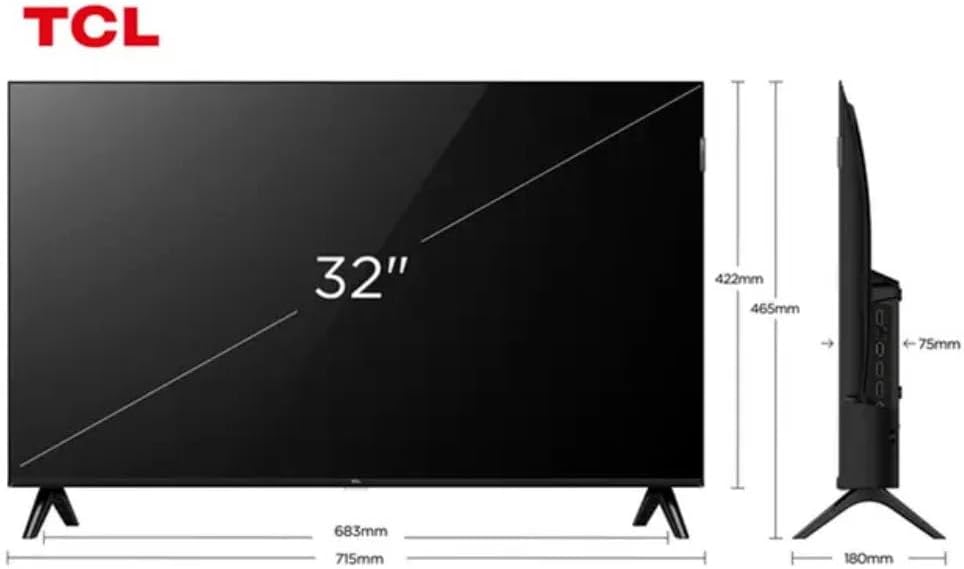
Figure 3: TV Dimensions. This image provides a detailed diagram of the TCL 32S5K Smart TV's physical dimensions, including screen size (32 inches), width (715mm), height (422mm without stand, 465mm with stand), and depth (75mm).
| ຄຸນສົມບັດ | ລາຍລະອຽດ |
|---|---|
| ຊື່ຕົວແບບ | 32S5K |
| ຂະໜາດໜ້າຈໍ | 32 ນິ້ວ |
| ເຕັກໂນໂລຊີການສະແດງ | QLED |
| ຄວາມລະອຽດ | 1080p (Full HD) |
| ອັດຕາການໂຫຼດຂໍ້ມູນຄືນໃໝ່ | 60 Hz |
| ການເຊື່ອມຕໍ່ | Bluetooth, Ethernet, HDMI, USB, Wi-Fi |
| ພອດ HDMI ທັງໝົດ | 2 |
| ຄຸນນະສົມບັດພິເສດ | Integrated Speaker, Google TV, Googlecast Integrated, HDR10, Dolby Audio |
| ຂະໜາດສິນຄ້າ (ກວ້າງ x ຍາວ x ສູງ) | 7.6P x 71.6L x 42.3A centimeters (approx. 3 x 28.2 x 16.7 inches) |
| ຜູ້ຜະລິດ | TCL |
| ປະເທດຕົ້ນກໍາເນີດ | ບຣາຊິນ |
ການຮັບປະກັນແລະການສະຫນັບສະຫນູນ
ຂໍ້ມູນການຮັບປະກັນ
The TCL 32S5K Smart TV comes with a ການຮັບປະກັນຂອງຜູ້ຜະລິດ 1 ປີ. This warranty covers defects in materials and workmanship under normal use. Please retain your proof of purchase for warranty claims. For specific terms and conditions, refer to the warranty card included in your package or visit the official TCL webເວັບໄຊ.
ການຊ່ວຍເຫຼືອລູກຄ້າ
If you require technical assistance, have questions about your product, or need to initiate a warranty claim, please contact TCL customer support. You can typically find contact information on the TCL official webເວັບໄຊທ໌ຫຼືໃນເອກະສານຜະລິດຕະພັນຂອງທ່ານ.
Before contacting support, please have your TV model number (32S5K) and serial number ready, along with a detailed description of the issue.