
ແນະນຳ
The ARCCTV Y2U3 Indoor Security Camera is designed to enhance your home's security and monitoring capabilities. Featuring advanced Wi-Fi 6 and dual-band (5GHz/2.4GHz) connectivity, it ensures stable and fast streaming. This camera offers 2.5K Quad HD resolution for clear visuals, two-way audio for communication, and intelligent motion detection with tracking. It also includes true-color night vision, automatic patrol cruise, and compatibility with Amazon Alexa for voice control.
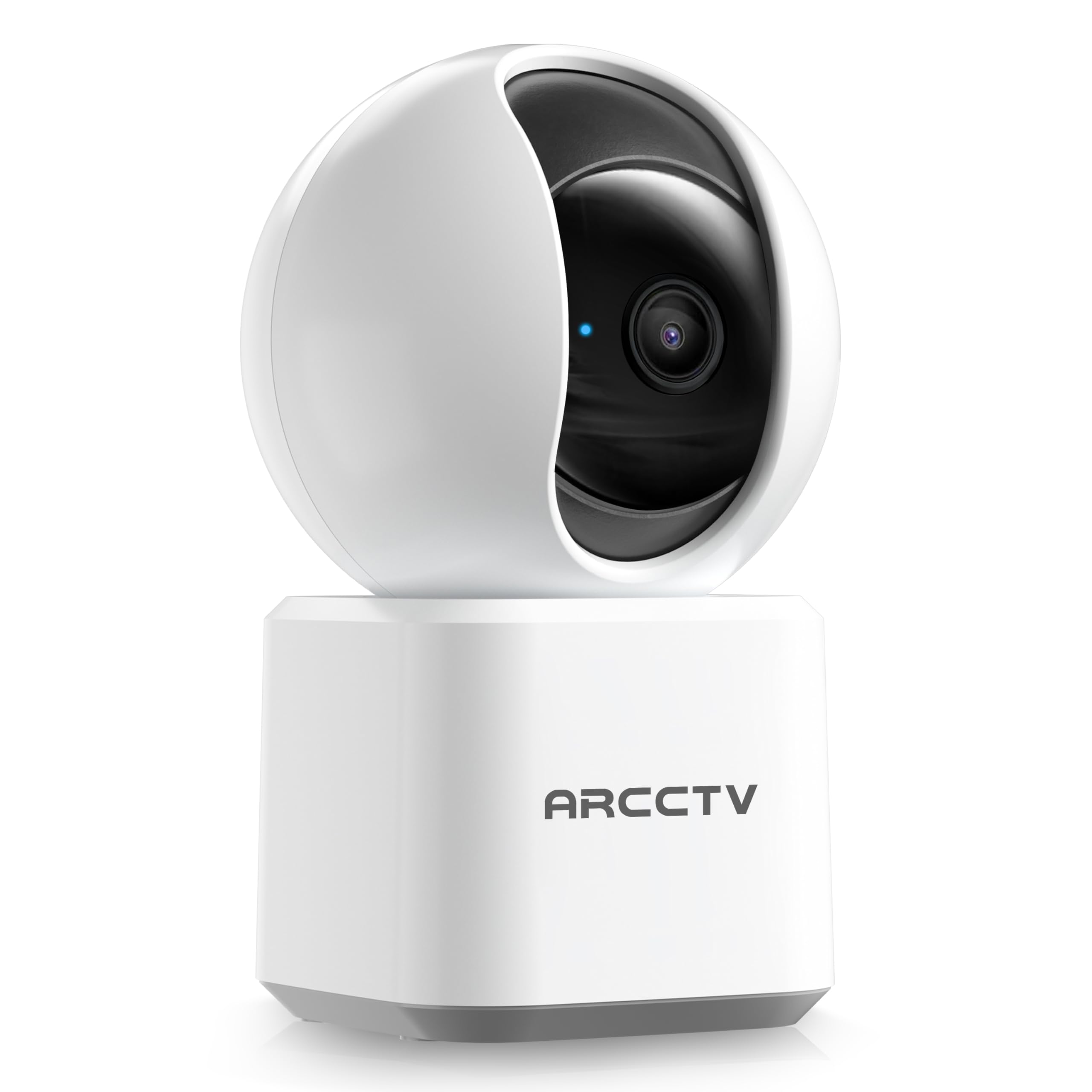
Image: The ARCCTV Y2U3 Indoor Security Camera.
ແມ່ນຫຍັງຢູ່ໃນກ່ອງ
Upon unboxing your ARCCTV Y2U3 camera, you should find the following components:
- ARCCTV Y2U3 Indoor Security Camera Body
- USB Power Adapter (for your region)
- ສາຍໄຟ USB-C
- ວົງເລັບຕິດຕັ້ງ
- Screws ຍຶດແລະຍຶດຕິດຝາ
- ຄູ່ມືເລີ່ມຕົ້ນດ່ວນ

Image: The ARCCTV Y2U3 camera and its included accessories laid out on a wooden surface.
Video: An unboxing video demonstrating the contents of the ARCCTV Y2U3 Indoor Security Camera package, including the camera, power adapter, USB-C cable, mounting bracket, screws, and quick start guide.
ຕັ້ງຄ່າ
- ເປີດ: Connect the USB-C cable to the camera's port (located at the back of the base) and the USB power adapter. Plug the adapter into a power outlet. The camera will initiate a self-test and a blue indicator light will appear.
- ດາວໂຫລດ App ໄດ້: Scan the QR code in the Quick Start Guide or search for the "ARCCTV Security" app on your smartphone's app store (available for Android and iOS).
- ການລົງທະບຽນບັນຊີ: ເປີດ app ແລະລົງທະບຽນສໍາລັບບັນຊີໃຫມ່ຫຼືເຂົ້າສູ່ລະບົບຖ້າຫາກວ່າທ່ານມີແລ້ວ.
- ເພີ່ມອຸປະກອນ: Follow the in-app instructions to add your new camera. This typically involves selecting "Add Device," choosing your camera model, and scanning a QR code displayed on your phone with the camera's lens.
- ການເຊື່ອມຕໍ່ Wi-Fi: Ensure your smartphone is connected to a 2.4GHz or 5GHz Wi-Fi network. The camera supports both bands. The app will guide you through connecting the camera to your home Wi-Fi.
- ການຕິດຕັ້ງບັດ MicroSD (ທາງເລືອກ): If you plan to use local storage, gently rotate the camera lens upwards to reveal the microSD card slot. Insert a compatible microSD card (up to 256GB, not included) with the gold contacts facing down.
- ການຕິດຕັ້ງ (ທາງເລືອກ): If mounting the camera, use the provided mounting bracket, screws, and wall anchors. Secure the bracket to your desired location (wall or ceiling), then attach the camera to the bracket. Ensure the camera is within range of a power outlet.
ວິດີໂອ: ກ່ອນview of the ARCCTV Y2U3 camera setup process, demonstrating the initial power-on, app connection, and basic functionality like pan/tilt control and live view.
ຄໍາແນະນໍາການດໍາເນີນງານ
ດໍາລົງຊີວິດ View ແລະການຄວບຄຸມ Pan/Tilt
Access the live feed through the ARCCTV Security app. Use the on-screen controls to remotely pan (355° horizontal) and tilt (90° vertical) the camera lens, providing a 360° panoramic view of your space. This allows you to monitor every corner of the room.

Image: The camera's pan and tilt capabilities are illustrated, showing its wide coverage range.
ສຽງສອງທາງ
Utilize the built-in microphone and speaker for real-time two-way communication. Speak through the app to interact with family members, pets, or deter intruders. The audio quality is designed for clear conversations.

Image: A visual representation of the two-way communication feature, allowing interaction with individuals near the camera.
ກວດຈັບການເຄື່ອນໄຫວ ແລະການຕິດຕາມ
The camera features intelligent motion detection that sends instant notifications to your smartphone when activity is detected. With Smart Motion Tracking, the camera's lens automatically follows moving subjects, ensuring continuous monitoring of important events. You can customize monitoring zones to focus on specific areas.

Image: The camera's precision motion detection capability, distinguishing between human and pet movements.

Image: Smart motion tracking in action, where the camera automatically adjusts to follow moving subjects.
ວິໄສທັດກາງຄືນ
The camera is equipped with true-color night vision using an invisible light spectrum, allowing for clear monitoring in low-light conditions without disruptive red glows. The night vision range is up to 32 feet.

Image: A depiction of the camera's night vision capability, providing clear monochrome images in darkness.
ຕົວເລືອກການເກັບຮັກສາ
The ARCCTV Y2U3 supports local storage via a microSD card (up to 256GB) for continuous recording. Additionally, encrypted cloud storage is available through a paid subscription, ensuring your data is secure even if the device is damaged.

Image: The camera highlighting its microSD card slot for local video storage.

Image: An illustration of encrypted cloud storage, emphasizing data security and accessibility.
ຄວາມເຂົ້າກັນໄດ້ກັບ Alexa
Integrate your ARCCTV Y2U3 camera with Amazon Alexa for convenient voice control. Use simple voice commands like "Alexa, show me the nursery" to view ອາຫານສົດໃນອຸປະກອນທີ່ເປີດໃຊ້ງານ Alexa ທີ່ເຂົ້າກັນໄດ້.
Image: A user interacting with the camera via Alexa voice commands, viewing the feed on a tablet.
ບໍາລຸງຮັກສາ
- ທໍາຄວາມສະອາດ: Gently wipe the camera lens and body with a soft, dry cloth. Avoid using harsh chemicals or abrasive materials that could scratch the lens or surface.
- ການອັບເດດເຟີມແວ: Regularly check the ARCCTV Security app for available firmware updates. Keeping your camera's firmware up-to-date ensures optimal performance, security, and access to new features.
- ວົງຈອນພະລັງງານ: If the camera experiences connectivity issues or unusual behavior, try power cycling it by unplugging it from the power source for 10 seconds and then plugging it back in.
- ການຄຸ້ມຄອງບັດ MicroSD: If using a microSD card, periodically review and back up important recordings. Format the card within the app as needed to maintain performance and free up space.
ການແກ້ໄຂບັນຫາ
- ກ້ອງຖ່າຍຮູບອອບລາຍ:
- ກວດສອບວ່າກ້ອງຖ່າຍຮູບເປີດຢູ່ ແລະ ອະແດບເຕີໄຟຟ້າໄດ້ເຊື່ອມຕໍ່ຢ່າງແໜ້ນໜາແລ້ວ.
- Verify your Wi-Fi network is active and the camera is within range of the router.
- ຣີສະຕາດເລົາເຕີ Wi-Fi ແລະກ້ອງຖ່າຍຮູບຂອງທ່ານ.
- Ensure the camera is connected to a supported 2.4GHz or 5GHz Wi-Fi network.
- ຄຸນນະພາບວິດີໂອບໍ່ດີ:
- ກວດໃຫ້ແນ່ໃຈວ່າເລນກ້ອງຖ່າຍຮູບສະອາດ ແລະບໍ່ມີຝຸ່ນ ຫຼືຮອຍເປື້ອນ.
- Check your Wi-Fi signal strength in the app. A weak signal can affect video quality.
- Adjust the video resolution settings within the app to a lower quality if your network bandwidth is limited.
- ກວດຈັບການເຄື່ອນໄຫວບໍ່ເຮັດວຽກ:
- ກວດສອບວ່າການກວດຈັບການເຄື່ອນໄຫວຖືກເປີດໃຊ້ງານຢູ່ໃນການຕັ້ງຄ່າແອັບ.
- ປັບລະດັບຄວາມອ່ອນໄຫວຂອງການກວດຈັບການເຄື່ອນໄຫວ.
- ໃຫ້ແນ່ໃຈວ່າບໍ່ມີສິ່ງກີດຂວາງໃດໆທີ່ຂັດຂວາງກ້ອງຖ່າຍຮູບ view in the monitored zones.
- ບັນຫາສຽງສອງທາງ:
- Check the microphone and speaker volume settings in the app.
- ໃຫ້ແນ່ໃຈວ່າບໍ່ມີສິ່ງກີດຂວາງທາງກາຍະພາບໃດໆທີ່ປົກຄຸມໄມໂຄຣໂຟນ ຫຼື ລຳໂພງຢູ່ກ້ອງຖ່າຍຮູບ.
- ຫຼຸດຜ່ອນສຽງລົບກວນພື້ນຫຼັງໃຫ້ໜ້ອຍທີ່ສຸດເພື່ອການສື່ສານທີ່ຊັດເຈນກວ່າ.
- ຣີເຊັດກ້ອງ: If issues persist, locate the reset button (usually near the microSD card slot, accessible by rotating the lens upwards) and press and hold it for several seconds until you hear a prompt or see the indicator light change. This will restore factory settings, and you will need to set up the camera again.
ຂໍ້ມູນຈໍາເພາະ
| ຄຸນສົມບັດ | ລາຍລະອຽດ |
|---|---|
| ຊື່ຕົວແບບ | Y2U3 |
| ຍີ່ຫໍ້ | ARCCTV |
| ເຕັກໂນໂລຊີການເຊື່ອມຕໍ່ | ໄຮ້ສາຍ (Wi-Fi) |
| ເຕັກໂນໂລຊີການສື່ສານໄຮ້ສາຍ | Bluetooth, Wi-Fi (Dual-Band: 2.4GHz, 5GHz) |
| ຄວາມລະອຽດການຖ່າຍວິດີໂອ | 1440p (2.5K Quad HD) |
| ການແກ້ໄຂປະສິດທິພາບ | 4 MP |
| ຄຸນນະສົມບັດພິເສດ | 2-Way Audio, PTZ Technology (Pan/Tilt/Zoom), Motion Tracking, Night Vision, Alexa Compatibility |
| Viewໃນມຸມ | 360 ອົງສາ (ແພນ ແລະ ອຽງ) |
| ຂອບເຂດວິໄສທັດກາງຄືນ | 32 ຟຸດ |
| ແຫຼ່ງພະລັງງານ | ໄຟຟ້າສາຍ (5 ໂວນ) |
| Flash Memory ຮອງຮັບຂະໜາດສູງສຸດ | 256 GB (MicroSD card) |
| ຂະໜາດລາຍການ L x W x H | 10 x 1.98 x 2.7 ນິ້ວ |
| ນ້ໍາຫນັກລາຍການ | 12.6 ອອນ |
| ການນໍາໃຊ້ທີ່ແນະນໍາສໍາລັບຜະລິດຕະພັນ | ຄວາມປອດໄພພາຍໃນ |
ການຮັບປະກັນແລະການສະຫນັບສະຫນູນ
For warranty information, technical support, or further assistance with your ARCCTV Y2U3 Indoor Security Camera, please refer to the official ARCCTV website or contact their customer service directly. Details can typically be found in the Quick Start Guide or on the product packaging.
You can also visit the ARCCTV Store on Amazon for product updates and additional resources: ARCCTV Store