
1. ບົດແນະນຳ
Welcome to the user manual for your Hisense 32C35R 32-inch Smart Full HD TV. This television is designed to provide a rich entertainment experience with its Full HD display, smart features, and advanced audio processing. This manual will guide you through the setup, operation, and maintenance of your new TV, ensuring you get the most out of its capabilities.
2. ຂໍ້ມູນຄວາມປອດໄພ
Before operating your TV, please read all safety instructions carefully. Keep this manual for future reference. Always disconnect the power cord from the wall outlet before cleaning or servicing the TV. Do not expose the TV to rain or moisture to prevent fire or electric shock. Ensure proper ventilation and avoid blocking ventilation openings.
3. ເນື້ອໃນຊຸດ
ກະລຸນາກວດເບິ່ງວ່າລາຍການທັງໝົດແມ່ນລວມຢູ່ໃນຊຸດຂອງທ່ານ:
- Hisense 32C35R 32-inch Smart Full HD TV
- ການຄວບຄຸມໄລຍະໄກ
- ສາຍໄຟ
- TV Stand and Screws
- Anti-tip bracket (for TV stand installation)
- ຄູ່ມືຜູ້ໃຊ້ (ເອກະສານນີ້)
4. ຕັ້ງຄ່າ
4.1 ການຕິດຕັ້ງທາງດ້ານຮ່າງກາຍ
Place the TV on a stable, flat surface or mount it on a wall using a compatible VESA mount (sold separately). If using the included stand, attach it securely to the TV using the provided screws. For added safety, install the anti-tip bracket to prevent accidental tipping.
ໝາຍເຫດ: Ensure the installation location is prepared in advance. Removal of existing products or wall mounts is not supported by the installation service.
4.2 ສາຍເຊື່ອມຕໍ່
Connect the necessary cables to your TV:
- Antenna Cable: Connect your terrestrial digital, BS, or CS antenna cable to the TV's antenna input.
- ສາຍໄຟ: ສຽບສາຍໄຟໃສ່ໂທລະທັດ ແລະຈາກນັ້ນເຂົ້າໄປໃນປລັກສຽບໃສ່ຝາ.
- ອຸປະກອນພາຍນອກ: Connect any external devices such as Blu-ray players, game consoles, or sound systems using HDMI or other appropriate ports.
ໝາຍເຫດ: Antenna cables and other connection cables are not included and must be prepared by the customer.
4.3 ການຕິດຕັ້ງເບື້ອງຕົ້ນ
After connecting all cables and powering on the TV for the first time, follow the on-screen instructions for initial setup:
- Insert the B-CAS card (if applicable).
- Set your region and postal code.
- Perform initial channel scanning and other basic settings.
ໝາຍເຫດ: Network connection settings are not covered by the installation service and must be configured by the user.
5. ຄໍາແນະນໍາການດໍາເນີນງານ
5.1 ການຄວບຄຸມໄລຍະໄກເກີນview
Familiarize yourself with the TV remote control. It provides access to all TV functions, including power, volume, channel selection, smart TV apps, and voice control.
5.2 ຄຸນສົມບັດໂທລະທັດອັດສະລິຍະ (VIDAA OS)
Your Hisense 32C35R TV runs on VIDAA OS, offering quick access to popular streaming services like YouTube, Netflix, and more. It also supports AirPlay2 for seamless content sharing from Apple devices and Bluetooth for wireless audio.

Image: The Hisense TV displaying its VIDAA OS home screen with various streaming applications and content recommendations. The interface is designed for quick navigation and access to online videos.

Image: A close-up of the Hisense TV remote control, highlighting dedicated buttons for popular streaming services and a voice control button for easy access to smart features.
5.3 HI-VIEW Engine 2K+ (Image Quality)
The HI-VIEW Engine 2K+ enhances image quality, especially for online video content. It features a rich video menu allowing you to select optimal picture settings for different content types, such as sports, games, or PC monitor use. The TV also includes an automatic sensor that adjusts screen brightness based on room lighting conditions.

Image: A detailed diagram illustrating the Hisense HI-VIEW Engine 2K+ chip, which is responsible for advanced image processing and enhancing visual clarity, particularly for 4K content.
5.4 ຄຸນສົມບັດສຽງ
Experience high-quality audio with the TV's 2.0 speaker configuration and 12W practical maximum audio output. It incorporates eilex sound processing and supports Dolby Audio for an immersive sound experience.

Image: The Hisense TV screen showing various sound processing features such as Auto Volume for automatic volume adjustment, Clear Voice for enhanced dialogue, Sound Remaster for improved audio quality, and VIR Filter for better sound range.
5.5 Screen Share & Bluetooth
The TV supports screen sharing to display content from your smartphone. With Bluetooth connectivity, you can enjoy audio wirelessly through devices like soundbars, speakers, headphones, or wireless earphones without disturbing others.
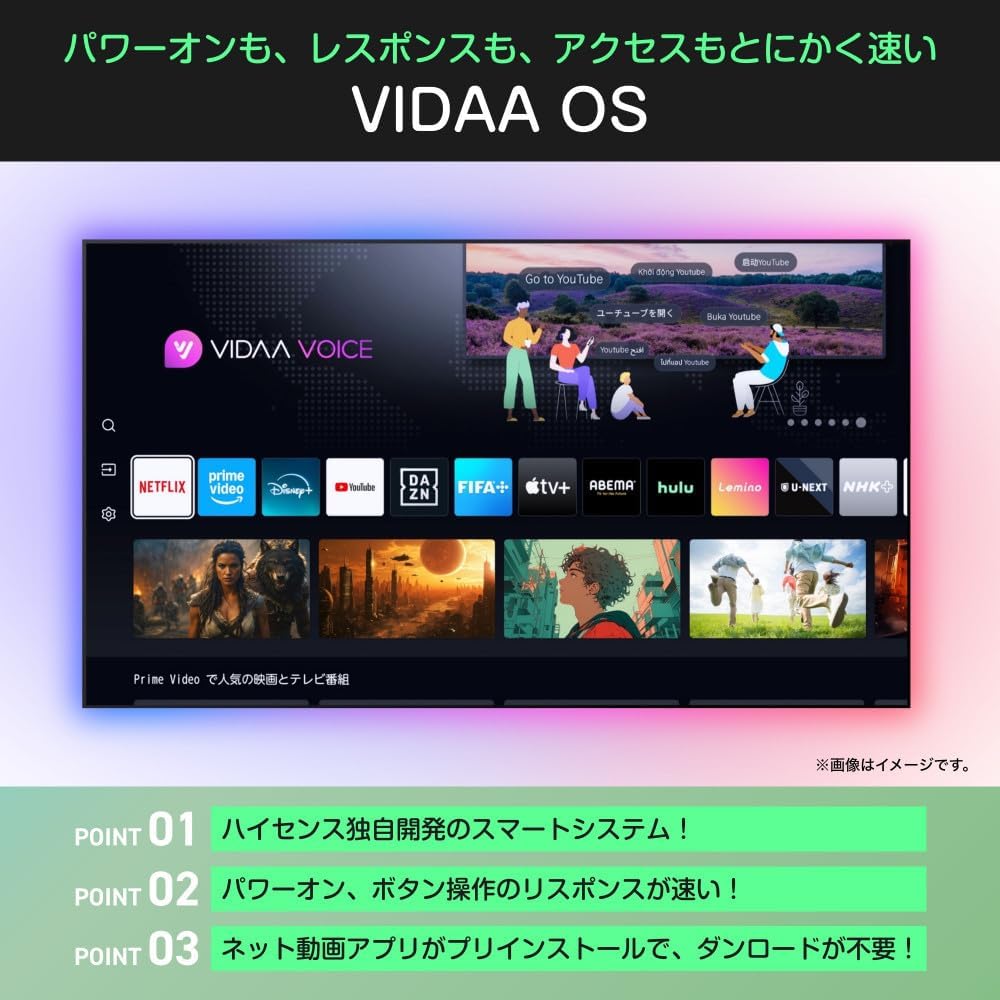
Image: An illustration demonstrating the TV's Bluetooth capabilities, allowing users to connect wireless headphones, soundbars, and speakers for private listening or enhanced audio.
5.6 ການຄວບຄຸມດ້ວຍສຽງ (Alexa)
The Hisense 32C35R is compatible with Alexa voice control. By speaking to an Alexa-enabled smart speaker (sold separately), you can control TV functions such as power on/off, volume adjustment, and launching streaming services.

Image: A diagram illustrating the integration of the Hisense TV with Alexa. A user can issue voice commands to an Alexa smart speaker to control the TV, such as changing channels, while performing other tasks.
5.7 Game Mode (ALLM)
For gamers, the TV features a low-latency game mode and ALLM (Auto Low Latency Mode) support, ensuring a smoother and more responsive gaming experience by minimizing input lag.
5.8 Google TV Video
This video demonstrates the features and user experience of Google TV, which is integrated into some Hisense models, showcasing content aggregation, personalized recommendations, and voice search capabilities.
ວິດີໂອ: ວິດີໂອສະແດງຂອງຜູ້ຂາຍຢ່າງເປັນທາງການasing the Google TV interface, its ability to consolidate streaming services, personalized content recommendations, family profiles, and voice control features. It highlights how users can easily find and enjoy content across various platforms.
6. ບໍາລຸງຮັກສາ
ເພື່ອຮັບປະກັນອາຍຸຍືນ ແລະປະສິດທິພາບທີ່ດີທີ່ສຸດຂອງໂທລະພາບ Hisense ຂອງທ່ານ, ປະຕິບັດຕາມຄໍາແນະນໍາການບໍາລຸງຮັກເຫຼົ່ານີ້:
- ທໍາຄວາມສະອາດຫນ້າຈໍ: ເຊັດໜ້າຈໍຄ່ອຍໆດ້ວຍຜ້າອ່ອນ, ແຫ້ງ, ບໍ່ມີສານຂັດ. ສໍາລັບຮອຍແຂງ, ເລັກນ້ອຍ dampໃສ່ຜ້າດ້ວຍນ້ໍາຫຼືເຄື່ອງເຮັດຄວາມສະອາດຫນ້າຈໍພິເສດ. ຢ່າສີດນໍ້າໂດຍກົງໃສ່ໜ້າຈໍ.
- ທໍາຄວາມສະອາດຕູ້: ໃຊ້ຜ້າປຽກແຫ້ງເພື່ອເຮັດຄວາມສະອາດຕູ້ໂທລະທັດ. ຫຼີກເວັ້ນການນໍາໃຊ້ເຄື່ອງເຮັດຄວາມສະອາດຂັດຫຼືສານລະລາຍ.
- ການລະບາຍອາກາດ: ໃຫ້ແນ່ໃຈວ່າຊ່ອງລະບາຍອາກາດຢູ່ດ້ານຫຼັງຂອງໂທລະທັດບໍ່ໄດ້ຖືກປິດກັ້ນເພື່ອປ້ອງກັນຄວາມຮ້ອນເກີນໄປ.
- ສາຍໄຟ: ກວດເຊັກສາຍໄຟເປັນປະຈຳວ່າມີຄວາມເສຍຫາຍໃດໆ. ຖ້າເສຍຫາຍ, ປ່ຽນມັນທັນທີ.
7. ການແກ້ໄຂບັນຫາ
ຖ້າເຈົ້າພົບບັນຫາກັບໂທລະພາບຂອງເຈົ້າ, ໃຫ້ເບິ່ງຂັ້ນຕອນການແກ້ໄຂບັນຫາທົ່ວໄປຕໍ່ໄປນີ້:
| ບັນຫາ | ການແກ້ໄຂທີ່ເປັນໄປໄດ້ |
|---|---|
| ບໍ່ມີພະລັງງານ | Check if the power cord is securely plugged into the TV and the wall outlet. Press the power button on the remote or TV. |
| ບໍ່ມີຮູບ, ແຕ່ສຽງແມ່ນປະຈຸບັນ | ກວດເບິ່ງແຫຼ່ງປ້ອນຂໍ້ມູນ. ໃຫ້ແນ່ໃຈວ່າອຸປະກອນພາຍນອກເປີດ ແລະເຊື່ອມຕໍ່ຢ່າງຖືກຕ້ອງ. ລອງສາຍ HDMI ອື່ນ. |
| ບໍ່ມີສຽງ, ແຕ່ມີຮູບພາບ | Check the volume level and mute settings. Ensure external audio devices are connected and configured correctly. |
| ການຄວບຄຸມໄລຍະໄກບໍ່ເຮັດວຽກ | ປ່ຽນແບັດເຕີລີ. ໃຫ້ແນ່ໃຈວ່າບໍ່ມີສິ່ງກີດຂວາງລະຫວ່າງຣີໂໝດ ແລະໂທລະພາບ. |
| ບໍ່ສາມາດເຊື່ອມຕໍ່ກັບ Wi-Fi ໄດ້ | ກວດເບິ່ງເຣົາເຕີ ແລະໂມເດັມຂອງທ່ານ. ກວດໃຫ້ແນ່ໃຈວ່າລະຫັດຜ່ານ Wi-Fi ຖືກຕ້ອງ. ລອງຣີສະຕາດໂທລະທັດ ແລະອຸປະກອນເຄືອຂ່າຍຂອງທ່ານ. |
8. ຂໍ້ມູນຈໍາເພາະ
| ຄຸນສົມບັດ | ຂໍ້ມູນຈໍາເພາະ |
|---|---|
| ໝາຍເລກຕົວແບບ | 32C35R |
| ຂະໜາດໜ້າຈໍ | 32 ນິ້ວ |
| ເຕັກໂນໂລຊີການສະແດງ | ຈໍ LCD |
| ຄວາມລະອຽດ | ຄວາມລະອຽດ Full HD (1920 x 1080) |
| ອັດຕາການໂຫຼດຂໍ້ມູນຄືນໃໝ່ | 60 Hz |
| ເຄື່ອງຈັກຮູບພາບ | HI-VIEW Engine 2K+ |
| ແສງຫຼັງ | LED ໂດຍກົງ |
| ການຕັ້ງຄ່າລໍາໂພງ | 2.0 ຊ່ອງ |
| ສຽງອອກ | 12W (Practical Max) |
| ການປຸງແຕ່ງສຽງ | eilex Sound Processing, Dolby Audio |
| ຄຸນສົມບັດອັດສະລິຍະ | VIDAA OS, YouTube, Netflix, AirPlay2, Bluetooth, Alexa Voice Control, Game Mode (ALLM) |
| ການບໍລິໂພກພະລັງງານທີ່ຖືກຈັດອັນດັບ | 55W |
| ການຊົມໃຊ້ພະລັງງານປະຈໍາປີ | 60 kWh/ປີ |
| Main Unit Weight (without stand) | 3.4 ກິໂລ |
| Main Unit Dimensions (W x H x D, without stand) | 725 x 429 x 78 ມມ |
| ນ້ຳໜັກ (ພ້ອມຂາຕັ້ງ) | 3.5 ກິໂລ |
| ຂະໜາດ (ກວ້າງ x ສູງ x ເລິກ, ພ້ອມຂາຕັ້ງ) | 725 x 472 x 183 ມມ |
9. ການຮັບປະກັນແລະການສະຫນັບສະຫນູນ
9.1 ຂໍ້ມູນການຮັບປະກັນ
Your Hisense 32C35R TV comes with a ຮັບປະກັນ 3 ປີ from the date of purchase. Please retain your proof of purchase for warranty claims. The warranty covers manufacturing defects under normal use. It does not cover damage caused by misuse, accidents, unauthorized repairs, or natural disasters.
9.2 ສະຫນັບສະຫນູນລູກຄ້າ
For technical assistance, troubleshooting, or warranty inquiries, please contact Hisense customer support. Refer to the contact information provided with your product documentation or visit the official Hisense webເວັບໄຊທ໌ສໍາລັບລາຍລະອຽດສະຫນັບສະຫນູນທີ່ທັນສະໄຫມທີ່ສຸດ.