
ສິນຄ້າເກີນview
The DIERYA DK68 is a 60% compact mechanical keyboard designed for versatility and performance. It features triple-mode connectivity, allowing seamless switching between Bluetooth 5.0, 2.4GHz wireless, and USB-C wired connections. Equipped with clicky blue mechanical switches and vibrant RGB backlighting, it offers a responsive and customizable typing experience for both gaming and office use.

Figure 1: DIERYA DK68 Wireless Mechanical Keyboard showcasinການອອກແບບທີ່ກະທັດຮັດ ແລະ ໄຟ RGB ຂອງມັນ.
ເນື້ອໃນຊຸດ
ໃຫ້ແນ່ໃຈວ່າທຸກລາຍການຢູ່ໃນຊຸດ:
- DIERYA DK68 Wireless Mechanical Keyboard
- ສາຍ USB-C ຫາ USB-A
- ຕົວດຶງກະແຈ
- 2.4GHz USB Receiver (stored in the keyboard's back compartment)
- ຄູ່ມືຜູ້ໃຊ້ (ເອກະສານນີ້)
ການຕັ້ງຄ່າແລະການເຊື່ອມຕໍ່
The DK68 keyboard supports three connection modes: USB-C wired, 2.4GHz wireless, and Bluetooth 5.0. Choose the mode that best suits your needs.
1. ໂໝດສາຍ USB-C
- ເຊື່ອມຕໍ່ສາຍ USB-C ທີ່ໃຫ້ມາກັບພອດ USB-C ຂອງແປ້ນພິມ.
- ເຊື່ອມຕໍ່ປາຍສາຍ USB-A ເຂົ້າກັບພອດ USB ທີ່ມີຢູ່ໃນຄອມພິວເຕີຂອງທ່ານ.
- ແປ້ນພິມຈະຖືກຮັບຮູ້ໂດຍອັດຕະໂນມັດ ແລະພ້ອມນຳໃຊ້.
2. ໂໝດໄຮ້ສາຍ 2.4GHz
- Locate the 2.4GHz USB receiver in the compartment on the back of the keyboard.
- ເອົາເຄື່ອງຮັບສັນຍານອອກ ແລະ ສຽບມັນເຂົ້າກັບພອດ USB ທີ່ມີຢູ່ໃນຄອມພິວເຕີຂອງທ່ານ.
- Turn on the keyboard using the switch located on the back.
- ແປ້ນພິມຄວນເຊື່ອມຕໍ່ກັບເຄື່ອງຮັບສັນຍານໂດຍອັດຕະໂນມັດ. ຖ້າບໍ່, ກົດ Fn + G (labeled '2.4G' on the key) to activate 2.4GHz pairing mode.

Figure 2: Triple-mode connectivity options including 2.4GHz wireless.
3. ໂໝດ Bluetooth 5.0
ແປ້ນພິມສາມາດເຊື່ອມຕໍ່ໄດ້ເຖິງສາມອຸປະກອນ Bluetooth.
- Turn on the keyboard using the switch on the back.
- ກົດຄ້າງໄວ້ Fn+Z (labeled 'BT1'), Fn + X (labeled 'BT2'), or Fn + C (labeled 'BT3') for 3-5 seconds until the corresponding key's backlight flashes rapidly. This indicates pairing mode.
- On your device (PC, laptop, tablet, phone), enable Bluetooth and search for "DIERYA DK68".
- Select the keyboard to pair. The key's backlight will stop flashing once connected.
- ເພື່ອສະຫຼັບລະຫວ່າງອຸປະກອນ Bluetooth ທີ່ຈັບຄູ່ແລ້ວ, ພຽງແຕ່ກົດ Fn + Z/X/C.

Figure 3: Bluetooth connectivity for multiple devices.
ຄໍາແນະນໍາການດໍາເນີນງານ
ການຄວບຄຸມໄຟ Backlighting RGB
The DK68 features 20 built-in RGB lighting effects and 16.8 million customizable colors. Use the following key combinations to control the lighting:
- Fn + Backspace: Turn backlighting On/Off.
- Fn + Shift: Switch light colors.
- Fn + Enter: Switch light modes (20 dynamic RGB modes).
- Fn + ລູກສອນຂຶ້ນ: ເພີ່ມຄວາມສະຫວ່າງ.
- Fn + ລູກສອນລົງ: Decrease brightness.
- Fn + ລູກສອນຊ້າຍ: Decrease light speed.
- Fn + ລູກສອນຂວາ: Increase light speed.

Figure 4: RGB lighting control key combinations for the DK68 keyboard.
ການປັບແຕ່ງຫຼັກ ແລະ Macros
The DIERYA DK68 supports full key anti-ghosting and N-Key Rollover (NKRO) for accurate input. For advanced customization, including key remapping, macro programming, and additional lighting effects, dedicated software is available. Please refer to the official DIERYA webເວັບໄຊທ໌ສຳລັບການດາວໂຫຼດຊອບແວ ແລະ ຄຳແນະນຳຕ່າງໆ.

Figure 5: Full N-Key Rollover and software customization capabilities.
ສະຫຼັບສີຟ້າກົນຈັກ
The keyboard is equipped with clicky blue mechanical switches, providing a distinct tactile bump and an audible click with each keystroke. These switches are ideal for users who prefer clear feedback and a satisfying typing experience. They feature a medium 60gf actuation force (±15gf) and 2.3mm travel (±0.6mm), with a lifespan of 50 million clicks.

ຮູບທີ 6: ລາຍລະອຽດ view of mechanical blue switches and their specifications.
ບໍາລຸງຮັກສາ
ການຄຸ້ມຄອງຫມໍ້ໄຟ
The keyboard is powered by a 3000mAh lithium battery. To charge, connect the keyboard via the USB-C cable to a power source. The keyboard can be used while charging.
- Usage Time (Backlighting On): ເຖິງ 12 ຊົ່ວໂມງ.
- Usage Time (Backlighting Off): ເຖິງ 333 ຊົ່ວໂມງ.
- ຮູບແບບການນອນອັດຕະໂນມັດ: The keyboard enters auto-sleep mode after 3 minutes of inactivity to conserve power.
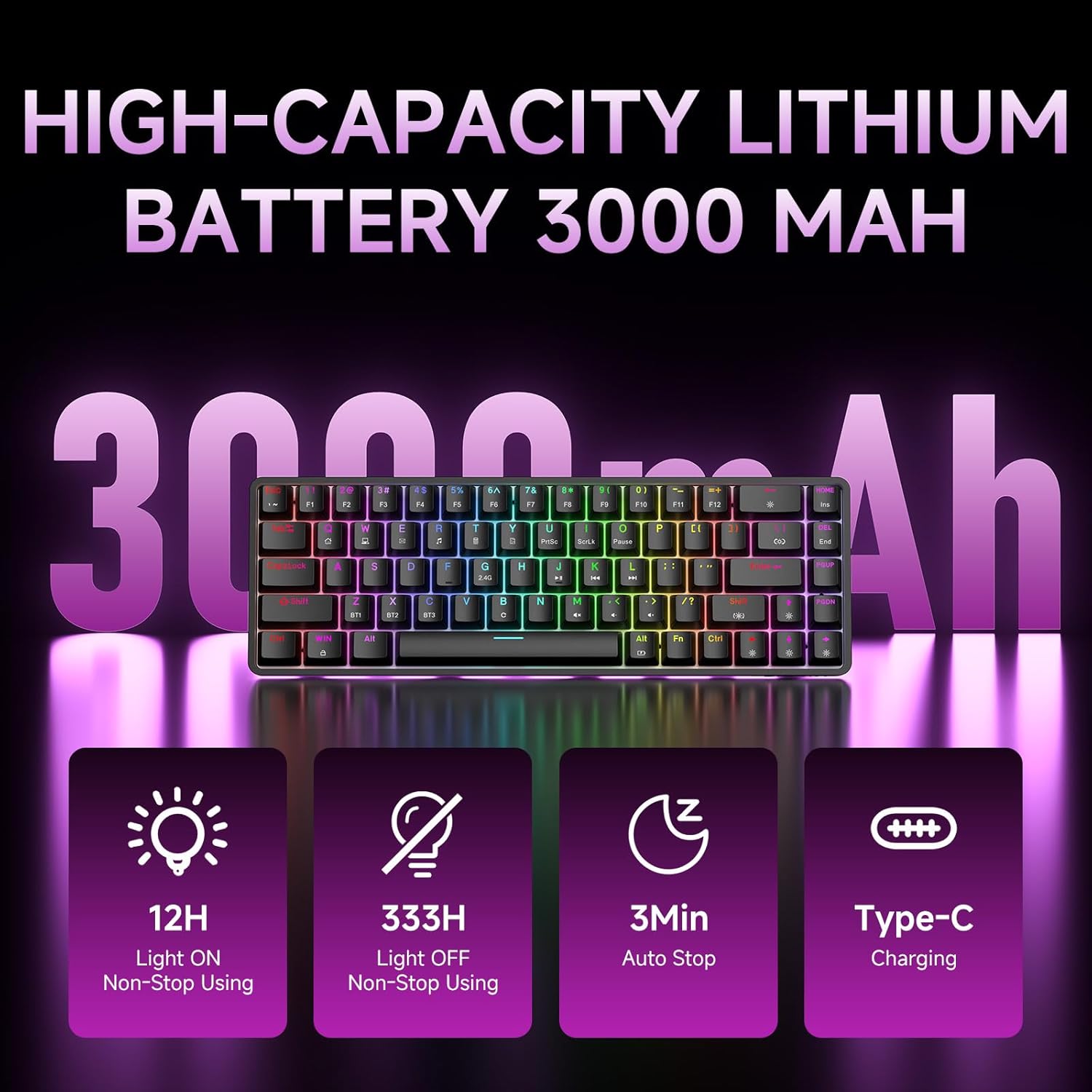
Figure 7: Battery capacity and power-saving features of the DK68.
ການທໍາຄວາມສະອາດແລະການດູແລ
- Use the provided keycap puller to carefully remove keycaps for cleaning.
- Clean the keyboard surface with a soft, damp ຜ້າ. ຫຼີກເວັ້ນຄວາມຊຸ່ມຊື່ນຫຼາຍເກີນໄປ.
- ຢ່າໃຊ້ສານເຄມີທີ່ຮຸນແຮງຫຼືນໍ້າຢາ ທຳ ຄວາມສະອາດທີ່ຫຍາບຄາຍ.
- Ensure the keyboard is powered off before cleaning.
ການແກ້ໄຂບັນຫາ
- ແປ້ນພິມບໍ່ຕອບສະໜອງ:
- Check the power switch on the back of the keyboard.
- Ensure the correct connection mode (wired, 2.4GHz, or Bluetooth) is selected.
- ສໍາລັບ 2.4GHz, ໃຫ້ແນ່ໃຈວ່າໄດ້ສຽບສາຍຮັບ USB ຢ່າງປອດໄພ.
- ສໍາລັບ Bluetooth, ໃຫ້ແນ່ໃຈວ່າແປ້ນພິມໄດ້ຖືກຈັບຄູ່ແລະເລືອກຢູ່ໃນອຸປະກອນຂອງທ່ານ. ລອງຈັບຄູ່ຄືນໃໝ່ຖ້າຈຳເປັນ.
- If using wired mode, try a different USB port or cable.
- Backlighting ບໍ່ເຮັດວຽກ:
- ກົດ Fn + Backspace to toggle the backlighting.
- ກວດສອບລະດັບແບັດເຕີຣີ; ແບັດເຕີຣີຕໍ່າອາດເຮັດໃຫ້ໄຟ backlight ປິດການໃຊ້ງານໄດ້.
- ກະແຈບໍ່ໄດ້ລົງທະບຽນ:
- Ensure the keyboard is properly connected and powered on.
- If specific keys are not working, try removing and re-seating their keycaps.
ຂໍ້ມູນຈໍາເພາະ
| ຄຸນສົມບັດ | ລາຍລະອຽດ |
|---|---|
| ໝາຍເລກຕົວແບບ | DK68 |
| ເຕັກໂນໂລຊີການເຊື່ອມຕໍ່ | 2.4GHz Wireless, Bluetooth 5.0, ມີສາຍ USB-C |
| ປະເພດສະຫຼັບ | ສະວິດກົນຈັກ Clicky Blue |
| ໂຄງຮ່າງຫຼັກ | 68 ກະແຈ (60% ໂຄງຮ່າງ) |
| Backlighting | RGB (16.8 ລ້ານສີ, 20 ຜົນກະທົບ) |
| ຄວາມອາດສາມາດຫມໍ້ໄຟ | ໂພລີເມີລີທຽມ 3000mAh |
| ອຸປະກອນທີ່ເຂົ້າກັນໄດ້ | ຄອນໂຊລເກມ, ແລັບທັອບ, PC, ແທັບເລັດ |
| ຕ້ານຜີ | Full Key Anti-Ghosting & NKRO |
| ວັດສະດຸ | ພາດສະຕິກ |
| ນ້ໍາຫນັກລາຍການ | 1.76 ປອນ (ປະມານ 800g) |
| ຂະໜາດແພັກເກັດ | 14.33 x 4.37 x 1.73 ນິ້ວ |

Figure 8: Keyboard dimensions and compact 68-key layout.
ການຮັບປະກັນແລະການສະຫນັບສະຫນູນ
For warranty information and technical support, please refer to the documentation included with your product or visit the official DIERYA website. Amazon's return policy for this product is 30 days from the date of receipt.