
ແນະນຳ
Thank you for choosing the LIORQUE Wireless Weather Station YGH6208. This device provides accurate indoor and outdoor temperature and humidity readings, weather forecasts, and features a DCF radio-controlled clock with alarm functions. This manual will guide you through the setup, operation, and maintenance of your weather station.
ເນື້ອໃນຊຸດ
- 1 x LIORQUE Wireless Weather Station (Main Unit)
- 1 x ເຊັນເຊີກາງແຈ້ງ
- 3 x AAA Batteries (for Main Unit)
- 2 x AAA Batteries (for Outdoor Sensor)
- 1 x ຄູ່ມືຜູ້ໃຊ້ (ເອກະສານນີ້)
ສິນຄ້າເກີນview
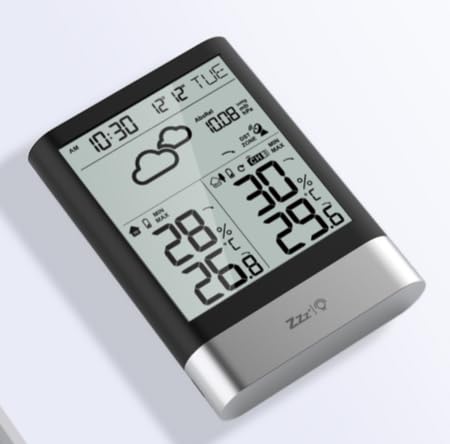
ຮູບພາບ 1: LIORQUE Wireless Weather Station Main Unit. This image shows the front view of the main display unit, highlighting its LCD screen and compact design.
ຄຸນນະສົມບັດຫົວຫນ່ວຍຕົ້ນຕໍ:
- 4.3-inch LCD screen with backlight
- ການສະແດງອຸນຫະພູມແລະຄວາມຊຸ່ມຊື່ນໃນເຮືອນ
- ການສະແດງອຸນຫະພູມແລະຄວາມຊຸ່ມຊື່ນກາງແຈ້ງ
- ໄອຄອນພະຍາກອນອາກາດ
- DCF radio-controlled clock with manual setting option
- Double alarm clock with snooze function
- Calendar and day of the week display (7 languages)
- Max/Min temperature and humidity records
- Air pressure display and weather trend
- ການສະແດງ 12/24 ຊົ່ວໂມງ
ຄຸນສົມບັດເຊັນເຊີກາງແຈ້ງ:
- Wireless transmission up to 100m (open area)
- ການວັດແທກອຸນຫະພູມແລະຄວາມຊຸ່ມຊື່ນ
- Supports hanging or standing placement
- Data updated every 30 seconds
- Supports up to 3 sensors (one included)
ຕັ້ງຄ່າ
1. ການຕິດຕັ້ງຫມໍ້ໄຟ
- ເຊັນເຊີກາງແຈ້ງ: Open the battery compartment cover on the back of the outdoor sensor. Insert 2 x AAA batteries, ensuring correct polarity (+/-). Close the cover.
- ຫົວໜ່ວຍຫຼັກ: Open the battery compartment cover on the back of the main unit. Insert 3 x AAA batteries, ensuring correct polarity (+/-). Close the cover.
- The main unit will power on and display indoor readings.
2. ການຈັບຄູ່ເຊັນເຊີ
After installing batteries in both units, the main unit will automatically search for the outdoor sensor. The outdoor temperature and humidity should appear on the main unit's display within a few minutes. If the outdoor readings do not appear:
- Ensure both units are within range (up to 100m in open air).
- ກົດປຸ່ມ "TX" ພາຍໃນຊ່ອງໃສ່ແບັດເຕີຣີຂອງເຊັນເຊີພາຍນອກເພື່ອສົ່ງສັນຍານດ້ວຍຕົນເອງ.
- On the main unit, press and hold the "CHANNEL" button to initiate a manual search for the sensor.
3. ການຕັ້ງຄ່າເບື້ອງຕົ້ນ (ເວລາ, ວັນທີ, ຫົວໜ່ວຍ)
The weather station will attempt to synchronize with the DCF radio signal for automatic time setting. This may take several hours, especially in areas with weak signals. You can manually set the time and date if needed.
- ການຕັ້ງຄ່າເວລາຄູ່ມື: Press and hold the "MODE" button to enter time setting mode. Use the "UP" and "DOWN" buttons to adjust values and "MODE" to confirm and move to the next setting (e.g., 12/24 hour format, hour, minute, year, month, day, language for day of week).
- ຫົວໜ່ວຍອຸນຫະພູມ: ກົດປຸ່ມ "°C/°F" ເພື່ອສະຫຼັບລະຫວ່າງເຊວຊຽດ ແລະ ຟາເຣນຮາຍ.
- Air Pressure Units: Press the "BARO" button to cycle through air pressure units (e.g., hPa, inHg).
ຄໍາແນະນໍາການດໍາເນີນງານ
ສະແດງຂໍ້ມູນ
The 4.3-inch LCD screen displays various information:
- ເວລາ ແລະວັນທີ: ເວລາປັດຈຸບັນ, ວັນທີ ແລະ ມື້ຂອງອາທິດ.
- Indoor Readings: Current indoor temperature and humidity.
- Outdoor Readings: Current outdoor temperature and humidity from the connected sensor.
- ພະຍາກອນອາກາດ: Icons indicating predicted weather conditions (e.g., sunny, cloudy, rainy).
- ຄວາມກົດດັນອາກາດ: Current atmospheric pressure and trend.
- ແສງຫຼັງ: The screen backlight activates with a light touch and returns to normal brightness after 10 seconds to conserve battery.
ຟັງຊັນໂມງປຸກ
The weather station features a double alarm clock with snooze.
- ການຕັ້ງຄ່າໂມງປຸກ: ກົດປຸ່ມ "ALARM" ເພື່ອ view Alarm 1. Press "ALARM" again to view Alarm 2. Hold "ALARM" to enter alarm setting mode. Use "UP" and "DOWN" to adjust the hour and minute, and "ALARM" to confirm.
- ການເປີດ/ປິດການໃຊ້ງານສັນຍານເຕືອນໄພ: ໃນຂະນະທີ່ viewing an alarm, press "UP" to toggle it on or off. An alarm icon will appear when active.
- ຟັງຊັນ Snooze: When an alarm sounds, press any button (except "ALARM OFF") to activate snooze. The alarm will sound again after a set interval. Press "ALARM OFF" to stop the alarm completely.
ບັນທຶກສູງສຸດແລະຕໍາ່ສຸດທີ່
ສະຖານີດິນຟ້າອາກາດບັນທຶກສູງສຸດແລະຕໍາ່ສຸດທີ່ອຸນຫະພູມໃນ / ນອກແລະຄ່າຄວາມຊຸ່ມຊື່ນ.
- Press the "MAX/MIN" button once to display maximum recorded values.
- Press "MAX/MIN" again to display minimum recorded values.
- Press "MAX/MIN" a third time to return to current readings.
- To clear records, hold the "MAX/MIN" button while viewໃນການບັນທຶກການ.
ບໍາລຸງຮັກສາ
- ການປ່ຽນແບັດເຕີຣີ: Replace batteries in both the main unit and outdoor sensor when the low battery indicator appears on the display. Always replace all batteries at the same time.
- ທໍາຄວາມສະອາດ: ເຮັດຄວາມສະອາດພື້ນຜິວຂອງຈໍສະແດງຜົນ ແລະ ເຄື່ອງດ້ວຍຜ້າທີ່ອ່ອນນຸ້ມ.amp ຜ້າ. ຢ່າໃຊ້ເຄື່ອງເຮັດຄວາມສະອາດຂັດຫຼືສານລະລາຍ.
- ການວາງເຊັນເຊີກາງແຈ້ງ: For optimal performance and longevity, install the outdoor sensor in a shaded area, protected from direct sunlight and rain. Ensure it is within the 100m wireless range of the main unit.
ການແກ້ໄຂບັນຫາ
| ບັນຫາ | ການແກ້ໄຂທີ່ເປັນໄປໄດ້ |
|---|---|
| ບໍ່ມີການສະແດງອຸນຫະພູມ/ຄວາມຊຸ່ມຊື່ນກາງແຈ້ງ. |
|
| Incorrect time display. |
|
| ຈໍສະແດງຜົນແມ່ນມືດ ຫຼືຫວ່າງເປົ່າ. |
|
| ພະຍາກອນອາກາດເບິ່ງຄືວ່າບໍ່ຖືກຕ້ອງ. |
|
ຂໍ້ມູນຈໍາເພາະ
- ຕົວແບບ: YGH6208
- ຍີ່ຫໍ້: LIORQUE
- ປະເພດການສະແດງ: ຈໍ LCD
- ແຫຼ່ງພະລັງງານ (ໜ່ວຍຫຼັກ): 3 x ຫມໍ້ໄຟ AAA (ລວມ)
- ແຫຼ່ງພະລັງງານ (ເຊັນເຊີພາຍນອກ): 2 x ຫມໍ້ໄຟ AAA (ລວມ)
- ຊ່ວງໄຮ້ສາຍ: ສູງສຸດ 100 ແມັດ (ພື້ນທີ່ເປີດ)
- ຄວາມຖືກຕ້ອງຂອງອຸນຫະພູມ: ±0.5°C
- ເຕັກໂນໂລຊີເຊັນເຊີ: Funk (Wireless)
- ຄຸນນະສົມບັດພິເສດ: DCF Radio Clock, Alarm, Snooze, Weather Forecast, Max/Min Records, Backlight
- ອົງປະກອບລວມ: Weather Station Main Unit, Outdoor Sensor
ການຮັບປະກັນແລະການສະຫນັບສະຫນູນ
LIORQUE products are designed for reliability and performance. For warranty information or technical support, please refer to the contact details provided with your purchase or visit the official LIORQUE webເວັບໄຊ. ກະລຸນາຮັກສາຫຼັກຖານການຊື້ຂອງທ່ານສໍາລັບການຮຽກຮ້ອງການຮັບປະກັນ.