
ແນະນຳ
Thank you for choosing the Surfans F20 Pro Android Hi-Res Music Player. This manual provides essential information for setting up, operating, and maintaining your device. Please read it thoroughly to ensure optimal performance and longevity of your music player.
1. ຕັ້ງຄ່າ
1.1 Unboxing ແລະ Package Contents
Carefully unpack your Surfans F20 Pro. Ensure all components are present.
ຊຸດຄວນປະກອບດ້ວຍ:
- 1 x Surfans F20 Pro Music Player
- (Other accessories like USB cable, protective case, etc., may be included depending on the specific package.)
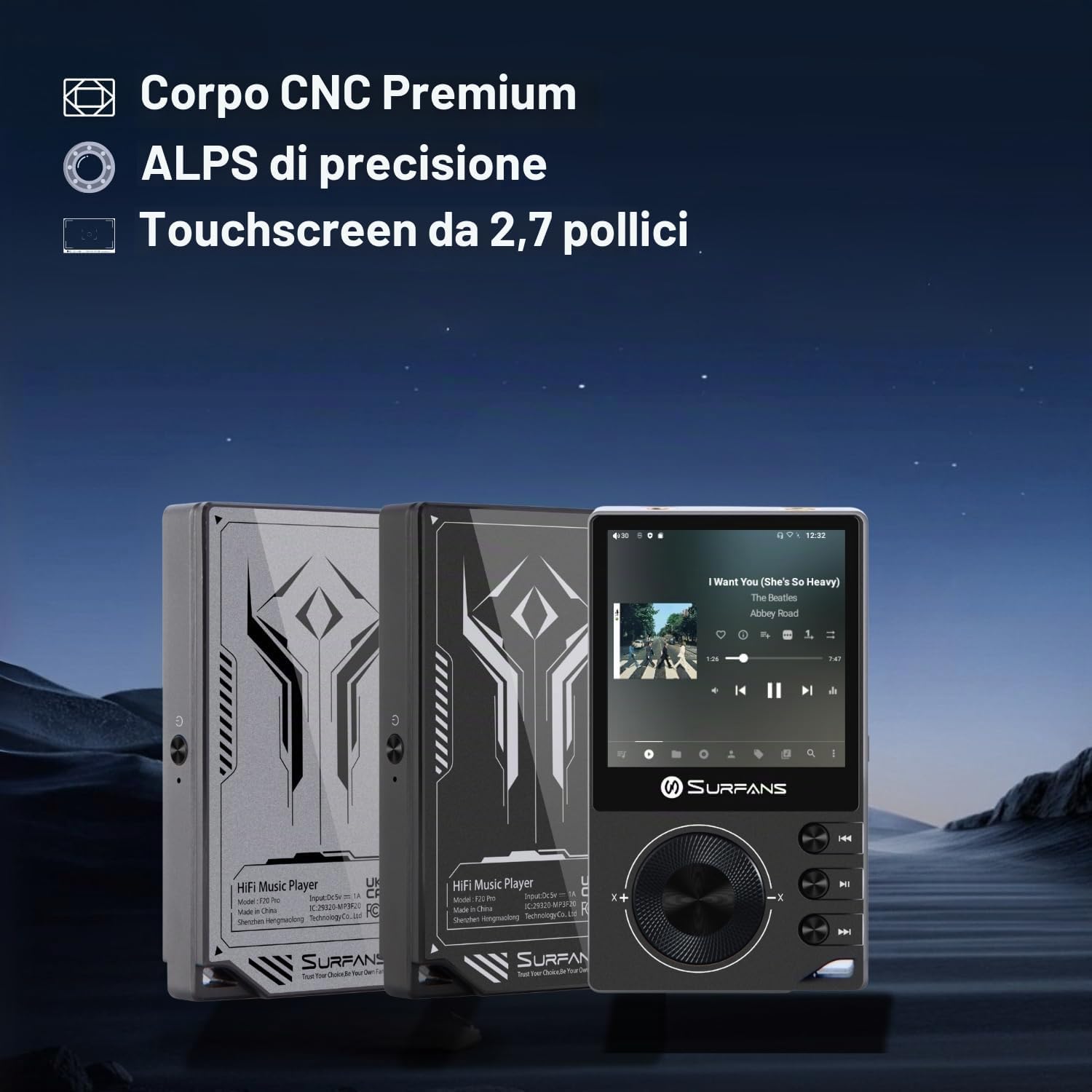
The Surfans F20 Pro features a premium CNC body for durability and aesthetics.
1.2 ການສາກອຸປະກອນ
Before first use, fully charge the device. Connect the included USB cable to the player's charging port and to a USB power adapter (not included) or a computer's USB port. The charging indicator will show the charging status. A full charge typically takes approximately 3 hours.
The Surfans F20 Pro features a 1450mAh rechargeable battery, providing up to 15 hours of music playback on a full charge.
1.3 ການເປີດ/ປິດ
- ເພື່ອເປີດເຄື່ອງ: Press and hold the Power button located on the side of the device until the screen lights up.
- ປິດເຄື່ອງ: Press and hold the Power button until a power-off menu appears on the screen. Select "Power Off" to shut down the device. A short press will turn the screen on/off.
1.4 ການຕັ້ງຄ່າເບື້ອງຕົ້ນ
Upon first power-on, you may be guided through an initial setup process. This typically includes:
- ການເລືອກພາສາ: ເລືອກພາສາທີ່ເຈົ້າມັກ.
- ຕັ້ງຄ່າ Wi-Fi: Connect to a Wi-Fi network to enable streaming services and software updates. Navigate to Settings > Network & Internet > Wi-Fi.
- ບັນຊີ Google: ເຂົ້າສູ່ລະບົບດ້ວຍບັນຊີ Google ຂອງທ່ານເພື່ອເຂົ້າເຖິງ Google Play Store ແລະການບໍລິການອື່ນໆຂອງ Google.
1.5 ການຂະຫຍາຍບ່ອນເກັບຂໍ້ມູນ
The Surfans F20 Pro comes with 32GB of internal memory. You can expand the storage up to 1TB using a Micro SD card. Insert the Micro SD card into the designated slot on the device.
2. ຄໍາແນະນໍາການດໍາເນີນງານ
2.1 ອຸປະກອນເກີນview ແລະການນໍາທາງ
The F20 Pro features a 2.73-inch touchscreen for primary interaction and physical buttons for quick control.

The Surfans F20 Pro features a touchscreen interface for easy navigation and access to various applications.
- ໜ້າຈໍສຳຜັດ: Tap, swipe, and pinch to navigate menus, select options, and control playback.
- ປຸ່ມທາງດ້ານຮ່າງກາຍ: Use the side buttons for power, volume control, and playback (play/pause, skip tracks). The scroll wheel provides tactile navigation.
2.2 ການຫລີ້ນດົນຕີ
The F20 Pro supports various audio formats including MP3, AAC, FLAC, WAV, and DSD. You can play music stored on the device's internal memory or Micro SD card, or stream from online services.
- ການຫຼິ້ນທ້ອງຖິ່ນ: Use the pre-installed music player app to browse and play your local audio files.
- ການຖ່າຍທອດ: Install and use streaming applications like Spotify, Apple Music, Tidal, or YouTube from the Google Play Store.
2.3 ການເຊື່ອມຕໍ່ອຸປະກອນສຽງ
The player offers both wired and wireless audio output options.

The F20 Pro features both 3.5mm single-ended and 4.4mm balanced audio output ports for versatile headphone connectivity.
- ຫູຟັງແບບມີສາຍ:
- 3.5mm ສິ້ນດຽວ: Connect standard headphones to the 3.5mm port.
- 4.4mm ສົມດຸນ: For enhanced audio quality and power, connect compatible balanced headphones to the 4.4mm port. This port provides 500mW of power.
- Bluetooth Headphones/Speakers:
- The F20 Pro supports Bluetooth 5.0 with LDAC for high-fidelity wireless audio.
- To pair: Go to Settings > Connected devices > Pair new device. Ensure your Bluetooth device is in pairing mode.

The F20 Pro supports Bluetooth 5.0 with LDAC for high-quality wireless audio streaming.
This video demonstrates the process of pairing a Bluetooth device with a music player. The steps shown are generally applicable to the Surfans F20 Pro.
2.4 ການເຊື່ອມຕໍ່ Wi-Fi
The device supports dual-band Wi-Fi (2.4GHz and 5GHz) for fast downloads and smooth streaming.

The Surfans F20 Pro supports dual-band Wi-Fi for reliable internet connection and streaming.
- To connect: Go to Settings > Network & Internet > Wi-Fi. Select your network and enter the password.
- Once connected, you can use pre-installed or downloaded streaming apps.
2.5 ເຊື່ອມຕໍ່ກັບຄອມພິວເຕີ້
You can connect the F20 Pro to a computer via USB to transfer files or use it as a USB DAC.
This video illustrates how to easily connect a music player to a PC for file transfer or other functions. The process is similar for the Surfans F20 Pro.
- ເຊື່ອມຕໍ່ເຄື່ອງຫຼີ້ນກັບຄອມພິວເຕີຂອງທ່ານໂດຍໃຊ້ສາຍ USB.
- On the player, swipe down from the top of the screen to access notifications. Tap on the USB connection notification and select "File transfer" or "USB DAC" mode as needed.
3. ບໍາລຸງຮັກສາ
3.1 ການທໍາຄວາມສະອາດອຸປະກອນ
To keep your F20 Pro in optimal condition:
- ໃຊ້ຜ້າອ່ອນ, ແຫ້ງ, ແລະ ບໍ່ມີຂົນເພື່ອເຊັດໜ້າຈໍ ແລະ ຕົວເຄື່ອງ.
- Avoid using abrasive cleaners, solvents, or aerosol sprays, which can damage the finish.
- ຢ່າເຮັດໃຫ້ອຸປະກອນມີຄວາມຊຸ່ມຊື່ນຫຼາຍເກີນໄປ.
3.2 ການດູແລຫມໍ້ໄຟ
ເພື່ອເພີ່ມອາຍຸແບັດເຕີຣີ ແລະປະສິດທິພາບສູງສຸດ:
- ຫຼີກເວັ້ນອຸນຫະພູມທີ່ຮຸນແຮງ.
- ຢ່າປ່ອຍໃຫ້ອຸປະກອນມີໄຟຟ້າໝົດເປັນເວລາດົນ.
- ສໍາລັບການເກັບຮັກສາໃນໄລຍະຍາວ, ສາກໄຟຫມໍ້ໄຟປະມານ 50% ແລະເກັບຮັກສາໄວ້ໃນບ່ອນທີ່ເຢັນ, ແຫ້ງ.
3.3 ການປັບປຸງຊອບແວ
The F20 Pro runs on Android 12. Periodically check for software updates to ensure the best performance and access to new features. Connect to Wi-Fi and go to Settings > System > System update.
4. ການແກ້ໄຂບັນຫາ
4.1 ອຸປະກອນບໍ່ເປີດເຄື່ອງ
- ໃຫ້ແນ່ໃຈວ່າໄດ້ສາກໄຟແລ້ວ. ເຊື່ອມຕໍ່ອຸປະກອນກັບເຄື່ອງສາກເປັນເວລາຢ່າງໜ້ອຍ 30 ນາທີ.
- Try pressing and holding the Power button for 10-15 seconds to force a restart.
4.2 ບໍ່ມີສຽງອອກ
- Check headphone connections (3.5mm or 4.4mm). Ensure they are fully inserted.
- Verify volume levels on the device and any connected Bluetooth audio devices.
- ຖ້າໃຊ້ Bluetooth, ໃຫ້ຮັບປະກັນວ່າອຸປະກອນຖືກຈັບຄູ່ ແລະ ເຊື່ອມຕໍ່ຢ່າງຖືກຕ້ອງແລ້ວ.
- Test with different headphones or speakers to rule out a faulty audio accessory.
4.3 Wi-Fi or Bluetooth Connection Issues
- Ensure Wi-Fi or Bluetooth is enabled in the settings.
- Restart the F20 Pro and your router/Bluetooth device.
- ລືມເຄືອຂ່າຍ/ອຸປະກອນໃນການຕັ້ງຄ່າ ແລະ ລອງເຊື່ອມຕໍ່ຄືນໃໝ່.
- ໃຫ້ແນ່ໃຈວ່າທ່ານຢູ່ໃນຂອບເຂດຂອງເຄືອຂ່າຍ Wi-Fi ຫຼືອຸປະກອນ Bluetooth.
4.4 Slow Performance or App Crashes
While the F20 Pro has an Octa-Core processor and 3GB RAM, some apps or heavy multitasking might affect performance.
- ປິດແອັບພລິເຄຊັນພື້ນຫຼັງທີ່ບໍ່ໄດ້ໃຊ້.
- ລຶບລ້າງແຄສຂອງແອັບ (ການຕັ້ງຄ່າ > ແອັບ > [ຊື່ແອັບ] > ບ່ອນເກັບຂໍ້ມູນ ແລະ ແຄສ > ລຶບລ້າງແຄສ).
- ໃຫ້ແນ່ໃຈວ່າຊອບແວຂອງອຸປະກອນທັນສະໄໝແລ້ວ.
- If issues persist, consider a factory reset (Settings > System > Reset options > Erase all data), but back up your data first.
5. ຂໍ້ມູນຈໍາເພາະ
Below are the key technical specifications for the Surfans F20 Pro Music Player:
| ຄຸນສົມບັດ | ລາຍລະອຽດ |
|---|---|
| ຊື່ຕົວແບບ | F20 Pro |
| ຍີ່ຫໍ້ | Surfans |
| ລະບົບປະຕິບັດການ | Android 12 |
| ໂຮງງານຜະລິດ | Octa-Core |
| RAM | 3GB |
| ການເກັບຮັກສາພາຍໃນ | 32GB |
| ການເກັບຮັກສາທີ່ຂະຫຍາຍໄດ້ | Up to 1TB via Micro SD |
| DAC | Dual ESS9018 |
| ຮອງຮັບສຽງ Hi-Res | DSD512 |
| ການເຊື່ອມຕໍ່ | AUX, Bluetooth 5.0 (LDAC), USB, Dual-Band Wi-Fi (2.4GHz & 5GHz) |
| ຂະໜາດໜ້າຈໍ | 2.73 ນິ້ວ |
| ເຕັກໂນໂລຊີຫນ້າຈໍ | ຫນ້າຈໍສໍາຜັດ |
| ຮູບແບບສຽງທີ່ຮອງຮັບ | MP3, AAC, FLAC, WAV, DSD |
| ຜົນຜະລິດທີ່ສົມດູນ | 4.4mm (500mW) |
| ຄວາມອາດສາມາດຫມໍ້ໄຟ | 1450mAh |
| ຊີວິດຫມໍ້ໄຟ | Up to 15 hours music playback |

The Surfans F20 Pro features dual ESS9018 DACs for superior audio decoding.

Internal audio architecture showing dual DACs and multi-stage amplifier design for both single-ended and balanced outputs.
6. ການຮັບປະກັນແລະການສະ ໜັບ ສະ ໜູນ
For warranty information and technical support, please refer to the documentation provided with your purchase or contact the seller directly. The seller for this product is SurfansAudio.
ຮັກສາຫຼັກຖານການຊື້ຂອງທ່ານສໍາລັບການຮຽກຮ້ອງການຮັບປະກັນໃດໆ.