
ຂໍ້ມູນຄວາມປອດໄພທີ່ສໍາຄັນ
ກະລຸນາອ່ານແລະເຂົ້າໃຈຄໍາແນະນໍາທັງຫມົດກ່ອນທີ່ຈະປະກອບແລະນໍາໃຊ້. ຮັກສາຄູ່ມືນີ້ໄວ້ສໍາລັບການອ້າງອີງໃນອະນາຄົດ.
- ສະເຫມີປະຕິບັດຕາມຄໍາແນະນໍາການປະກອບຢ່າງລະມັດລະວັງ.
- ບໍ່ເກີນຄໍາແນະນໍານ້ໍາຫນັກສູງສຸດຂອງ 60 ປອນ for the top surface and 30 ປອນ per drawer to ensure stability and prevent accidents.
- Ensure all connections for the charging station are secure before use.
- Keep liquids away from the charging station to prevent electrical hazards.
- ຜະລິດຕະພັນນີ້ແມ່ນສໍາລັບການນໍາໃຊ້ພາຍໃນເຮືອນເທົ່ານັ້ນ.
ສິນຄ້າເກີນview
The T4TREAM Farmhouse Nightstand (Model BDC24ST2TD) is designed to provide convenient storage and charging capabilities for your bedroom or living space. It features a rustic design with durable construction.
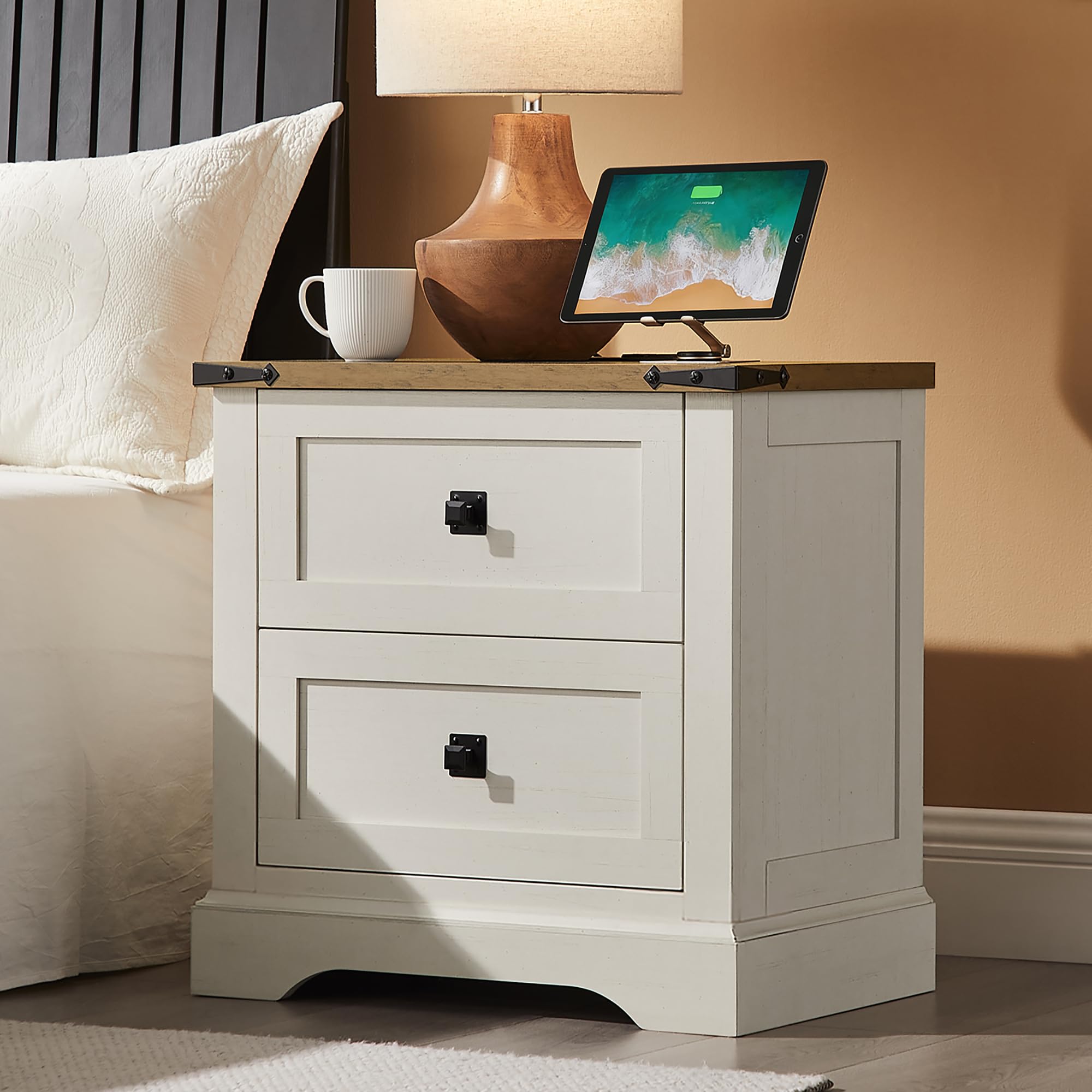
ຮູບພາບ: ທາງຫນ້າ view of the T4TREAM 24-inch Farmhouse Nightstand in Antique White, showcasing its two drawers and rustic design.
ຄຸນນະສົມບັດທີ່ສໍາຄັນ:
- ສະຖານີສາກໄຟແບບປະສົມປະສານ: Includes two AC outlets, one USB port, and one Type C port.
- Two Storage Drawers: ສະຫນອງ ample space for bedside essentials.
- ການກໍ່ສ້າງທົນທານ: Made from FSC-Certified wood, optimal MDF, and P2 engineered wood with a waterproof surface.
- ການອອກແບບເຮືອນກະສິກໍາ rustic: Features natural woodgrain textures and sleek metal handles.
ຄໍາແນະນໍາຂອງສະພາແຫ່ງ
Assembly of the T4TREAM nightstand is designed to be straightforward. Please ensure you have all components and tools before beginning.
ເຄື່ອງມືທີ່ຕ້ອງການ:
- Allen Key (usually included)
- Screwdriver (ຫົວ Phillips ແນະນໍາ)
ຂັ້ນຕອນກອງປະຊຸມໃຫຍ່:
- Unpack ອົງປະກອບ: Carefully remove all parts from the packaging. Verify that all components listed in the included assembly guide are present and undamaged.
- ລະບຸພາກສ່ວນ: Each part is typically labeled. Refer to the assembly guide for a diagram of all parts and hardware.
- ປະຕິບັດຕາມຄໍາແນະນໍາຂັ້ນຕອນໂດຍຂັ້ນຕອນ: Assemble the nightstand by following the detailed, illustrated instructions provided in the separate assembly guide. Pay close attention to the orientation of each piece.
- ການເຊື່ອມຕໍ່ທີ່ປອດໄພ: Ensure all screws, cams, and other fasteners are tightened securely. Do not overtighten.
- ຕິດຕັ້ງ Drawers: Assemble the drawers according to the instructions and install them into the nightstand frame. Ensure they slide smoothly.
- ຕິດຕັ້ງສະຖານີສາກໄຟ: Integrate the charging station into the designated slot on the top surface as per the instructions.
Note: The estimated assembly time is approximately 30 minutes. Using a hand screwdriver is recommended over a power drill to prevent damage to the wood.

Image: Diagram illustrating the nightstand's overall dimensions (24"W x 15.75"D x 24"H), drawer dimensions (17.7"W x 11.8"D x 8.8"H), and maximum load capacities (Top: 60 lbs, Drawer: 30 lbs).
ຄໍາແນະນໍາການດໍາເນີນງານ
ການນໍາໃຊ້ສະຖານີສາກໄຟ:
- ເຊື່ອມຕໍ່ພະລັງງານ: After assembly, plug the nightstand's 4.9-foot power cord into a standard 125V wall outlet.
- ເຕົ້າສຽບໄຟ AC: Use the two 125V/12A AC outlets to power devices such as lamps, laptops, or other electronics.
- ພອດ USB: Use the 5V/2.1A USB-A and Type-C ports to charge compatible smartphones, tablets, and other USB-powered devices.
- ການຈັດວາງອຸປະກອນ: Place devices securely on the nightstand's top surface while charging.

ຮູບພາບ: ເທິງ view of the nightstand demonstrating the integrated charging station with an iPad and smartphone connected to the AC and USB ports.
ການນໍາໃຊ້ Storage Drawers:
- The two drawers provide concealed storage for personal items.
- Ensure items placed in drawers do not exceed the 30-pound weight limit per drawer.
- Avoid placing oversized or irregularly shaped items that may obstruct drawer movement.

ຮູບພາບ: View of the nightstand with both drawers partially open, revealing the interior storage space.
ບໍາລຸງຮັກສາ
- ທໍາຄວາມສະອາດ: ເຊັດຫນ້າດ້ວຍການໂຄສະນາamp ຜ້າ. ຫຼີກເວັ້ນການສານເຄມີທີ່ຮຸນແຮງຫຼືເຄື່ອງເຮັດຄວາມສະອາດຂັດທີ່ອາດຈະທໍາລາຍການສໍາເລັດຮູບ.
- ການຮົ່ວໄຫລ: Promptly wipe up any spills to prevent staining, as the product is not stain-resistant.
- ຮາດແວ: ກວດສອບ ແລະ ຮັດການເຊື່ອມຕໍ່ຮາດແວທັງໝົດໃຫ້ແໜ້ນເປັນໄລຍະເພື່ອຮັກສາຄວາມໝັ້ນຄົງ.
- ສະຖານີສາກໄຟ: ຮັກສາພອດສາກໄຟໃຫ້ບໍ່ມີຝຸ່ນ ແລະ ສິ່ງເສດເຫຼືອ. ຢ່າພະຍາຍາມຖອດອຸປະກອນສາກໄຟອອກ.
ການແກ້ໄຂບັນຫາ
| ບັນຫາ | ສາເຫດທີ່ເປັນໄປໄດ້ | ການແກ້ໄຂ |
|---|---|---|
| ສະຖານີສາກໄຟບໍ່ເຮັດວຽກ. | Power cord not fully plugged in; wall outlet not active; device not compatible. | Ensure power cord is securely plugged into both the nightstand and a working wall outlet. Test the outlet with another device. Verify device compatibility with USB/AC specifications. |
| ລິ້ນຊັກແຂງ ຫຼື ເລື່ອນບໍ່ໄດ້ຢ່າງລຽບງ່າຍ. | Drawer slides misaligned; items obstructing movement; loose hardware. | Check for obstructions inside the drawer or along the slides. Ensure drawer slides are correctly installed and aligned. Tighten any loose screws on the drawer or frame. |
| ໂຕະຂ້າງຕຽງຮູ້ສຶກສັ່ນ. | ຮາດແວປະກອບວ່າງ; ພື້ນທີ່ບໍ່ສະເຫມີພາບ. | Re-tighten all assembly hardware. Ensure the nightstand is placed on a flat, level surface. |
ຂໍ້ມູນຈໍາເພາະ
| ຄຸນສົມບັດ | ລາຍລະອຽດ |
|---|---|
| ຊື່ຕົວແບບ | BDC24ST2TD |
| ຍີ່ຫໍ້ | T4TREAM |
| ຂະໜາດສິນຄ້າ (ກວ້າງ x ຍາວ x ສູງ) | 15.75" x 24" x 24" |
| ນ້ໍາຫນັກລາຍການ | 40.8 ປອນ |
| ແນະນຳນ້ຳໜັກສູງສຸດ (ເທິງສຸດ) | 60 ປອນ |
| ຄຳແນະນຳກ່ຽວກັບນ້ຳໜັກສູງສຸດ (ລິ້ນຊັກ) | 30 ປອນ |
| ວັດສະດຸກອບ | Engineered Wood (FSC-Certified, MDF, P2) |
| ການຈັດການວັດສະດຸ | ໂລຫະ |
| ສີ | ສີຂາວບູຮານ |
| ຈຳ ນວນຕູ້ແຕ້ມ | 2 |
| ຂະໜາດລິ້ນຊັກ (ກວ້າງ x ເລິກ x ສູງ) | 17.7" x 11.8" x 8.8" |
| ສະຖານີສາກໄຟ | 2 AC Outlets (125V/12A), 1 USB-A Port (5V/2.1A), 1 USB-C Port (5V/2.1A) |
| ຄວາມຍາວຂອງສາຍໄຟ | 4.9 ຟຸດ |
| ຕ້ອງການສະພາແຫ່ງ | ແມ່ນແລ້ວ |
| ການດູແລຜະລິດຕະພັນ | ເຊັດດ້ວຍ Damp ຜ້າ |
ການຮັບປະກັນແລະການສະຫນັບສະຫນູນ
For any questions regarding assembly, missing parts, or product functionality, please contact T4TREAM customer support. Refer to your purchase documentation for specific warranty details.
ຂໍ້ມູນຕິດຕໍ່: Please refer to the contact details provided with your purchase or visit the official T4TREAM webເວັບໄຊສໍາລັບການສະຫນັບສະຫນູນ.