
1. ບົດແນະນຳ
This manual provides detailed instructions for the safe and efficient use of your Surfans F20 Pro Android Hi-Res Music Player. Please read this manual thoroughly before operating the device and retain it for future reference.
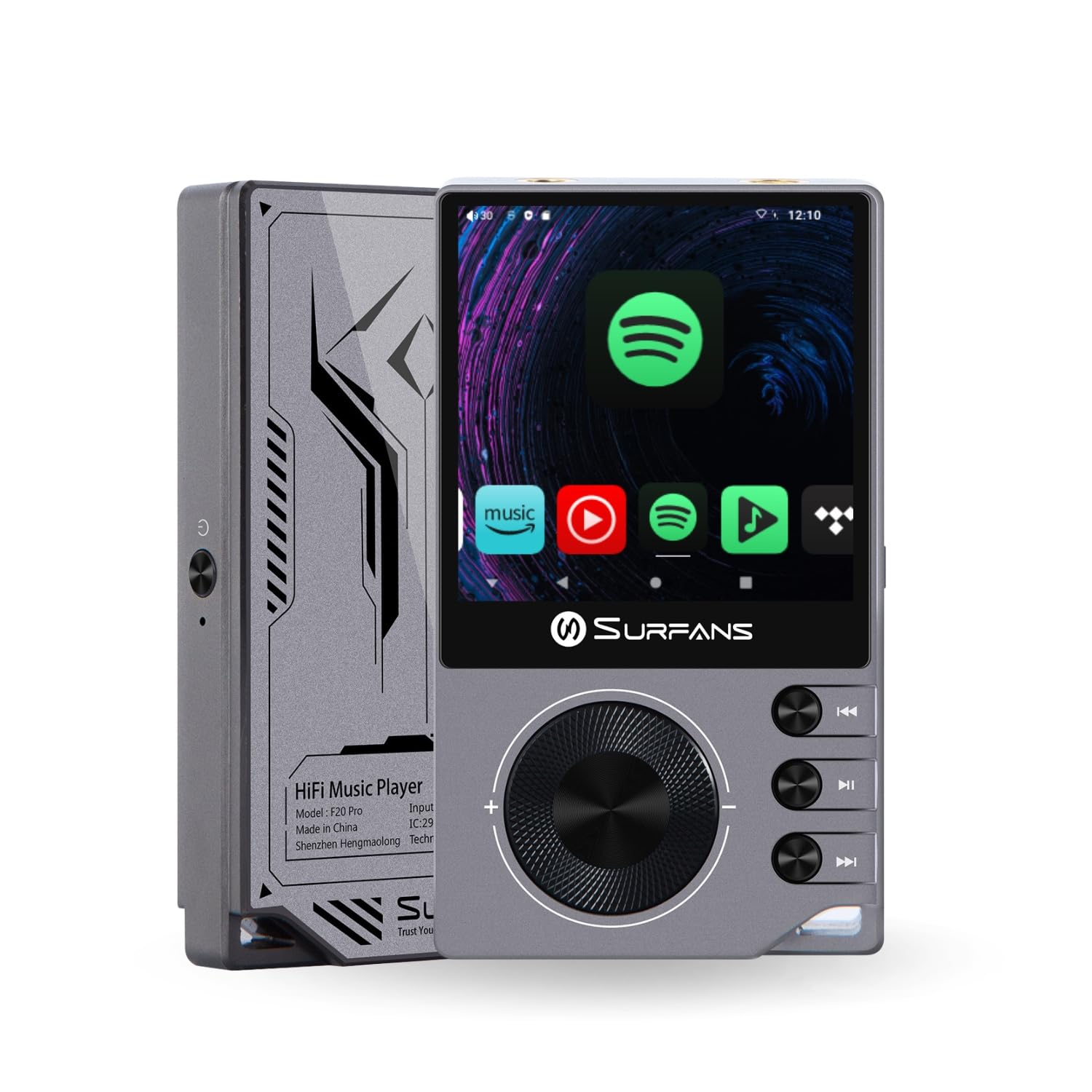
The Surfans F20 Pro Hi-Res Music Player, showcasing its compact design and touchscreen interface.
2. ເນື້ອໃນຊຸດ
ກວດສອບວ່າລາຍການທັງຫມົດແມ່ນມີຢູ່ໃນຊຸດ:
- Surfans F20 Pro Hi-Res Music Player
- ສາຍ USB Type-C
- 32 GB MicroSD Memory Card (pre-installed or separate)
- ກໍລະນີປ້ອງກັນ
- ຄູ່ມືຜູ້ໃຊ້ (ເອກະສານນີ້)
3. ອຸປະກອນເກີນview
Familiarize yourself with the physical components and ports of your F20 Pro player.

ດ້ານໜ້າ ແລະ ດ້ານຫຼັງ view of the Surfans F20 Pro, highlighting its robust CNC metal chassis and button layout.
3.1. ຄຸນນະສົມບັດທີ່ສໍາຄັນ
- Dual ESS9018Q2M DACs: For high-fidelity audio processing.
- Octa-Core Android 12 System: Enables streaming app compatibility and smooth operation.
- 3.5mm Single-Ended & 4.4mm Balanced Outputs: Versatile headphone connectivity.
- Bluetooth 5.0 with LDAC: High-quality wireless audio transmission.
- Wi-Fi ຄູ່ຄວາມຖີ່ (2.4GHz & 5GHz): For stable internet connectivity.
- ການເກັບຮັກສາທີ່ຂະຫຍາຍໄດ້: Supports up to 1TB via MicroSD card.
- ໜ້າຈໍສຳຜັດ 2.7 ນິ້ວ: ການໂຕ້ຕອບຜູ້ໃຊ້ intuitive.
4. ຕັ້ງຄ່າ
4.1. ການສາກອຸປະກອນ
Before first use, fully charge the F20 Pro. Connect the included USB Type-C cable to the device's charging port and a compatible USB power adapter (not included) or computer USB port. The charging indicator will show the charging status.
4.2. ການໃສ່ບັດ MicroSD
The F20 Pro supports MicroSD cards up to 1TB for expanded storage. Locate the MicroSD card slot on the side of the device. Gently insert the card until it clicks into place. To remove, push the card in again until it springs out.
4.3. ການເປີດເຄື່ອງເບື້ອງຕົ້ນ
Press and hold the power button until the screen illuminates. Follow the on-screen prompts to complete the initial setup, including language selection and Wi-Fi connection.
4.4. ການເຊື່ອມຕໍ່ Wi-Fi
ທ່ອງໄປຫາ ການຕັ້ງຄ່າ > ເຄືອຂ່າຍ ແລະອິນເຕີເນັດ > Wi-Fi. Select your desired network and enter the password if prompted. The F20 Pro supports both 2.4GHz and 5GHz Wi-Fi bands.

The Surfans F20 Pro demonstrating its dual-band Wi-Fi capability for fast and stable connections.
4.5. ການຈັບຄູ່ Bluetooth
To connect Bluetooth headphones or speakers:
- ກວດໃຫ້ແນ່ໃຈວ່າອຸປະກອນ Bluetooth ຂອງທ່ານຢູ່ໃນໂໝດຈັບຄູ່.
- On the F20 Pro, go to ການຕັ້ງຄ່າ > ອຸປະກອນທີ່ເຊື່ອມຕໍ່ > ຈັບຄູ່ອຸປະກອນໃໝ່.
- Select your device from the list and confirm pairing.

An illustration of the Bluetooth 5.0 chip, indicating support for high-resolution wireless audio codecs like LDAC.
5. ປະຕິບັດການອຸປະກອນ
5.1. ການນໍາທາງພື້ນຖານ
The F20 Pro features a 2.7-inch touchscreen for navigation. Swipe to scroll, tap to select, and use the physical buttons for quick controls:
- ປຸ່ມເປີດປິດ: Power on/off, screen on/off.
- Volume Wheel: ປັບລະດັບສຽງອອກ.
- ປຸ່ມຄວບຄຸມການຫຼິ້ນ: ຫຼິ້ນ/ຢຸດຊົ່ວຄາວ, ເພງຕໍ່ໄປ, ເພງກ່ອນໜ້ານີ້.
5.2. ການຫຼິ້ນເພງ
The F20 Pro supports various audio formats including DSD512, 192kHz/24bit, FLAC, WAV, WMA, M4A, MP3, MP2, and AAC.
5.2.1. ທ້ອງຖິ່ນ Files
ໂອນເພງ files to the device's internal storage or MicroSD card via USB connection to a computer. Use the pre-installed music player application to browse and play your library.
5.2.2. ແອັບພລິເຄຊັນສະຕຣີມມິງ
The Android 12 operating system allows installation of streaming apps like Spotify, Apple Music, Tidal, or YouTube. Connect to Wi-Fi and download apps from the Google Play Store or other compatible sources.

The Surfans F20 Pro's screen showing various streaming application icons, demonstrating its Android capabilities.
5.3. Headphone Connections
The device offers both single-ended and balanced audio outputs.
- 3.5 ມມ ປາຍດຽວ Standard headphone jack (125mW/32Ω).
- 4.4mm Balanced Output: For enhanced audio performance with compatible headphones (500mW/32Ω).

ໃກ້ຊິດ view of the 3.5mm single-ended and 4.4mm balanced audio output ports on the Surfans F20 Pro.
6. ບໍາລຸງຮັກສາ
6.1. ທໍາຄວາມສະອາດ
Use a soft, dry, lint-free cloth to clean the device. Avoid using abrasive cleaners or solvents, which may damage the surface.
6.2. ການປັບປຸງຊອບແວ
Periodically check for software updates to ensure optimal performance and access to new features. Updates can typically be found in ການຕັ້ງຄ່າ > ລະບົບ > ການປັບປຸງລະບົບ.
6.3. ການດູແລຫມໍ້ໄຟ
ເພື່ອຍືດອາຍຸການໃຊ້ງານຂອງແບັດເຕີຣີ, ໃຫ້ຫຼີກລ່ຽງການສາກໄຟອຸປະກອນຈົນໝົດເລື້ອຍໆ. ເກັບຮັກສາອຸປະກອນໄວ້ໃນບ່ອນທີ່ເຢັນແລະແຫ້ງເມື່ອບໍ່ໄດ້ໃຊ້ງານເປັນເວລາດົນ.

ພາຍໃນ view of battery cells, representing the long-lasting battery capacity of the F20 Pro.
7. ການແກ້ໄຂບັນຫາ
If you encounter issues with your F20 Pro, refer to the following common problems and solutions:
| ບັນຫາ | ສາເຫດທີ່ເປັນໄປໄດ້ | ການແກ້ໄຂ |
|---|---|---|
| ອຸປະກອນບໍ່ເປີດ | ຫມໍ້ໄຟຕ່ໍາ; ລະບົບຂັດຂ້ອງ | Charge the device; Press and hold the power button for 10-15 seconds to force restart. |
| ບໍ່ມີສຽງອອກ | Volume too low; Incorrect output selected; Faulty headphones | Increase volume; Check headphone connection; Test with different headphones. |
| ບໍ່ສາມາດເຊື່ອມຕໍ່ກັບ Wi-Fi ໄດ້ | Incorrect password; Out of range; Router issue | Verify password; Move closer to router; Restart router. |
| Slow performance/App crashes | ແອັບທີ່ເຮັດວຽກຫຼາຍເກີນໄປ; ການເກັບຮັກສາຕ່ໍາ; ຊອບແວລ້າສະໄຫມ | Close background apps; Free up storage; Check for system updates. |
8. ຂໍ້ມູນຈໍາເພາະ
Detailed technical specifications for the Surfans F20 Pro:
| ຄຸນສົມບັດ | ລາຍລະອຽດ |
|---|---|
| ຍີ່ຫໍ້ | Surfans |
| ຊື່ຕົວແບບ | F20 PRO |
| ຊິບ DAC | Dual ESS9018Q2M |
| Op-Amps | Dual OPA1612 |
| ລະບົບປະຕິບັດການ | Android 12 |
| RAM | 3GB |
| ການເກັບຮັກສາພາຍໃນ | 32GB |
| ການເກັບຮັກສາທີ່ຂະຫຍາຍໄດ້ | ສູງສຸດ 1TB ຜ່ານບັດ MicroSD |
| ຂະໜາດໜ້າຈໍ | 2.73 ນິ້ວ |
| ການເຊື່ອມຕໍ່ | Aux, Bluetooth 5.0 (LDAC), USB Type-C, Wi-Fi (2.4GHz & 5GHz) |
| ຜົນໄດ້ຮັບສຽງ | 3.5mm Single-Ended (125mW/32Ω), 4.4mm Balanced (500mW/32Ω) |
| ຮູບແບບສຽງທີ່ຮອງຮັບ | DSD512, 192kHz/24bit, FLAC, WAV, WMA, M4A, MP3, MP2, AAC |
| ສີ | ສີເທົາ |

An illustration of the dual ESS9018K2M DAC chips, central to the F20 Pro's high-resolution audio capabilities.
9. ຂໍ້ມູນການຮັບປະກັນ
The Surfans F20 Pro comes with a ຮັບປະກັນ 1 ປີ ນັບຈາກວັນທີ່ຊື້. ການຮັບປະກັນນີ້ກວມເອົາຂໍ້ບົກຜ່ອງຈາກການຜະລິດ ແລະ ຝີມືການຜະລິດພາຍໃຕ້ການນຳໃຊ້ປົກກະຕິ. ມັນບໍ່ກວມເອົາຄວາມເສຍຫາຍທີ່ເກີດຈາກການໃຊ້ຜິດວິທີ, ອຸບັດຕິເຫດ, ການດັດແປງທີ່ບໍ່ໄດ້ຮັບອະນຸຍາດ, ຫຼື ການສວມໃສ່ ແລະ ການຈີກຂາດຕາມປົກກະຕິ. ກະລຸນາເກັບຫຼັກຖານການຊື້ຂອງທ່ານໄວ້ເພື່ອການຮຽກຮ້ອງການຮັບປະກັນ.
10. ການຊ່ວຍເຫຼືອລູກຄ້າ
For further assistance, technical support, or warranty inquiries, please contact Surfans customer service through the official website or your retailer. You may also find additional resources and FAQs online.