
ແນະນຳ
This manual provides detailed instructions for the safe installation, operation, and maintenance of your TCL 62-inch ceiling fan. Please read this manual thoroughly before installation and keep it for future reference. Ensure all safety precautions are followed to prevent injury or damage.
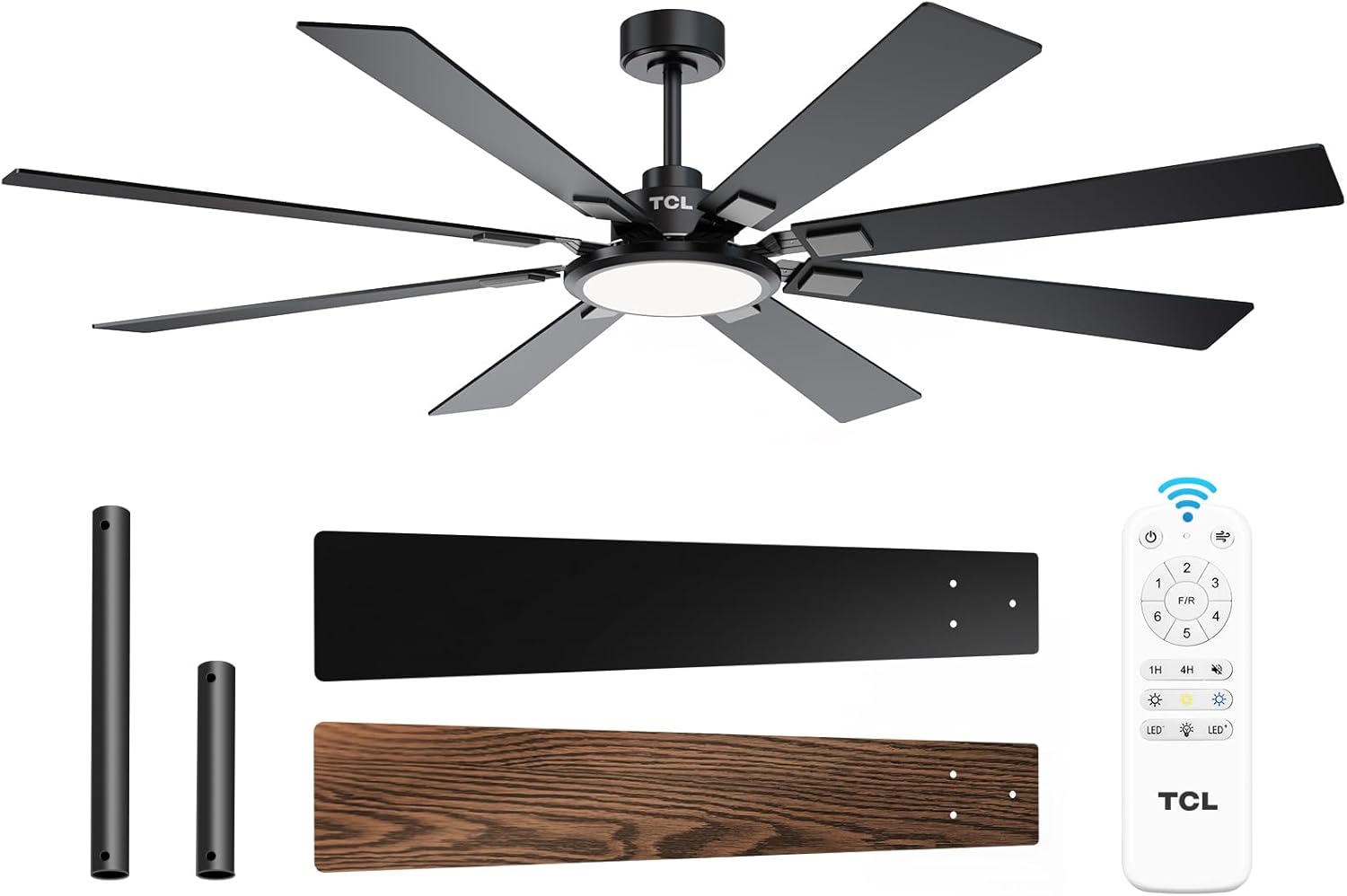
Figure 1: TCL 62-Inch Ceiling Fan Overview
ຂໍ້ມູນຄວາມປອດໄພ
Always follow basic safety precautions when installing and operating this appliance to reduce the risk of fire, electric shock, and personal injury.
- ອ່ານຄໍາແນະນໍາທັງຫມົດ: Familiarize yourself with the fan's components and installation steps before beginning.
- ຄວາມປອດໄພທາງໄຟຟ້າ: Ensure the power is turned off at the circuit breaker before installation or servicing. All wiring must be in accordance with national and local electrical codes.
- ການຕິດຕັ້ງ: The fan must be mounted to a structurally sound ceiling joist or outlet box capable of supporting the fan's weight (12.4 lbs).
- ໄລຍະຫ່າງຂອງໃບມີດ: Maintain a minimum clearance of 7 feet from the floor to the fan blades.
- ການຕິດຕັ້ງແບບມືອາຊີບ: If you are unsure about wiring or installation, consult a qualified electrician.
ການຕິດຕັ້ງແລະການຕິດຕັ້ງ
ອົງປະກອບລວມ
Before beginning installation, verify that all parts are present:
- 1 Ceiling Fan with 8 Blades
- ຄູ່ມືແນະ ນຳ (ເອກະສານນີ້)
- ການຄວບຄຸມໄລຍະໄກ
- Downrods (10-inch and 5-inch switchable)

Figure 2: Fan Components and Features
ຂັ້ນຕອນການຕິດຕັ້ງ
- ປິດໄຟ: Disconnect power at the main circuit breaker to avoid electrical shock.
- ການຕິດຕັ້ງຕົວຍຶດຕິດ: Securely attach the mounting bracket to the ceiling outlet box or a structural support. Ensure it can safely hold the fan's weight.
- ປະກອບ Downrod: Choose the appropriate downrod (5-inch or 10-inch) and assemble it with the fan motor unit.
- ພັດລົມ Hang: ຍົກພັດລົມຢ່າງລະມັດລະວັງແລະວາງສາຍໃສ່ຕົວຍຶດ.
- ສາຍໄຟ: Connect the electrical wires according to the wiring diagram provided in the separate installation guide. Ensure all connections are secure.
- ຕິດແຜ່ນໃບ: Securely attach the 8 fan blades to the motor housing. Note that blades are reversible with black and wood-grain sides.
- ຕິດຕັ້ງຊຸດແສງສະຫວ່າງ: Connect and install the LED light panel to the bottom of the fan.
- ຟື້ນຟູພະລັງງານ: ເມື່ອການຕິດຕັ້ງສໍາເລັດແລະການເຊື່ອມຕໍ່ທັງຫມົດຖືກກວດສອບ, ຟື້ນຟູພະລັງງານຢູ່ທີ່ຕົວຕັດວົງຈອນ.
ວິດີໂອແນະນຳການຕິດຕັ້ງ
Video 1: Step-by-step guide on how to install the TCL ceiling fan, demonstrating the ease of assembly and mounting.
ຄໍາແນະນໍາການດໍາເນີນງານ
Your TCL ceiling fan is operated using the included remote control. Ensure batteries are correctly installed in the remote.
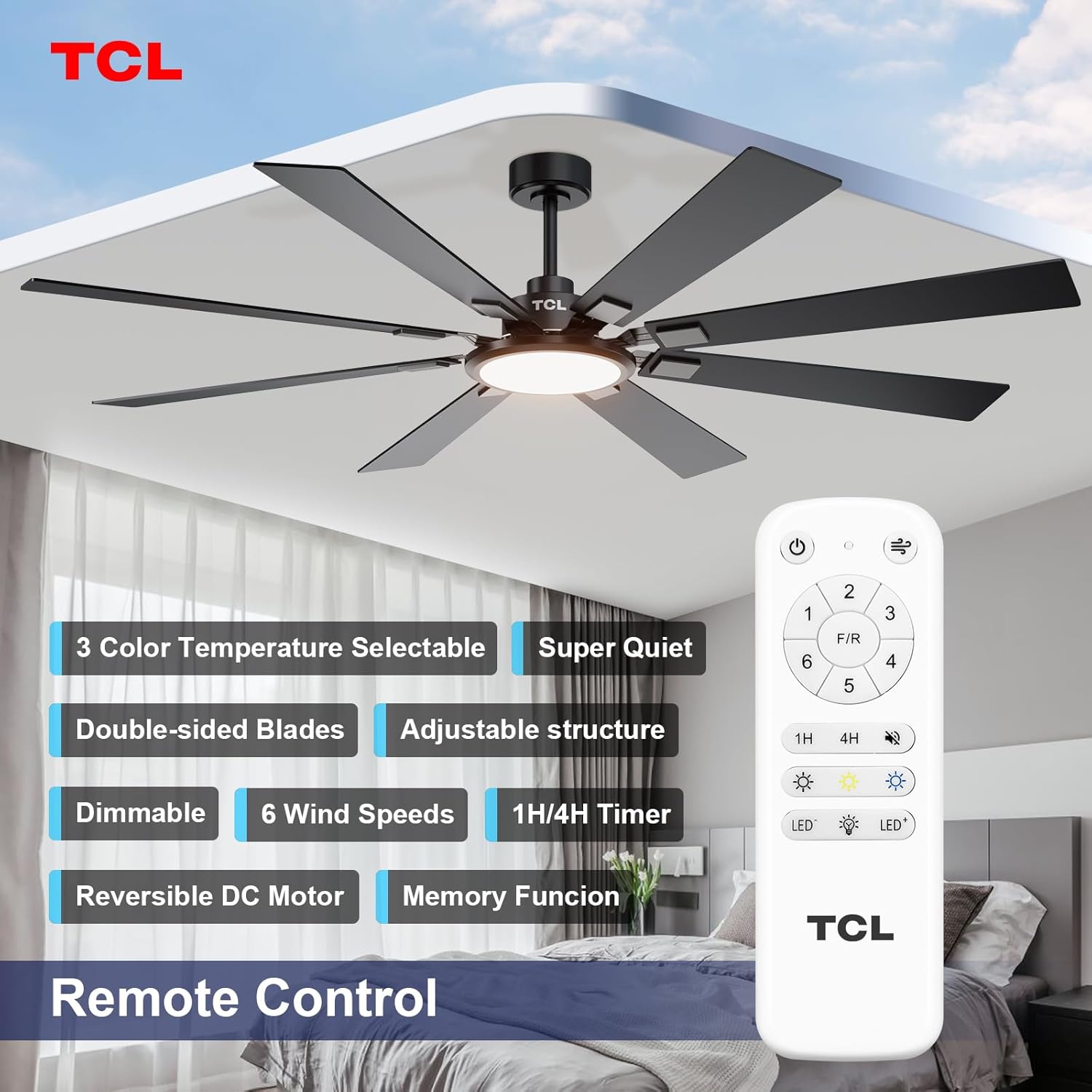
ຮູບທີ 3: ຮູບແບບການຄວບຄຸມໄລຍະໄກ
ການຄວບຄຸມຄວາມໄວພັດລົມ
The fan features 6 adjustable speeds to suit your comfort needs. Use the '1' through '6' buttons on the remote to select your desired speed.
- ລະດັບ 1-2: Low, comfortable wind for gentle air circulation.
- ລະດັບ 3-4: Medium, natural wind for moderate cooling.
- ລະດັບ 5-6: High, powerful wind for maximum cooling.
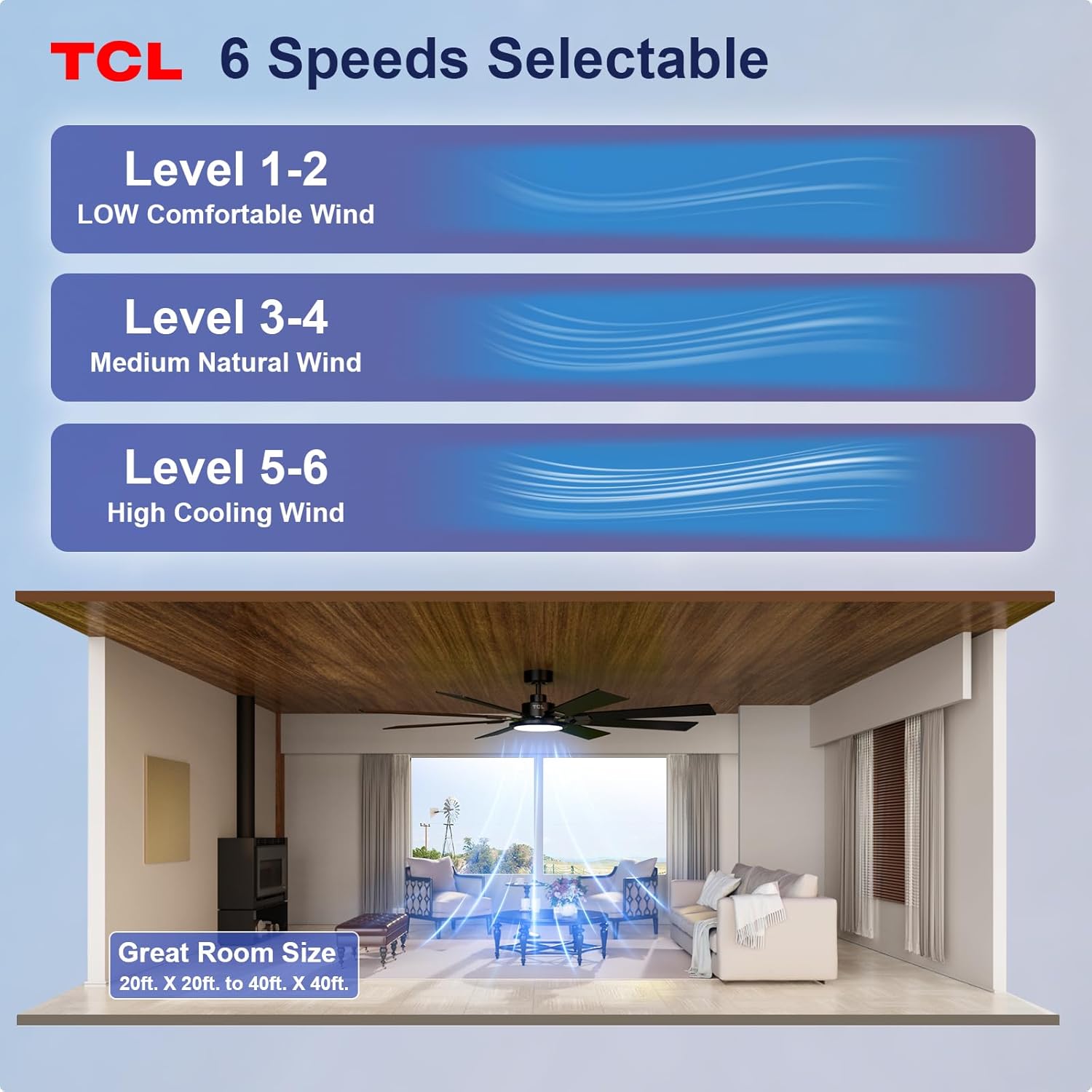
Figure 4: Fan Speed Settings
ການດໍາເນີນງານແສງສະຫວ່າງ
The integrated LED light offers dimmable brightness and 3 color temperature options:
- ເປີດ/ປິດ: Use the light button on the remote to turn the light on or off.
- ມືດມົວ: Use the dimming buttons (up/down arrows) to adjust brightness from 10% to 100%.
- ອຸນຫະພູມສີ: Cycle through 3000K (Warm White), 4000K (Natural White), and 6000K (Cool White) using the color temperature button.
- ຟັງຊັນຫນ່ວຍຄວາມຈໍາ: The fan remembers your last light setting (brightness and color temperature) when turned off and on again. To ensure memory function works correctly, wait at least 20 seconds after turning off the light before turning it back on.

Figure 5: Customizable Light Settings
Reversible DC Motor
The fan features a reversible DC motor, allowing you to change the direction of airflow for year-round comfort. Use the 'F/R' button on the remote control.
- ໂໝດລະດູຮ້ອນ (ກະແສລົມລົງ): Blades rotate counter-clockwise, creating a downward breeze that provides a cooling effect.
- ໂໝດລະດູໜາວ (ກະແສລົມຂຶ້ນ): Blades rotate clockwise, drawing cool air up and pushing warm air down from the ceiling, helping to balance indoor heating.

Figure 6: Reversible DC Motor Function
ຟັງຊັນຈັບເວລາ
Set the fan to automatically turn off after a specified period using the timer buttons (1H/4H) on the remote control.
ການດໍາເນີນງານງຽບ
The fan is designed for noiseless operation, ensuring a peaceful environment.

Figure 7: Noiseless Operation Comparison
ວິດີໂອປະຕິບັດງານ
ວິດີໂອ 2: ຫຼາຍກວ່າview of the TCL ceiling fan, highlighting its modern design and large size suitable for various rooms.
Video 3: Demonstrates the cooling power and stylish lighting features of the TCL ceiling fan.
ວິດີໂອ 4: ເປັນທີ່ສົມບູນແບບview of the TCL ceiling fan's features and benefits.
ບໍາລຸງຮັກສາ
ການບໍາລຸງຮັກສາເປັນປົກກະຕິຮັບປະກັນການປະຕິບັດທີ່ດີທີ່ສຸດແລະຍືດອາຍຸຂອງພັດລົມເພດານຂອງທ່ານ.
- ທໍາຄວາມສະອາດ: ແຕ່ລະໄລຍະເຮັດຄວາມສະອາດແຜ່ນພັດລົມແລະທີ່ຢູ່ອາໄສຂອງມໍເຕີດ້ວຍຄວາມອ່ອນ, ງamp ຜ້າ. ຢ່າໃຊ້ເຄື່ອງເຮັດຄວາມສະອາດຂັດຫຼືສານລະລາຍ. ໃຫ້ແນ່ໃຈວ່າປິດໄຟກ່ອນທີ່ຈະທໍາຄວາມສະອາດ.
- ການກວດກາແຜ່ນໃບ: Check fan blades for any cracks or damage. Replace damaged blades immediately.
- Tighten screws: Over time, screws may loosen. Periodically check and tighten all screws on the motor housing and blade attachments.
- Light Cover: Ensure the light cover is securely fastened.
ການແກ້ໄຂບັນຫາ
ຖ້າເຈົ້າປະສົບບັນຫາກັບພັດລົມຂອງເຈົ້າ, ໃຫ້ອ້າງອີງເຖິງບັນຫາ ແລະວິທີແກ້ໄຂບັນຫາທົ່ວໄປຕໍ່ໄປນີ້:
| ບັນຫາ | ສາເຫດທີ່ເປັນໄປໄດ້ | ການແກ້ໄຂ |
|---|---|---|
| ພັດລົມບໍ່ເລີ່ມຕົ້ນ | ບໍ່ມີພະລັງງານກັບພັດລົມ; ການເຊື່ອມຕໍ່ສາຍວ່າງ; ແບັດເຕີຣີຄວບຄຸມໄລຍະໄກຕາຍ. | ກວດສອບ breaker ວົງຈອນ; ກວດສອບການເຊື່ອມຕໍ່ສາຍໄຟທັງຫມົດແມ່ນປອດໄພ; ປ່ຽນແບັດເຕີລີຄວບຄຸມໄລຍະໄກ. |
| ແສງສະຫວ່າງບໍ່ເຮັດວຽກ | Loose wire connection; LED panel issue. | Check light kit wiring; Contact customer support if LED panel is faulty. |
| ການສັ່ນສະເທືອນຫຼາຍເກີນໄປ | ໃບມີດທີ່ວ່າງ ຫຼື ອຸປະກອນຕິດຕັ້ງ; ໃບມີດບໍ່ສົມດຸນ. | Ensure all blade screws and mounting screws are tight; Use a balancing kit (not included) if necessary. |
| ການດໍາເນີນງານທີ່ບໍ່ມີສຽງ | Loose screws; Motor issue. | Tighten all screws; If noise persists, contact customer support. |
ຂໍ້ມູນຈໍາເພາະ
Detailed technical specifications for the TCL 62-inch ceiling fan:
| ຄຸນສົມບັດ | ລາຍລະອຽດ |
|---|---|
| ຍີ່ຫໍ້ | TCL |
| ໝາຍເລກຕົວແບບ | HFSB-000000D |
| ຂະໜາດ | 62 ນິ້ວ |
| ສີ | ດຳ |
| ວັດສະດຸ | ໂລຫະ, ໄມ້ |
| ແບບ | ທັນສະໄຫມ |
| ການນຳໃຊ້ພາຍໃນ/ນອກ | ພາຍໃນ, ກາງແຈ້ງ |
| ແຫຼ່ງພະລັງງານ | DC |
| ວິທີການຄວບຄຸມ | ໄລຍະໄກ |
| ແຫຼ່ງແສງ | LED |
| ຈໍານວນແຫຼ່ງແສງສະຫວ່າງ | 1 |
| ສະບັບtage | 120 ໂວນ |
| ສີອ່ອນ | Warm to Cool White (2700K-6500K) |
| ວັດtage | 66 ວັດ |
| ຄວາມສະຫວ່າງ | 3000 ລູເມັນ (ສູງສຸດ) |
| ປະສິດທິພາບ | LED, Dimmable |
| ນ້ໍາຫນັກລາຍການ | 12.4 ປອນ |
| ຂະໜາດ (L x W x H) | 72"L x 72"W x 20"H (Note: Product is 62-inch, this dimension might refer to overall span) |
| UPC | 846042019989 |
ການຮັບປະກັນແລະການສະຫນັບສະຫນູນ
ຂໍ້ມູນການຮັບປະກັນ
This TCL ceiling fan is covered by a limited manufacturer's warranty. Please refer to the warranty card included in your product packaging for specific terms, conditions, and duration. Retain your proof of purchase for warranty claims.
ການຊ່ວຍເຫຼືອລູກຄ້າ
For technical assistance, troubleshooting not covered in this manual, or warranty inquiries, please contact TCL customer service. Contact information can typically be found on the product packaging or the official TCL webເວັບໄຊ.