
1. ບົດແນະນຳ
Thank you for choosing the TECKNET Hybrid Active Noise Cancelling Bluetooth Headphones, Model TK-HS049. These over-ear wireless headphones are designed to provide a superior audio experience with advanced noise cancellation, comfortable wear, and extended battery life. This manual will guide you through the setup, operation, and maintenance of your new headphones.

ຮູບພາບ: ທາງຫນ້າ view of the TECKNET Hybrid Active Noise Cancelling Bluetooth Headphones.
2. ເນື້ອໃນຊຸດ
Please check the package contents upon unboxing. If any items are missing or damaged, please contact customer support.
- TECKNET Hybrid Active Noise Cancelling Bluetooth Headphones (TK-HS049)
- ສາຍສາກ USB-C
- ສາຍສຽງ 3.5 ມມ
- ຄູ່ມືຜູ້ໃຊ້
3. ການຄວບຄຸມແລະຕົວຊີ້ວັດ
Familiarize yourself with the buttons and ports on your headphones for optimal use.

ຮູບພາບ: ຂ້າງ view of the headphones highlighting control buttons and ports.
- ປຸ່ມເປີດປິດ: ກົດຄ້າງໄວ້ເພື່ອເປີດ/ປິດ. ກົດສັ້ນເພື່ອຫຼິ້ນ/ຢຸດຊົ່ວຄາວ.
- ເພີ່ມລະດັບສຽງຂຶ້ນ/ເພງຕໍ່ໄປ: ກົດສັ້ນເພື່ອປະລິມານຂຶ້ນ, ກົດຄ້າງໄວ້ສຳລັບເພງຕໍ່ໄປ.
- ຫຼຸດສຽງລົງ/ເພງກ່ອນ ໜ້າ: ກົດສັ້ນເພື່ອປະລິມານລົງ, ກົດຄ້າງໄວ້ສຳລັບເພງກ່ອນໜ້າ.
- ປຸ່ມ ANC: Press to cycle through Active Noise Cancellation modes (Hybrid ANC, Normal, Transparency).
- ພອດສາກໄຟ USB-C: ສໍາລັບການສາກໄຟຫູຟັງ.
- ພອດສຽງ 3.5 ມມ: ສໍາລັບການເຊື່ອມຕໍ່ສາຍ.
- ຕົວຊີ້ວັດ LED: ສະແດງພະລັງງານ, ການຈັບຄູ່, ແລະສະຖານະການສາກໄຟ.
4. ຕັ້ງຄ່າ
4.1. ການສາກຫູຟັງ
- ເຊື່ອມຕໍ່ສາຍສາກໄຟ USB-C ເຂົ້າກັບພອດສາກໄຟຢູ່ຫູຟັງ.
- ເຊື່ອມຕໍ່ອີກສົ້ນຂອງສາຍກັບອະແດັບເຕີໄຟ USB (ບໍ່ລວມ) ຫຼືພອດ USB ຂອງຄອມພິວເຕີ.
- The LED indicator will show red during charging and turn off or blue when fully charged.
- ໂດຍປົກກະຕິການສາກເຕັມຈະໃຊ້ເວລາປະມານ 2-3 ຊົ່ວໂມງ.
4.2. ການຈັບຄູ່ Bluetooth
- ກວດໃຫ້ແນ່ໃຈວ່າປິດຫູຟັງແລ້ວ.
- Press and hold the Power Button for approximately 5 seconds until the LED indicator flashes blue and red alternately, indicating pairing mode.
- ໃນອຸປະກອນຂອງທ່ານ (ໂທລະສັບສະຫຼາດ, ແທັບເລັດ, ແລັບທັອບ), ເປີດໃຊ້ Bluetooth ແລະຊອກຫາອຸປະກອນທີ່ມີຢູ່.
- Select "TECKNET TK-HS049" from the list of devices.
- ເມື່ອເຊື່ອມຕໍ່ແລ້ວ, ໄຟ LED ຈະກະພິບສີຟ້າຊ້າໆ ຫຼື ຍັງຄົງເປັນສີຟ້າຄົງທີ່.
4.3. ການເຊື່ອມຕໍ່ແບບມີສາຍ (ໂໝດ AUX)
You can use the headphones with a 3.5mm audio cable when the battery is low or for devices without Bluetooth connectivity.
- Plug one end of the 3.5mm audio cable into the headphone's 3.5mm audio port.
- ສຽບປາຍອື່ນເຂົ້າໄປໃນຊ່ອງສຽບສຽງອອກຂອງອຸປະກອນຂອງທ່ານ.
- The headphones will automatically switch to wired mode. Bluetooth functions and ANC may be limited or unavailable in wired mode depending on the headphone's power status.
5. ການເຮັດວຽກ
5.1. ເປີດ/ປິດ
- ເປີດ: Press and hold the Power Button for 2-3 seconds until the LED indicator lights up.
- ປິດພະລັງງານ: Press and hold the Power Button for 3-4 seconds until the LED indicator turns off.
5.2. ການຫຼິ້ນເພງ
- ຫຼິ້ນ/ຢຸດ: ກົດປຸ່ມເປີດປິດສັ້ນ.
- ປະລິມານຂຶ້ນ: ກົດສັ້ນກົດປຸ່ມເພີ່ມສຽງ.
- ປະລິມານລົງ: ກົດສັ້ນ ປຸ່ມປະລິມານລົງ.
- ເພງຕໍ່ໄປ: ກົດປຸ່ມເພີ່ມສຽງຄ້າງໄວ້.
- ຕິດຕາມກ່ອນ ໜ້າ ນີ້: ກົດປຸ່ມ Volume Down ຄ້າງໄວ້.
5.3. ການຄຸ້ມຄອງການໂທ
- ຮັບ/ສາຍໂທ: ກົດປຸ່ມເປີດປິດສັ້ນ.
- ປະຕິເສດການໂທ: ກົດປຸ່ມເປີດປິດຄ້າງໄວ້.
- ໂທຫາເບີສຸດທ້າຍ: Double-press the Power Button (if supported by your device).
5.4. Active Noise Cancellation (ANC) ໂໝດ
Press the ANC Button to cycle through the available noise cancellation modes:
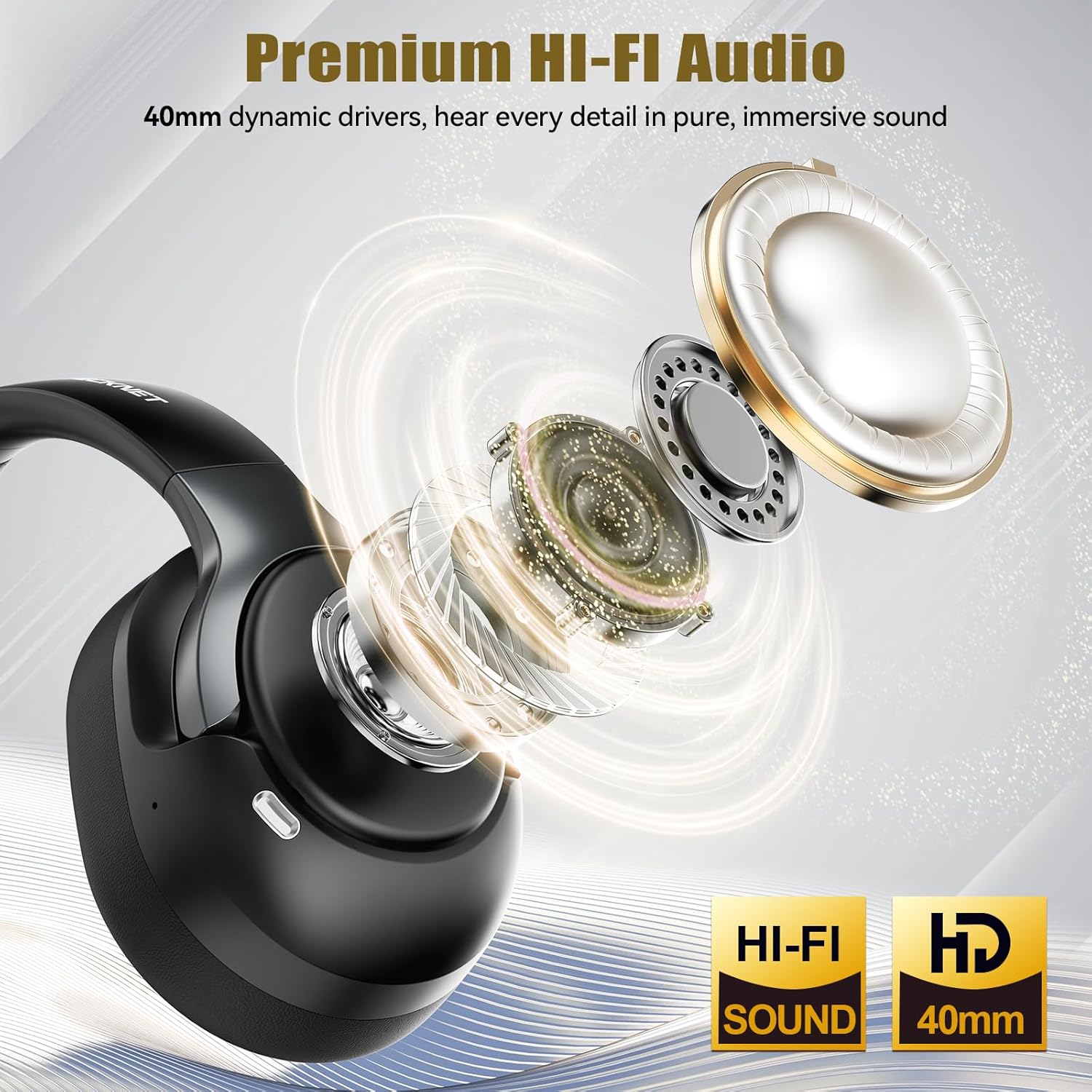
Image: Explanation of different noise control modes.
- ໂໝດ ANC ແບບປະສົມ: Blocks up to 95% of ambient noise, ideal for travel or noisy environments.
- ໂໝດປົກກະຕິ: Standard audio experience without active noise cancellation.
- ໂໝດຄວາມໂປ່ງໃສ: Allows you to hear your surroundings while listening to audio, enhancing environmental awareness.
5.5. Multiple Device Connections
The headphones support connecting to multiple devices, allowing seamless switching.

Image: Illustration of multiple device connectivity.
- Pair the headphones with each desired device following the Bluetooth pairing instructions (Section 4.2).
- To switch between connected devices, simply pause audio on the current device and start playback on the other. The headphones will automatically switch the audio source.
6. ບໍາລຸງຮັກສາ
6.1. ທໍາຄວາມສະອາດ
- ເຊັດຫູຟັງດ້ວຍຜ້າອ່ອນໆ, ແຫ້ງ, ບໍ່ມີເສັ້ນດ່າງ.
- ຢ່າໃຊ້ເຄື່ອງເຮັດຄວາມສະອາດຂັດ, ສານລະລາຍ, ຫຼືສີດສານເຄມີ.
- Clean ear cushions gently with a slightly damp cloth if necessary, and allow them to air dry completely before use.
6.2. ການເກັບຮັກສາ
- ເກັບຮັກສາຫູຟັງໄວ້ໃນບ່ອນທີ່ເຢັນ, ແຫ້ງ, ຫ່າງຈາກແສງແດດໂດຍກົງ ແລະອຸນຫະພູມທີ່ຮ້າຍກາດ.
- If storing for an extended period, charge the headphones at least once every three months to preserve battery life.
6.3. ການດູແລຫມໍ້ໄຟ
- ຫຼີກລ້ຽງການປະຈຸຫມໍ້ໄຟຢ່າງເຕັມທີ່ເລື້ອຍໆ.
- ຫ້າມບໍ່ໃຫ້ແບດເຕີຣີ້ຢູ່ໃນອຸນຫະພູມສູງ.
- ໃຊ້ພຽງແຕ່ສາຍສາກທີ່ສະໜອງໃຫ້ ຫຼືສາຍ USB-C ທີ່ໄດ້ຮັບການຮັບຮອງ.
7. ການແກ້ໄຂບັນຫາ
ຖ້າທ່ານພົບບັນຫາກັບຫູຟັງຂອງທ່ານ, ອ້າງອີງເຖິງບັນຫາທົ່ວໄປຕໍ່ໄປນີ້ແລະວິທີແກ້ໄຂ.
| ບັນຫາ | ການແກ້ໄຂທີ່ເປັນໄປໄດ້ |
|---|---|
| ຫູຟັງບໍ່ເປີດ. | ກວດໃຫ້ແນ່ໃຈວ່າຫູຟັງຖືກສາກເຕັມແລ້ວ. ເຊື່ອມຕໍ່ຫາແຫຼ່ງພະລັງງານແລ້ວລອງໃໝ່ອີກຄັ້ງ. |
| ບໍ່ສາມາດຈັບຄູ່ກັບອຸປະກອນໄດ້. | Ensure headphones are in pairing mode (flashing blue/red LED). Turn off and on Bluetooth on your device. Clear previous Bluetooth connections on your device. |
| ບໍ່ມີສຽງ ຫຼືສຽງຕໍ່າ. | Check headphone and device volume levels. Ensure headphones are properly connected via Bluetooth or AUX. Try another audio source. |
| ANC ບໍ່ເຮັດວຽກຢ່າງມີປະສິດທິພາບ. | Ensure ANC mode is activated. Check that the earcups form a good seal around your ears. |
| ການເຊື່ອມຕໍ່ແບບບໍ່ຢຸດຢັ້ງ. | Move closer to your device. Avoid obstacles between headphones and device. Ensure no other strong wireless signals are interfering. |
8. ຂໍ້ມູນຈໍາເພາະ
Key technical details of the TECKNET Hybrid Active Noise Cancelling Bluetooth Headphones.

Image: Playback time details for the headphones.

Image: Details on the 40mm dynamic drivers for audio quality.
- ຕົວແບບ: TK-HS049
- ການເຊື່ອມຕໍ່: ບລູທູດ 6.0, ຊ່ອງສຽບ 3.5 ມມ
- ການຄວບຄຸມສິ່ງລົບກວນ: Hybrid Active Noise Cancellation
- ໄດຣເວີສຽງ: 40mm Dynamic Drivers
- ຊ່ວງຄວາມຖີ່: 20Hz - 20,000Hz
- ຊີວິດຫມໍ້ໄຟ: Up to 50 hours (average, may vary with ANC usage)
- ວິທີການຄວບຄຸມ: Physical Buttons (Volume, Power, ANC)
- ການວາງຫູ: ຫູເກີນ
- ວັດສະດຸ: Fabric, Silicone, Memory Foam
- ຄວາມຕ້ານທານນ້ໍາ: Waterproof (Note: While rated waterproof, avoid prolonged submersion or exposure to harsh conditions.)
- ອຸປະກອນທີ່ເຂົ້າກັນໄດ້: Smartphones, Laptops, Tablets, Gaming Consoles, Computers, Smart Speakers, Cars (with Bluetooth support)
- ສີ: ດຳ
9. ຂໍ້ມູນຄວາມປອດໄພ
- Do not use the headphones at excessively high volumes for extended periods to prevent hearing damage.
- ຢ່າໃຊ້ຫູຟັງໃນສະຖານະການທີ່ການບໍ່ສາມາດໄດ້ຍິນສຽງອ້ອມຂ້າງອາດເປັນອັນຕະລາຍໄດ້ (ຕົວຢ່າງ: ການຂັບຂີ່, ການຂີ່ລົດຖີບ, ການຍ່າງໃນການຈະລາຈອນ).
- ເກັບຮັກສາຫູຟັງໃຫ້ຫ່າງຈາກອຸນຫະພູມ, ຄວາມຊຸ່ມຊື່ນ ແລະ ສານທີ່ກັດກ່ອນທີ່ສຸດ.
- ຢ່າພະຍາຍາມຖອດ ຫຼືດັດແປງຫູຟັງ. ນີ້ຈະເປັນການຍົກເລີກການຮັບປະກັນ ແລະອາດຈະເຮັດໃຫ້ເກີດຄວາມເສຍຫາຍ.
- Dispose of the product and battery according to local regulations. Do not dispose of with household waste.
10. ການຮັບປະກັນແລະການສະຫນັບສະຫນູນ
TECKNET products come with a standard warranty. For detailed warranty information, product support, or to report any issues, please visit the official TECKNET webເວັບໄຊ ຫຼືຕິດຕໍ່ບໍລິການລູກຄ້າຂອງເຂົາເຈົ້າໂດຍກົງ. ກະລຸນາຮັກສາຫຼັກຖານການຊື້ຂອງທ່ານສໍາລັບການຮຽກຮ້ອງການຮັບປະກັນ.