
1. ບົດແນະນຳ
This manual provides detailed instructions for the installation, setup, and operation of your JOYING JY-TT163N4 Android 13 Car Stereo. This unit is designed specifically for Toyota Corolla models manufactured between 2008 and 2013, offering advanced features such as Android 13 operating system, 9-inch touch screen, CarPlay, Android Auto, GPS navigation, and Bluetooth connectivity.
ກະລຸນາອ່ານຄູ່ມືນີ້ຢ່າງລະອຽດກ່ອນທີ່ຈະຕິດຕັ້ງແລະນໍາໃຊ້ເພື່ອຮັບປະກັນການເຮັດວຽກທີ່ເຫມາະສົມແລະຄວາມປອດໄພ.
2. ເນື້ອໃນຊຸດ
ກວດສອບວ່າລາຍການທັງຫມົດທີ່ລະບຸໄວ້ຂ້າງລຸ່ມນີ້ແມ່ນລວມຢູ່ໃນຊຸດຂອງທ່ານ:
- 9" Radio Unit (x1)
- Single Din Cage (x1)
- Left & Right Bracket (x1)
- WiFi Antenna (x1)
- GPS Antenna (x1)
- ເສົາອາກາດ 4G (x2)
- External Mic (x1)
- ສາຍ USB (x2)
- AR Cable (x1)
- Screen Ribbon Cable (x1)
- ສາຍໄຟ (x1)
- ຄູ່ມືຜູ້ໃຊ້ (x1)

Figure 2.1: All included accessories for the JOYING JY-TT163N4 car stereo.
3. ຄູ່ມືການຕິດຕັ້ງ
ການຕິດຕັ້ງແບບມືອາຊີບແມ່ນແນະນໍາໃຫ້. ກວດໃຫ້ແນ່ໃຈວ່າໄດ້ຕັດການເຊື່ອມຕໍ່ໄຟຟ້າຂອງລົດກ່ອນທີ່ຈະເລີ່ມການຕິດຕັ້ງ.
3.1. ການກວດສອບຄວາມເຂົ້າກັນໄດ້
This unit is designed for Toyota Corolla 2008-2013. Please verify your car's dashboard configuration to ensure compatibility, especially regarding JBL amplifier systems and screen sizes.

Figure 3.1: Dashboard compatibility for models without factory JBL amplifier (Option A).
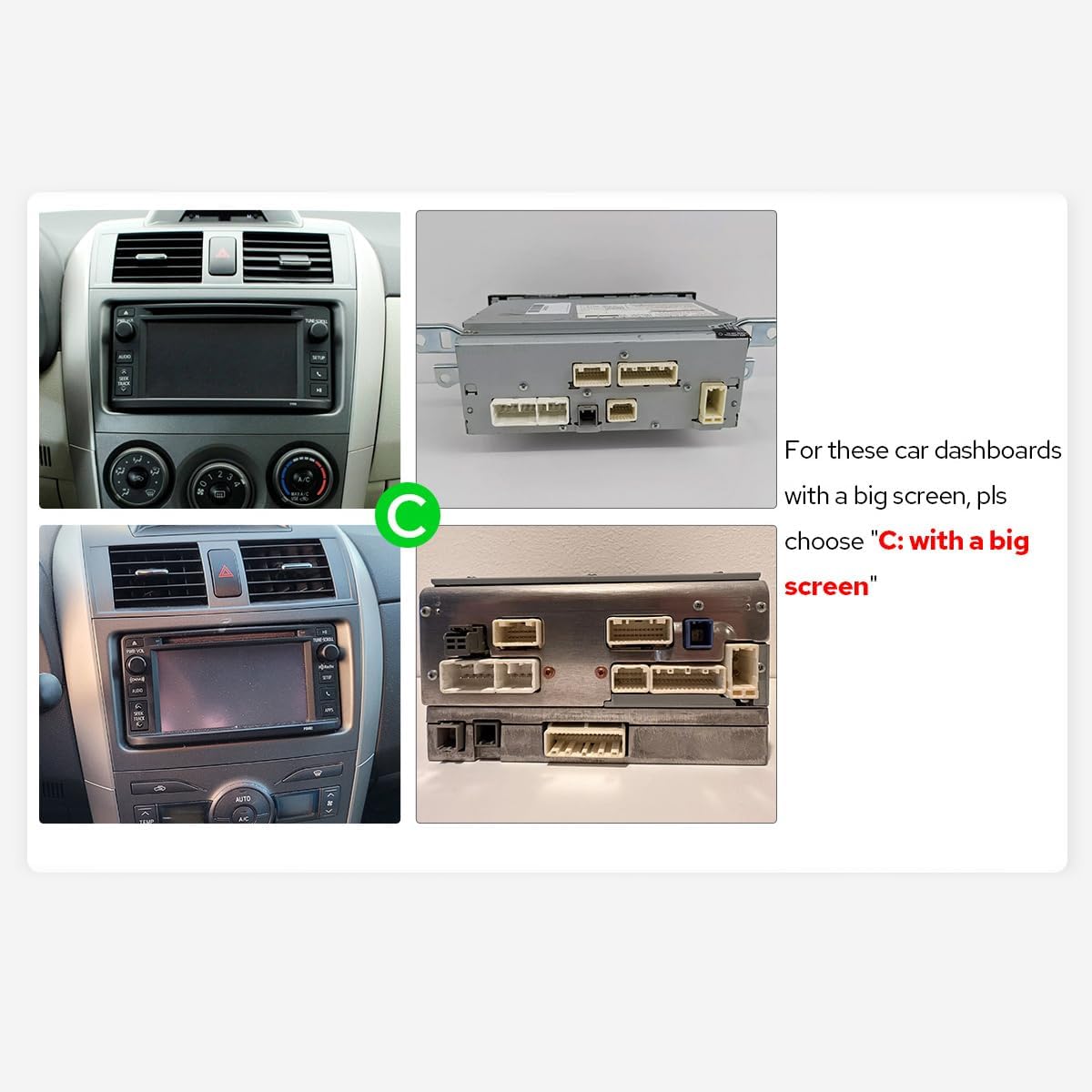
Figure 3.2: Dashboard compatibility for models with a big screen (Option C).
3.2. ການເຊື່ອມຕໍ່ສາຍໄຟ
Connect the provided cables to the corresponding ports on the car stereo and your vehicle's harness. Ensure all connections are secure.

ຮູບ 3.3: ດ້ານຫລັງ view of the car stereo with labeled connection ports.
Video 3.1: This video demonstrates the general wiring operation for car stereo installation. It shows how to connect the power cable, RCA harness, USB adapter cables, radio antenna, and GPS antenna to the head unit.
Video 3.2: This video illustrates the installation effect of a car stereo in a Toyota Corolla 2009-2013 model, providing a visual reference for the final appearance.
4. ການຕິດຕັ້ງເບື້ອງຕົ້ນ
4.1. First Boot
Upon inserting the car key, the unit will start up and enter the user interface within 2 seconds (initial boot may take 30-40 seconds).
4.2. AC Settings
To adjust AC settings, including temperature units (Fahrenheit) and display options:
- Navigate to the main home screen.
- Tap on 'My Car'.
- Select 'Setting'.
- Choose 'AC setting'.
- Toggle the 'Fahrenheit' option to your preference.
- Ensure 'Display large Air' is enabled for full AC display.
- Click 'Confirm' to save changes.
Video 4.1: This video demonstrates how to access and adjust the AC settings on your car stereo, including switching between Celsius and Fahrenheit and enabling the large air display option.
5. ຄໍາແນະນໍາການດໍາເນີນງານ
5.1. CarPlay ແລະ Android Auto
Connect your mobile phone via USB cable or Bluetooth to share apps, navigation, make calls, and listen to music on the larger screen.

Figure 5.1: Built-in CarPlay and Android Auto interfaces.
Video 5.1: This video demonstrates the main functions of the car stereo, including how to connect and use CarPlay, Android Auto, and Mirror Link features.
Video 5.2: This video provides instructions on how to set up and use Wireless CarPlay and Android Auto with the car stereo.
Video 5.3: This video guides users through the process of connecting their smartphone to the car stereo for CarPlay and Android Auto functionality.
Video 5.4: This video demonstrates the steps to connect your device to the car stereo for CarPlay functionality.
5.2. ການເຊື່ອມຕໍ່ກະຈົກ
Mirror your smartphone screen directly onto the car stereo display for enhanced viewການນຳໃຊ້ແອັບ ແລະ ເນື້ອຫາ.
ວິດີໂອທີ 5.5: ສັ້ນໆກ່ອນໜ້ານີ້view video demonstrates the wireless mirroring feature, showing a smartphone screen duplicated on the car stereo display.
5.3. GPS ນໍາທາງ
The unit features precise GPS engines and includes GPS antennas for accurate positioning and faster real-time navigation. Offline maps are supported in areas where data download is available.
5.4. Bluetooth 5.0
Supports audio streaming, automatic phone book transfer, and hands-free calling. Note: It primarily supports phone and OBD dongle connections.
5.5. ການຫຼິ້ນສື່
Enjoy music and videos from various sources. The unit supports split-screen multitasking, allowing you to run two applications simultaneously.
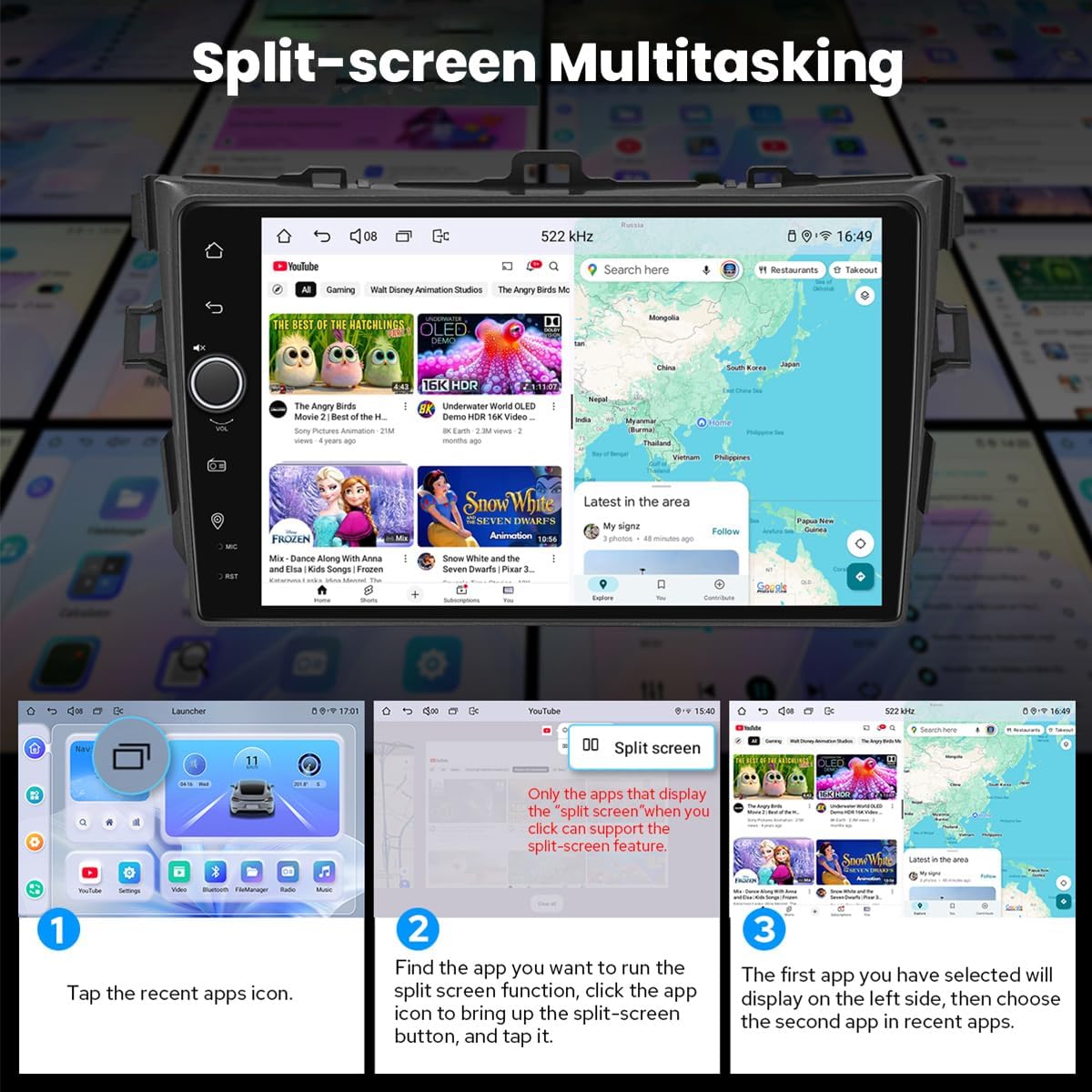
Figure 5.2: Split-screen multitasking interface.
5.6. Personalized Settings
Customize your stereo with various options including car boot logos, wallpapers, and changeable button colors.

Figure 5.3: Personalized settings options.
5.7. Sound Enjoyment
Equipped with a TDA7851 DSP chip, a 48-Band Graphic Equalizer, and 4x50W Max Output Power. Supports aftermarket amplifiers with 4 Audio Outputs, 1 SUB Output, Fiber Optical Output, SPDIF Coaxial Output, and Center Channel Output.

Figure 5.4: High-quality sound features.
5.8. Built-in 4G Module
Insert a SIM card for internet access. Supports FDD-LTE: B2/B4/B5/B7/B12/B13/B14/B17/B25/B26/B38/B66/B71 and TDD-LTE: B41. Does not support phone calls or SMS.
5.9. HDMI Output
Provides full digital image and sound output for external displays like headrest monitors, offering 1080P clear picture without stuttering. HDMI cable is not included.
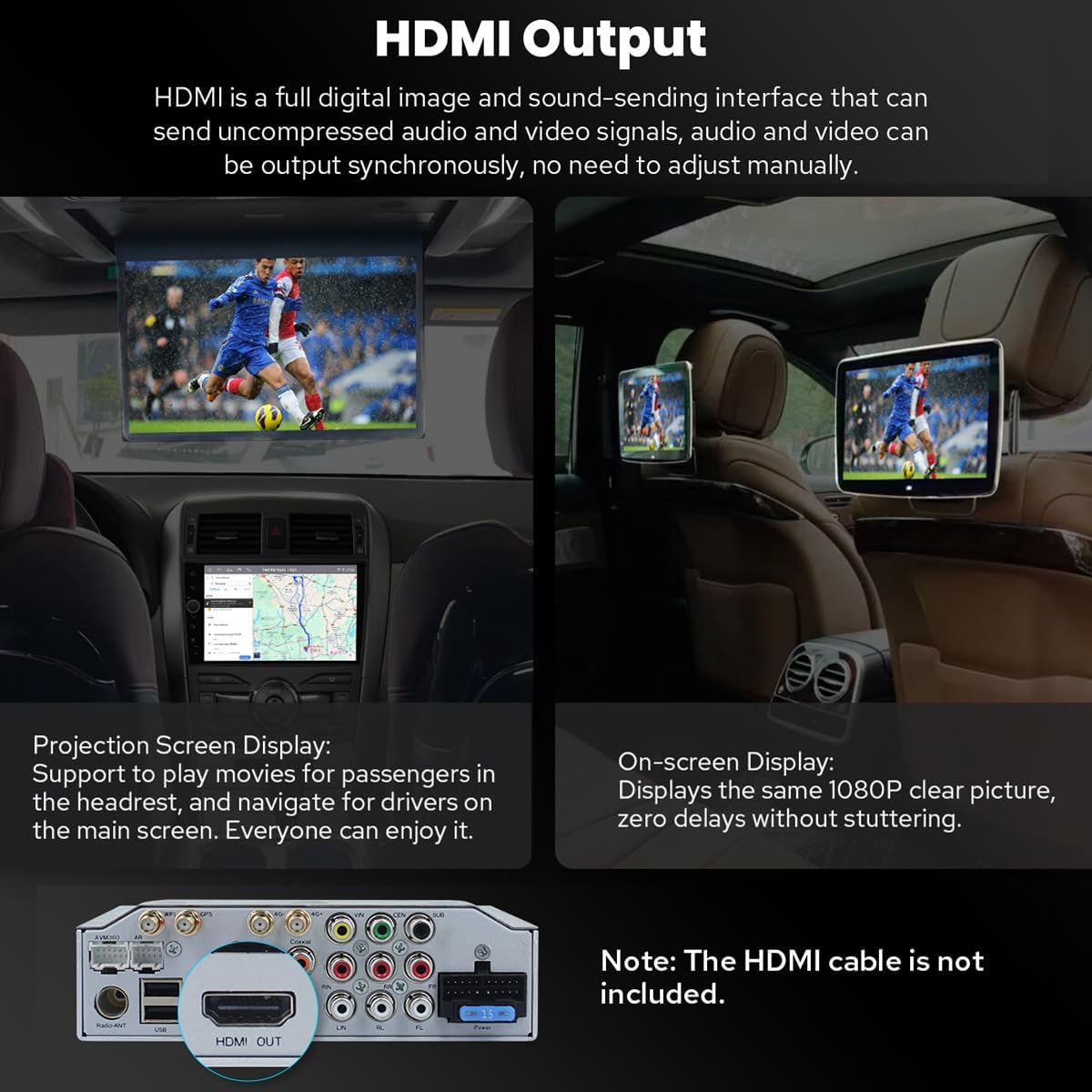
Figure 5.5: HDMI Output functionality.
5.10. ລັກສະນະອື່ນໆ
Includes Picture-in-Picture, 3 USB Ports, Micro SD Card Slot, and 4G SIM Card Slot.

ຮູບ 5.6: ເກີນview of additional features.
6. ບໍາລຸງຮັກສາ
6.1. ການທໍາຄວາມສະອາດຫນ້າຈໍ
ໃຊ້ຜ້າທີ່ອ່ອນນຸ່ມ, ບໍ່ມີສານດ່າງເພື່ອເຊັດໜ້າຈໍຢ່າງຄ່ອຍໆ. ສໍາລັບ smudges stubborn, ເລັກນ້ອຍ dampໃສ່ຜ້າດ້ວຍນ້ໍາຫຼືເຄື່ອງເຮັດຄວາມສະອາດຫນ້າຈໍທີ່ປອດໄພ. ຫຼີກເວັ້ນການສານເຄມີທີ່ຮຸນແຮງຫຼືວັດສະດຸຂັດ.
6.2. ລະບົບເຮັດຄວາມເຢັນ
The unit features a dual heat sink design for superior heat dissipation and improved temperature control. A warning value can be set for volume or CPU temperature; if exceeded, the fan will automatically activate to prevent overheating.

Figure 6.1: Cooling system features.
6.3. WiFi Signal
An independent WiFi antenna ensures stable signal quality and provides fast and smooth internet access, supporting 802.11a/b/g/n/AC standards across 2.4GHz/5GHz spectral bands.

Figure 6.2: WiFi signal features.
7. ການແກ້ໄຂບັນຫາ
If you encounter any issues, please refer to the following general troubleshooting steps:
- ບໍ່ມີພະລັງງານ: ກວດເບິ່ງການເຊື່ອມຕໍ່ໄຟຟ້າແລະຟິວທັງຫມົດ. ກວດໃຫ້ແນ່ໃຈວ່າໄດ້ເປີດໄຟແລ້ວ.
- ບໍ່ມີສຽງ: Verify speaker connections, volume levels, and audio output settings.
- ບັນຫາການເຊື່ອມຕໍ່ Bluetooth: ໃຫ້ແນ່ໃຈວ່າ Bluetooth ຖືກເປີດໃຊ້ງານທັງໃນສະເຕີລິໂອ ແລະ ອຸປະກອນຂອງທ່ານ. ລອງຍົກເລີກການຈັບຄູ່ ແລະ ຈັບຄູ່ອຸປະກອນຄືນໃໝ່.
- ການສູນເສຍສັນຍານ GPS: ໃຫ້ແນ່ໃຈວ່າເສົາອາກາດ GPS ຖືກຕິດຕັ້ງຢ່າງຖືກຕ້ອງແລະມີຄວາມຊັດເຈນ view ຂອງທ້ອງຟ້າ.
- ໜ້າຈໍສໍາຜັດບໍ່ຕອບສະໜອງ: Try restarting the unit. If the issue persists, contact support.
For more specific issues, consult the detailed troubleshooting section in the full user manual or contact JOYING customer support.
8. ຂໍ້ມູນຈໍາເພາະ
| ຄຸນສົມບັດ | ຂໍ້ມູນຈໍາເພາະ |
|---|---|
| ໝາຍເລກຕົວແບບ | JY-TT163N4 |
| ຂະຫນາດຈໍສະແດງຜົນ | 9 ນິ້ວ |
| ຂະໜາດໜ້າຈໍ | 9 ນິ້ວ |
| ປະເພດຫນ້າຈໍສໍາຜັດ | Capacitive |
| ລະບົບປະຕິບັດການ | Android, iOS (via CarPlay/Android Auto) |
| ຄວາມອາດສາມາດເກັບຮັກສາຫນ່ວຍຄວາມຈໍາ | 64 GB |
| ເຕັກໂນໂລຊີການເຊື່ອມຕໍ່ | Bluetooth, Ethernet, USB, Wi-Fi |
| ຄຸນນະສົມບັດພິເສດ | ບູທູດ, ໜ້າຈໍສຳຜັດ |
| ຮູບແບບການອອກສຽງ | ສະເຕຣິໂອ |
| ປະເພດແຜນທີ່ | ອາເມລິກາເຫນືອ |
| ຜູ້ຜະລິດ | ມີຄວາມສຸກ |
9. ການຮັບປະກັນແລະການສະ ໜັບ ສະ ໜູນ
9.1. ຂໍ້ມູນການຮັບປະກັນ
This JOYING car stereo comes with a ຮັບປະກັນ 2 ປີ ຈາກວັນທີ່ຊື້. ກະລຸນາຮັກສາຫຼັກຖານການຊື້ຂອງທ່ານສໍາລັບການຮຽກຮ້ອງການຮັບປະກັນ.
9.2. ການຊ່ວຍເຫຼືອລູກຄ້າ
For technical assistance, troubleshooting, or warranty inquiries, please contact JOYING customer support through the retailer where the product was purchased or visit the official JOYING webເວັບໄຊສໍາລັບຂໍ້ມູນຕິດຕໍ່.