
1. ບົດແນະນຳ
The THOMSON RT400DABBTBK is a versatile portable radio designed to provide a comprehensive audio experience. It features DAB+ and FM radio reception, Bluetooth connectivity for wireless audio streaming, USB playback for MP3 files, and an AUX-IN port for external devices. Additionally, it includes a dual alarm clock function, making it a practical and convenient device for various settings.
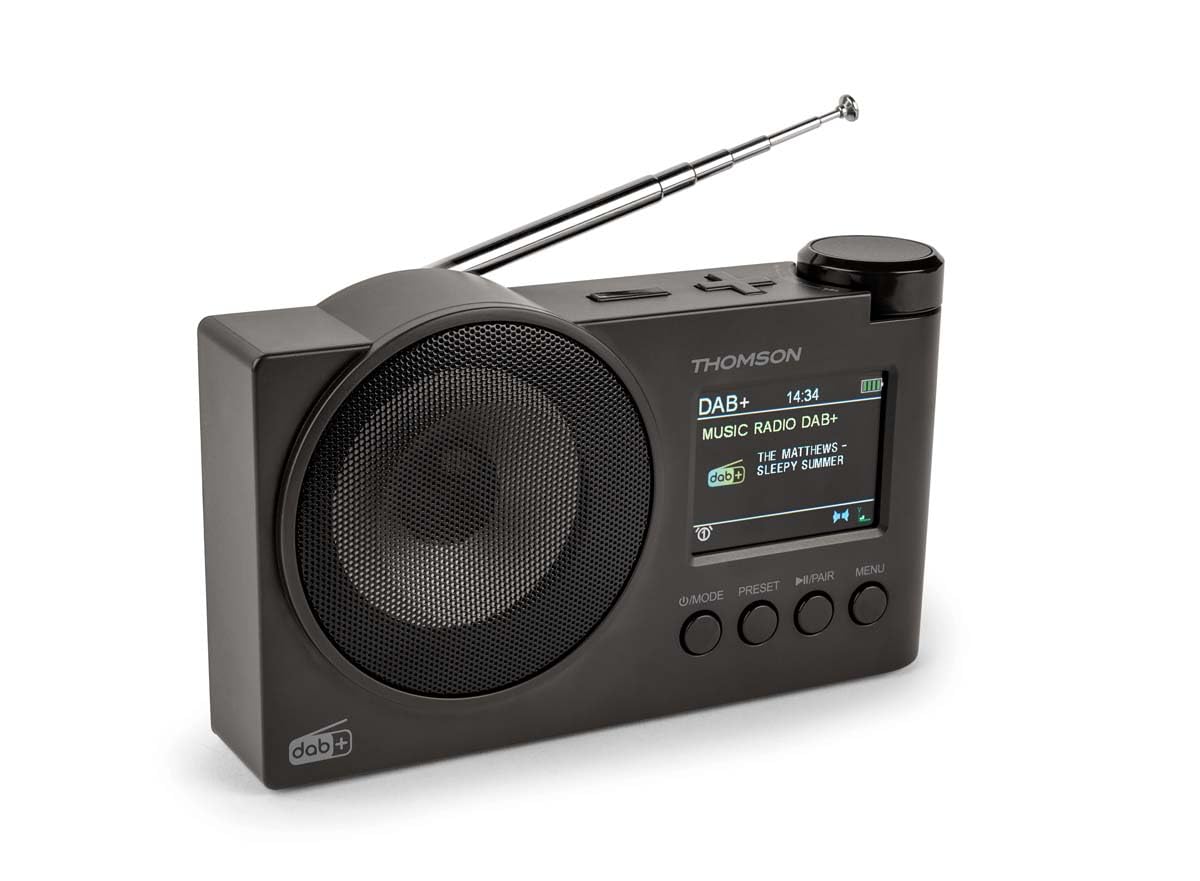
ຮູບທີ 1.1: THOMSON RT400DABBTBK portable radio. This image shows the front of the radio, featuring the speaker grille on the left and the LED display with control buttons on the right. The display indicates the time, date, and battery level.
2. ຄໍາແນະນໍາຄວາມປອດໄພທີ່ສໍາຄັນ
- ອ່ານຄໍາແນະນໍາທັງຫມົດຢ່າງລະອຽດກ່ອນທີ່ຈະດໍາເນີນການອຸປະກອນ.
- ຮັກສາຄູ່ມືນີ້ໄວ້ສໍາລັບການອ້າງອີງໃນອະນາຄົດ.
- ຢ່າເຮັດໃຫ້ອຸປະກອນຖືກຝົນ, ຄວາມຊຸ່ມຊື່ນ, ຫຼືອຸນຫະພູມທີ່ຮຸນແຮງ.
- ຢ່າ disassemble ຫນ່ວຍບໍລິການ. ອ້າງອີງການບໍລິການທັງໝົດໃຫ້ກັບບຸກຄະລາກອນທີ່ມີຄຸນວຸດທິ.
- Use only the specified power adapter (DC 5V 2A) and USB-C cable.
- ຮັບປະກັນການລະບາຍອາກາດທີ່ເຫມາະສົມຮອບອຸປະກອນ.
- ຫຼີກເວັ້ນການວາງອຸປະກອນຢູ່ໃກ້ກັບແຫຼ່ງຄວາມຮ້ອນ ຫຼືແສງແດດໂດຍກົງ.
3. ເນື້ອໃນຊຸດ
ກະລຸນາກວດເບິ່ງວ່າລາຍການທັງໝົດມີຢູ່:
- THOMSON RT400DABBTBK Radio
- ສາຍສາກ USB-C
- ຄູ່ມືເຈົ້າຂອງ (ເອກະສານສະບັບນີ້)
4. ຮູບແບບຜະລິດຕະພັນ ແລະ ການຄວບຄຸມ

ຮູບທີ 4.1: Front Panel Controls and Display. This image provides a detailed view of the radio's front panel, featuring the circular speaker on the left and the rectangular LED display on the right. Below the display are four control buttons: MODE, PRESET, PLAY/PAIR, and MENU. The display shows '12/8/2025 Mardi 16:24' with alarm and stop icons.
4.1. ປຸ່ມຄວບຄຸມ
- POWER / MODE: Press to turn on/off. Press to switch between DAB+, FM, Bluetooth, USB, and AUX-IN modes.
- ຕັ້ງໄວ້ລ່ວງໜ້າ: Access and save preset radio stations.
- PLAY / PAIR: In Bluetooth mode, press to play/pause or initiate pairing. In USB mode, play/pause.
- ເມນູ: Access system settings and options for the current mode.
- Rotary Knob (Top Right): Adjust volume, navigate menus, or tune frequencies. Press to confirm selections.
4.2. ສະແດງຂໍ້ມູນ
The LED display shows various information depending on the operating mode:
- Current time and date (12/24h format).
- Radio station name, frequency, or DAB+ service information.
- ສະຖານະການເຊື່ອມຕໍ່ Bluetooth.
- USB track information.
- ຕົວຊີ້ວັດລະດັບຫມໍ້ໄຟ.
- Alarm icons (Alarm 1, Alarm 2).
5. ຕັ້ງຄ່າ
5.1. ເປີດເຄື່ອງ
The radio can be powered in two ways:
- ໄຟຟ້າ AC: Connect the supplied USB-C cable to the DC 5V 2A input on the radio and to a suitable USB power adapter (not included).
- ແບັດເຕີຣີທີ່ສາມາດສາກໄດ້: The radio has a built-in 1500mAh Lithium rechargeable battery. Ensure it is fully charged before portable use. The battery charges automatically when connected to AC power.
5.2. ການປັບເສົາອາກາດ
For optimal DAB+ and FM radio reception, fully extend the telescopic antenna. Adjust its position for the best signal quality.
5.3. ການຕັ້ງຄ່າເບື້ອງຕົ້ນ
Upon first use or after a factory reset, you may need to configure basic settings:
- ການເລືອກພາສາ: Use the MENU button to navigate to System Settings, then select 'Language' to choose your preferred language (French, English, German, Italian, Spanish, Portuguese, Dutch).
- ເວລາ ແລະວັນທີ: The time and date are often automatically updated in DAB+ mode. If not, navigate to System Settings > Time/Date to set manually.
6. ການໃຊ້ງານວິທະຍຸ
6.1. DAB+ Radio Mode
- ກົດ ໂໝດ ເພື່ອເລືອກໂໝດ DAB+.
- The radio will automatically perform a scan for available DAB+ stations.
- Use the rotary knob to scroll through the list of found stations. Press the knob to select a station.
- ເພື່ອບັນທຶກສະຖານີເປັນຄ່າທີ່ຕັ້ງໄວ້ລ່ວງໜ້າ, ໃຫ້ກົດປຸ່ມຄ້າງໄວ້ ຕັ້ງໄວ້ລ່ວງໜ້າ button, select a preset number using the rotary knob, and press the knob to confirm.
6.2. ໂໝດວິທະຍຸ FM
- ກົດ ໂໝດ ປຸ່ມເພື່ອເລືອກໂໝດ FM.
- To auto-scan for stations, press and hold the rotary knob. The radio will scan and save stations.
- To manually tune, rotate the knob to adjust the frequency.
- ເພື່ອບັນທຶກສະຖານີເປັນຄ່າທີ່ຕັ້ງໄວ້ລ່ວງໜ້າ, ໃຫ້ກົດປຸ່ມຄ້າງໄວ້ ຕັ້ງໄວ້ລ່ວງໜ້າ button, select a preset number using the rotary knob, and press the knob to confirm.
6.3. ໂໝດລຳໂພງ Bluetooth
- ກົດ ໂໝດ ປຸ່ມເພື່ອເລືອກໂໝດ Bluetooth. ຈໍສະແດງຜົນຈະສະແດງ 'Bluetooth Pairing'.
- On your smartphone or tablet, enable Bluetooth and search for 'THOMSON RT400DABBTBK'.
- Select the device to pair. Once connected, the display will show 'Bluetooth Connected'.
- Play audio from your paired device. Use the radio's rotary knob to adjust volume.
6.4. ການຫຼິ້ນ USB
- ໃສ່ USB flash drive ທີ່ບັນຈຸ MP3 files ເຂົ້າໄປໃນພອດ USB.
- ກົດ ໂໝດ ປຸ່ມເພື່ອເລືອກໂຫມດ USB.
- ວິທະຍຸຈະເລີ່ມຫຼິ້ນ MP3 ໂດຍອັດຕະໂນມັດ files. Use the rotary knob to navigate tracks and the PLAY/PAIR ປຸ່ມເພື່ອຫຼິ້ນ / ຢຸດຊົ່ວຄາວ.
6.5. ໂຫມດ AUX-IN
- Connect an external audio device (e.g., MP3 player) to the AUX-IN 3.5mm port using an audio cable (not included).
- ກົດ ໂໝດ ປຸ່ມເພື່ອເລືອກໂໝດ AUX-IN.
- Control playback from your external device. Use the radio's rotary knob to adjust volume.
6.6. ການໃຊ້ຫູຟັງ
Connect headphones (not supplied) to the 3.5mm headphone jack for private listening. The main speaker will be muted automatically.
7. ໂມງປຸກ
The radio features a dual alarm clock.
- ກົດ ເມນູ button and navigate to 'Alarm Settings'.
- ເລືອກ 'ໂມງປຸກ 1' ຫຼື 'ໂມງປຸກ 2' ເພື່ອຕັ້ງຄ່າ.
- ຕັ້ງເວລາ: Use the rotary knob to set the desired alarm time.
- ທີ່ມາ: Choose your preferred wake-up sound: DAB+, FM, USB, or Bluetooth.
- ໄລຍະເວລາປຸກ: Set the alarm duration (15, 30, 45, 60, or 90 minutes).
- ຄວາມຖີ່ຂອງການປຸກ: Select how often the alarm should sound: Once, Daily, Weekdays, or Weekends.
- ປະລິມານ: ປັບລະດັບສຽງປຸກ.
- ເປີດ/ປິດ: Turn the alarm ON or OFF.
8. ການຕັ້ງຄ່າລະບົບ
Access system settings by pressing the ເມນູ button and navigating to 'System Settings'.
- ການຕັ້ງຄ່າການສະແດງຜົນ: Adjust backlight duration (10 to 180 seconds) and choose between 12-hour or 24-hour time format.
- ພາສາ: Select the display language (French, English, German, Italian, Spanish, Portuguese, Dutch).
- Automatic Station Update: Enable or disable automatic updates for radio stations.
- ປັບຄ່າໂຮງງານ: ຣີເຊັດການຕັ້ງຄ່າທັງໝົດເປັນຄ່າເລີ່ມຕົ້ນຂອງພວກມັນ.
9. ບໍາລຸງຮັກສາ
9.1. ທໍາຄວາມສະອາດ
Wipe the radio's surface with a soft, dry cloth. Do not use abrasive cleaners, waxes, or solvents, as these may damage the finish.
9.2. ການດູແລຫມໍ້ໄຟ
To prolong the life of the built-in Lithium battery:
- ຫຼີກລ້ຽງການປະຈຸຫມໍ້ໄຟຢ່າງເຕັມທີ່ເລື້ອຍໆ.
- Charge the battery regularly, even if the radio is not in use for extended periods.
- ເກັບຮັກສາວິທະຍຸໃນບ່ອນທີ່ເຢັນ, ແຫ້ງເມື່ອບໍ່ໄດ້ໃຊ້.
10. ການແກ້ໄຂບັນຫາ
| ບັນຫາ | ສາເຫດທີ່ເປັນໄປໄດ້ | ການແກ້ໄຂ |
|---|---|---|
| ບໍ່ມີພະລັງງານ | Battery discharged or power cable not connected. | Connect the USB-C cable to a power source. Charge the battery. |
| ການຮັບວິທະຍຸທີ່ບໍ່ດີ | Antenna not extended or weak signal area. | ຂະຫຍາຍ ແລະ ປັບເສົາອາກາດ telescopic ຢ່າງສົມບູນ. ລອງຍ້າຍວິທະຍຸໄປບ່ອນອື່ນ. |
| Bluetooth ບໍ່ເຊື່ອມຕໍ່ | Radio not in pairing mode or device already paired. | Ensure the radio is in Bluetooth mode and 'Bluetooth Pairing' is displayed. Forget the device on your phone/tablet and try pairing again. |
| ການຫຼິ້ນ USB ບໍ່ເຮັດວຽກ | USB drive not formatted correctly or unsupported file ປະເພດ. | Ensure USB drive is formatted to FAT32 and contains MP3 fileລອງໃຊ້ໄດຣຟ໌ USB ອື່ນ. |
| ປຸກບໍ່ດັງ | Alarm disabled or incorrect settings. | Check alarm settings (time, source, frequency, enable/disable status). |
11. ຂໍ້ມູນຈໍາເພາະ
| ຄຸນສົມບັດ | ຂໍ້ມູນຈໍາເພາະ |
|---|---|
| ຍີ່ຫໍ້ | ທອມສັນ |
| ໝາຍເລກຕົວແບບ | RT400DABBTBK |
| ແຖບວິທະຍຸສະຫນັບສະຫນູນ | DAB+, FM |
| ເຕັກໂນໂລຊີການເຊື່ອມຕໍ່ | Bluetooth |
| ຄຸນນະສົມບັດພິເສດ | ແບບພົກພາ |
| ແຫຼ່ງພະລັງງານ | Battery Powered, Corded Electric (DC 5V 2A via USB-C) |
| ແບັດເຕີຣີ | 1500mAh Lithium ສາມາດສາກໄຟໄດ້ |
| ປະເພດການສະແດງ | LED |
| ຂະໜາດສິນຄ້າ (L x W x H) | 8 x 5 x 15 ຊັງຕີແມັດ |
| ນ້ໍາຫນັກລາຍການ | 300 ກຣາມ |
| ອຸປະກອນທີ່ເຂົ້າກັນໄດ້ | MP3 Player, Speaker, Headphones, Tablet |
12. ການຮັບປະກັນແລະການສະຫນັບສະຫນູນ
This THOMSON RT400DABBTBK radio comes with a ການຮັບປະກັນຜູ້ຜະລິດ 1 ປີ.
For further support, troubleshooting, or warranty claims, please refer to your point of purchase or visit the official THOMSON brand store: