
1. ບົດແນະນຳ
This manual provides detailed instructions for the safe and effective use of your Moukey MPS5 Portable Karaoke Machine. Please read this manual thoroughly before operating the device and retain it for future reference. The MPS5 is a versatile portable speaker system designed for various audio playback needs, including karaoke, music streaming, and public address, featuring wireless microphones and multiple connectivity options.
2. ສິ່ງທີ່ຢູ່ໃນກ່ອງ
ຖອດເຄື່ອງທັງໝົດອອກຈາກກ່ອງຢ່າງລະມັດລະວັງ. ໃຫ້ແນ່ໃຈວ່າອົງປະກອບທັງຫມົດທີ່ລະບຸໄວ້ຂ້າງລຸ່ມນີ້ແມ່ນປະຈຸບັນແລະຢູ່ໃນສະພາບດີ.
- Moukey MPS5 Portable Karaoke Machine (1 unit)
- ໄມໂຄຣໂຟນໄຮ້ສາຍ (2 ໜ່ວຍ)
- ສາຍສາກ USB (1 ໜ່ວຍ)
- 3.5mm AUX Cable (1 unit)
- Shoulder Strap (1 unit)
- ຄູ່ມືຜູ້ໃຊ້ (1 ຫນ່ວຍ)
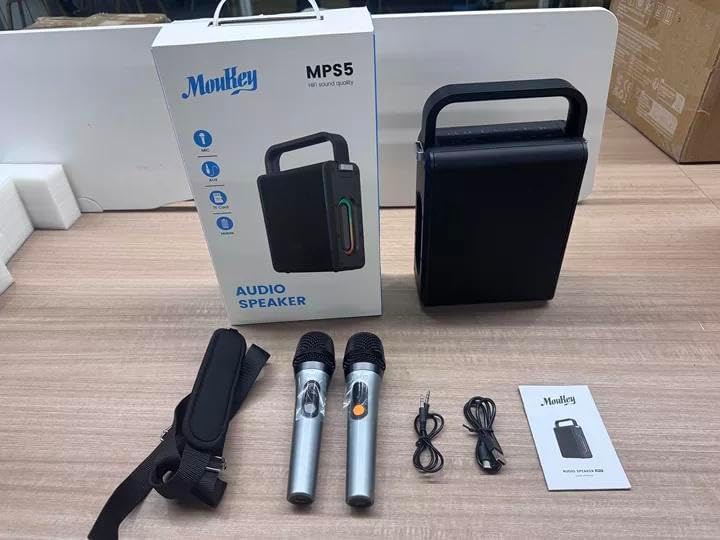
Image: All components included in the Moukey MPS5 package.
3. ຜະລິດຕະພັນເກີນview
The Moukey MPS5 is a compact yet powerful portable karaoke machine. It features a robust design with integrated LED lighting on the sides, enhancing the user experience. A sturdy handle and an included shoulder strap provide convenient portability.
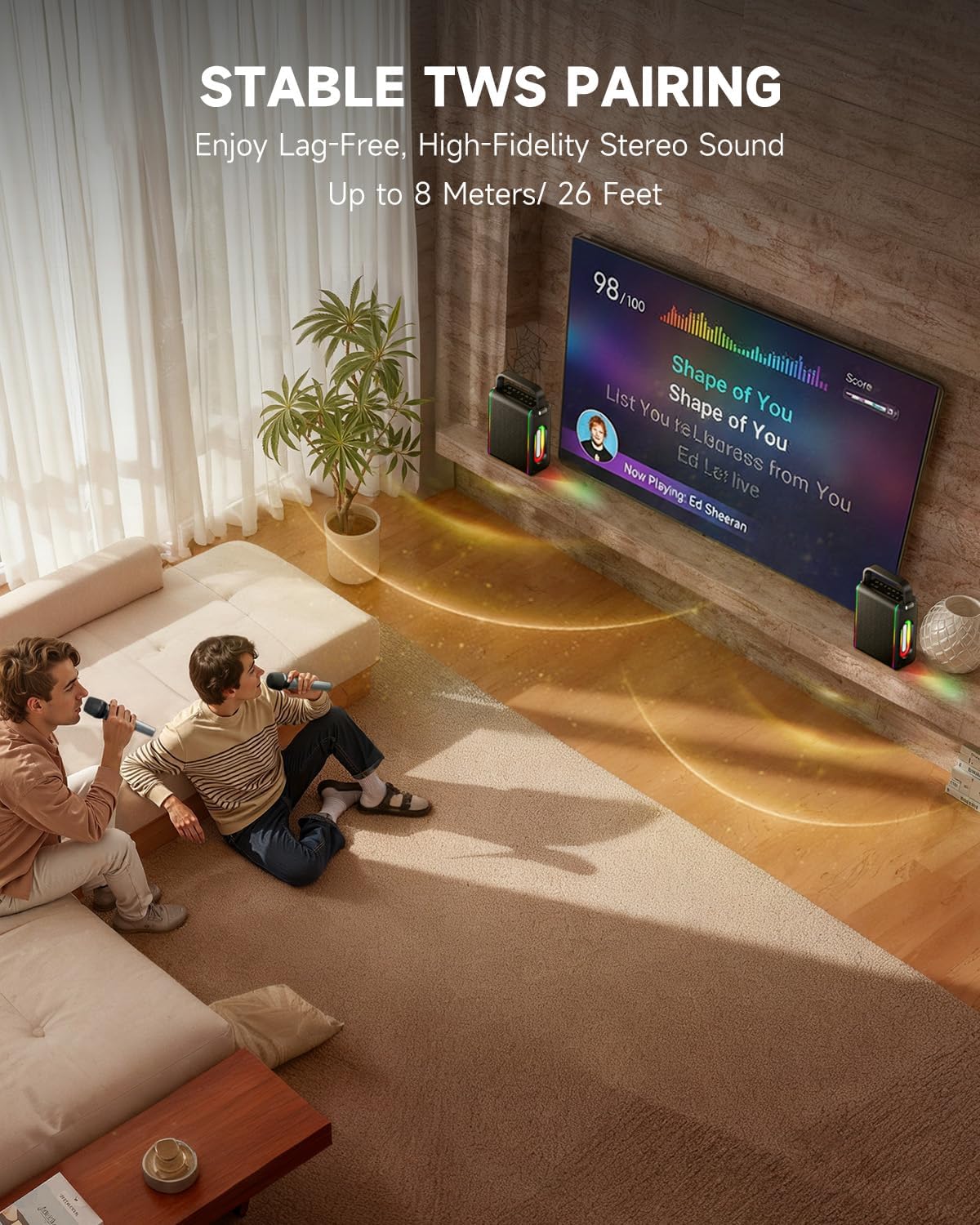
ຮູບພາບ: ທາງຫນ້າ view of the Moukey MPS5 speaker.

ຮູບພາບ: ຂ້າງ view of the Moukey MPS5, showing the LED lighting.
4. ຄຸນນະສົມບັດທີ່ສໍາຄັນ
- Excellent Sound Output: The MPS5 delivers 200W peak power (RMS 60W) through a 4-inch woofer and two 2-inch tweeters, providing full-range stereo sound with enhanced bass.
- Powerful Functionality: Supports Bluetooth 5.3 for wireless connection to various devices. Also includes Micro TF card, Flash USB, MP3, and AUX IN playback options. Features stable TWS (True Wireless Stereo) pairing for connecting two MPS5 units for a wider stereo soundstage.
- ອາຍຸແບັດເຕີລີຍາວສູງສຸດ: The rechargeable battery provides up to 8 hours of continuous music playback on a 2-hour charge, suitable for extended use indoors or outdoors.
- ການອອກແບບນ້ຳໜັກເບົາ ແລະພົກພາໄດ້: Weighing only 2kg, the MPS5 is designed for easy transport. It can be carried by hand using the integrated handle or with the included shoulder strap.
- ໄມໂຄຣໂຟນໄຮ້ສາຍຄູ່: Includes two 2.4Ghz rechargeable microphones with a connection range of up to 60 feet and up to 8 hours of use time per charge (2-3 hours charging time). Features one-tap connectivity for effortless pairing.

Image: Internal speaker components of the MPS5.

Image: MPS5 connected to multiple devices via Bluetooth.

Image: Battery life and charging details for the MPS5.

Image: Demonstrating the portability of the MPS5 with hand and shoulder strap options.

Image: The two wireless microphones for the MPS5.
5. ຕັ້ງຄ່າ
5.1 ການສາກໄຟລຳໂພງ ແລະ ໄມໂຄຣໂຟນ
Before first use, fully charge the MPS5 speaker and both wireless microphones.
- ລໍາໂພງ: Connect the provided USB Type-C cable to the charging port on the speaker and to a compatible USB power adapter (not included). The charging indicator light will show charging status. A full charge takes approximately 2 hours.
- ໄມໂຄຣໂຟນ: Each microphone has a charging port. Connect them to a USB power source using the provided USB cable. Charging time for microphones is 2-3 hours.
5.2 ເປີດ/ປິດ
- To power on the speaker, press and hold the power button (U) on the top panel for 2 seconds.
- ເພື່ອປິດເຄື່ອງ, ໃຫ້ກົດປຸ່ມເປີດເຄື່ອງຄ້າງໄວ້ (U) ອີກເທື່ອຫນຶ່ງສໍາລັບ 2 ວິນາທີ.
5.3 ການຈັບຄູ່ Bluetooth
- Ensure the MPS5 speaker is powered on and in Bluetooth mode (indicated by a blue LED). If not, press the 'M' (Mode) button to switch to Bluetooth mode.
- ໃນອຸປະກອນມືຖືຂອງທ່ານ (ໂທລະສັບສະຫຼາດ, ແທັບເລັດ, ແລະອື່ນໆ), ເປີດໃຊ້ Bluetooth ແລະຄົ້ນຫາອຸປະກອນທີ່ມີຢູ່.
- Select 'Moukey MPS5' from the list of devices to pair. A voice prompt will confirm successful connection.
5.4 TWS (True Wireless Stereo) ການຈັບຄູ່
To achieve stereo sound, you can pair two Moukey MPS5 speakers together.
- Ensure both MPS5 speakers are powered on and in Bluetooth mode, but not connected to any other device.
- On one of the speakers, double-press the 'M' (Mode) button. The speaker will enter TWS pairing mode.
- The two speakers will automatically connect to each other. A voice prompt will confirm successful TWS pairing.
- Once TWS is established, connect your mobile device to one of the MPS5 speakers via Bluetooth as described in section 5.3. Both speakers will then play audio in stereo.
Video: A quick overview of the MPS5 Karaoke Machine, demonstrating TWS pairing and other features.
6. ຄໍາແນະນໍາການດໍາເນີນງານ
6.1 ຄວບຄຸມview
The top panel of the MPS5 speaker features several buttons for controlling playback, volume, and microphone settings.
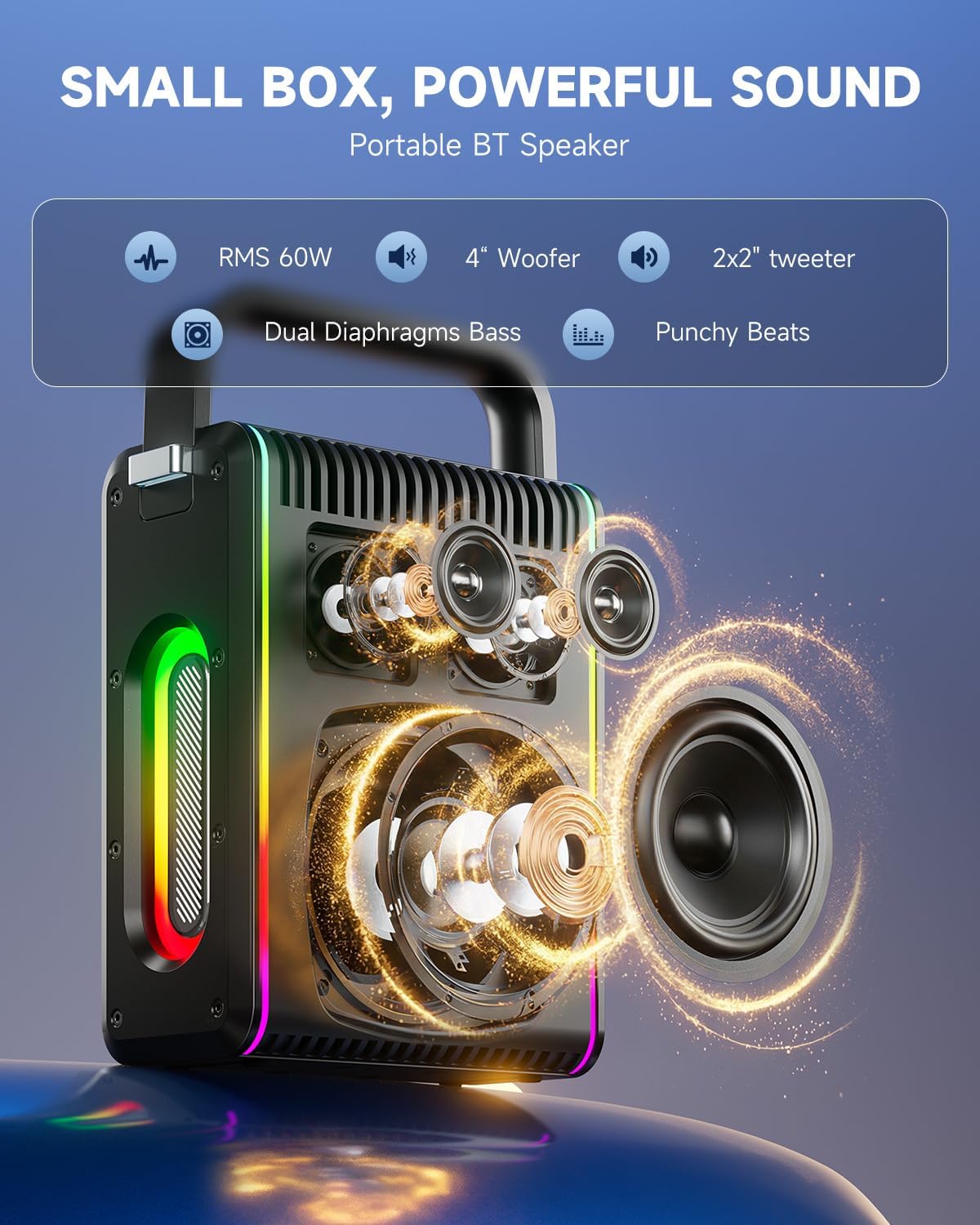
Image: Top control panel of the MPS5.
- ປຸ່ມເປີດປິດ (U): ກົດຄ້າງໄວ້ 2 ວິນາທີເພື່ອເປີດ/ປິດ.
- ປຸ່ມໂໝດ (M): Short press to cycle through input modes (Bluetooth, AUX, USB, TF Card). Double-press to initiate TWS pairing.
- Microphone Volume (Mic - / Mic +): ປັບລະດັບສຽງຂອງໄມໂຄຣໂຟນທີ່ເຊື່ອມຕໍ່.
- Echo Adjustment (R- / R+): ປັບເອັບເຟັກສຽງສະທ້ອນສຳລັບໄມໂຄຣໂຟນ.
- ຫຼິ້ນ/ຢຸດ (▶): ຫຼິ້ນ ຫຼືຢຸດເພງປັດຈຸບັນ.
- ປະລິມານລົງ (-): Decreases the main speaker volume.
- ປະລິມານຂຶ້ນ (+): Increases the main speaker volume.
- EQ A/E: Short press to switch between EQ modes. Long press to toggle between original sound and accompaniment elimination.
6.2 ການນຳໃຊ້ໄມໂຄຣໂຟນ
The MPS5 comes with two wireless microphones for karaoke and vocal performances.
- ເປີດ/ປິດ: ກົດປຸ່ມເປີດປິດຢູ່ໄມໂຄຣໂຟນຄ້າງໄວ້ເພື່ອເປີດ ຫຼືປິດມັນ.
- ການຈັບຄູ່: The microphones are pre-paired with the speaker. If re-pairing is needed, ensure the speaker is on, then power on the microphone. They should connect automatically.
- Microphone Disconnect/Reconnect: Press the dedicated microphone button on the speaker's control panel to quickly disconnect or reconnect the microphones.
6.3 ຮູບແບບການປ້ອນຂໍ້ມູນສຽງ
In addition to Bluetooth, the MPS5 supports several wired and local storage input options.

Image: Input ports on the MPS5 speaker.
- AUX Input: Connect an external audio device using the 3.5mm AUX cable. Select AUX mode using the 'M' button.
- ການຫລີ້ນ USB: ໃສ່ USB flash drive ທີ່ບັນຈຸສຽງ MP3 files ເຂົ້າໄປໃນພອດ USB. ລຳໂພງຈະປ່ຽນເປັນໂໝດ USB ໂດຍອັດຕະໂນມັດ ແລະ ເລີ່ມຫຼິ້ນຄືນ.
- ການຫຼິ້ນບັດ TF: Insert a Micro TF card containing MP3 audio files ເຂົ້າໄປໃນຊ່ອງໃສ່ບັດ TF. ລຳໂພງຈະປ່ຽນເປັນໂໝດບັດ TF ໂດຍອັດຕະໂນມັດ ແລະເລີ່ມການຫຼິ້ນຄືນ.
ໄຟ LED 6.4 ອັນ
The MPS5 features dynamic LED lighting on its sides. Use the dedicated LED button (if available, or refer to the 'M' button for light control if combined) to cycle through different light modes or turn them off.
7. ບໍາລຸງຮັກສາ
- ທໍາຄວາມສະອາດ: ໃຊ້ຜ້າປຽກແຫ້ງເພື່ອເຮັດຄວາມສະອາດດ້ານນອກຂອງລຳໂພງ. ຢ່າໃຊ້ເຄື່ອງເຮັດຄວາມສະອາດຂອງແຫຼວຫຼືວັດສະດຸຂັດ.
- ການເກັບຮັກສາ: ເກັບຮັກສາອຸປະກອນໄວ້ໃນບ່ອນທີ່ເຢັນ, ແຫ້ງ, ຫ່າງຈາກແສງແດດໂດຍກົງ ແລະອຸນຫະພູມທີ່ຮ້າຍກາດ.
- ການດູແລຫມໍ້ໄຟ: ເພື່ອຍືດອາຍຸແບັດເຕີລີ, ຫຼີກເວັ້ນການຖອດແບດເຕີລີ່ເຕັມເລື້ອຍໆ. ສາກອຸປະກອນຢ່າງເປັນປົກກະຕິ, ເຖິງແມ່ນວ່າບໍ່ໄດ້ໃຊ້ເປັນໄລຍະເວລາທີ່ຍາວນານ.
8. ການແກ້ໄຂບັນຫາ
If you encounter issues with your Moukey MPS5, refer to the following common problems and solutions:
| ບັນຫາ | ສາເຫດທີ່ເປັນໄປໄດ້ | ການແກ້ໄຂ |
|---|---|---|
| ບໍ່ມີພະລັງງານ | ແບັດເຕີຣີໝົດ. | ສາກລຳໂພງໂດຍໃຊ້ສາຍ USB Type-C ທີ່ໃຫ້ມາ. |
| ບໍ່ມີສຽງຈາກລຳໂພງ | ລະດັບສຽງຕໍ່າເກີນໄປ ຫຼືຖືກປິດສຽງ. ເລືອກໂໝດການປ້ອນຂໍ້ມູນບໍ່ຖືກຕ້ອງ. | Increase volume using the '+' button. Press 'M' to cycle through input modes. |
| ການຈັບຄູ່ Bluetooth ລົ້ມເຫລວ | ລຳໂພງບໍ່ໄດ້ຢູ່ໃນໂໝດຈັບຄູ່. ອຸປະກອນຢູ່ໄກເກີນໄປ. | Ensure speaker is in Bluetooth mode. Move device closer to speaker. Try restarting both devices. |
| ໄມໂຄຣໂຟນບໍ່ເຮັດວຽກ | Microphone is off or uncharged. Microphone is disconnected. | Ensure microphone is charged and powered on. Press the microphone button on the speaker to reconnect. |
| ການຈັບຄູ່ TWS ລົ້ມເຫລວ | Speakers are already connected to another device. | Ensure both speakers are not connected to any other Bluetooth device before initiating TWS pairing. |
9. ຂໍ້ມູນຈໍາເພາະ
- ຍີ່ຫໍ້: Moukey
- ໝາຍເລກຕົວແບບ: ມ. ສ .5
- ຜົນຜະລິດວັດtage: 200 ວັດ (ສູງສຸດ)
- ເຕັກໂນໂລຍີການເຊື່ອມຕໍ່: Bluetooth 5.3
- ການປ້ອນຂໍ້ມູນສຽງ: Bluetooth, TF card, USB, MP3, AUX, Wired microphones
- ຈຳນວນຊ່ອງ: 2
- ແຫຼ່ງພະລັງງານ: ພະລັງງານຫມໍ້ໄຟ
- ປະເພດຕົວເຊື່ອມຕໍ່: USB ປະເພດ C
- ຂະໜາດລາຍການ (L x W x H): 2.36 x 6.3 x 12.2 ນິ້ວ
- ນ້ໍາຫນັກລາຍການ: ປະມານ 2 ກິໂລ
- ອຸປະກອນທີ່ເຂົ້າກັນໄດ້: Smartphone, Tablet, Laptop, MP3 Player, Microphone
- ສີ: Black with Silver Accents
10. ການຮັບປະກັນແລະການສະ ໜັບ ສະ ໜູນ
The Moukey MPS5 Portable Karaoke Machine comes with a ຮັບປະກັນ 1 ປີ ຈາກວັນທີ່ຊື້. ການຮັບປະກັນນີ້ກວມເອົາຄວາມບົກຜ່ອງດ້ານການຜະລິດແລະການເຮັດວຽກພາຍໃຕ້ການນໍາໃຊ້ປົກກະຕິ. ກະລຸນາຮັກສາຫຼັກຖານການຊື້ຂອງທ່ານສໍາລັບການຮຽກຮ້ອງການຮັບປະກັນ.
For technical support, troubleshooting assistance, or warranty inquiries, please contact Moukey customer service through the retailer where the product was purchased or visit the official Moukey webເວັບໄຊສໍາລັບຂໍ້ມູນຕິດຕໍ່.