
1. ບົດແນະນຳ
The LEVN LM101 Wireless Microphone System is designed to provide high-quality audio recording for a variety of applications, including content creation, vlogging, interviews, and live streaming. Featuring dual receivers for broad compatibility and advanced noise cancellation, this system ensures clear and consistent sound capture.
2. ສິ່ງທີ່ຢູ່ໃນກ່ອງ
- 2 x Mini Microphones (Transmitters)
- 2 x Receivers (1x Lightning, 1x USB-C)
- 1 x ກ່ອງສາກ
- ສາຍໄຟສາກແບັດ USB-C 1 x
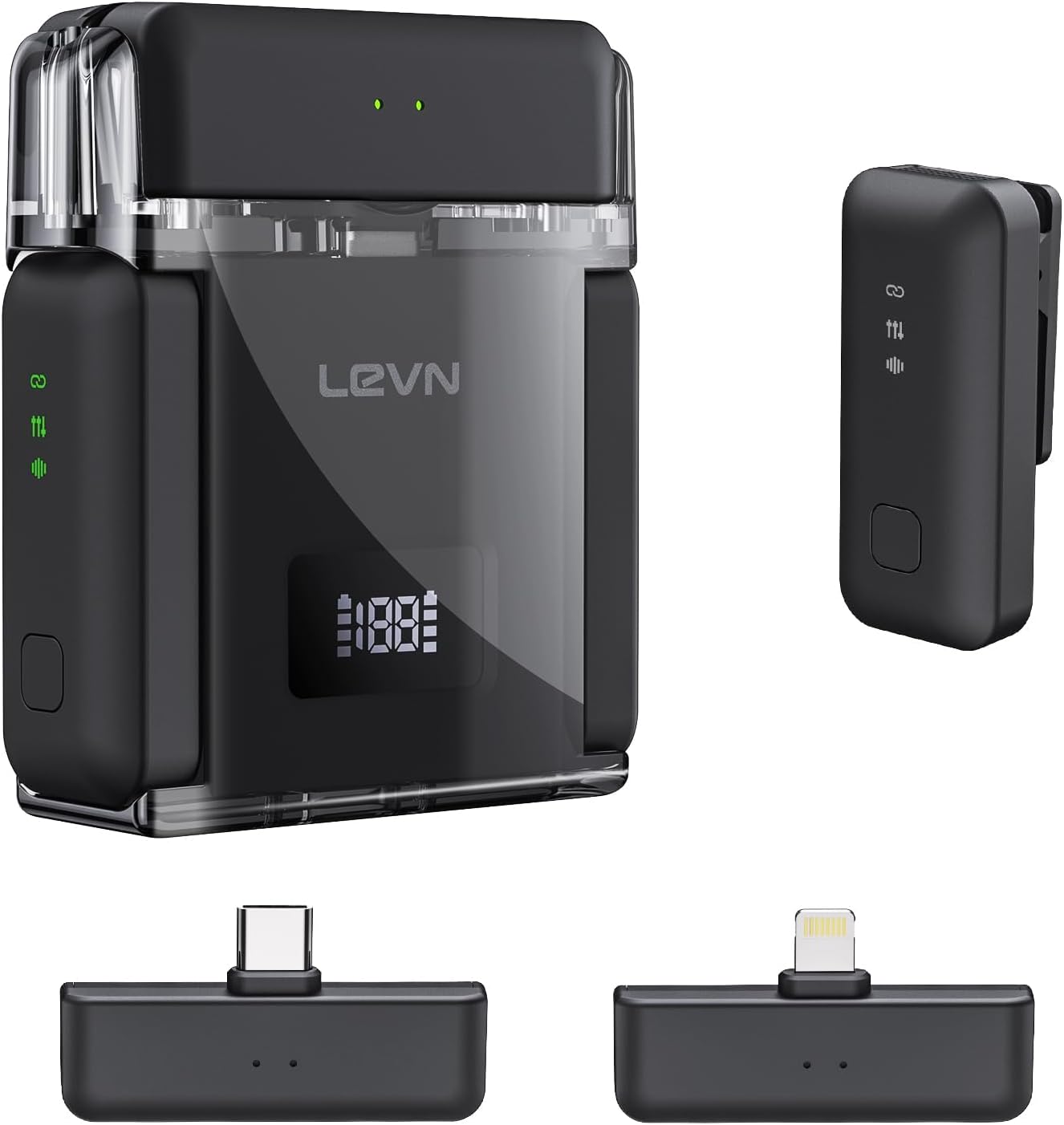
Figure 1: Contents of the LEVN LM101 Wireless Microphone System package.
3. ຕັ້ງຄ່າ
- ສາກໄຟລະບົບ: Before first use, fully charge the charging case and microphones using the provided USB-C cable. The charging case features a digital display indicating battery percentage.
- ເຊື່ອມຕໍ່ຜູ້ຮັບ: Select the appropriate receiver (Lightning for iOS devices or USB-C for Android/PC) and plug it directly into your recording device's port. The receiver's green light will indicate it is ready.
- ໄມໂຄຣໂຟນທີ່ເປີດ: Open the charging case. The microphones will automatically power on and attempt to pair with the connected receiver. A solid green light on the microphone indicates successful pairing.
- ຕິດຕັ້ງໄມໂຄຣໂຟນ: The mini microphones are lightweight and feature a magnetic design for easy attachment. You can clip them onto your clothing or use the included magnetic backings for discreet placement.

Figure 2: The LEVN LM101 system connected to a smartphone, demonstrating its plug-and-play functionality.
4. ຄໍາແນະນໍາການດໍາເນີນງານ
- ການບັນທຶກ: Once the microphones are paired (solid green light), open your device's camera or recording application and begin recording. The system is plug-and-play, requiring no additional app installation.
- AI Noise Cancellation: The microphones feature 3-level AI noise cancellation (Weak/Medium/Strong). Press the dedicated noise reduction button on the microphone to cycle through the levels. This feature helps filter out ambient sounds like wind or traffic.
- ຟັງຊັນປິດສຽງ: A dedicated button on the microphone allows for quick muting and unmuting of the audio input.
- ໃຊ້ໄມໂຄຣໂຟນຄູ່: The system supports simultaneous use of both microphones, ideal for interviews or recordings involving two speakers.

Figure 3: Visual representation of the AI Noise Cancelling Technology in action.
5. ຄຸນສົມບັດຫຼາຍກວ່າview
- ຄຸນນະພາບສຽງທີ່ດີກວ່າ: Experience CD-quality audio with high-fidelity technology. The omnidirectional design captures every nuance of your voice.
- ອາຍຸແບັດເຕີຣີທີ່ຂະຫຍາຍອອກ: Each microphone offers up to 6 hours of continuous recording. The compact charging case extends the total battery life to 30 hours, ensuring prolonged use.
- ຊ່ວງໄຮ້ສາຍຍາວ: Enjoy a stable wireless transmission range of up to 328 feet (100 meters), allowing for flexible recording in various environments.
- ຄວາມເຂົ້າກັນໄດ້ຢ່າງກວ້າງຂວາງ: Fully compatible with iOS and Android devices, including iPhones (16/15/14 series), Android smartphones, iPads, and PCs, connecting effortlessly via Lightning or USB-C.

Figure 4: The charging case with a digital display showing battery status and charging time.

Figure 5: Demonstrating the extensive wireless range of the microphone system in an open environment.
6. ບໍາລຸງຮັກສາ
- ທໍາຄວາມສະອາດ: Use a soft, dry cloth to clean the microphones and charging case. Avoid using liquids or abrasive cleaners.
- ການເກັບຮັກສາ: Store the system in its charging case when not in use to protect it and ensure it remains charged.
- ການດູແລຫມໍ້ໄຟ: For optimal battery longevity, avoid fully discharging the batteries frequently. Charge the system regularly.
7. ການແກ້ໄຂບັນຫາ
- ບໍ່ມີສຽງ:
- Ensure the receiver is securely plugged into your device.
- Verify microphones are powered on and paired (solid green light).
- ກວດເບິ່ງການຕັ້ງຄ່າການປ້ອນຂໍ້ມູນສຽງຂອງອຸປະກອນຂອງທ່ານເພື່ອຮັບປະກັນວ່າໄມໂຄຣໂຟນພາຍນອກຖືກເລືອກ.
- ຢືນຢັນວ່າໄມໂຄຣໂຟນບໍ່ໄດ້ຖືກປິດສຽງ.
- ບັນຫາການຈັບຄູ່:
- Place microphones back into the charging case and close it, then reopen to re-initiate pairing.
- Ensure the receiver is correctly inserted into your device.
- ຄຸນະພາບສຽງບໍ່ດີ:
- Adjust AI noise cancellation levels to suit your environment.
- Ensure microphones are positioned correctly, angled towards the sound source.
- Check for obstructions between the microphone and receiver.
8. ຂໍ້ມູນຈໍາເພາະ
| ຄຸນສົມບັດ | ລາຍລະອຽດ |
|---|---|
| ຊື່ຕົວແບບ | LM101 |
| ຍີ່ຫໍ້ | LEVN |
| ເຕັກໂນໂລຊີການເຊື່ອມຕໍ່ | ໄຮ້ສາຍ |
| ປະເພດຕົວເຊື່ອມຕໍ່ | ຟ້າຜ່າ, USB Type-C |
| ຄຸນນະສົມບັດພິເສດ | 1-Touch Recording, Battery Indicator Light, Clip, Noise Reduction |
| ອຸປະກອນທີ່ເຂົ້າກັນໄດ້ | ແລັບທັອບ, ໂທລະສັບສະຫຼາດ |
| ຕົວປະກອບແບບຟອມໄມໂຄຣໂຟນ | Lavalier |
| ຈໍານວນຊ່ອງ | 2 |
| Range ໄຮ້ສາຍ | ສູງເຖິງ 328 ຟຸດ (100 ແມັດ) |
| ຊີວິດຫມໍ້ໄຟໄມໂຄຣໂຟນ | ສູງສຸດ 6 ຊົ່ວໂມງ (ບັນທຶກສຽງຢ່າງຕໍ່ເນື່ອງ) |
| ອາຍຸແບັດເຕີຣີທັງໝົດ (ພ້ອມກ່ອງ) | ສູງສຸດ 30 ຊົ່ວໂມງ |
| ນ້ໍາຫນັກລາຍການ | 3.84 ອອນ |
| ວັດສະດຸ | ພາດສະຕິກ |
9. ການຮັບປະກັນແລະການສະຫນັບສະຫນູນ
For warranty information or technical support, please contact LEVN customer service. You can typically find contact details in the product packaging or on the official LEVN website. For direct email support, please refer to the contact information provided in your user manual: support@levnisonic.com.