
ແນະນຳ
This manual provides instructions for the setup, operation, and maintenance of your replacement remote control for Casio Projectors. Please read this manual thoroughly before use to ensure proper functionality and to maximize the lifespan of your device.
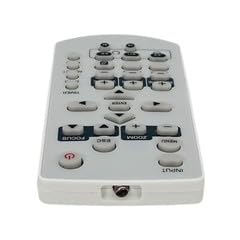
ຮູບພາບ 1: ຫຼາຍກວ່າview ຂອງຣີໂໝດຄວບຄຸມທົດແທນ.
ເນື້ອໃນຊຸດ
- 1 x ຣີໂມດຄວບຄຸມທົດແທນ
ໝາຍເຫດ: Batteries are not included and must be purchased separately. This is a replacement remote control and may not offer all functions of the original remote. Minor scratches may be present due to bulk item storage.
ຕັ້ງຄ່າ
1. ການຕິດຕັ້ງຫມໍ້ໄຟ
- ຊອກຫາຊ່ອງໃສ່ຫມໍ້ໄຟຢູ່ດ້ານຫຼັງຂອງການຄວບຄຸມໄລຍະໄກ.
- ເລື່ອນເປີດຝາປິດຫມໍ້ໄຟ.
- ໃສ່ໝໍ້ໄຟ AAA ສອງໜ່ວຍ (ບໍ່ລວມເຂົ້າ), ຮັບປະກັນການຂົ້ວທີ່ຖືກຕ້ອງ (+ ແລະ -) ຕາມທີ່ລະບຸໄວ້ພາຍໃນຊ່ອງ.
- ປິດຝາປິດຫມໍ້ໄຟຢ່າງປອດໄພ.
Image 2: Battery compartment for AAA batteries.
2. Pairing (Not Required)
This remote control operates via infrared (IR) technology and typically does not require pairing. It is designed to work directly with compatible Casio projector models upon battery installation.
ຄໍາແນະນໍາການດໍາເນີນງານ
Point the remote control directly at the infrared receiver on your Casio projector. Ensure there are no obstructions between the remote and the projector.
ຟັງຊັນພື້ນຖານ:
- ເປີດ/ປິດ: ກົດ ພະລັງງານ ປຸ່ມເພື່ອເປີດ ຫຼືປິດໂປຣເຈັກເຕີ.
- ການຄັດເລືອກການປ້ອນຂໍ້ມູນ: ໃຊ້ ປ້ອນຂໍ້ມູນ or source buttons to cycle through available input sources (e.g., HDMI, VGA).
- ການນໍາທາງ: ໃຊ້ປຸ່ມລູກສອນທິດທາງ (ຂຶ້ນ, ລົງ, ຊ້າຍ, ຂວາ) ແລະ ປ້ອນ or OK ປຸ່ມເພື່ອນໍາທາງເມນູ.
- ການຄວບຄຸມລະດັບສຽງ: If your projector has audio output, use the ປະລິມານ +/- ປຸ່ມເພື່ອປັບລະດັບສຽງ.
- ການເຂົ້າເຖິງເມນູ: ກົດ ເມນູ button to access the projector's on-screen display (OSD) menu.
- ອອກ/ກັບຄືນ: ໃຊ້ ອອກ or ກັບຄືນ button to close menus or return to the previous screen.
Refer to your Casio projector's original manual for specific functions and button layouts, as this replacement remote aims to replicate common controls.
ບໍາລຸງຮັກສາ
- ທໍາຄວາມສະອາດ: ເຊັດການຄວບຄຸມໄລຍະໄກດ້ວຍຜ້າອ່ອນ, ແຫ້ງ. ຢ່າໃຊ້ເຄື່ອງເຮັດຄວາມສະອາດຂອງແຫຼວຫຼືວັດສະດຸຂັດ.
- ການປ່ຽນແບັດເຕີຣີ: ປ່ຽນແບັດເຕີລີ ເມື່ອຣີໂມດຕອບສະໜອງຊ້າ ຫຼືຢຸດເຮັດວຽກ. ປ່ຽນແບັດເຕີລີທັງສອງໃນເວລາດຽວກັນດ້ວຍເຄື່ອງໃໝ່ຂອງປະເພດດຽວກັນ (AAA).
- ການເກັບຮັກສາ: ຖ້າບໍ່ໄດ້ໃຊ້ຣີໂໝດຄວບຄຸມເປັນເວລາດົນ, ໃຫ້ຖອດແບັດເຕີຣີອອກເພື່ອປ້ອງກັນການຮົ່ວໄຫຼ ແລະ ຄວາມເສຍຫາຍທີ່ອາດເກີດຂຶ້ນ. ເກັບຮັກສາໄວ້ໃນບ່ອນທີ່ເຢັນ ແລະ ແຫ້ງ.
- ຫຼີກເວັ້ນການເສຍຫາຍ: Do not drop the remote control or expose it to extreme temperatures, humidity, or direct sunlight.
ການແກ້ໄຂບັນຫາ
- ໄລຍະໄກບໍ່ເຮັດວຽກ:
- Ensure batteries are inserted correctly with the correct polarity.
- ປ່ຽນແບັດເກົ່າດ້ວຍແບັດ AAA ໃໝ່.
- Check for any obstructions between the remote control and the projector's IR receiver.
- Ensure you are within the maximum operating range (approximately 5 meters).
- ບາງຟັງຊັນບໍ່ເຮັດວຽກ:
- This is a replacement remote. Some advanced or specific functions of your original projector remote may not be supported.
- Verify the function exists on your projector model.
ຂໍ້ມູນຈໍາເພາະ
| ໝາຍເລກຕົວແບບ | ATFO-RPL-RMT-070925-22182 |
| ໂປເຈັກເຕີທີ່ເຂົ້າກັນໄດ້ | Casio XJ-FC330XN, XJ-F210WN, XJ-UT310WN |
| ເຕັກໂນໂລຊີການເຊື່ອມຕໍ່ | ອິນຟາເລດ (IR) |
| ຂອບເຂດສູງສຸດ | ປະມານ 5 ແມັດ (16 ຟຸດ) |
| ປະເພດຫມໍ້ໄຟ | 2 x AAA (ບໍ່ລວມ) |
| ສີ | ສີຂາວ/ສີເທົາອ່ອນ |
| ຄຸນນະສົມບັດພິເສດ | ການອອກແບບ Ergonomic |
| ຜູ້ຜະລິດ | VieRemote |
ການຮັບປະກັນແລະການສະຫນັບສະຫນູນ
This product is a replacement remote control. For specific warranty information, please refer to the seller's policy at the time of purchase. For technical support or inquiries, please contact the seller directly through the platform where the purchase was made.