
1. ບົດແນະນຳ
The Cudy AX300 WU300 Wi-Fi 6 Nano USB Adapter provides a compact and efficient solution for adding Wi-Fi 6 connectivity to your desktop or laptop computer. Designed for ease of use, this adapter offers fast and stable 2.4GHz wireless performance, making it ideal for everyday internet activities such as streaming, browsing, and online communication. Its nano size ensures it remains discreetly plugged into your USB port.
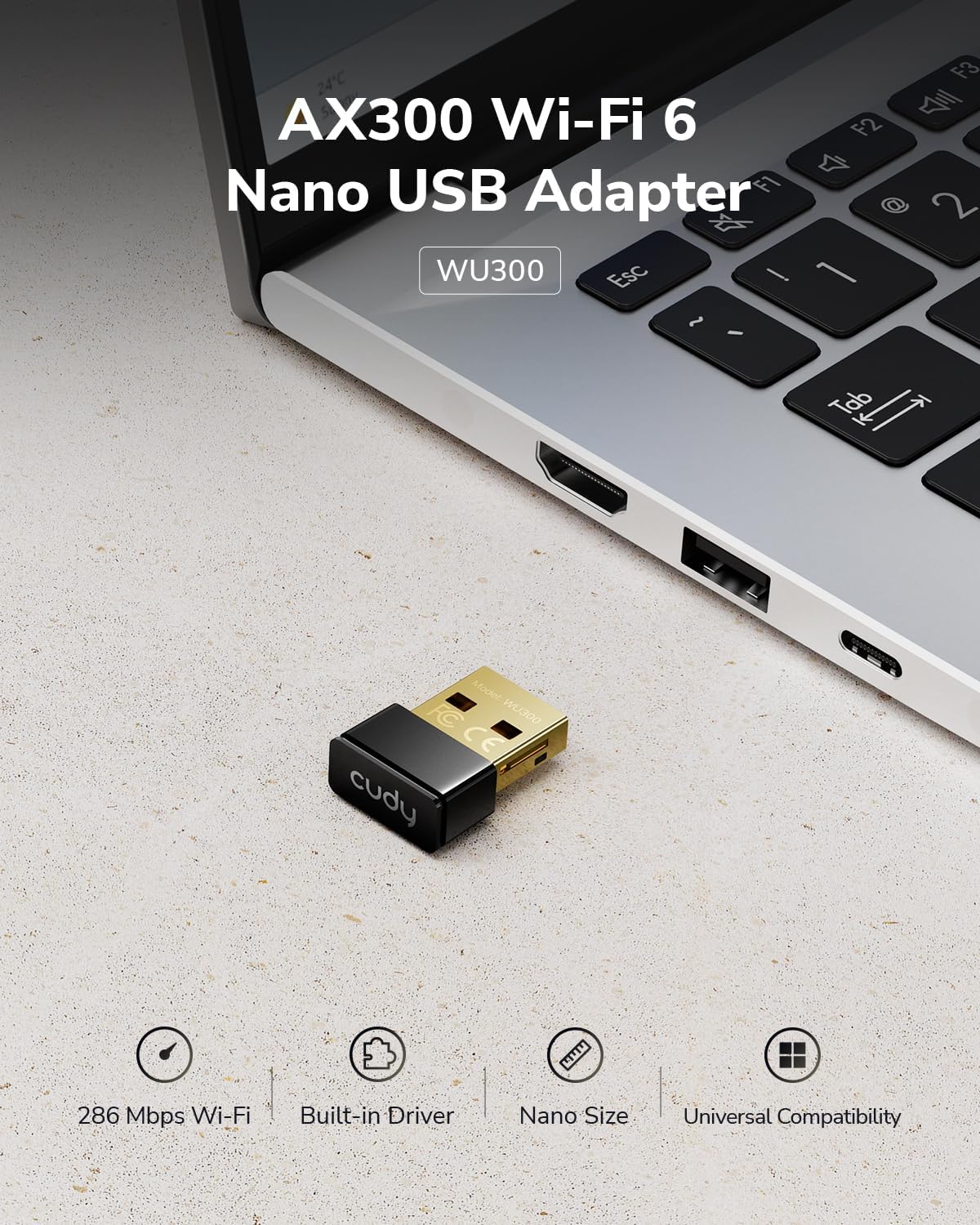
Image: The Cudy AX300 WU300 Nano USB Adapter shown plugged into a laptop's USB port, highlighting its small form factor.
2. ຜະລິດຕະພັນເກີນview
ຄຸນນະສົມບັດທີ່ສໍາຄັນ:
- Ultra-Fast Wi-Fi 6 Speeds: Experience wireless speeds up to 286 Mbps on the 2.4GHz band for smooth online activities.
- Compact Nano Design: The ultra-small dimensions (20 × 15 × 8 mm) allow for discreet integration into your device without obstructing other ports.
- Flexible Soft AP Mode: Convert your computer's wired internet connection into a Wi-Fi hotspot to share with other devices.
- Universal USB 2.0 Compatibility: Works with standard USB 2.0 ports, ensuring broad compatibility with various devices.
- Broad System Support: Compatible with Windows 7, Windows 10, Windows 11, and Linux operating systems.
ມີຫຍັງຢູ່ໃນກ່ອງ:
- Cudy AX300 WU300 Wi-Fi 6 Nano USB Adapter

Image: The compact design of the Cudy AX300 WU300 adapter, illustrating its small physical dimensions.
3. ຕັ້ງຄ່າ
The Cudy AX300 WU300 adapter features a built-in driver for convenient installation.
ຂັ້ນຕອນການຕິດຕັ້ງ:
- ໃສ່ອະແດັບເຕີ: Plug the Cudy AX300 WU300 Nano USB Adapter into an available USB 2.0 port on your computer.
- ການຕິດຕັ້ງໄດເວີ:
- ສໍາລັບ Windows 10/11: The adapter is typically plug-and-play. Your operating system should automatically detect the device and install the necessary drivers.
- For Windows 7 and Linux: Manual driver installation may be required. The adapter functions as a small flash drive containing the driver installer. Navigate to 'My Computer' or 'This PC', locate the adapter's drive, and run the installer executable. Follow the on-screen prompts to complete the installation.
- ເຊື່ອມຕໍ່ກັບ Wi-Fi: Once the drivers are installed, you can connect to your Wi-Fi network through your operating system's network settings.

Image: The Cudy AX300 WU300 adapter illustrating its easy setup process with a built-in driver, eliminating the need for a physical CD.
4. ຄໍາແນະນໍາການດໍາເນີນງານ
ກຳລັງເຊື່ອມຕໍ່ກັບເຄືອຂ່າຍ Wi-Fi:
- After driver installation, click on the Wi-Fi icon in your system tray (Windows) or network manager (Linux).
- ເລືອກເຄືອຂ່າຍ Wi-Fi ທີ່ທ່ານຕ້ອງການຈາກບັນຊີລາຍຊື່ຂອງເຄືອຂ່າຍທີ່ມີຢູ່.
- ໃສ່ກະແຈຄວາມປອດໄພເຄືອຂ່າຍ (ລະຫັດຜ່ານ) ຖ້າຖືກຖາມ.
- Click 'Connect'. Your computer should now be connected to the Wi-Fi network.
Using Soft AP Mode:
Soft AP (Access Point) mode allows your computer to act as a Wi-Fi hotspot, sharing its internet connection with other wireless devices.
- Ensure your computer has an active internet connection (e.g., via Ethernet).
- Open your operating system's network settings.
- Look for an option like 'Mobile hotspot', 'Wi-Fi hotspot', or 'Soft AP'.
- ກຳນົດຄ່າຊື່ເຄືອຂ່າຍ (SSID) ແລະລະຫັດຜ່ານສຳລັບຈຸດເຊື່ອມຕໍ່ໃໝ່ຂອງທ່ານ.
- Enable the hotspot feature. Your other devices can now connect to this new Wi-Fi network.

Image: A user demonstrating the Soft AP mode, sharing a laptop's internet connection with a smartphone.
5. ບໍາລຸງຮັກສາ
To ensure optimal performance and longevity of your Cudy AX300 WU300 Wi-Fi 6 Nano USB Adapter, follow these general maintenance guidelines:
- ຮັກສາຄວາມສະອາດ: ເຊັດອະແດບເຕີເປັນໄລຍະໆດ້ວຍຜ້າອ່ອນໆແຫ້ງ. ຫຼີກລ່ຽງການໃຊ້ນໍ້າຢາທຳຄວາມສະອາດ ຫຼື ຕົວລະລາຍ.
- ຫຼີກລ້ຽງການທໍາລາຍທາງດ້ານຮ່າງກາຍ: Handle the adapter carefully. While compact, excessive force or bending can damage the USB connector or internal components.
- ສະພາບແວດລ້ອມທີ່ດີທີ່ສຸດ: Use the adapter in a dry environment, away from extreme temperatures, direct sunlight, and humidity.
- ການອັບເດດເຟີມແວ: Check the official Cudy website periodically for any available firmware or driver updates to ensure the best performance and security.
6. ການແກ້ໄຂບັນຫາ
If you encounter issues with your Cudy AX300 WU300 adapter, refer to the following troubleshooting tips:
Adapter Not Recognized / Drivers Not Installing:
- ລອງໃຊ້ພອດ USB ອື່ນ: Some USB ports may have power delivery issues or compatibility problems. Try plugging the adapter into another USB port on your computer.
- ຕິດຕັ້ງໄດເວີຄືນໃໝ່: If automatic installation fails (especially on Windows 7 or Linux), manually run the driver installer from the adapter's virtual drive. Ensure you have administrator privileges.
- ກວດສອບຕົວຈັດການອຸປະກອນ (Windows): Open Device Manager and look for any unknown devices or devices with warning signs. Right-click and select 'Update driver' or 'Uninstall device' and then restart your computer.
ບໍ່ສາມາດເຊື່ອມຕໍ່ກັບເຄືອຂ່າຍ Wi-Fi ໄດ້:
- Verify Network Band: The Cudy AX300 WU300 adapter supports ເຄືອຂ່າຍ Wi-Fi 2.4GHz ເທົ່ານັ້ນ. Ensure your router's 2.4GHz band is enabled and that you are attempting to connect to a 2.4GHz network.
- ລະຫັດຜ່ານທີ່ຖືກຕ້ອງ: ກວດເບິ່ງຄືນວ່າທ່ານກໍາລັງໃສ່ລະຫັດຜ່ານ Wi-Fi ທີ່ຖືກຕ້ອງ.
- WPA3 Compatibility: This adapter does not support WPA3 security. If your network is configured for WPA3-only, you may need to adjust your router settings to allow WPA2 connections or create a separate WPA2 SSID.
- ໄລຍະຫ່າງຂອງເຣົາເຕີ: Ensure you are within a reasonable range of your Wi-Fi router.
- Restart Router/PC: Sometimes, a simple restart of your router and computer can resolve connectivity issues.
ຄວາມໄວ Wi-Fi ຊ້າ:
- ແຊກແຊງ: Other electronic devices (microwaves, cordless phones, Bluetooth devices) can interfere with 2.4GHz signals. Try to minimize these or move closer to your router.
- ການຈັດວາງເຣົາເຕີ: Ensure your router is centrally located and not obstructed by large objects.
- ຄວາມແອອັດຂອງເຄືອຂ່າຍ: If many devices are using the 2.4GHz network, speeds may be reduced.
Boot Issues (Advanced Users):
- Some users have reported that the adapter's built-in storage for drivers can cause boot issues on certain systems if BIOS settings are not configured correctly. If you experience boot problems with the adapter plugged in, try adjusting your BIOS settings to prioritize your primary boot drive or disable USB boot options.
7. ຂໍ້ມູນຈໍາເພາະ
| ຕົວແບບ | WU300 |
| ການໂຕ້ຕອບຮາດແວ | USB 2.0 ປະເພດ A |
| ມາດຕະຖານ Wi-Fi | Wi-Fi 6 (802.11ax) |
| ແຖບຄວາມຖີ່ | 2.4 GHz ເທົ່ານັ້ນ |
| ອັດຕາການໂອນຂໍ້ມູນ | ສູງເຖິງ 286 Mbps |
| ລະບົບປະຕິບັດການທີ່ເຂົ້າກັນໄດ້ | Windows 7 / 10 / 11, Linux |
| ຂະໜາດສິນຄ້າ (L x W x H) | 0.79" x 0.59" x 0.31" (20 x 15 x 8 ມມ) |
| ນ້ໍາຫນັກລາຍການ | 1.13 ອອນ |

Image: Visual representation of the Cudy AX300 WU300 adapter's compatibility with Windows 11, Windows 10, Windows 7, and Linux operating systems.
8. ການຮັບປະກັນແລະການສະຫນັບສະຫນູນ
Cudy products are designed for reliability and performance. For warranty information, technical support, or further assistance, please visit the official Cudy webເວັບໄຊ ຫຼືຕິດຕໍ່ທີມງານຊ່ວຍເຫຼືອລູກຄ້າຂອງເຂົາເຈົ້າ. ຮັກສາໃບຮັບເງິນການຊື້ຂອງທ່ານສໍາລັບການຮ້ອງຂໍການຮັບປະກັນ.
Cudy ຢ່າງເປັນທາງການ Webເວັບໄຊ: www.cudy.com