
1. ບົດແນະນຳ
Thank you for choosing the UCOCARE 4G LTE Outdoor Solar Security Camera, Model BF-A30. This camera is designed to provide reliable surveillance in outdoor environments where traditional power and Wi-Fi connectivity may be limited. Featuring a high-resolution camera, efficient solar charging, and advanced detection capabilities, this manual will guide you through the setup, operation, and maintenance of your new security camera.
2. ຄຸນລັກສະນະຂອງຜະລິດຕະພັນ
- Self-Sufficient Power: Equipped with an 8W high-efficiency solar panel and a large 15000mAh rechargeable battery, ensuring continuous operation without external power sources.
- ການເຊື່ອມຕໍ່ 4G LTE: Operates independently of Wi-Fi, utilizing a 4G SIM card (included with a 7-day free unlimited data trial) for remote access. Compatible with major Japanese carriers (NTT Docomo, KDDI AU, SoftBank).
- ວິດີໂອຄວາມລະອຽດສູງ: Captures clear and vivid 4MP QHD images with a 120° wide-angle lens.
- Flexible Monitoring: Offers 355° pan and 120° tilt control via the UBox app, along with 10x digital zoom to cover a wide area and capture details.
- Advanced Night Vision: Features a powerful 500 lumen floodlight for full-color night vision up to 20 meters in low-light conditions. Built-in IR LEDs provide clear black and white night vision up to 30 meters in complete darkness.
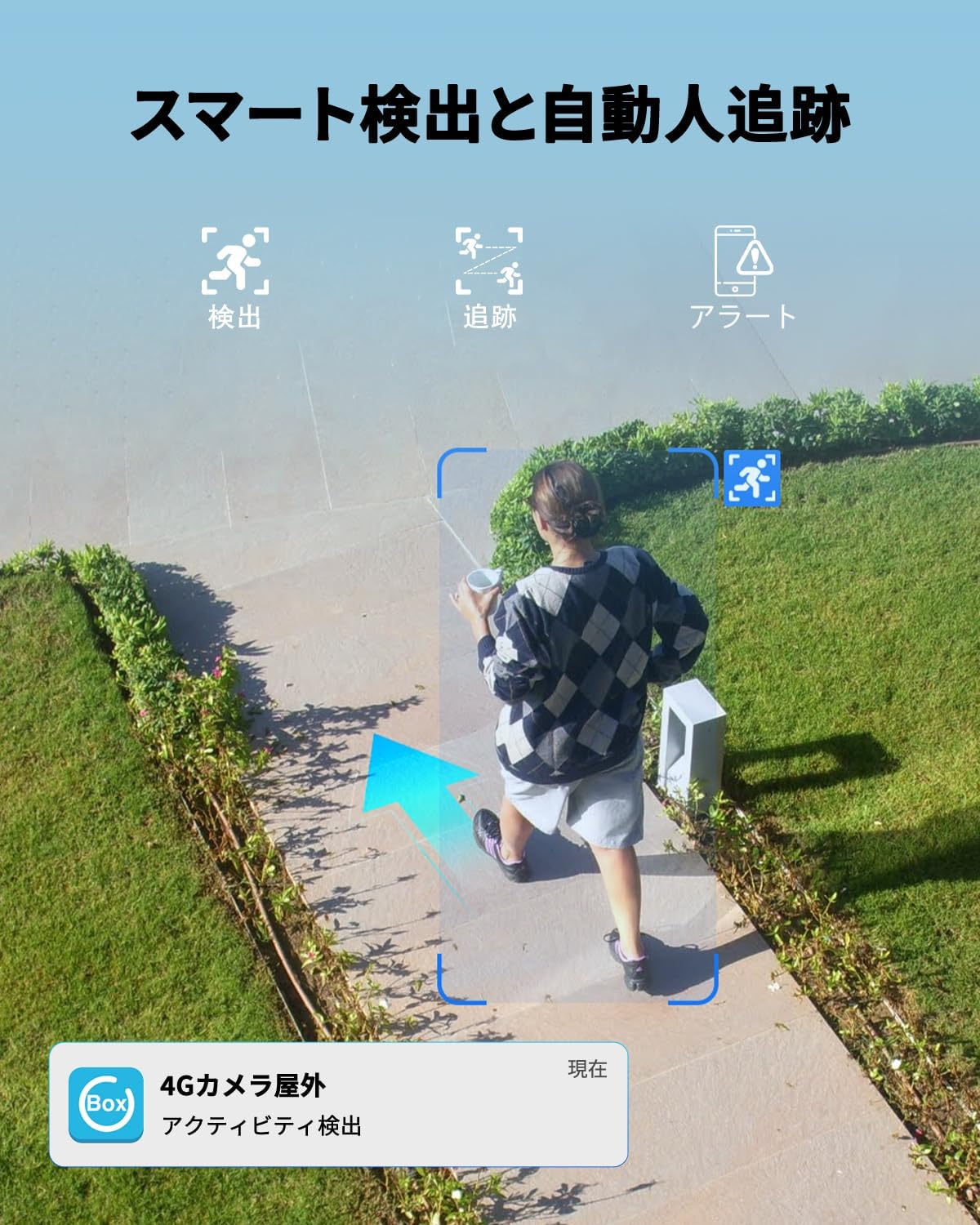
- Smart Detection & Tracking: Utilizes advanced detection technology to accurately identify human movement, filtering out irrelevant motion. Automatic human tracking ensures continuous monitoring of detected subjects.
- Instant Alerts & Deterrence: Sends real-time alerts to your mobile phone upon detection. Includes two-way audio for remote communication and a sound/light alarm to deter intruders. Alert sensitivity and schedules are customizable.
- ການອອກແບບທົນທານ: IP66 waterproof rating ensures reliable performance in various weather conditions, including sun, rain, and snow.
- Secure Storage Options: Supports local storage via a Micro SD card (up to 128GB, sold separately) and cloud storage with a 30-day free trial.
- ການເຂົ້າເຖິງຫຼາຍຜູ້ໃຊ້: Allows unlimited device sharing and up to 5 online users to view ການຖ່າຍທອດສົດພ້ອມໆກັນ.
3. ເນື້ອໃນຊຸດ
ກະລຸນາກວດເບິ່ງຊຸດສຳລັບລາຍການຕໍ່ໄປນີ້:
- UCOCARE 4G LTE Outdoor Solar Security Camera (BF-A30)
- ແຜງພະລັງງານແສງອາທິດ (8W)
- Mounting Bracket ແລະ screws
- 4G SIM Card (pre-installed or included separately)
- ສາຍສາກ USB
- ຄູ່ມືຜູ້ໃຊ້
4. ຄູ່ມືການຕິດຕັ້ງ
4.1 ການສາກໄຟເບື້ອງຕົ້ນ
Before first use, fully charge the camera's built-in 15000mAh battery using the provided USB cable. Connect the cable to the camera's charging port and a standard 5V/2A USB power adapter (not included). The charging indicator light will show the charging status.
4.2 ການຕິດຕັ້ງ SIM card
The camera operates using a 4G LTE SIM card. If the SIM card is not pre-installed, follow these steps:
- Locate the SIM card slot on the camera, usually protected by a rubber cover.
- Carefully open the cover and insert the 4G SIM card into the slot with the correct orientation. Ensure it clicks into place.
- Close the rubber cover firmly to maintain waterproofing.

4.3 ການດາວໂຫຼດແອັບ ແລະ ການລົງທະບຽນ
ດາວນ໌ໂຫລດ Ubox app from your smartphone's app store (iOS App Store or Google Play Store). Follow the in-app instructions to register an account.
4.4 ການຈັບຄູ່ກ້ອງຖ່າຍຮູບກັບແອັບ
- Power on the camera. A blue indicator light should illuminate, indicating it's ready for pairing.
- Open the UBox app and tap on "Add Device" or the '+' icon.
- Select the 4G camera option.
- Scan the QR code located on the camera or its packaging using the app.
- ປະຕິບັດຕາມການເຕືອນໃນຫນ້າຈໍເພື່ອສໍາເລັດຂະບວນການຈັບຄູ່.

4.5 ຕິດຕັ້ງກ້ອງ
Choose a suitable outdoor location with good solar exposure for the solar panel and a clear view for the camera. Use the provided mounting bracket and screws to securely attach the camera to a wall, ceiling, or pole.
5. ຄໍາແນະນໍາການດໍາເນີນງານ
5.1 ດໍາລົງຊີວິດ View ແລະການຄວບຄຸມໄລຍະໄກ
Open the UBox app to access the live feed from your camera. You can remotely control the camera's pan (355°) and tilt (120°) movements by swiping on the screen. Use the pinch-to-zoom gesture for 10x digital zoom.


5.2 ສຽງສອງທາງ
The camera supports two-way audio communication. Tap the microphone icon in the app to speak through the camera's speaker, and listen to audio from the camera's microphone.

5.3 ກວດຈັບການເຄື່ອນໄຫວ ແລະການແຈ້ງເຕືອນ
The camera features smart human detection and automatic tracking. When motion is detected, the camera will send instant alerts to your phone. You can customize the detection sensitivity and set alarm schedules within the UBox app to avoid false alarms.

5.4 ການບັນທຶກແລະການຫຼິ້ນ
Recordings are saved to either a Micro SD card (if installed) or cloud storage. You can access and playback recorded events through the UBox app. The smart playback feature allows you to quickly locate important events.


5.5 ການແບ່ງປັນອຸປະກອນ
You can share access to your camera with family members or trusted individuals through the UBox app. The camera supports unlimited device sharing and up to 5 online users simultaneously.

6. ບໍາລຸງຮັກສາ
6.1 ການດູແລແຜງໂຊລາເຊວ
To ensure optimal charging efficiency, regularly clean the surface of the solar panel to remove dust, dirt, or debris. A clean panel will maximize sunlight absorption.
6.2 ການຄຸ້ມຄອງຫມໍ້ໄຟ
The 15000mAh battery provides extended operation. In areas with prolonged cloudy weather or low sunlight, occasional manual charging via the USB port may be necessary to maintain battery levels.
6.3 ການອັບເດດເຟີມແວ
Periodically check the UBox app for available firmware updates. Keeping your camera's firmware up-to-date ensures optimal performance, security, and access to new features.
6.4 ການກັນນ້ໍາ
The camera is rated IP66 waterproof, designed to withstand various outdoor elements. Ensure all covers and seals are properly closed after any access to internal components (e.g., SIM card, SD card) to maintain its waterproof integrity.
7. ການແກ້ໄຂບັນຫາ
| ບັນຫາ | ສາເຫດທີ່ເປັນໄປໄດ້ | ການແກ້ໄຂ |
|---|---|---|
| ກ້ອງຖ່າຍຮູບບໍ່ເປີດ | Low battery; Power button not pressed; Faulty unit. | Charge the battery fully. Press and hold the power button. Contact support if issue persists. |
| ບໍ່ສາມາດເຊື່ອມຕໍ່ກັບແອັບໄດ້ | Incorrect SIM card insertion; No 4G signal; App pairing error. | Ensure SIM card is correctly inserted. Check 4G signal strength. Re-attempt pairing process. |
| ຄຸນນະພາບວິດີໂອບໍ່ດີ | Low 4G signal; Dirty lens; App settings. | Check 4G signal. Clean the camera lens. Adjust video quality settings in the app. |
| ສັນຍານເຕືອນທີ່ບໍ່ຖືກຕ້ອງເລື້ອຍໆ | High sensitivity setting; Environmental factors (e.g., moving branches). | Adjust motion detection sensitivity in the app. Set up activity zones to ignore irrelevant areas. |
| ແຜງແສງອາທິດບໍ່ໄດ້ສາກໄຟ | Panel is dirty; Insufficient sunlight; Panel not connected. | Clean the solar panel. Relocate for better sun exposure. Ensure the solar panel cable is securely connected. |
For further assistance, please refer to the UBox app's help section or contact UCOCARE customer support.
8. ຂໍ້ມູນຈໍາເພາະ
| ຄຸນສົມບັດ | ລາຍລະອຽດ |
|---|---|
| ໝາຍເລກຕົວແບບ | BF-A30 |
| ຜູ້ຜະລິດ | UCOCARE |
| ສີ | ດຳ |
| ຄວາມລະອຽດ | ຄວາມລະອຽດ 4MP QHD |
| ພະລັງງານກະດານແສງຕາເວັນ | 8W |
| ຄວາມອາດສາມາດຫມໍ້ໄຟ | 15000mAh |
| ການເຊື່ອມຕໍ່ | 4G LTE (SIM card required) |
| ຊ່ວງເລື່ອນ/ອຽງ | 355° Pan, ອຽງ 120° |
| ຊູມດິຈິຕອລ | 10x |
| ວິໄສທັດກາງຄືນ | Color (up to 20m), IR B&W (up to 30m) |
| ຕົວເລືອກການເກັບຮັກສາ | ກາດ Micro SD (ສູງສຸດ 128GB), ບ່ອນເກັບຂໍ້ມູນໃນຄລາວ |
| ການປະເມີນກັນນ້ໍາ | IP66 |
| ຕົ້ນກໍາເນີດ | ຈີນ |
| UPC | 755560373117 |
| GTIN | 755560373117 |
9. ການຮັບປະກັນແລະການສະຫນັບສະຫນູນ
UCOCARE products are manufactured to high-quality standards and undergo strict inspection. For warranty information, technical support, or any product-related inquiries, please refer to the contact information provided with your purchase or visit the official UCOCARE website. Our technical support team is dedicated to resolving any issues and ensuring your satisfaction.