
OHAYO X10 Max
OHAYO X10 Max Bluetooth Speaker Instruction Manual
Welcome to your new OHAYO X10 Max Portable Bluetooth Speaker.
1. ຂໍ້ມູນຄວາມປອດໄພທີ່ສໍາຄັນ
- ຢ່າເຮັດໃຫ້ລຳໂພງຖືກອຸນຫະພູມທີ່ຮຸນແຮງ ຫຼືຖືກແສງແດດໂດຍກົງເປັນເວລາດົນ.
- ຮັກສາລຳໂພງໃຫ້ຫ່າງຈາກແຫຼ່ງຄວາມຮ້ອນ, ວັດຖຸແຫຼມ ແລະ ວັດສະດຸທີ່ກັດກ່ອນ.
- Do not disassemble, repair, or modify the speaker yourself. Contact qualified service personnel if needed.
- ໃຫ້ແນ່ໃຈວ່າຝາປິດພອດສາກໄຟຖືກປິດຢ່າງແໜ້ນໜາເມື່ອໃຊ້ລຳໂພງໃກ້ນໍ້າເພື່ອຮັກສາລະດັບການກັນນໍ້າ IPX7.
- ໃຊ້ພຽງແຕ່ສາຍສາກທີ່ສະໜອງໃຫ້ ຫຼືສາຍ USB-C ທີ່ໄດ້ຮັບການຮັບຮອງສຳລັບການສາກໄຟ.
2. ເນື້ອໃນຊຸດ
- 1 x OHAYO X10 Max Bluetooth Speaker (White)
- 1 x USB-C Charging Cable (charging plug not contained)
- ສາຍໄຟຂະ ໜາດ 1 x 3.5 ມມ
- 1 x ຄູ່ມືຜູ້ໃຊ້
- 1 x Lanyard
3. ຜະລິດຕະພັນເກີນview
The OHAYO X10 Max is a versatile portable Bluetooth speaker designed for high-quality audio and durability. It features a powerful 25W sound output with active bass, IPX7 waterproofing, and a long-lasting 24-hour battery. Enjoy dynamic sound with colorful RGB lighting effects, dual pairing for stereo sound, and multiple input modes.
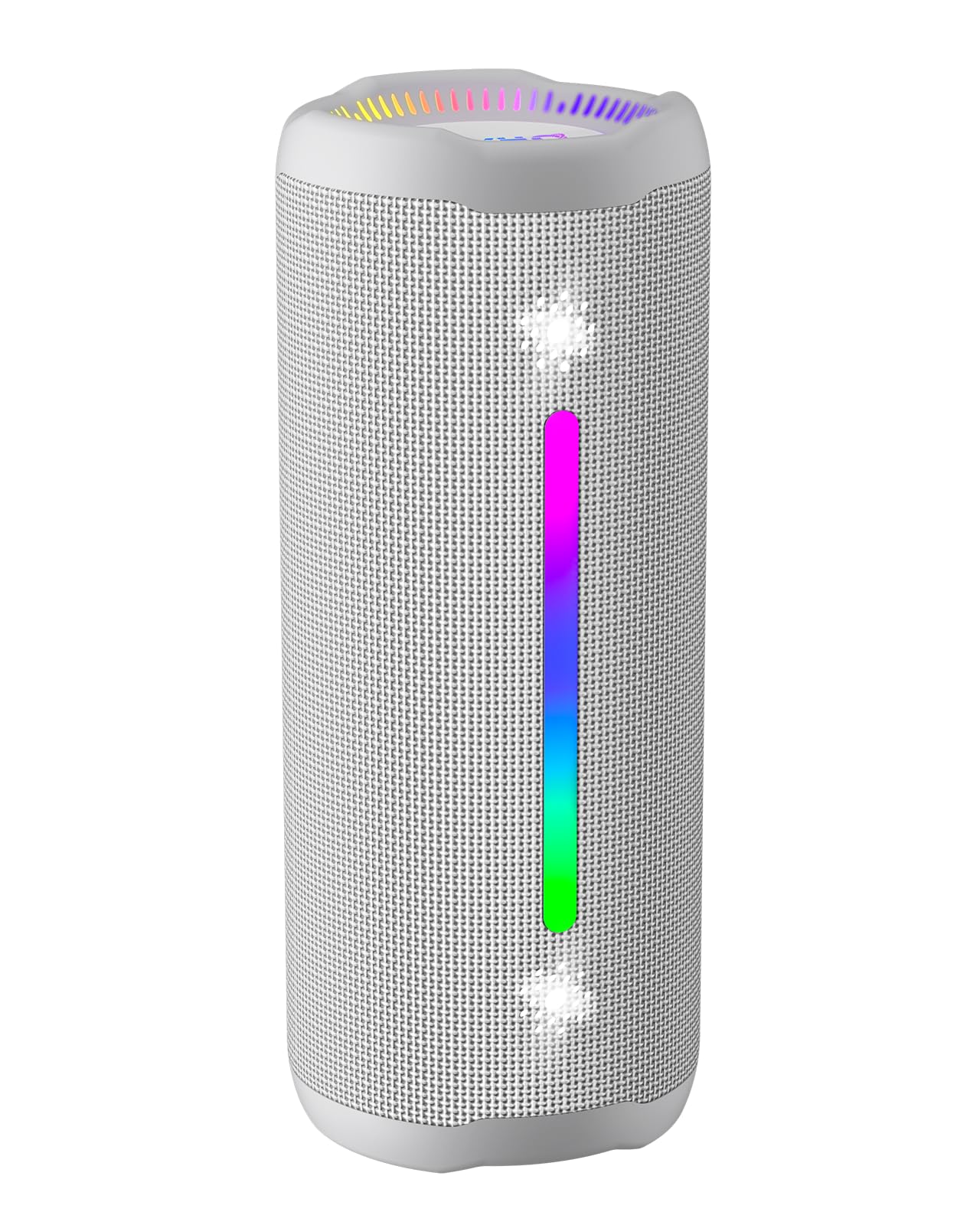
Figure 3.1: OHAYO X10 Max Bluetooth Speaker (White)

Figure 3.2: OHAYO X10 Max Bluetooth Speaker - Fully upgraded from appearance to performance.

Figure 3.3: 25W Deep Bass Sound - Independent channel design for accurate audio performance.

Figure 3.4: 6 Dazzling RGB Light Effects - Syncs with music for an immersive experience.

Figure 3.5: IPX7 Waterproof - Highly sealed design for use in various environments.

Figure 3.6: 24H Ultra-Long Battery Life - 6600mAh battery for extended playback.
4. ການຄວບຄຸມແລະຕົວຊີ້ວັດ
The OHAYO X10 Max features intuitive controls for easy operation.

ຮູບທີ 4.1: ແຜງຄວບຄຸມ ແລະພອດ
- ປຸ່ມເປີດປິດ: Press and hold to power on/off. Short press to switch between input modes (Bluetooth, AUX, TF Card, USB-Audio).
- Volume Up (>): ກົດສັ້ນເພື່ອເພີ່ມລະດັບສຽງ. ກົດຄ້າງໄວ້ສຳລັບເພງຕໍ່ໄປ.
- Volume Down (<): ກົດສັ້ນເພື່ອຫຼຸດລະດັບສຽງ. ກົດຄ້າງໄວ້ສຳລັບເພງກ່ອນໜ້າ.
- ປຸ່ມເບດ: Press to activate/deactivate Bass Boost mode.
- ປຸ່ມຫຼິ້ນ/ຢຸດ/ໂທ: Short press to play/pause music. Short press to answer/end calls. Long press to reject calls. Double press to activate voice assistant.
- ໄຟຕົວຊີ້ວັດຫມໍ້ໄຟ: Four LED lights indicate battery level.
- RGB Light Strip: Displays various colorful lighting effects.
- ຊ່ອງສາກໄຟ (USB-C): ສໍາລັບການສາກໄຟລໍາໂພງ.
- AUX-in Port: ສໍາລັບການເຊື່ອມຕໍ່ສຽງມີສາຍ.
- ສະລັອດຕິງບັດ TF: ສຳລັບການຫຼິ້ນເພງໂດຍກົງຈາກບັດ MicroSD.
5. ຕັ້ງຄ່າ
5.1 ກຳລັງສາກລຳໂພງ
Before first use, fully charge the speaker. Connect the provided USB-C charging cable to the speaker's charging port and the other end to a 5V/2A USB power adapter (not included). The battery indicator lights will blink during charging and remain steady when fully charged.
5.2 ການເປີດ/ປິດ
Press and hold the Power button for approximately 3 seconds to turn the speaker on or off. A voice prompt will confirm the action.
5.3 ການຈັບຄູ່ Bluetooth
- Turn on the speaker. It will automatically enter Bluetooth pairing mode, indicated by a blinking blue LED.
- ເປີດໃຊ້ Bluetooth ໃນອຸປະກອນຂອງທ່ານ (ໂທລະສັບສະຫຼາດ, ແທັບເລັດ, ແລະອື່ນໆ).
- ຊອກຫາ "X10 Max" in your device's Bluetooth list and select it to connect.
- ເມື່ອເຊື່ອມຕໍ່ແລ້ວ, ການເຕືອນດ້ວຍສຽງຈະຢືນຢັນການຈັບຄູ່ສຳເລັດ.
5.4 True Wireless Stereo (TWS) ການຈັບຄູ່
To achieve a true wireless stereo experience, you can pair two OHAYO X10 Max speakers together.

ຮູບທີ 5.1: ການຈັບຄູ່ສະເຕີລິໂອໄຮ້ສາຍແທ້
- Ensure both X10 Max speakers are powered on and not connected to any other Bluetooth device.
- ໃນລຳໂພງໂຕໜຶ່ງ (ອັນນີ້ຈະເປັນລຳໂພງຫຼັກ), ກົດປຸ່ມເປີດ/ປິດສອງຄັ້ງ. ມັນຈະເຂົ້າສູ່ໂໝດຈັບຄູ່ TWS.
- The two speakers will automatically connect to each other. A voice prompt will confirm successful TWS pairing.
- ຕອນນີ້, ເຊື່ອມຕໍ່ອຸປະກອນຂອງທ່ານກັບລຳໂພງຫຼັກຜ່ານ Bluetooth ຕາມທີ່ໄດ້ອະທິບາຍໄວ້ໃນພາກ 5.3.
5.5 ການເຊື່ອມຕໍ່ຜ່ານ AUX
Use the provided 3.5mm AUX cable to connect the speaker to devices without Bluetooth capability.
Figure 5.2: 4 Input Modes - Including AUX, TF, and USB-Audio.
- Connect one end of the AUX cable to the speaker's AUX-in port.
- ເຊື່ອມຕໍ່ສົ້ນອື່ນກັບສຽງອອກຂອງອຸປະກອນຂອງທ່ານ.
- The speaker will automatically switch to AUX mode. If not, short press the Power button to cycle through modes until AUX mode is activated.
5.6 Using TF Card
Insert a MicroSD (TF) card with MP3/WAV/FLAC/WMA audio files into the TF card slot. The speaker will automatically switch to TF card mode and begin playback. Short press the Power button to cycle through modes if needed.
5.7 Using USB-Audio
Connect the speaker to a computer using the USB-C cable. The speaker can function as an external audio output device for your computer. Short press the Power button to cycle through modes if needed.
6. ຄໍາແນະນໍາການດໍາເນີນງານ
6.1 ຫຼີ້ນດົນຕີ
- ຫຼິ້ນ/ຢຸດ: ກົດສັ້ນປຸ່ມຫຼິ້ນ/ຢຸດ/ໂທ.
- ການຄວບຄຸມລະດັບສຽງ: Short press the Volume Up (>) or Volume Down (<) buttons.
- ເພງຕໍ່ໄປ: Long press the Volume Up (>) button.
- ຕິດຕາມກ່ອນ ໜ້າ ນີ້: Long press the Volume Down (<) button.
6.2 ຟັງຊັນເພີ່ມສຽງເບສ
Press the 'BASS' button to activate or deactivate the enhanced bass mode. This feature provides deeper and richer low frequencies for a more impactful audio experience.
6.3 ໂໝດແສງ RGB
The speaker features dynamic RGB lighting. The lights will automatically sync with the music beat. To turn the lights on/off, refer to the specific control instructions in your quick start guide or experiment with the mode button if available.
6.4 ໂທຟຣີ
ເມື່ອເຊື່ອມຕໍ່ຜ່ານ Bluetooth ກັບໂທລະສັບສະຫຼາດຂອງທ່ານ, ລຳໂພງສາມາດໃຊ້ສຳລັບການໂທແບບບໍ່ຕ້ອງໃຊ້ມືໄດ້.

ຮູບທີ 6.1: ຄຸນສົມບັດການໂທແບບບໍ່ຕ້ອງໃຊ້ມື
- ຮັບ/ສາຍໂທ: ກົດສັ້ນປຸ່ມຫຼິ້ນ/ຢຸດ/ໂທ.
- ປະຕິເສດການໂທ: ກົດປຸ່ມ Play/Pause/Call ຄ້າງໄວ້.
- ກະຕຸ້ນຜູ້ຊ່ວຍສຽງ: Double press the Play/Pause/Call button.
7. ບໍາລຸງຮັກສາ
- ທໍາຄວາມສະອາດ: ເຊັດລໍາໂພງດ້ວຍສຽງອ່ອນ, ງamp ຜ້າ. ຢ່າໃຊ້ສານເຄມີທີ່ຮຸນແຮງຫຼືເຄື່ອງເຮັດຄວາມສະອາດຂັດ.
- ການເກັບຮັກສາ: ເກັບຮັກສາລຳໂພງໄວ້ໃນບ່ອນທີ່ເຢັນ, ແຫ້ງ, ຫ່າງຈາກແສງແດດໂດຍກົງ ແລະ ອຸນຫະພູມສູງສຸດເມື່ອບໍ່ໄດ້ໃຊ້ເປັນເວລາດົນ.
- ການດູແລຫມໍ້ໄຟ: ເພື່ອຍືດອາຍຸການໃຊ້ງານຂອງແບັດເຕີຣີ, ໃຫ້ສາກລຳໂພງຢ່າງໜ້ອຍທຸກໆສາມເດືອນຖ້າບໍ່ໄດ້ໃຊ້ເປັນປະຈຳ.
8. ການແກ້ໄຂບັນຫາ
| ບັນຫາ | ສາເຫດທີ່ເປັນໄປໄດ້ | ການແກ້ໄຂ |
|---|---|---|
| ລຳໂພງບໍ່ເປີດ. | ແບັດເຕີຣີຕໍ່າ. | ສາກລຳໂພງໃຫ້ເຕັມ. |
| ບໍ່ສາມາດຈັບຄູ່ຜ່ານ Bluetooth ໄດ້. | ລຳໂພງບໍ່ໄດ້ຢູ່ໃນໂໝດຈັບຄູ່; Bluetooth ຂອງອຸປະກອນປິດຢູ່; ຢູ່ໄກຈາກອຸປະກອນເກີນໄປ. | Ensure speaker is in pairing mode (blinking blue LED). Turn on device Bluetooth. Move device closer to speaker (within 10 meters). |
| ບໍ່ມີສຽງ ຫຼືສຽງຕໍ່າ. | ລະດັບສຽງຕໍ່າເກີນໄປໃນລຳໂພງ ຫຼືອຸປະກອນ; ໂໝດປ້ອນຂໍ້ມູນບໍ່ຖືກຕ້ອງ. | Increase volume on both speaker and device. Check if the correct input mode (Bluetooth, AUX, TF) is selected. |
| ການຈັບຄູ່ TWS ລົ້ມເຫລວ. | Speakers too far apart; one speaker already connected to another device. | Ensure speakers are close to each other. Disconnect any existing Bluetooth connections before TWS pairing. |
| ການບິດເບືອນສຽງ. | ປະລິມານສູງເກີນໄປ; ແບັດເຕີຣີຕໍ່າ. | ຫຼຸດປະລິມານ. ສາກໄຟລຳໂພງ. |
9. ຂໍ້ມູນຈໍາເພາະ
| ຄຸນສົມບັດ | ຂໍ້ມູນຈໍາເພາະ |
|---|---|
| ຊື່ຕົວແບບ | X10 ສູງສຸດທີ່ເຄຍ |
| ລຸ້ນ Bluetooth | 5.3 |
| ເຕັກໂນໂລຊີການສື່ສານໄຮ້ສາຍ | Bluetooth |
| ລຳໂພງກຳລັງຜົນຜະລິດສູງສຸດ | 35 Watts (25W effective) |
| ຄວາມອາດສາມາດຫມໍ້ໄຟ | 6600 mAh |
| ເວລາຫຼິ້ນ | Up to 24 hours (varies with volume and light use) |
| ລະດັບຄວາມຕ້ານທານນ້ໍາ | IPX7 (ກັນນໍ້າ) |
| ການປ້ອນຂໍ້ມູນ Voltage | 5 ໂວນ (DC) |
| ການຕອບສະໜອງຄວາມຖີ່ | 20 KHz |
| ອັດຕາສ່ວນສັນຍານເຖິງສຽງດັງ | 80 dB |
| ປະເພດໄດເວີສຽງ | ໄດນາມິກໄດເວີ |
| Woofer ເສັ້ນຜ່າສູນກາງ | 75 ມິນລິແມັດ |
| Tweeter ເສັ້ນຜ່າສູນກາງ | 26 ມິນລິແມັດ |
| ຂະໜາດສິນຄ້າ | 2.95"D x 2.95"W x 7.28"H |
| ນ້ໍາຫນັກລາຍການ | 450 ກຣາມ (15.9 ອອນສ໌) |
| ວັດສະດຸ | Acrylonitrile Butadiene Styrene (ABS), ອະລູມິນຽມ |
| ວິທີການຄວບຄຸມ | ປຸ່ມກົດ |
| ຄຸນນະສົມບັດພິເສດ | Bass Boost, AUX, Hi-Res Audio, 24-Hour Playtime, IPX7 Waterproof, TF Card Port, Dual Passive Radiators, Hands-free, True Wireless Stereo Pairing, Shockproof |
10. ການຮັບປະກັນແລະການສະຫນັບສະຫນູນ
The OHAYO X10 Max Bluetooth Speaker comes with an extended warranty. For specific warranty details and to register your product, please refer to the information provided in your quick start guide or contact OHAYO customer support.
For technical support or customer service inquiries, please contact OHAYO Direct. Contact information may be found in your product packaging or on the official OHAYO webເວັບໄຊ.
11. ວິດີໂອຜະລິດຕະພັນຢ່າງເປັນທາງການ
Video 11.1: Official OHAYO Portable Bluetooth Speaker overview by OHAYO Direct. This video highlights key features and design elements of the speaker.
Ask a question about this manual
Ask about setup, troubleshooting, compatibility, parts, safety, or missing instructions. Manuals+ will review the question and use this page’s manual context to help answer it.