
1. ບົດແນະນຳ
ຂອບໃຈສໍາລັບການຊື້asing the Supersonic IQ Sound IQ-1505WK Portable Karaoke System. This device combines a powerful audio system with a 12.1-inch touch screen, running on Android 12.1, to provide a versatile entertainment experience. It is designed for karaoke, media playback, and smart functionalities, suitable for various events and personal use. Please read this manual thoroughly before operating the device to ensure proper use and to maximize its performance and longevity.
2. ຂໍ້ມູນຄວາມປອດໄພ
- ແຫຼ່ງພະລັງງານ: Use only the provided charging plug. Ensure the power voltage ກົງກັບຄວາມຕ້ອງການທີ່ລະບຸໄວ້ໃນອຸປະກອນ.
- ນ້ໍາແລະຄວາມຊຸ່ມ: ຢ່າໃຫ້ອຸປະກອນຖືກຝົນ, ຄວາມຊຸ່ມຊື່ນ ຫຼື ຈຸ່ມມັນລົງໃນນໍ້າ. ຮັກສານໍ້າໃຫ້ຫ່າງຈາກອຸປະກອນ.
- ການລະບາຍອາກາດ: ຢ່າອຸດຕັນຊ່ອງລະບາຍອາກາດ. ຮັບປະກັນໃຫ້ມີກະແສລົມໄຫຼວຽນພຽງພໍອ້ອມຮອບເຄື່ອງເພື່ອປ້ອງກັນຄວາມຮ້ອນເກີນໄປ.
- ຄວາມຮ້ອນ: ຮັກສາເຄື່ອງໃຫ້ຫ່າງຈາກແຫຼ່ງຄວາມຮ້ອນເຊັ່ນ: ລັງສີ, ເຄື່ອງບັນທຶກຄວາມຮ້ອນ, ເຕົາ ຫຼືອຸປະກອນອື່ນໆທີ່ຜະລິດຄວາມຮ້ອນ.
- ທໍາຄວາມສະອາດ: ຖອດປລັກເຄື່ອງອອກຈາກປລັກໄຟກ່ອນທຳຄວາມສະອາດ. ໃຊ້ຜ້າອ່ອນແລະແຫ້ງ. ຢ່າໃຊ້ນ້ຳຢາທຳຄວາມສະອາດຂອງແຫຼວ ຫຼື ນ້ຳຢາທຳຄວາມສະອາດແບບສະເປຣ.
- ການບໍລິການ: ຢ່າພະຍາຍາມສ້ອມແປງຜະລິດຕະພັນນີ້ດ້ວຍຕົວທ່ານເອງ. ໃຫ້ແນະນຳການບໍລິການທັງໝົດໄປຫາພະນັກງານບໍລິການທີ່ມີຄຸນວຸດທິ. ການເປີດ ຫຼື ການຖອດຝາປິດອາດຈະເຮັດໃຫ້ທ່ານມີຄວາມສ່ຽງຕໍ່ອັນຕະລາຍ.tage ຫຼືອັນຕະລາຍອື່ນໆ.
- ຄວາມປອດໄພຫມໍ້ໄຟ: The unit contains a rechargeable battery. Do not expose the battery to excessive heat or direct sunlight. Do not disassemble, puncture, or short-circuit the battery. Dispose of batteries properly according to local regulations.
- ການຈັດວາງ: ວາງເຄື່ອງໄວ້ເທິງພື້ນຜິວທີ່ໝັ້ນຄົງ ແລະ ຮາບພຽງເພື່ອປ້ອງກັນບໍ່ໃຫ້ມັນຕົກ.
3. ເນື້ອໃນຊຸດ
ກະລຸນາກວດເບິ່ງກ່ອງສໍາລັບລາຍການຕໍ່ໄປນີ້:
- IQ Sound IQ-1505WK Portable Karaoke System
- 1x ໄມໂຄຣໂຟນໄຮ້ສາຍ
- ສຽບສາກໄຟ
- ການຄວບຄຸມໄລຍະໄກ
- ຄູ່ມືຜູ້ໃຊ້ (ເອກະສານນີ້)
4. ຜະລິດຕະພັນເກີນview
The IQ Sound IQ-1505WK is a feature-rich portable karaoke system designed for high-quality audio and interactive entertainment. It integrates a 12.1-inch capacitive touch screen, dual 5-inch woofers, and 2-inch tweeters for clear sound, powered by a 5000W peak output. Running on Android 12.1 with a quad-core processor, it offers Wi-Fi, Bluetooth, HDMI, USB, and Micro SD connectivity. A built-in 5400mAh rechargeable battery provides portability.
4.1. ອຸປະກອນ Views
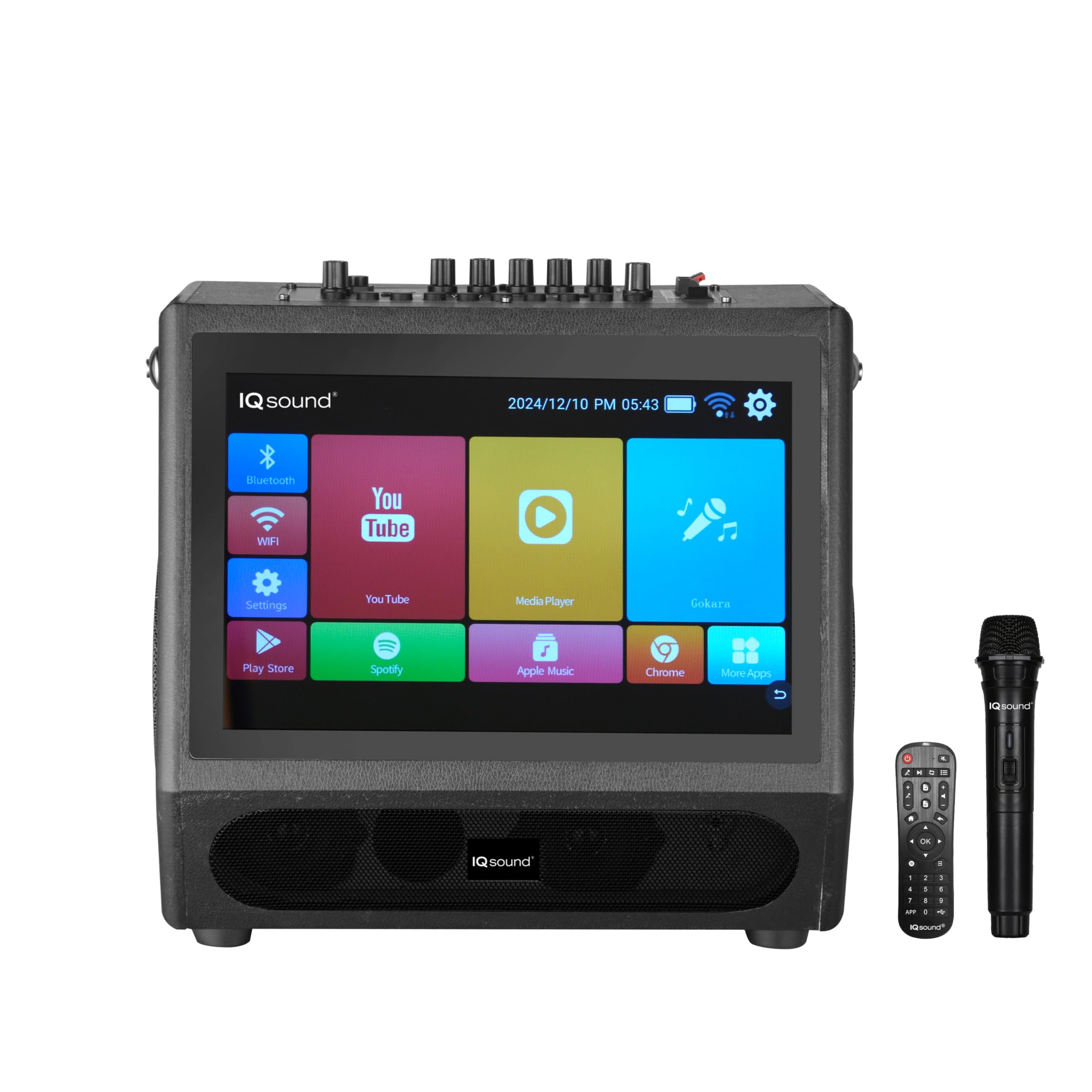
ຮູບ 1: ດ້ານຫນ້າ View. This image shows the front of the karaoke system, highlighting the large 12.1-inch touch screen interface with various application icons for Bluetooth, Wi-Fi, YouTube, Media Player, Settings, Play Store, Spotify, Apple Music, and Chrome. The IQ Sound logo is visible below the screen.
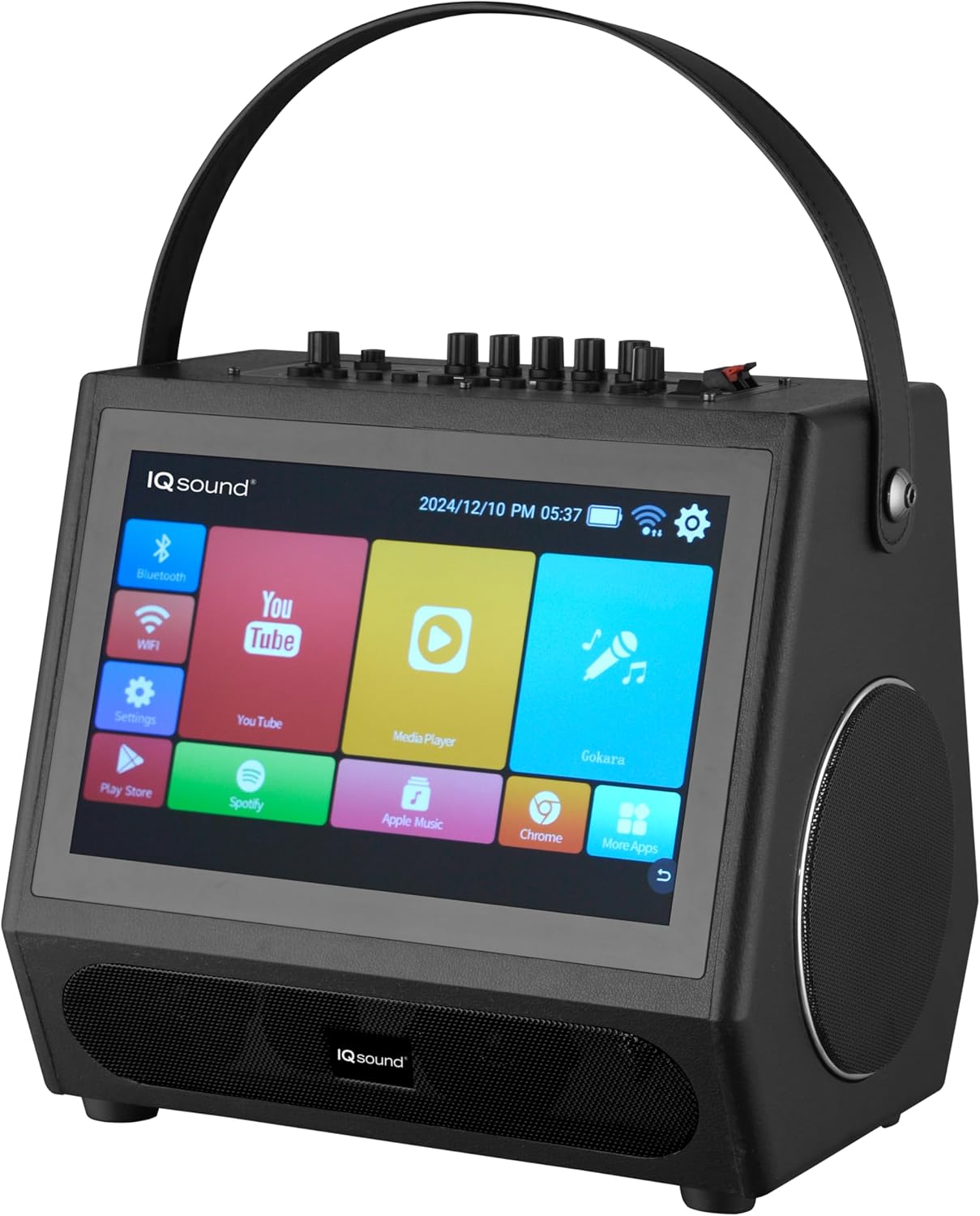
ຮູບທີ 2: ມຸມ View with Handle. ນີ້ view presents the karaoke system from an angle, showcasing its portable design with a sturdy carry handle on top. One of the side speakers is visible, along with the touch screen and a glimpse of the control panel on the top surface.

ຮູບທີ 3: ແຜງຄວບຄຸມເທິງສຸດ. ຮູບພາບນີ້ໃຫ້ຄວາມຊັດເຈນ view of the top control panel. It features various knobs for volume, microphone input, echo, and bass/treble adjustments. Input ports such as MIC IN, AUDIO IN/AUDIO OUT, USB, TF CARD (Micro SD), HDMI OUT, and DC 13.5V IN are clearly labeled. A power switch is also visible.
5. ຕັ້ງຄ່າ
5.1. ການສາກແບັດເຕີຣີ
- Connect the provided charging plug to the DC 13.5V IN port on the top panel of the karaoke system.
- Plug the other end of the charging plug into a standard wall outlet.
- The charging indicator light (if present) will illuminate, indicating that the unit is charging.
- Allow the unit to charge fully before first use (approximately 3-4 hours). A full charge provides up to 2.5 hours of playtime.
5.2. ເປີດ / ປິດພະລັງງານ
- To power on the system, locate the POWER switch on the top panel and slide it to the 'ON' position. The screen will light up.
- To power off, slide the POWER switch to the 'OFF' position.
5.3. ການເຊື່ອມຕໍ່ໄມໂຄຣໂຟນໄຮ້ສາຍ
- Ensure the wireless microphone has fresh batteries installed.
- ເປີດໄມໂຄຣໂຟນໄຮ້ສາຍ.
- The microphone should automatically pair with the karaoke system. If not, refer to the microphone's specific instructions for pairing.
- Adjust the 'MIC VOL' knob on the top panel to control the microphone's volume.
5.4. ການເຊື່ອມຕໍ່ Wi-Fi
- On the touch screen, tap the 'Settings' icon.
- Navigate to 'Network & Internet' or 'Wi-Fi'.
- ເປີດ Wi-Fi ແລະເລືອກເຄືອຂ່າຍທີ່ທ່ານຕ້ອງການຈາກລາຍຊື່.
- ໃສ່ລະຫັດຜ່ານ Wi-Fi ຖ້າຖືກເຕືອນ ແລະແຕະ 'ເຊື່ອມຕໍ່'.
5.5. ການຈັບຄູ່ Bluetooth
- On the touch screen, tap the 'Bluetooth' icon or go to 'Settings' > 'Connected devices' > 'Bluetooth'.
- Ensure Bluetooth is enabled on the karaoke system.
- On your external device (smartphone, tablet), enable Bluetooth and search for available devices.
- Select 'IQ-1505WK' from the list of found devices to pair.
- Once paired, you can stream audio from your external device to the karaoke system.
6. ຄໍາແນະນໍາການດໍາເນີນງານ
6.1. ການໂຕ້ຕອບໜ້າຈໍສຳຜັດ
- The 12.1-inch touch screen operates like a standard Android tablet. Tap icons to open applications, swipe to navigate, and use the on-screen keyboard for input.
- The home screen provides quick access to essential functions like Bluetooth, Wi-Fi, YouTube, Media Player, and Settings.
6.2. ຟັງຊັ່ນຄາຣາໂອເກະ
- Use the 'YouTube' app or other compatible media players to find karaoke tracks with lyrics.
- Connect the wireless microphone as described in Section 5.3.
- Adjust the 'MIC VOL' and 'ECHO' knobs on the top panel to achieve your desired vocal effect.
- The system's powerful speakers will project your voice and the music.
6.3. ການຫຼິ້ນສື່ (USB/SD)
- Insert a USB drive into the 'USB' port or a Micro SD card into the 'TF CARD' slot on the top panel.
- Open the 'Media Player' app on the touch screen.
- Navigate to the USB or SD card storage to browse and play your audio or video files.
6.4. ວິທະຍຸ FM
- Tap the 'FM Radio' app icon on the touch screen.
- Use the on-screen controls to scan for stations, save presets, and adjust volume.
6.5. HDMI Output
- Connect an HDMI cable (not included) from the 'HDMI OUT' port on the top panel to an HDMI input on an external display (TV, projector).
- The system's screen content will be mirrored on the external display, allowing for a larger viewing experience for lyrics or videos.
6.6. ການນໍາໃຊ້ການຄວບຄຸມໄລຍະໄກ
The included remote control allows for convenient operation of various functions from a distance. Point the remote control directly at the front of the karaoke system. Functions typically include:
- ເປີດ/ປິດ
- ປະລິມານຂຶ້ນ/ລົງ
- ຫຼິ້ນ/ຢຸດຊົ່ວຄາວ
- ຕິດຕາມຕໍ່ໄປ/ກ່ອນໜ້າ
- Mode Selection (e.g., Bluetooth, FM, USB)
- Navigation for Android interface (directional buttons, OK, Return)
7. ບໍາລຸງຮັກສາ
7.1. ທໍາຄວາມສະອາດ
- ຖອດປລັກເຄື່ອງທຸກຄັ້ງກ່ອນທຳຄວາມສະອາດ.
- ໃຊ້ຜ້າແພທີ່ອ່ອນ, ແຫ້ງ, ບໍ່ມີເສັ້ນດ່າງເພື່ອເຊັດພື້ນຜິວພາຍນອກ.
- For the touch screen, use a screen-specific cleaning solution and a microfiber cloth. Do not spray liquid directly onto the screen.
- Avoid using abrasive cleaners, waxes, or solvents as they may damage the finish.
7.2. ການດູແລຫມໍ້ໄຟ
- ເພື່ອຍືດອາຍຸແບັດເຕີລີ, ຫຼີກເວັ້ນການຖອດແບດເຕີລີ່ເຕັມເລື້ອຍໆ.
- If storing the unit for an extended period, charge the battery to about 50% and recharge every few months.
- Operating the unit in extremely hot or cold conditions can affect battery performance and lifespan.
8. ການແກ້ໄຂບັນຫາ
If you encounter any issues with your IQ Sound IQ-1505WK, please refer to the following table for common problems and solutions:
| ບັນຫາ | ສາເຫດທີ່ເປັນໄປໄດ້ | ການແກ້ໄຂ |
|---|---|---|
| ຫນ່ວຍບໍລິການບໍ່ເປີດ. | ແບັດເຕີຣີໝົດ. ສະວິດໄຟປິດຢູ່. | Connect the charging plug and allow the unit to charge. Ensure the power switch is in the 'ON' position. |
| ບໍ່ມີສຽງຈາກລຳໂພງ. | Volume is too low. Input source not selected correctly. Cables are loose. | Increase the master volume. Ensure the correct input source (Bluetooth, USB, etc.) is selected. Check all cable connections. |
| ໄມໂຄຣໂຟນບໍ່ເຮັດວຽກ. | Microphone batteries are low/dead. Microphone is off. MIC VOL knob is low. | Replace microphone batteries. Turn on the microphone. Increase the 'MIC VOL' knob. |
| ການຈັບຄູ່ Bluetooth ລົ້ມເຫລວ. | Bluetooth not enabled on device or system. Devices are too far apart. | Ensure Bluetooth is enabled on both devices. Keep devices within 10 meters (33 feet). Try restarting both devices. |
| ໜ້າຈໍສໍາຜັດບໍ່ຕອບສະໜອງ. | ຄວາມຜິດພາດຂອງຊອບແວຊົ່ວຄາວ. | Restart the system by powering it off and then on again. |
9. ຂໍ້ມູນຈໍາເພາະ
| ຄຸນສົມບັດ | ລາຍລະອຽດ |
|---|---|
| ຍີ່ຫໍ້ | ສຽງສູງ |
| ຕົວແບບ | IQ-1505WK |
| ຄຸນນະສົມບັດພິເສດ | ແບບພົກພາ |
| ແຫຼ່ງພະລັງງານ | ພະລັງງານຫມໍ້ໄຟ |
| ການຕັ້ງຄ່າລໍາໂພງ | 2x 5-inch Woofers, 2x 2-inch Tweeters |
| ຜົນຜະລິດພະລັງງານສູງສຸດ | 5000W |
| ຈໍສະແດງຜົນ | 12.1 ນິ້ວ Capacitive Touch Screen |
| ລະບົບປະຕິບັດການ | Android 12.1 |
| ໂຮງງານຜະລິດ | Quad-Core |
| ການເກັບຮັກສາພາຍໃນ | 32GB |
| RAM | 2GB |
| ການເຊື່ອມຕໍ່ | Wi-Fi, Bluetooth |
| Input/Output Ports | HDMI Out, USB, Micro SD (TF Card), MIC In, Audio In/Out |
| ແບັດເຕີຣີ | ແບັດເຕີຣີ 5400mAh ສາມາດສາກໄດ້ |
| Playtime (Battery) | ສູງສຸດ 2.5 ຊົ່ວໂມງ |
| ຂະ ໜາດ (D x W x H) | 12.72"D x 12"W x 10.04"H |
| UPC | 639131215054 |
10. ການຮັບປະກັນແລະການສະ ໜັບ ສະ ໜູນ
10.1. ຂໍ້ມູນການຮັບປະກັນ
ຜະລິດຕະພັນນີ້ແມ່ນກວມເອົາໂດຍ a ຮັບປະກັນ 90 ວັນ from the date of purchase. This warranty covers manufacturing defects in materials and workmanship under normal use. It does not cover damage caused by misuse, accident, unauthorized modification, or external causes such as power surges. Please retain your proof of purchase for warranty claims.
10.2. ການຊ່ວຍເຫຼືອລູກຄ້າ
For technical assistance, warranty service, or general inquiries, please contact Supersonic customer support. Refer to the contact information provided with your product packaging or visit the official Supersonic webເວັບໄຊທ໌ສໍາລັບລາຍລະອຽດສະຫນັບສະຫນູນທີ່ທັນສະໄຫມທີ່ສຸດ.