
ແນະນຳ
This manual provides essential information for the setup, operation, maintenance, and troubleshooting of your AWOW Mini PC, Model BA7. Please read these instructions carefully before using the device.

ຮູບພາບ: ຫຼາຍກວ່າview of the AWOW BA7 Mini PC, highlighting its compact design and key features.
ເນື້ອໃນຊຸດ
ກວດສອບວ່າລາຍການທັງຫມົດແມ່ນມີຢູ່ໃນຊຸດ:
- AWOW BA7 Mini PC
- Power Adapter
- screws ການຕິດຕັ້ງ
- VESA Mount Bracket
- ສາຍ HDMI
- ຄູ່ມືຜູ້ໃຊ້ (ເອກະສານນີ້)

Image: Illustration of the AWOW BA7 Mini PC and its included accessories: power adapter, screws, VESA mount, HDMI cable, and user manual.
ຄໍາແນະນໍາການຕິດຕັ້ງ
- ເຊື່ອມຕໍ່ອຸປະກອນຕໍ່ພ່ວງ: Connect your keyboard, mouse, and monitor(s) to the appropriate ports on the Mini PC.
ຮູບພາບ: ທາງຫນ້າ view of the Mini PC showing the Power Button, Type-C port, USB 3.2 ports, and 3.5mm Audio Jack.

ຮູບພາບ: ດ້ານຫລັງ view of the Mini PC showing the DC IN, DP1.2, HDMI2.0, USB 2.0 ports, and RJ45 LAN port.
- ການເຊື່ອມຕໍ່ພະລັງງານ: ເຊື່ອມຕໍ່ອະແດບເຕີໄຟກັບຜອດ DC IN ໃນ Mini PC, ຈາກນັ້ນສຽບອະແດັບເຕີໃສ່ປລັກສຽບໄຟ.
- ເປີດ: ກົດປຸ່ມເປີດປິດທີ່ຕັ້ງຢູ່ດ້ານຫນ້າຂອງ Mini PC. ລະບົບຈະບູດຂຶ້ນ.
- ການຕັ້ງຄ່າເບື້ອງຕົ້ນ: ປະຕິບັດຕາມຄໍາແນະນໍາໃນຫນ້າຈໍເພື່ອເຮັດສໍາເລັດການຕິດຕັ້ງເບື້ອງຕົ້ນ Windows 11 Pro, ລວມທັງພາສາ, ພາກພື້ນ, ການເຊື່ອມຕໍ່ເຄືອຂ່າຍ, ແລະການສ້າງບັນຊີຜູ້ໃຊ້.
- ການເຊື່ອມຕໍ່ເຄືອຂ່າຍ:
- Wired: Connect an Ethernet cable to the RJ45 LAN port for a stable wired connection.
- ໄຮ້ສາຍ: During Windows setup or via Windows settings, connect to your Wi-Fi network using the built-in WiFi 6.
ຄໍາແນະນໍາການດໍາເນີນງານ
ການດໍາເນີນງານພື້ນຖານ
- ເປີດ/ປິດ: Press the power button to turn on the PC. To shut down, use the Windows Start menu options (Shut down, Restart, Sleep). A short press on the power button can put the PC to sleep. A long press (approx. 5 seconds) will force a shutdown.
- ສະແດງຜົນອອກ: The Mini PC supports up to three 4K displays simultaneously via DP, HDMI, and USB-C. Connect your monitors and configure display settings in Windows.

Image: A user working with a triple monitor setup, demonstrating the Mini PC's multi-display capability.
- ການເຊື່ອມຕໍ່ USB: Utilize the USB 2.0 and USB 3.0 ports for connecting external devices such as external hard drives, USB flash drives, printers, and other peripherals. The Type-C port also supports data transfer and display output.
- ສຽງ: ເຊື່ອມຕໍ່ຫູຟັງ ຫຼື ລຳໂພງເຂົ້າກັບຊ່ອງສຽບສຽງ 3.5 ມມ.
ການນໍາໃຊ້ຂັ້ນສູງ
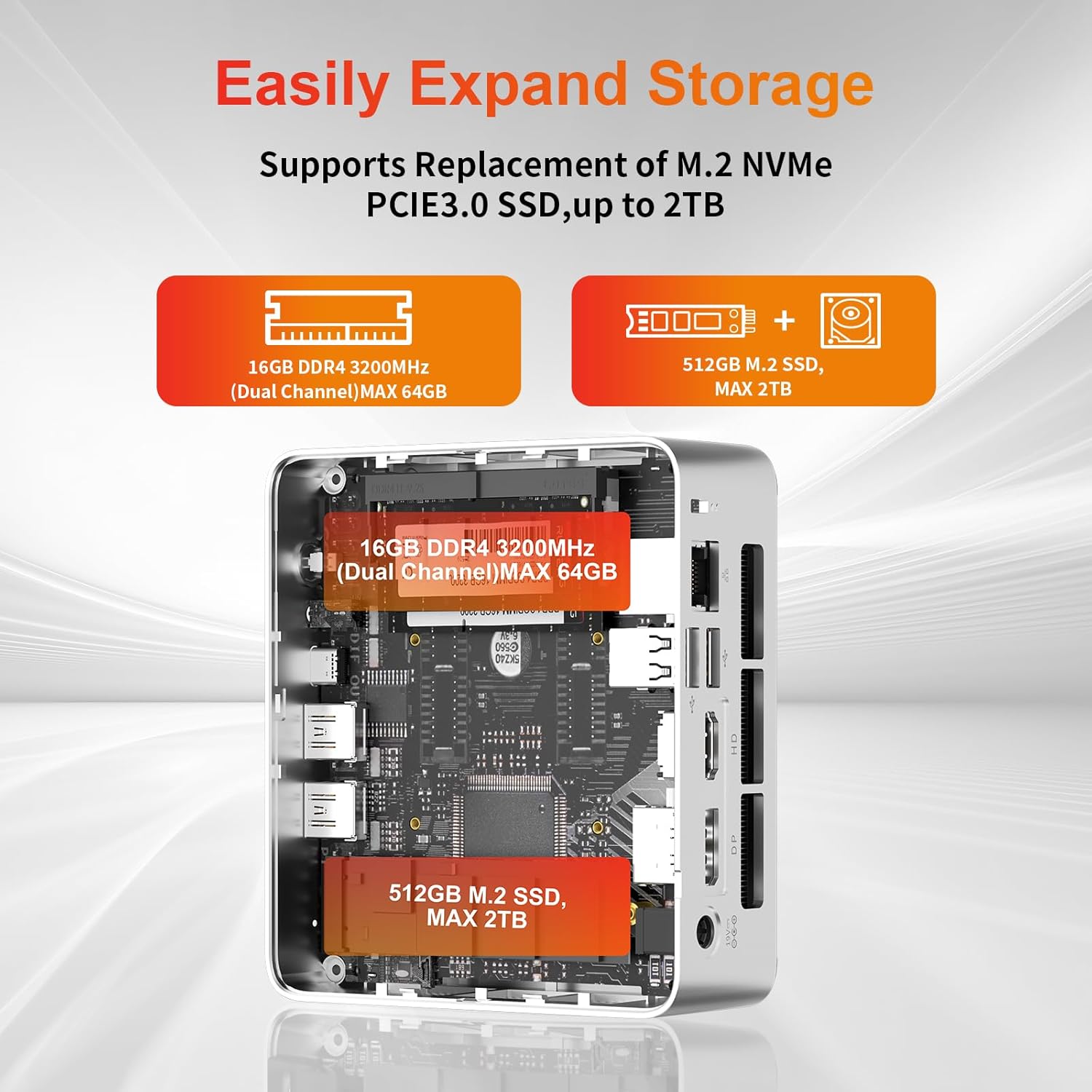
- ການຂະຫຍາຍພື້ນທີ່ຈັດເກັບຂໍ້ມູນ: The Mini PC supports replacement of the M.2 NVMe PCIe 3.0 SSD up to 2TB. It also supports memory expansion up to 64GB DDR4.

Image: Diagram illustrating the internal components and options for expanding storage (M.2 SSD up to 2TB) and RAM (DDR4 up to 64GB).
- ການຕິດຕັ້ງ VESA: Use the included VESA mount bracket to attach the Mini PC to the back of a compatible monitor or to a wall mount, saving desk space.
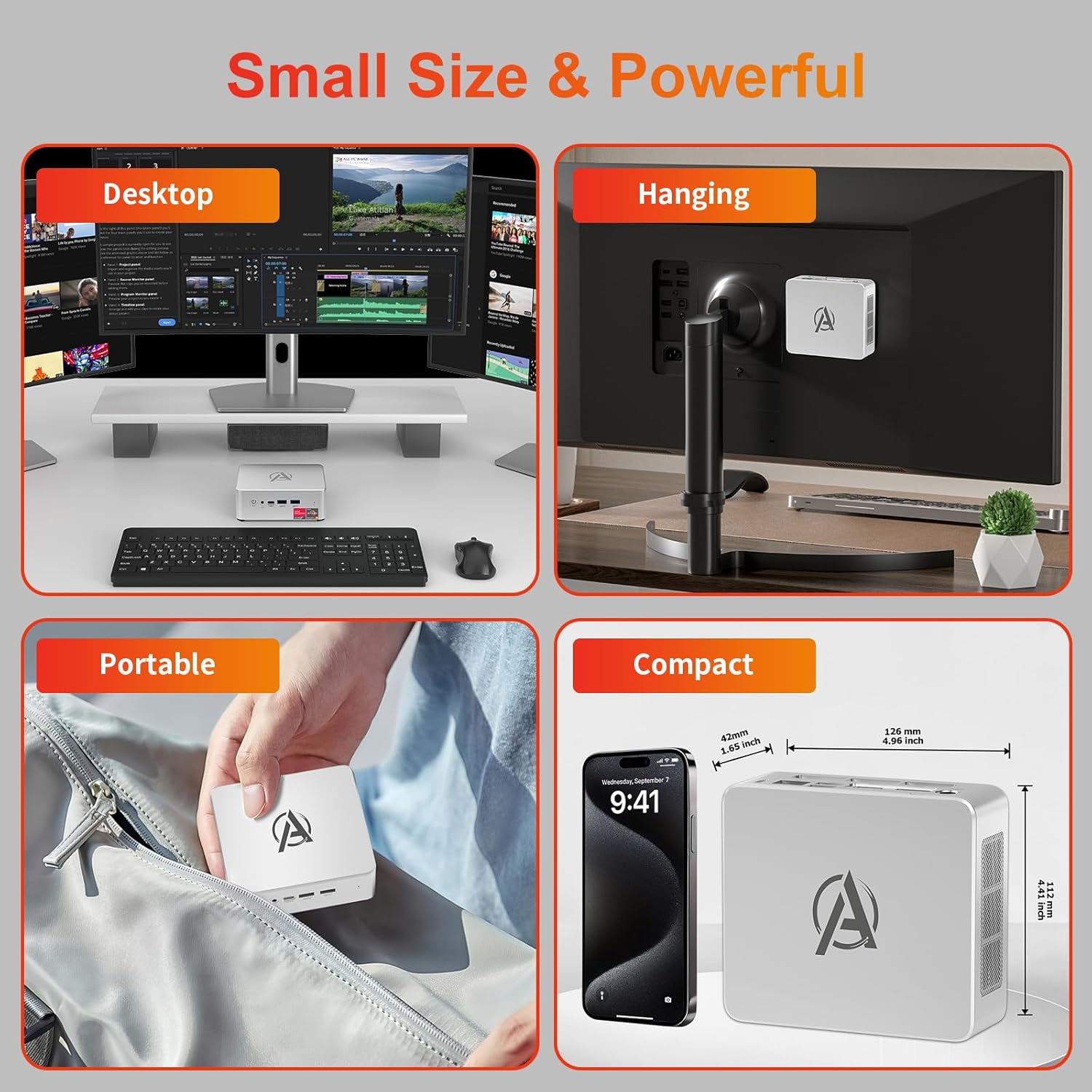
Image: Various usage scenarios for the Mini PC, including desktop, VESA-mounted behind a monitor, portable, and compact size comparison.
ບໍາລຸງຮັກສາ
- ທໍາຄວາມສະອາດ: Use a soft, dry cloth to clean the exterior of the Mini PC. Do not use liquid cleaners or aerosols. Ensure ventilation openings are free from dust.
- ອັບເດດຊອບແວ: ກວດສອບ ແລະ ຕິດຕັ້ງການອັບເດດ Windows ແລະ ໄດຣເວີເປັນປະຈຳເພື່ອຮັບປະກັນປະສິດທິພາບ ແລະ ຄວາມປອດໄພທີ່ດີທີ່ສຸດ.
- ການຄຸ້ມຄອງຄວາມຮ້ອນ: Ensure the Mini PC is placed in a well-ventilated area. Avoid blocking the air vents. The intelligent cooling system is designed for low noise and efficient heat dissipation.

Image: Diagram illustrating the internal cooling fan and heat sink, showing airflow for efficient heat dissipation.
- ການຈັດການການເກັບຮັກສາ: ແຕ່ລະໄລຍະເຮັດຄວາມສະອາດທີ່ບໍ່ຈໍາເປັນ files and applications to maintain system performance.
ການແກ້ໄຂບັນຫາ
- ບໍ່ມີພະລັງງານ:
- ກວດເບິ່ງວ່າອະແດັບເຕີໄຟເຊື່ອມຕໍ່ຢ່າງປອດໄພກັບທັງ Mini PC ແລະປລັກສຽບໄຟຫຼືບໍ່.
- ໃຫ້ແນ່ໃຈວ່າປລັກສຽບໄຟເຮັດວຽກໄດ້.
- ລອງປລັກສຽບໄຟອື່ນ.
- ບໍ່ມີການສະແດງຜົນ:
- Verify that the HDMI/DP/USB-C cable is securely connected to both the Mini PC and the monitor.
- ກວດໃຫ້ແນ່ໃຈວ່າເປີດໜ້າຈໍ ແລະຕັ້ງເປັນແຫຼ່ງປ້ອນຂໍ້ມູນທີ່ຖືກຕ້ອງ.
- ລອງສາຍຈໍສະແດງຜົນອື່ນ ຫຼືຈໍພາບຖ້າມີ.
- ປະສິດທິພາບຊ້າ:
- ປິດແອັບພລິເຄຊັນທີ່ບໍ່ຈໍາເປັນທີ່ເຮັດວຽກຢູ່ໃນພື້ນຫຼັງ.
- ກວດເບິ່ງ ແລະຕິດຕັ້ງການອັບເດດ Windows ຫຼືການອັບເດດໄດເວີທີ່ຍັງຄ້າງຢູ່.
- ໃຫ້ແນ່ໃຈວ່າມີພື້ນທີ່ຫວ່າງພຽງພໍໃນ SSD.
- ຕິດຕາມກວດກາການໃຊ້ CPU ແລະ RAM ໃນ Task Manager ເພື່ອກໍານົດຂະບວນການທີ່ໃຊ້ຊັບພະຍາກອນ.
- ບັນຫາການເຊື່ອມຕໍ່ເຄືອຂ່າຍ:
- For wired connections, ensure the Ethernet cable is properly connected and the router is working.
- For Wi-Fi, check if the Wi-Fi adapter is enabled and connected to the correct network. Restart your router/modem.
- ລະບົບຢຸດ/ຂັດຂ້ອງ:
- ຣີສະຕາດ Mini PC.
- ໃຫ້ແນ່ໃຈວ່າລະບົບບໍ່ຮ້ອນເກີນໄປ (ກວດເບິ່ງການລະບາຍອາກາດ).
- Run a system diagnostic or check Windows Event Viewer for error messages.
ຂໍ້ມູນຈໍາເພາະ
| ຕົວແບບ | AWOW BA7 Mini PC |
| ໂຮງງານຜະລິດ | AMD Ryzen 5 7430U (6 Cores, 12 Threads, ສູງສຸດ 4.3 GHz) |
| ຮູບພາບ | ປະສົມປະສານ AMD Radeon Graphics |
| RAM | 16GB DDR4 (ຂະຫຍາຍໄດ້ສູງສຸດ 64GB) |
| ການເກັບຮັກສາ | 512GB PCIe 3.0 M.2 SSD (Expandable up to 2TB) |
| ລະບົບປະຕິບັດການ | Windows 11 Pro |
| ຜົນຜະລິດວິດີໂອ | DP1.2 (4K@60Hz), HDMI2.0 (4K@60Hz), USB-C (4K@60Hz) - Supports Triple Display |
| ການເຊື່ອມຕໍ່ | WiFi 6, Bluetooth 5.2, 1000Mbps RJ45 LAN |
| ທ່າເຮືອ | 2x USB 3.2, 2x USB 2.0, 1x Type-C (Full Function), 1x DP1.2, 1x HDMI2.0, 1x RJ45 LAN, 1x 3.5mm Audio Jack, 1x DC IN |
| ຂະໜາດ | 126mm x 112mm x 42mm (ປະມານ 4.96 x 4.41 x 1.65 ນິ້ວ) |
| ນ້ຳໜັກ | 398g (ອຸປະກອນເທົ່ານັ້ນ) Image: The Mini PC with its dimensions (126mm x 112mm x 42mm) and weight (398g) labeled. |
ການຮັບປະກັນແລະການສະຫນັບສະຫນູນ
AWOW provides comprehensive support for its products.
- ການຮັບປະກັນ: This product includes a 12-month service period from the date of purchase, covering manufacturing defects.
- ສະຫນັບສະຫນູນດ້ານວິຊາການ: Lifetime technical support is available for all AWOW products.
- ຕິດຕໍ່: For technical assistance, warranty claims, or any product-related inquiries, please visit the official AWOW webເວັບໄຊ ຫຼືຕິດຕໍ່ບໍລິການລູກຄ້າຂອງເຂົາເຈົ້າ.

Image: AWOW brand message emphasizing fulfillment, lifetime technical support, and 12-month service.