
ແນະນຳ
This manual provides essential information for the safe and efficient use of your Google Pixel 9 Pro 5G smartphone. Please read these instructions carefully before operating your device.

ຮູບ 1: ດ້ານຫນ້າ view of the Google Pixel 9 Pro 5G.
ແມ່ນຫຍັງຢູ່ໃນກ່ອງ
ກວດສອບວ່າລາຍການທັງຫມົດແມ່ນມີຢູ່ໃນການຫຸ້ມຫໍ່:
- ໂທລະສັບສະຫຼາດ Google Pixel 9 Pro
- ສາຍ USB-C ຫາ USB-C (1 ແມັດ, USB 2.0)
- ເຄື່ອງມືຖອດຖາດຊິມ
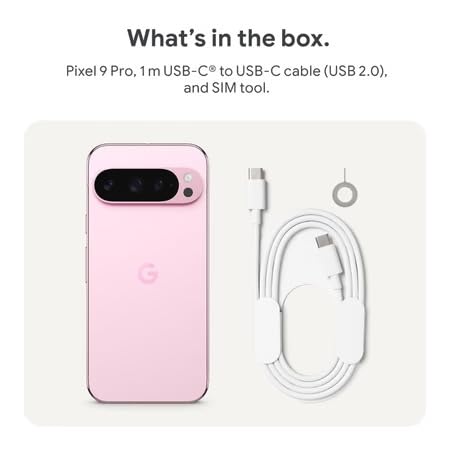
Figure 2: Included items in the Pixel 9 Pro packaging.
ຕັ້ງຄ່າ
1. ການໃສ່ຊິມກາດ
- ຊອກຫາຖາດຊິມຢູ່ດ້ານຂ້າງຂອງ Pixel 9 Pro ຂອງທ່ານ.
- Insert the provided SIM ejector tool into the small hole on the SIM tray and press gently until the tray pops out.
- Place your Nano-SIM card into the tray with the gold contacts facing down. Ensure it is seated correctly.
- ຍູ້ຖາດ SIM ກັບຄືນໃສ່ອຸປະກອນຢ່າງລະມັດລະວັງຈົນກວ່າມັນຈະໄຫຼອອກ.
2. ການສາກໄຟເບື້ອງຕົ້ນ
ກ່ອນທີ່ຈະໃຊ້ຄັ້ງທໍາອິດ, ມັນແນະນໍາໃຫ້ສາກອຸປະກອນຂອງທ່ານຢ່າງເຕັມທີ່.
- ເຊື່ອມຕໍ່ສາຍ USB-C ເຂົ້າກັບພອດສາກໄຟທີ່ຢູ່ທາງລຸ່ມຂອງໂທລະສັບຂອງທ່ານ.
- Connect the other end of the cable to a compatible USB power adapter (sold separately) and plug it into a power outlet.
- ໄອຄອນແບັດເຕີຣີໃນໜ້າຈໍຈະສະແດງສະຖານະການສາກໄຟ.
3. ເປີດ / ປິດພະລັງງານ
- ເພື່ອເປີດເຄື່ອງ: Press and hold the Power button (located on the right side) until the Google logo appears on the screen.
- ປິດເຄື່ອງ: ກົດປຸ່ມເປີດປິດຄ້າງໄວ້, ຈາກນັ້ນແຕະ 'ປິດເຄື່ອງ' ໃນໜ້າຈໍ.
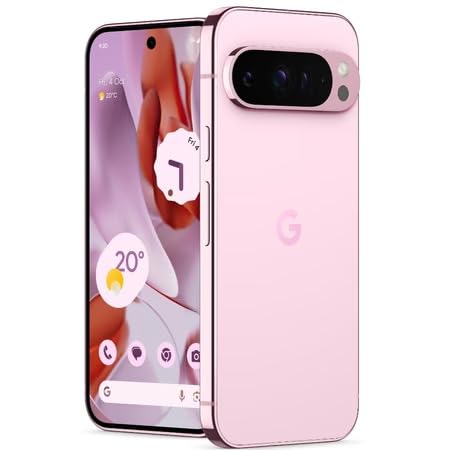
Figure 3: Power and volume buttons on the side of the device.
4. ຕົວຊ່ວຍສ້າງການຕິດຕັ້ງຄັ້ງທໍາອິດ
Upon powering on for the first time, follow the on-screen instructions to:
- ເລືອກພາສາ ແລະພາກພື້ນຂອງທ່ານ.
- ເຊື່ອມຕໍ່ກັບເຄືອຂ່າຍ Wi-Fi.
- ເຂົ້າສູ່ລະບົບດ້ວຍບັນຊີ Google ຂອງທ່ານ ຫຼືສ້າງອັນໃໝ່.
- Set up security features such as fingerprint unlock, face unlock, PIN, pattern, or password.
- ໂອນຂໍ້ມູນຈາກອຸປະກອນເກົ່າ (ທາງເລືອກ).
ຄໍາແນະນໍາການດໍາເນີນງານ
ການນໍາທາງພື້ນຖານ
- ທ່າທາງໜ້າຈໍສຳຜັດ: Interact with the device using taps, swipes, pinches (for zoom), and long presses.
- ໜ້າຈໍຫຼັກ: Access your applications, widgets, and customize your layout.
- ການແຈ້ງເຕືອນ: ປັດລົງຈາກເທິງສຸດຂອງໜ້າຈໍໄປທີ່ view ການແຈ້ງເຕືອນ.
- ການຕັ້ງຄ່າດ່ວນ: Swipe down twice from the top of the screen to access quick settings toggles (Wi-Fi, Bluetooth, etc.).
ການດໍາເນີນງານກ້ອງຖ່າຍຮູບ
The Pixel 9 Pro features a powerful triple rear camera system.

Figure 4: Rear camera system of the Pixel 9 Pro.
- ການເປີດກ້ອງຖ່າຍຮູບ: ແຕະໄອຄອນແອັບກ້ອງຖ່າຍຮູບຢູ່ໜ້າຈໍຫຼັກ ຫຼື ໜ້າຈໍລັອກຂອງທ່ານ.
- ການປ່ຽນເລນ: Tap the icons on the viewfinder to switch between wide, ultrawide, and 5x telephoto lenses.
- ໂໝດຍິງ: Select from various modes such as Night Sight for low-light conditions, ການຖ່າຍຮູບດາວເຄາະ for capturing stars, ມະຫາພາກ for close-up shots, ຊູນຍາວ for creative effects, and ຮູບຄົນ for depth-of-field effects.
- ຊູມຄວາມລະອຽດສູງ: Pinch the screen to digitally zoom up to 30x. For video, Super Res Zoom supports up to 20x.
- Pro Controls: Access advanced camera settings like shutter speed and manual focus for greater creative control.
ການຄຸ້ມຄອງຫມໍ້ໄຟ
- ກຳລັງກວດສອບລະດັບແບັດເຕີຣີ: View ຫມໍ້ໄຟເປີເຊັນtage in the status bar or in Settings > Battery.
- Extreme Battery Saver: Enable this mode in Settings > Battery > Extreme Battery Saver to significantly extend battery life.
- ການສາກໄຟ: Use the provided USB-C cable and a compatible power adapter for optimal charging speed.
ຄຸນນະສົມບັດຄວາມປອດໄພ
Your Pixel 9 Pro incorporates multiple hardware security layers to protect your data.
- ປົດລັອກລາຍນິ້ວມື: Register your fingerprints in Settings > Security & privacy > Device unlock.
- ປົດລັອກດ້ວຍໜ້າ: ຕັ້ງຄ່າການຮັບຮູ້ໃບໜ້າສຳລັບການປົດລັອກທີ່ສະດວກ.
- PIN/Pattern/Password: Always set a strong screen lock method.
- ອັບເດດຊອບແວ: Regularly install system updates to ensure your device has the latest security patches.
ເຊັນເຊີອຸນຫະພູມ
The Pixel 9 Pro includes a thermometer for measuring temperature.
- Open the dedicated Thermometer app.
- Follow the on-screen instructions to measure body temperature or the temperature of objects.
- Temperature data can be saved and tracked within the Fitbit application.
ບໍາລຸງຮັກສາ
ການເຮັດຄວາມສະອາດອຸປະກອນຂອງທ່ານ
- ໃຊ້ຜ້າອ່ອນໆທີ່ບໍ່ມີຂົນເພື່ອທຳຄວາມສະອາດໜ້າຈໍ ແລະ ຕົວເຄື່ອງຂອງໂທລະສັບຂອງທ່ານ.
- Avoid using abrasive materials, harsh chemicals, or aerosol sprays.
- Do not submerge the device in water, despite its water-resistant rating.
ອັບເດດຊອບແວ
Google regularly releases software updates to improve performance, add features, and enhance security.
- To check for updates, go to Settings > System > System update.
- Ensure your device is connected to Wi-Fi and has sufficient battery charge before installing updates.
ການດູແລທາງດ້ານຮ່າງກາຍ
The Pixel 9 Pro is built with Corning Gorilla Glass Victus 2 and is water-resistant, offering durability against everyday drops and spills.
- While durable, avoid excessive impacts or drops to prevent damage.
- Consider using a screen protector and a protective case for additional safeguarding.
ການແກ້ໄຂບັນຫາ
ອຸປະກອນບໍ່ຕອບສະໜອງ
If your phone becomes unresponsive, perform a force restart:
- ກົດປຸ່ມເປີດປິດຄ້າງໄວ້ປະມານ 10-15 ວິນາທີຈົນກວ່າອຸປະກອນຈະເລີ່ມລະບົບໃໝ່.
ແອັບຂັດຂ້ອງ ຫຼື ຄ້າງ
- ປິດແອັບທີ່ມີບັນຫາແລ້ວເປີດມັນຄືນໃໝ່.
- Clear the app's cache: Go to Settings > Apps > See all apps > [App Name] > Storage & cache > Clear cache.
- ກວດໃຫ້ແນ່ໃຈວ່າແອັບໄດ້ຖືກອັບເດດເປັນເວີຊັນຫຼ້າສຸດຂອງມັນຈາກ Google Play Store.
- ຣີສະຕາດໂທລະສັບຂອງທ່ານ.
Network Connectivity Issues (Wi-Fi/Cellular)
- Toggle Wi-Fi or cellular data off and then back on.
- ຣີສະຕາດໂທລະສັບຂອງທ່ານ.
- ກວດສອບວ່າຊິມກາດຂອງທ່ານໄດ້ຖືກໃສ່ຖືກຕ້ອງ.
- ຕັ້ງຄ່າເຄືອຂ່າຍຄືນໃໝ່: ໄປທີ່ ການຕັ້ງຄ່າ > ລະບົບ > ຕັ້ງຄ່າຄືນໃໝ່ > ຕັ້ງຄ່າ Wi-Fi, ມືຖື ແລະ Bluetooth ຄືນໃໝ່.
ແບັດເຕີຣີໝົດໄວ
- ກວດເບິ່ງການໃຊ້ແບັດເຕີຣີໃນການຕັ້ງຄ່າ > ແບັດເຕີຣີເພື່ອລະບຸແອັບທີ່ໃຊ້ພະລັງງານ.
- ຫຼຸດຄວາມສະຫວ່າງໜ້າຈໍ ແລະໄລຍະເວລາໝົດເວລາໜ້າຈໍ.
- Disable unnecessary features like GPS, Bluetooth, and Wi-Fi when not in use.
- Enable Extreme Battery Saver mode.
ຣີເຊັດເປັນຄ່າໂຮງງານ (ຣີສອດຄັ້ງສຸດທ້າຍ)
Warning: A factory reset will erase all data from your phone. Back up all important data before proceeding.
- ໄປທີ່ການຕັ້ງຄ່າ> ລະບົບ> ທາງເລືອກການຕັ້ງຄ່າໃຫມ່> ລຶບຂໍ້ມູນທັງຫມົດ (ການຕັ້ງຄ່າຈາກໂຮງງານຄືນໃຫມ່).
- Confirm your decision when prompted.
ຂໍ້ມູນຈໍາເພາະ
| ຄຸນສົມບັດ | ລາຍລະອຽດ |
|---|---|
| ຍີ່ຫໍ້ | |
| ຕົວແບບ | Pixel 9 Pro |
| ລະບົບປະຕິບັດການ | Android 15 |
| ໂຮງງານຜະລິດ | Google Tensor G4 (3.1 GHz) |
| RAM | 16 GB |
| ການເກັບຮັກສາພາຍໃນ | 256 GB |
| ຈໍສະແດງຜົນ | 6.3 Inches LTPO OLED (Actua), 1280 x 2856 Pixels, 120 Hz Refresh Rate |
| ກ້ອງຫຼັງ | 50 MP wide + 48 MP ultrawide (Macro) + 48 MP 5x telephoto |
| ກ້ອງໜ້າ | 42 MP |
| ຄວາມອາດສາມາດຫມໍ້ໄຟ | 4700 ລ້ານamp Hours (up to 24 hours average life) |
| ການເຊື່ອມຕໍ່ | 5G, Wi-Fi 7, Bluetooth 5.3, NFC, UWB, USB-C |
| ຊິມກາດ | Single Nano SIM |
| ການຕໍ່ຕ້ານນ້ໍາ | ກັນນ້ຳ |
| ຂະໜາດ | 8 x 72 x 153 ມິນລີແມັດ |
| ນ້ຳໜັກ | 198 ກຣາມ |
ການຮັບປະກັນແລະການສະຫນັບສະຫນູນ
ຂໍ້ມູນການຮັບປະກັນ
Your Google Pixel 9 Pro 5G comes with a 1 ປີຮັບປະກັນຜູ້ຜະລິດ ຈາກວັນທີ່ຊື້. ການຮັບປະກັນນີ້ກວມເອົາຄວາມບົກຜ່ອງດ້ານການຜະລິດພາຍໃຕ້ການນໍາໃຊ້ປົກກະຕິ. ກະລຸນາຮັກສາຫຼັກຖານການຊື້ຂອງທ່ານສໍາລັບການຮຽກຮ້ອງການຮັບປະກັນ.
ການຊ່ວຍເຫຼືອລູກຄ້າ
For technical assistance, warranty claims, or other support inquiries, please contact Google customer service:
- ຜູ້ຜະລິດ: Google LLC, 1600 AmpHitheatre Parkway, ພູເຂົາ View, CA 94043, USA
- Phone Support (India): +91 7718892303
- ຜູ້ຕິດຕໍ່ຜູ້ນຳເຂົ້າ (ອິນເດຍ): Nexora Axis Private Limited (+91 7718892303)
For the most up-to-date support information, please visit the official Google Pixel support webເວັບໄຊ.