
ແນະນຳ
Welcome to the user manual for your new HONOR Magic V5 5G smartphone. This guide provides essential information to help you set up, operate, maintain, and troubleshoot your device. The HONOR Magic V5 5G combines a revolutionary foldable design with powerful performance, advanced camera capabilities, and a long-lasting battery.
Please read this manual thoroughly to ensure optimal use and longevity of your device.
1. ຕັ້ງຄ່າ
1.1 Unboxing ແລະ Package Contents
Upon opening your HONOR Magic V5 5G package, verify that all items are present:
- HONOR Magic V5 5G Smartphone
- ສາຍ USB
- ຕົວຖອດຖາດຊິມ
- Polyurethane Case
- Pre-applied Screen Protectors (inner and outer screens)
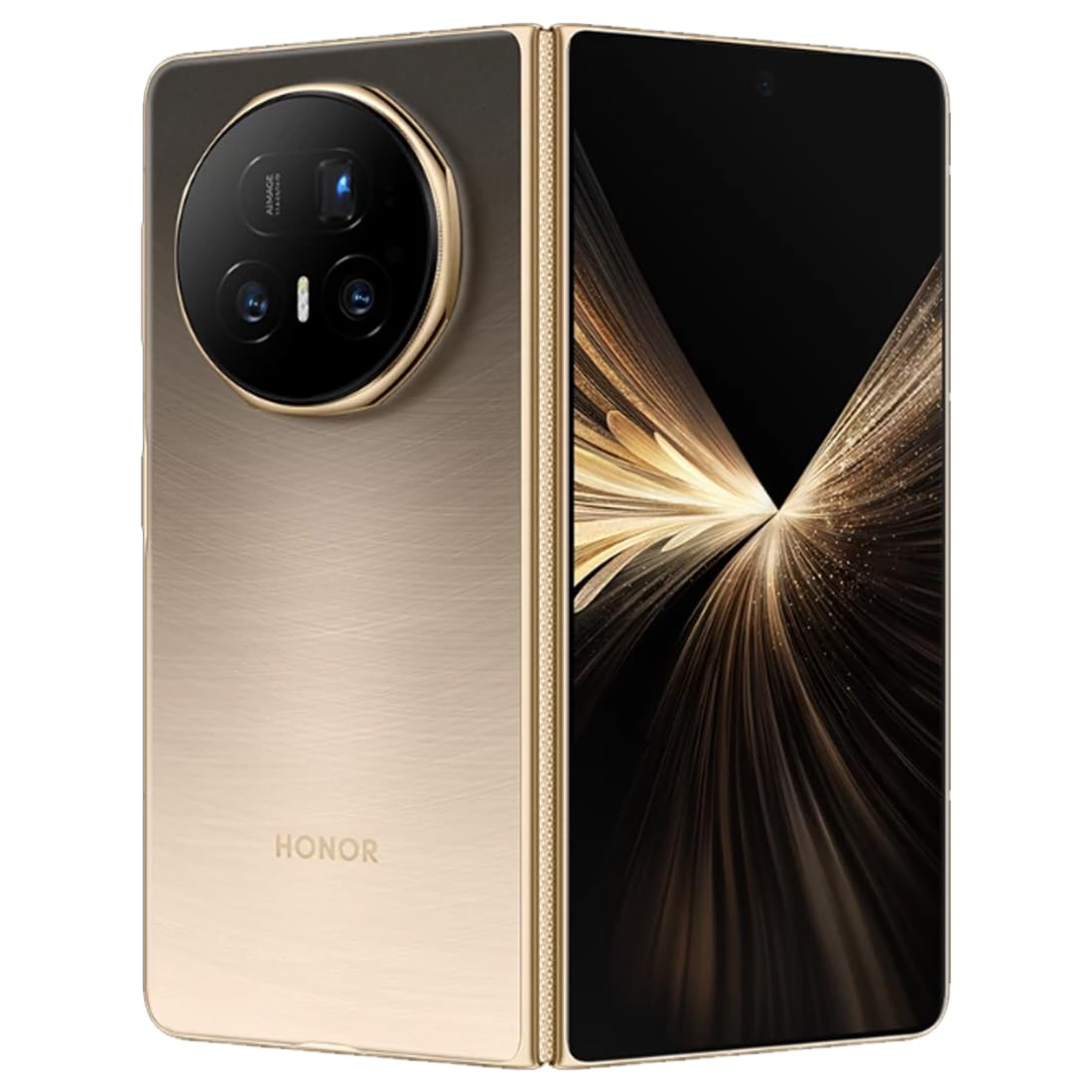
ຮູບພາບ: ດ້ານຫລັງ view of the HONOR Magic V5 5G smartphone, highlighting the camera array and the device's elegant finish.
1.2 ການຕິດຕັ້ງ SIM card
The HONOR Magic V5 5G supports Dual SIM functionality.
- ຊອກຫາຖາດຊິມກາດຢູ່ດ້ານຂ້າງຂອງອຸປະກອນ.
- ສຽບເຄື່ອງມືຖອດຊິມເຂົ້າໄປໃນຮູນ້ອຍໆຂ້າງຖາດ ແລະກົດຄ່ອຍໆຈົນກ່ວາຖາດຈະອອກມາ.
- Place your Nano-SIM card(s) into the tray with the gold contacts facing down, ensuring they are correctly oriented.
- ໃສ່ຖາດ SIM ເຂົ້າໄປໃນໂທລະສັບຢ່າງລະມັດລະວັງ.
1.3 ການເປີດ ແລະສາກເບື້ອງຕົ້ນ
To power on your device, press and hold the power button until the HONOR logo appears. Follow the on-screen instructions to complete the initial setup, including language selection, Wi-Fi connection, and Google account setup.
For optimal performance, fully charge your device before first use. The device supports 66W wired fast charging and 50W wireless charging. Use the provided USB cable and a compatible charger.
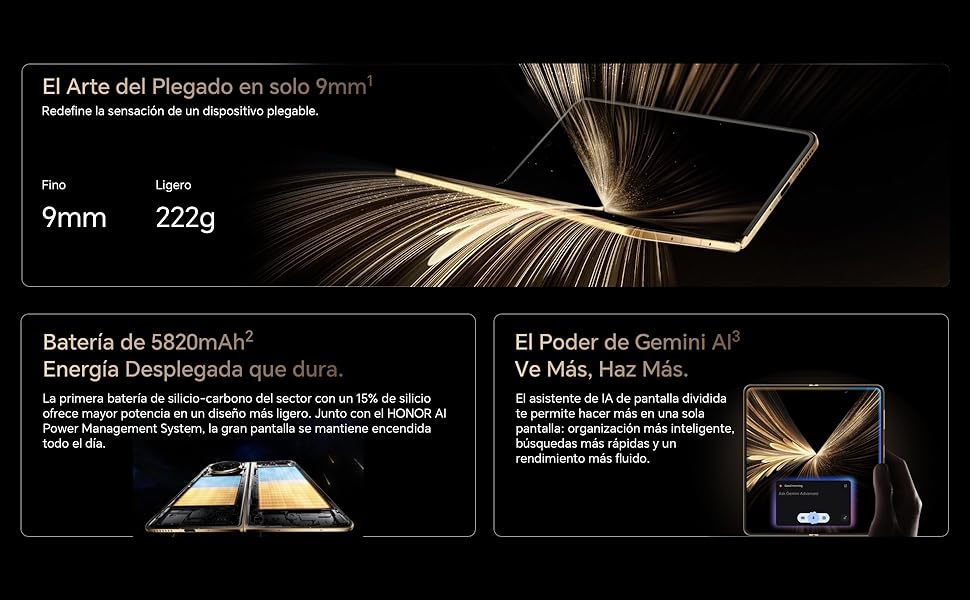
Image: Visual representation of the HONOR Magic V5 5G's large 5820mAh battery and the Gemini AI assistant's split-screen functionality.
2. ປະຕິບັດການອຸປະກອນຂອງທ່ານ
2.1 Foldable Display and Navigation
The HONOR Magic V5 5G features a unique foldable design. When unfolded, it reveals an impressive 7.95-inch LTPO OLED display with a 120Hz refresh rate and up to 5000 nits peak brightness. When folded, it maintains a compact form factor with a secondary display.
Navigate through the Android 15 operating system with MagicOS 9 using touch gestures. Swipe up from the bottom to go home, swipe and hold for recent apps, and swipe down from the top for notifications and quick settings.
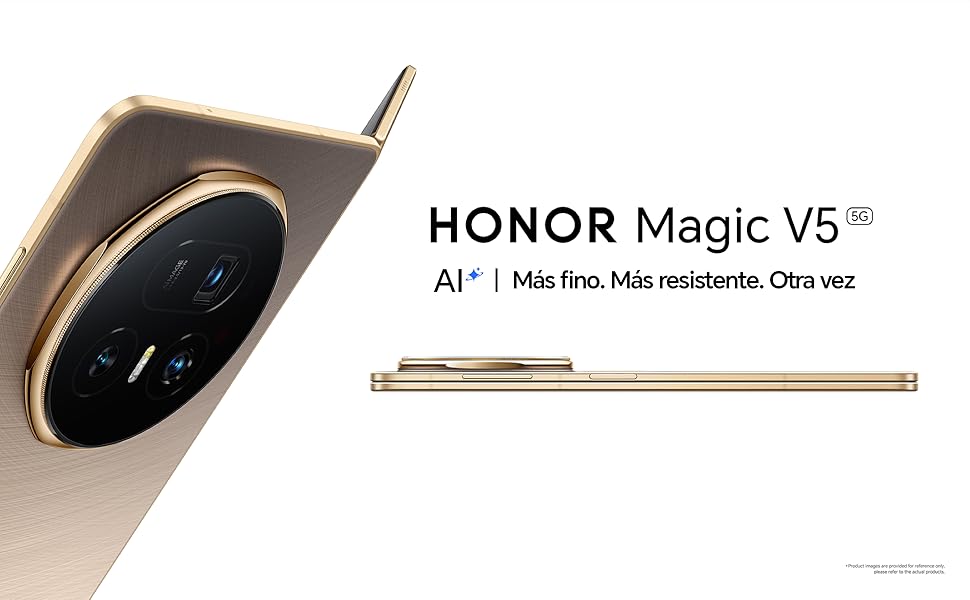
Image: The HONOR Magic V5 5G in its folded state, emphasizing its slim profile ແລະການກໍ່ສ້າງທີ່ມີນ້ຳໜັກເບົາ.
2.2 ຄຸນສົມບັດກ້ອງຖ່າຍຮູບ
Your device is equipped with an advanced HONOR Falcon AI Camera system:
- ກ້ອງຫຼັກ: 50MP ສຳລັບຮູບພາບທີ່ມີຄວາມລະອຽດສູງ.
- ກ້ອງເທເລໂຟໂຕ Periscope: 64MP ພ້ອມດ້ວຍການຊູມ optical 3x.
- ກ້ອງ Ultra-Wide: 50MP for expansive shots.
- ກ້ອງໜ້າ: Dual 20MP cameras (internal and cover screen).
The camera supports 4K HDR video recording and various AI-enhanced features for optimal image quality in different scenarios, including low light.
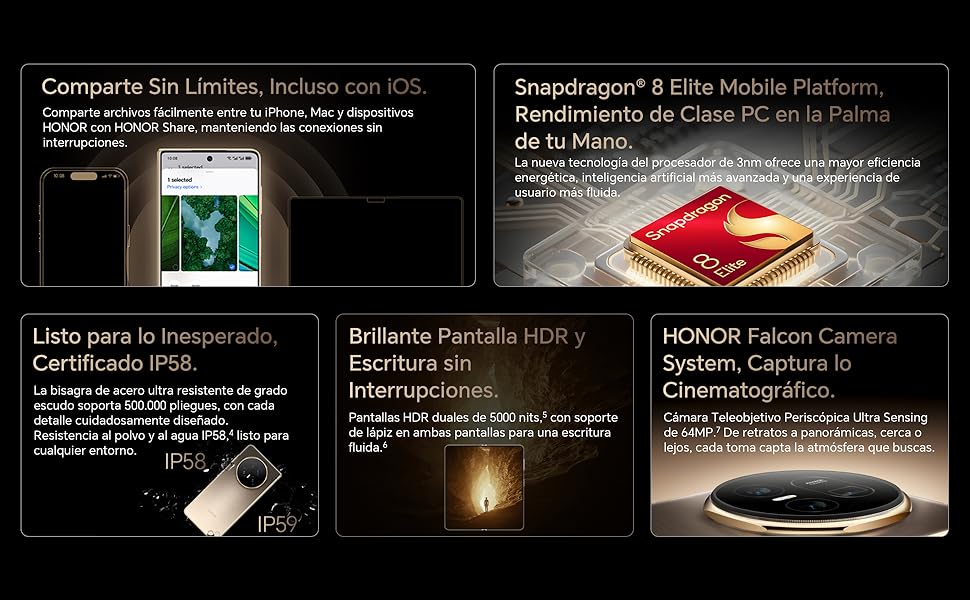
Image: A compilation of key features including the Snapdragon 8 Elite processor, IP58 dust and water resistance, and the advanced HONOR Falcon Camera System.
2.3 ປະສິດທິພາບແລະການເຊື່ອມຕໍ່
Powered by the Snapdragon 8 Elite 3nm chip and 16GB of RAM, the Magic V5 5G delivers flagship-level performance for smooth multitasking and fast app launches.
Connectivity options include 5G for high-speed mobile data, Wi-Fi, and Bluetooth. The device features a USB Type-C port for charging and data transfer.
2.4 ຄຸນສົມບັດຄວາມປອດໄພ
Unlock your device securely using facial recognition. Ensure your face is clearly visible to the front camera for accurate recognition.
2.5 HONOR Share and Gemini AI
HONOR Share: ແບ່ງປັນໄດ້ຢ່າງງ່າຍດາຍ files between your HONOR device, iPhone, and Mac for seamless connectivity.
Gemini AI: The split-screen AI assistant enhances productivity with smarter organization, faster searches, and smoother performance.
3. ບໍາລຸງຮັກສາ
3.1 ການທໍາຄວາມສະອາດອຸປະກອນຂອງທ່ານ
To clean your HONOR Magic V5 5G, use a soft, lint-free cloth. Avoid abrasive materials, solvents, or aerosol sprays. For the screen, a screen cleaner specifically designed for electronics can be used. Do not spray liquids directly onto the device.
3.2 ການປັບປຸງຊອບແວ
ກວດສອບ ແລະຕິດຕັ້ງການອັບເດດຊອບແວເປັນປະຈຳເພື່ອຮັບປະກັນວ່າອຸປະກອນຂອງທ່ານມີຄຸນສົມບັດຫຼ້າສຸດ, ແຜ່ນປ້ອງກັນຄວາມປອດໄພ ແລະການປັບປຸງປະສິດທິພາບ. ປົກກະຕິແລ້ວເຈົ້າສາມາດຊອກຫາຕົວເລືອກນີ້ຢູ່ໃນ ການຕັ້ງຄ່າ > ລະບົບ ແລະອັບເດດ > ອັບເດດຊອບແວ.
3.3 ການດູແລຫມໍ້ໄຟ
ເພື່ອຍືດອາຍຸຂອງຫມໍ້ໄຟ 5820mAh ຂອງທ່ານ:
- ຫຼີກເວັ້ນອຸນຫະພູມທີ່ຮຸນແຮງ.
- ຢ່າປ່ອຍໃຫ້ຫມໍ້ໄຟຫມົດໄປເລື້ອຍໆ.
- Use the original or certified charging accessories.
3.4 ຄວາມທົນທານແລະການຕໍ່ຕ້ານນ້ໍາ
The device is IP58 certified for dust and water resistance. This means it can withstand immersion in up to 1.5 meters of fresh water for up to 30 minutes. However, water resistance is not permanent and may decrease over time with normal wear. Avoid exposing the device to pressurized water, seawater, or other liquids. The hinge is designed for over 500,000 folds.
4. ການແກ້ໄຂບັນຫາ
4.1 ບັນຫາທົ່ວໄປ ແລະການແກ້ໄຂ
- ອຸປະກອນບໍ່ເປີດ: ໃຫ້ແນ່ໃຈວ່າໄດ້ສາກໄຟແລ້ວ. ເຊື່ອມຕໍ່ຫາເຄື່ອງສາກຢ່າງໜ້ອຍ 10 ນາທີ, ຈາກນັ້ນລອງເປີດເຄື່ອງ.
- ແອັບຄ້າງ ຫຼື ຂັດຂ້ອງ: ປິດແອັບແລະເປີດມັນຄືນໃໝ່. ຖ້າບັນຫາຍັງຄົງຢູ່, ໃຫ້ຣີສະຕາດອຸປະກອນ.
- ຊີວິດຫມໍ້ໄຟບໍ່ດີ: Check background app usage, reduce screen brightness, and disable unnecessary features like GPS or Bluetooth when not in use.
- ບັນຫາການເຊື່ອມຕໍ່ເຄືອຂ່າຍ: Toggle Airplane Mode on and off. Check SIM card insertion. Restart the device.
- ໜ້າຈໍສໍາຜັດບໍ່ຕອບສະໜອງ: ປິດເປີດອຸປະກອນຄືນໃໝ່. ຖ້າບັນຫາຍັງສືບຕໍ່, ຕິດຕໍ່ທີມງານຊ່ວຍເຫຼືອ.
4.2 ຣີເຊັດເປັນຄ່າໂຮງງານ
ຖ້າທ່ານພົບບັນຫາຊອບແວຢ່າງຕໍ່ເນື່ອງ, ການຣີເຊັດເປັນຄ່າໂຮງງານອາດຈະແກ້ໄຂພວກມັນໄດ້. ຄຳເຕືອນ: ການຣີເຊັດເປັນຄ່າໂຮງງານຈະລຶບຂໍ້ມູນທັງໝົດໃນອຸປະກອນຂອງທ່ານ. ສໍາຮອງຂໍ້ມູນທີ່ສໍາຄັນກ່ອນທີ່ຈະດໍາເນີນການ.
- ໄປທີ່ Settings > System & updates > Reset.
- ເລືອກ ຣີເຊັດໂທລະສັບ or ລຶບຂໍ້ມູນທັງໝົດ (ຣີເຊັດເປັນຄ່າໂຮງງານ).
- Confirm your choice and enter your password/PIN if prompted.
5. ຂໍ້ມູນຈໍາເພາະ
| ຄຸນສົມບັດ | ລາຍລະອຽດ |
|---|---|
| ຊື່ຕົວແບບ | Magic V5 |
| ໝາຍເລກຕົວແບບ | MBH-N49 |
| ລະບົບປະຕິບັດການ | Android 15 + MagicOS 9 |
| ໂຮງງານຜະລິດ | Snapdragon 8 Elite |
| RAM | 16 GB |
| ການເກັບຮັກສາ | 512 GB |
| ຈໍສະແດງຜົນຫຼັກ | 7.95 inches LTPO OLED, 2352 x 2172 resolution, 120Hz refresh rate, 5000 nits peak brightness |
| ກ້ອງຫຼັງ | 50 MP (Main) + 64 MP (Periscope Telephoto) + 50 MP (Ultra Wide) |
| ກ້ອງໜ້າ | 20 MP (Internal) + 20 MP (Cover Screen) |
| ຄວາມອາດສາມາດຫມໍ້ໄຟ | 5820 mAh |
| ກຳລັງສາກໄຟ | 66W Wired, 50W Wireless |
| ຊິມກາດ | Dual Nano SIM |
| ການເຊື່ອມຕໍ່ | 5G, Wi-Fi, Bluetooth, USB Type-C |
| ການຕໍ່ຕ້ານນ້ໍາ | IP58 (ກັນຝຸ່ນ ແລະ ນ້ຳกระเด็น) |
| ຂະ ໜາດ (ພັບ) | ຄວາມຫນາ 9mm |
| ນ້ຳໜັກ | 222g |
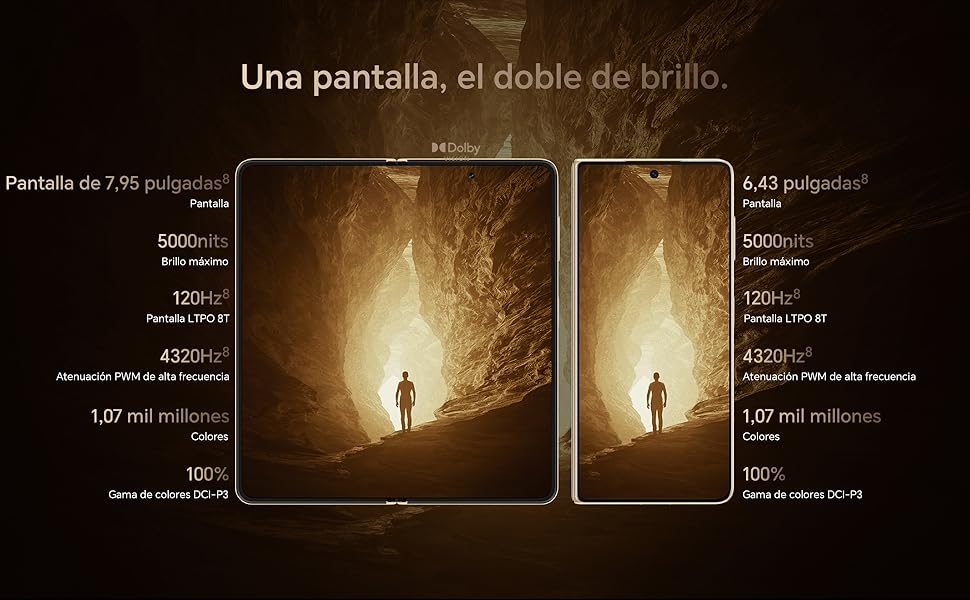
Image: Display comparison showing the large 7.95-inch main screen and the 6.43-inch cover screen, both featuring high brightness and refresh rates.
6. ຂໍ້ມູນການຮັບປະກັນ
Your HONOR Magic V5 5G comes with a ການຮັບປະກັນຂອງຜູ້ຜະລິດ 3 ປີ. This warranty covers defects in materials and workmanship under normal use. It does not cover damage caused by accidents, misuse, unauthorized repairs, or normal wear and tear.
Please retain your proof of purchase for warranty claims. For detailed terms and conditions, refer to the warranty card included in your product packaging or visit the official HONOR webເວັບໄຊ.
7. ສະຫນັບສະຫນູນ
For further assistance, technical support, or service inquiries, please visit the official HONOR support webເວັບໄຊ ຫຼືຕິດຕໍ່ບໍລິການລູກຄ້າຂອງເຂົາເຈົ້າ.