
TOPUTURE TP5
TOPUTURE TP5 Folding Treadmill User Manual
ຮູບແບບ: TP5 | ຍີ່ຫໍ້: TOPUTURE
ແນະນຳ
This manual provides essential instructions for the safe and efficient use of your TOPUTURE TP5 Folding Treadmill. Please read this manual thoroughly before operating the device and retain it for future reference.
ຄໍາແນະນໍາຄວາມປອດໄພທີ່ສໍາຄັນ
ເພື່ອຫຼຸດຜ່ອນຄວາມສ່ຽງຕໍ່ການບາດເຈັບທີ່ຮ້າຍແຮງ, ໃຫ້ອ່ານຂໍ້ຄວນລະວັງແລະຄໍາແນະນໍາທີ່ສໍາຄັນທັງຫມົດໃນຄູ່ມືນີ້ກ່ອນທີ່ຈະໃຊ້ treadmill. ຜູ້ຜະລິດບໍ່ຮັບຜິດຊອບຕໍ່ການບາດເຈັບສ່ວນບຸກຄົນຫຼືຄວາມເສຍຫາຍຂອງຊັບສິນທີ່ຍືນຍົງໂດຍຫຼືຜ່ານການນໍາໃຊ້ຜະລິດຕະພັນນີ້.
- Always ensure the safety key is properly attached to your clothing before starting the treadmill.
- ຮັກສາເດັກນ້ອຍ ແລະສັດລ້ຽງຢູ່ຫ່າງຈາກເຄື່ອງແລ່ນ ໃນລະຫວ່າງການປະຕິບັດງານ.
- Place the treadmill on a level surface with adequate clearance around it.
- ຢ່າເຮັດເຄື່ອງແລ່ນ treadmill ຖ້າມັນມີສາຍໄຟເສຍຫາຍຫຼືສຽບ, ຫຼືຖ້າມັນເຮັດວຽກບໍ່ຖືກຕ້ອງ.
- ປຶກສາແພດກ່ອນທີ່ຈະເລີ່ມໂຄງການອອກກໍາລັງກາຍໃດໆ.
ການຕິດຕັ້ງແລະການປະກອບ
The TOPUTURE TP5 treadmill comes largely pre-assembled. Follow these steps for quick setup:
- ການຫຸ້ມຫໍ່: Carefully remove the treadmill from its packaging. Ensure all components are present.
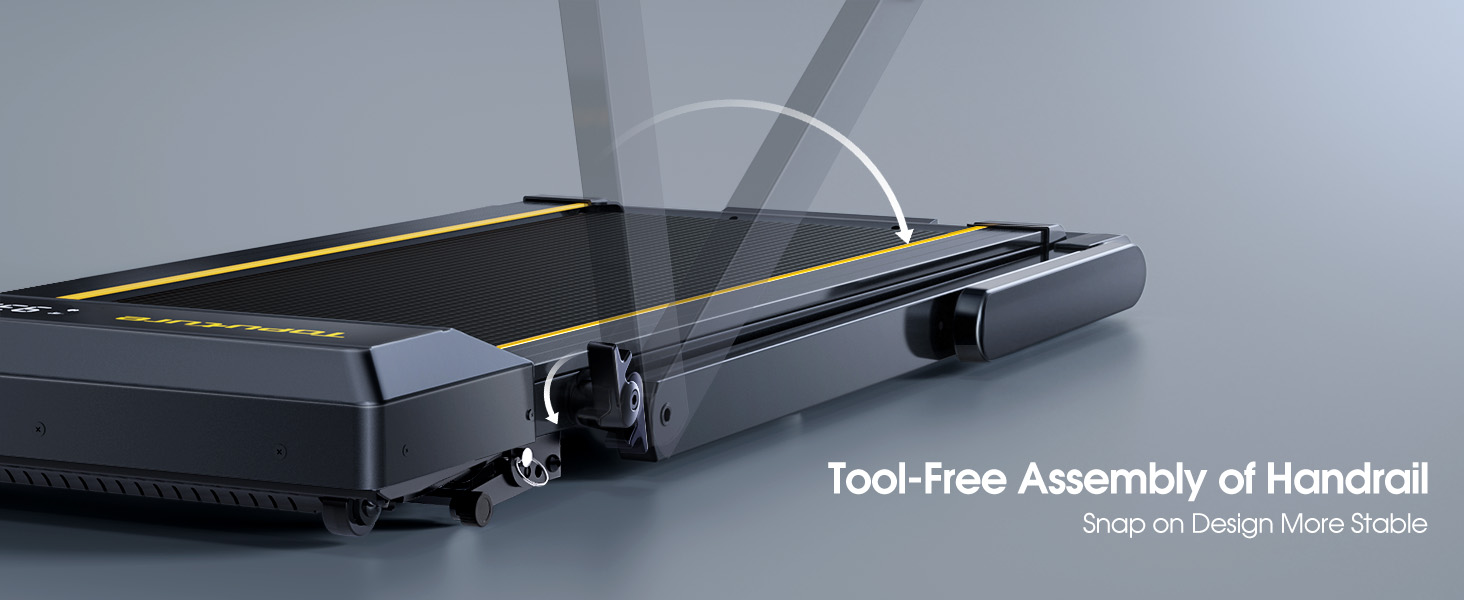
- Unfolding the Handlebar ໄດ້: Gently lift the handlebar into its upright position until it locks securely. The quick-release snaps allow for easy transition between walking pad and running treadmill configurations.
- ກຳລັງເຊື່ອມຕໍ່: ສຽບສາຍໄຟໃສ່ບ່ອນສຽບໄຟຟ້າທີ່ມີດິນ.
- ກວດສອບເບື້ອງຕົ້ນ: Before first use, ensure the running belt is centered and properly tensioned. Refer to the maintenance section for belt adjustment if needed.

ຄໍາແນະນໍາການດໍາເນີນງານ
ແຜງຄວບຄຸມ ແລະຈໍສະແດງຜົນ
The treadmill features a multifunctional LED display and touch controls. Information displayed includes time, speed, calories burned, distance, and heart rate.

Starting and Adjusting Speed
- ເລີ່ມ/ຢຸດ: Press the Start/Pause button on the control panel or remote to begin/end your workout.
- ການປັບຄວາມໄວ: Use the Speed +/- buttons on the control panel or remote to adjust the speed from 0.6 to 10 MPH.
- ການຄວບຄຸມແອັບ: Connect your smartphone or tablet via Bluetooth to control the treadmill and access guided workouts.

ຟັງຊັນ Incline
The treadmill offers three manual incline levels: 1%, 6%, and 12%. Adjust the incline by manually setting the support legs at the rear of the treadmill to the desired position.

ລຳໂພງ Bluetooth
Connect your device to the treadmill's built-in Bluetooth speaker to enjoy music or audio during your workout.
ຕິດຕາມອັດຕາການເຕັ້ນຫົວໃຈ
Grip the hand sensors on both sides of the display to monitor your heart rate during exercise.
ບໍາລຸງຮັກສາ
- ການລະບາຍສີ: Regularly apply treadmill lubricant under the running belt to ensure smooth operation and prolong belt life. Refer to the lubricant instructions for frequency.
- ທໍາຄວາມສະອາດ: ເຊັດເຄື່ອງແລ່ນດ້ວຍການໂຄສະນາamp ຜ້າຫຼັງຈາກແຕ່ລະການນໍາໃຊ້ເພື່ອເອົາເຫື່ອແລະຝຸ່ນ.
- ການປັບສາຍແອວ: If the running belt feels loose or is off-center, use the provided tools to adjust the tension and alignment as per the detailed instructions in the full manual.

ການແກ້ໄຂບັນຫາ
If you encounter any issues with your treadmill, please refer to the following common solutions:
- ເຄື່ອງແລ່ນບໍ່ເລີ່ມ: Ensure the power cord is securely plugged in and the safety key is correctly placed on the console. Check the power switch on the treadmill.
- ສາຍແອວ: The running belt may need tensioning. Refer to the maintenance section or the full manual for instructions on adjusting belt tension.
- ສຽງທີ່ຜິດປົກກະຕິ: Check for any loose parts or foreign objects under the belt. Lubricate the running belt if it has not been done recently.
- ຈໍສະແດງຜົນບໍ່ເຮັດວຽກ: ໃຫ້ແນ່ໃຈວ່າການເຊື່ອມຕໍ່ທັງຫມົດແມ່ນປອດໄພ. ຖ້າບັນຫາຍັງຄົງຢູ່, ໃຫ້ຕິດຕໍ່ຝ່າຍຊ່ວຍເຫຼືອລູກຄ້າ.
ຂໍ້ມູນຈໍາເພາະ
| ຄຸນສົມບັດ | ລາຍລະອຽດ |
|---|---|
| ຍີ່ຫໍ້ | ພູມສັນຖານ |
| ຊື່ຕົວແບບ | TP5 |
| ສີ | ດຳ |
| ຂະໜາດສິນຄ້າ | 52.3"D x 28.2"W x 5.1"H |
| ນ້ໍາຫນັກລາຍການ | 78 ປອນ |
| ວັດສະດຸ | ເຫຼັກໂລຫະປະສົມ |
| ຄວາມໄວສູງສຸດ | 10 ໄມຕໍ່ຊົ່ວໂມງ |
| Incline Percen ສູງສຸດtage | 12% |
| ແຮງມ້າສູງສຸດ | 2.5 HP |
| ຄໍາແນະນໍານ້ໍາຫນັກສູງສຸດ | 300 ປອນ |
| ຈໍສະແດງຜົນ | LED |
| ເຕັກໂນໂລຊີການເຊື່ອມຕໍ່ | Bluetooth |
| ຄຸນນະສົມບັດພິເສດ | ລຳໂພງໃນຕົວ, ພັບໄດ້, ເຄື່ອງຕິດຕາມອັດຕາການເຕັ້ນຂອງຫົວໃຈ, ພົກພາໄດ້, ດູດຊຶມແຮງກະແທກ |
| ຕ້ອງການສະພາແຫ່ງ | ບໍ່ (ປະກອບແລ້ວ) |
| ອົງປະກອບລວມ | ສາຍໄຟ |
ການຮັບປະກັນແລະການສະຫນັບສະຫນູນ
Your TOPUTURE TP5 Treadmill comes with a ການຮັບປະກັນຫນຶ່ງປີ. For any assistance, questions, or warranty claims, please contact TOPUTURE customer support.
ວິທີການຕິດຕໍ່ສະຫນັບສະຫນູນ:
- ເຂົ້າສູ່ລະບົບບັນຊີ Amazon ຂອງທ່ານ.
- ໄປທີ່ "ຄຳສັ່ງຊື້ຂອງທ່ານ".
- Find the order ID for your treadmill.
- Click "Contact Seller".
Please have your model name (TP5) and purchase details ready when contacting support.
Ask a question about this manual
Ask about setup, troubleshooting, compatibility, parts, safety, or missing instructions. Manuals+ will review the question and use this page’s manual context to help answer it.