
ແນະນຳ
ຂອບໃຈສໍາລັບການຊື້asing the Anker Soundcore P31i True Wireless Earbuds. This manual provides detailed instructions on how to set up, operate, and maintain your earbuds to ensure optimal performance and longevity. Please read this manual carefully before use and retain it for future reference.
ມີຫຍັງແດ່
Your Soundcore P31i package includes the following items:
- Soundcore P31i Earbuds (Left and Right)
- ກ່ອງສາກ
- Ear Tips (XS, S, M, L - M size pre-installed)
- ສາຍ USB-C ເຖິງ USB-A ສາກໄຟ
- ຄູ່ມືເລີ່ມຕົ້ນດ່ວນ
- ຄູ່ມືຄວາມປອດໄພ
ສິນຄ້າເກີນview
The Soundcore P31i earbuds are designed for comfort and high-quality audio. Each earbud features a touch control area and an indicator light. The charging case protects the earbuds and provides additional battery life.
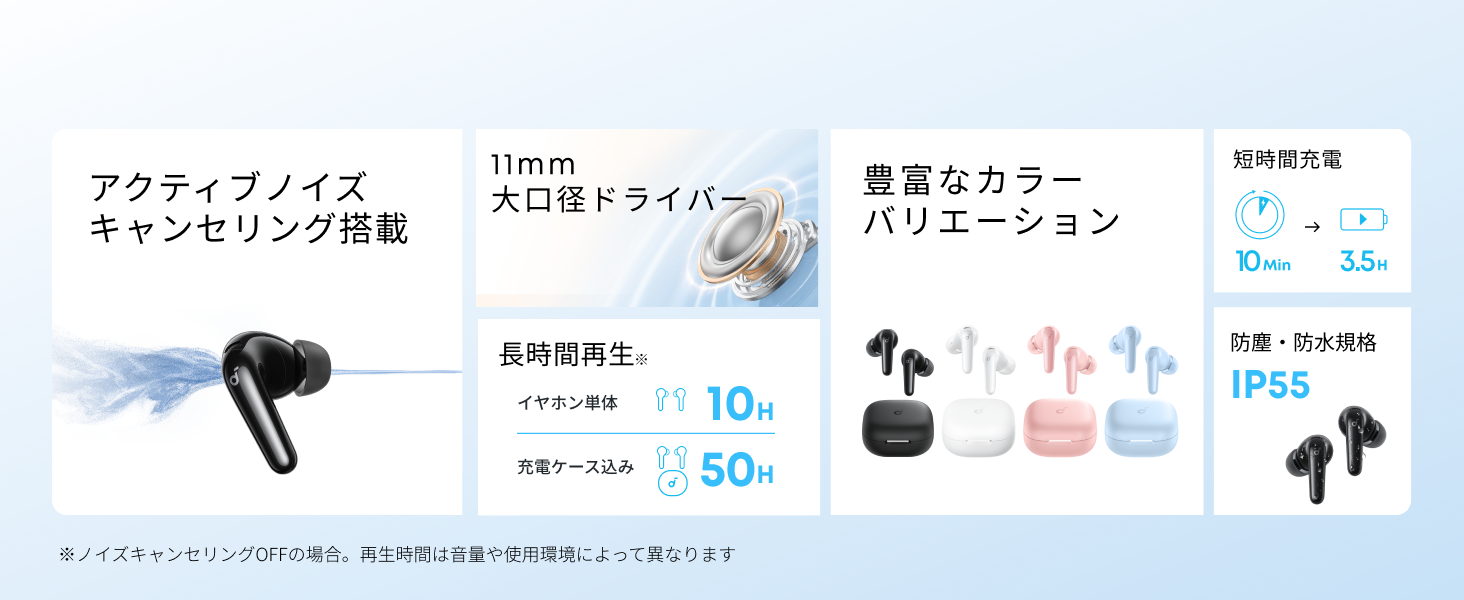
Diagram showing the Soundcore P31i earbuds and charging case with key components labeled.
ຕຸ້ມຫູ: Each earbud is equipped with an 11mm dynamic driver for powerful bass and clear sound. They feature active noise cancellation and AI noise reduction for calls. The ergonomic design ensures a secure and comfortable fit.
ຕູ້ສາກໄຟ: The compact charging case not only stores and protects your earbuds but also recharges them on the go. It has a USB-C charging port and a strap hole for portability.
ກຳລັງສາກຫູຟັງຫູຟັງ ແລະເຄສຂອງທ່ານ
ກ່ອນທີ່ຈະໃຊ້ຄັ້ງທຳອິດ, ໃຫ້ສາກທັງຫູຟັງຫູຟັງ ແລະ ຊ່ອງສາກໃຫ້ເຕັມ.
- ກຳລັງສາກຫູຟັງ: Place the earbuds into the charging case. The indicator lights on the earbuds will show charging status.
- ການສາກໄຟກໍລະນີ: Connect the charging case to a power source using the provided USB-C to USB-A cable. A full charge for the case and earbuds takes approximately 3 hours.
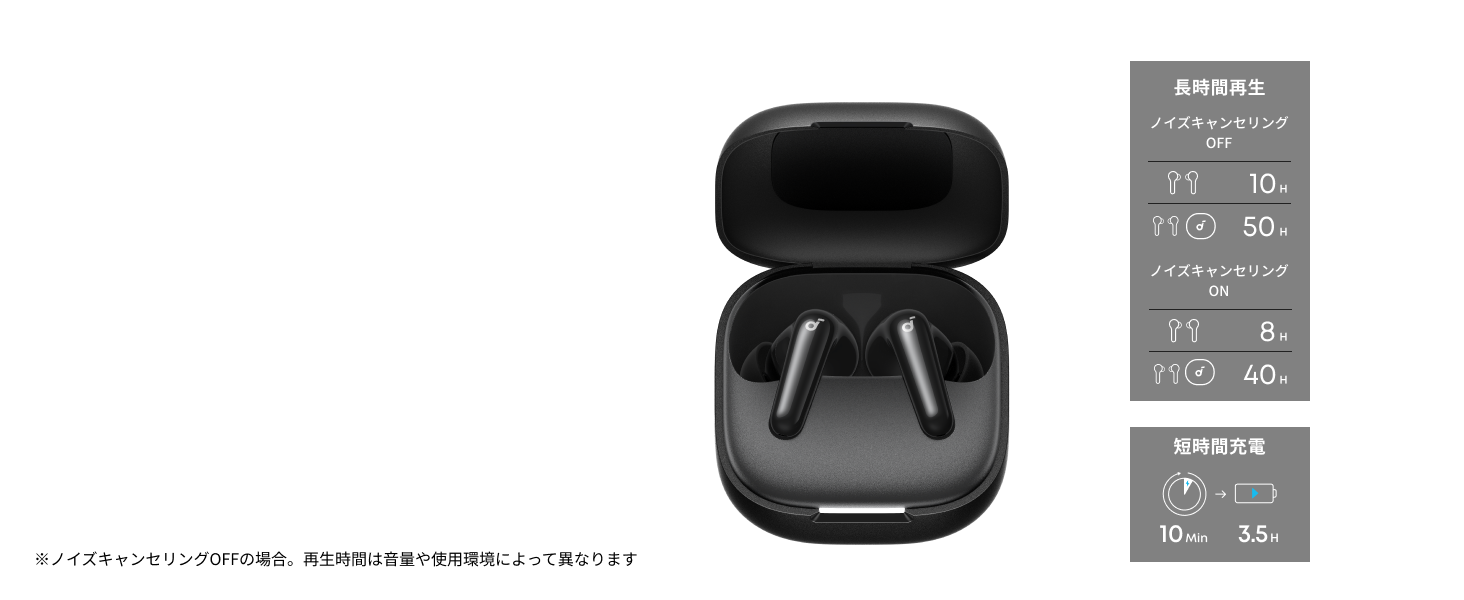
Diagram illustrating charging times and playback duration for Soundcore P31i earbuds.
ຊີວິດຫມໍ້ໄຟ:
- Up to 10 hours of playback on a single charge (earbuds only).
- ສູງສຸດ 50 ຊົ່ວໂມງຂອງການຫຼິ້ນຄືນທັງຫມົດກັບກໍລະນີການສາກໄຟ.
- A quick 10-minute charge provides up to 3.5 hours of listening time.
Note: Playback time varies depending on volume level and audio content.
ໃສ່ຫູຟັງຂອງທ່ານ
For optimal sound quality and comfort, it is important to wear your earbuds correctly.
- ເລືອກເຄັດລັບຫູທີ່ຖືກຕ້ອງ: Select the ear tips that provide the best seal and comfort for your ears. Experiment with different sizes (XS, S, M, L) to find the perfect fit.
- ໃສ່ຫູຟັງ: ຄ່ອຍໆໃສ່ຫູຟັງເອຍບັດເຂົ້າໄປໃນຮູຫູຂອງທ່ານ.
- Twist to Secure: Twist the earbuds slightly until they fit snugly and securely in your ears.

Image showing a person wearing the Soundcore P31i earbuds correctly.
ການຈັບຄູ່ Bluetooth
Follow these steps to pair your Soundcore P31i earbuds with your device:
- ການຈັບຄູ່ຄັ້ງທຳອິດ:
- Open the charging case. The earbuds will automatically enter Bluetooth pairing mode. The indicator lights on the earbuds will flash white.
- ໃນອຸປະກອນຂອງທ່ານ (ໂທລະສັບສະຫຼາດ, ແທັບເລັດ, ແລະອື່ນໆ), ໄປທີ່ການຕັ້ງຄ່າ Bluetooth.
- Select "Soundcore P31i" from the list of available devices.
- Once connected, the indicator lights on the earbuds will turn solid white for 1 second and then turn off.
- ການຈັບຄູ່ກັບອຸປະກອນອື່ນ:
- Place the earbuds in the charging case and leave the lid open.
- Press and hold the button on the charging case for 3 seconds until the earbud indicator lights flash white rapidly.
- Repeat steps 2 and 3 from "First-Time Pairing" on your new device.
ການຄວບຄຸມ
The Soundcore P31i earbuds feature touch controls for managing playback, calls, and other functions. Specific control configurations can often be customized via the Soundcore app.
General Touch Controls (Default):
- ຫຼິ້ນ/ຢຸດ: ແຕະເທື່ອດຽວໃສ່ຫູຟັງຂ້າງໃດກໍໄດ້.
- ເພງຕໍ່ໄປ: ແຕະສອງເທື່ອໃສ່ຫູຟັງທາງຂວາ.
- ຕິດຕາມກ່ອນ ໜ້າ ນີ້: ແຕະສອງເທື່ອໃສ່ຫູຟັງທາງຊ້າຍ.
- ຮັບ/ສາຍໂທ: ແຕະເທື່ອດຽວໃສ່ຫູຟັງຂ້າງໃດກໍໄດ້.
- ປະຕິເສດການໂທ: ກົດຫູຟັງອັນໃດອັນໜຶ່ງຄ້າງໄວ້ 2 ວິນາທີ.
- ກະຕຸ້ນຜູ້ຊ່ວຍສຽງ: Triple-tap either earbud (may vary).
- Switch ANC/Transparency Mode: Press and hold the right earbud for 2 seconds (may vary).
For detailed and customizable controls, please refer to the Soundcore app or the included Quick Start Guide.
Active Noise Canceling (ANC)
The Soundcore P31i earbuds feature Active Noise Cancelling technology to minimize ambient noise, allowing for an immersive listening experience.

Illustration demonstrating the active noise cancelling feature of the Soundcore P31i earbuds.
ANC detects and reduces various types of noise, such as engine hum on trains or buses, and chatter in cafes. This allows you to enjoy your music or podcasts with greater clarity and fewer distractions.
To switch between ANC, Normal, and Transparency modes, use the touch controls on the earbuds or adjust settings within the Soundcore app.
ຄຸນະພາບສຽງ
The Soundcore P31i earbuds are engineered to deliver a rich audio experience.

Diagram illustrating the 11mm dynamic driver responsible for the audio output.
- 11mm Dynamic Drivers: Equipped with large 11mm drivers, these earbuds produce a wide frequency range and detailed sound.
- ເທັກໂນໂລຢີ BassUp™: Anker's proprietary BassUp™ technology enhances low frequencies, delivering powerful and impactful bass.
You can further customize the sound profile using the equalizer settings within the Soundcore app.
ຄຸນນະພາບການໂທ
The Soundcore P31i earbuds ensure clear voice calls and web ກອງປະຊຸມ.

Illustration depicting AI noise reduction technology for clear voice calls.
AI ຫຼຸດສຽງລົບກວນ: Integrated AI noise reduction technology effectively filters out background noise, ensuring your voice is transmitted clearly to the person on the other end of the call, even in noisy environments.
ການເຊື່ອມຕໍ່ຫຼາຍຈຸດ
The Soundcore P31i supports multi-point connection, allowing you to connect to two Bluetooth devices simultaneously.

Illustration showing the Soundcore P31i connected to multiple devices simultaneously.
This feature enables seamless switching between devices. For example, you can listen to music on your laptop and instantly switch to answer a call on your phone without manually re-pairing.
To enable multi-point connection, ensure both devices are paired with your earbuds. The earbuds will automatically connect to the last two paired devices when powered on.
ແອັບ Soundcore
Download the Soundcore app to enhance your experience with the P31i earbuds. The app offers various features and customization options.

Screenshots of the Soundcore app interface, highlighting customization features.
App Features include:
- ການຄວບຄຸມທີ່ສາມາດປັບແຕ່ງໄດ້: Personalize touch controls for playback, calls, and voice assistant.
- ການຕັ້ງຄ່າ Equalizer: ປັບສຽງ profiles to your preference or choose from preset EQs.
- ANC/Transparency Mode Switching: Easily toggle between noise cancelling and transparency modes.
- ການອັບເດດເຟີມແວ: ອັບເດດຫູຟັງຫູຟັງຂອງທ່ານດ້ວຍຄຸນສົມບັດ ແລະການປັບປຸງຫຼ້າສຸດ.
- AI Translation Function: (Available from Spring 2026, requires Soundcore app ver 4.0.0 or higher).
The Soundcore app is available for download on both iOS and Android devices.
ສິນຄ້າເກີນview ວິດີໂອ
ວິດີໂອຜະລິດຕະພັນຢ່າງເປັນທາງການ showcasing the key features and design of the Soundcore P31i True Wireless Earbuds, including active noise cancellation, powerful bass, long battery life, and multi-point connectivity.
ການບໍາລຸງຮັກສາແລະການດູແລ
Proper maintenance ensures the longevity and performance of your Soundcore P31i earbuds.
- ທໍາຄວາມສະອາດ: ອະນາໄມຫູຟັງຫູຟັງ ແລະກະເປົ໋າສາກໄຟເປັນປະຈຳດ້ວຍຜ້າແພທີ່ອ່ອນ, ແຫ້ງ, ບໍ່ມີສານຂັດ. ຢ່າໃຊ້ສານເຄມີທີ່ຮຸນແຮງຫຼືວັດສະດຸຂັດ.
- ເຄັດລັບຫູ: Remove the ear tips and clean them with water and mild soap if necessary. Ensure they are completely dry before reattaching.
- ຕິດຕໍ່ພົວພັນການສາກໄຟ: Keep the charging contacts on both the earbuds and the case clean and dry to ensure proper charging.
- ການເກັບຮັກສາ: ເມື່ອບໍ່ໄດ້ໃຊ້, ໃຫ້ເກັບຮັກສາຫູຟັງໃສ່ໃນກະເປົ໋າສາກໄຟເພື່ອປົກປ້ອງພວກມັນຈາກຝຸ່ນ ແລະຄວາມເສຍຫາຍ.
- ຄວາມຕ້ານທານນ້ໍາ: The earbuds are rated IP55 for dust and water resistance. This means they can withstand sweat and light rain, but are not designed for submersion in water. Ensure the earbuds are dry before placing them back in the charging case.

Image showing Soundcore P31i earbuds with water droplets, highlighting their IP55 water resistance.
ການແກ້ໄຂບັນຫາ
If you encounter any issues with your Soundcore P31i earbuds, refer to the following common solutions:
- ຫູຟັງບໍ່ຈັບຄູ່:
- ກວດໃຫ້ແນ່ໃຈວ່າຫູຟັງຫູຟັງທັງສອງສາກເຕັມແລ້ວ.
- ວາງຫູຟັງເອຍບັດໃສ່ໃນກໍລະນີ, ປິດຝາປິດ, ຈາກນັ້ນເປີດມັນອີກຄັ້ງເພື່ອເຂົ້າສູ່ໂໝດຈັບຄູ່ຄືນໃໝ່.
- Forget "Soundcore P31i" from your device's Bluetooth list and try pairing again.
- Reset the earbuds (refer to the Quick Start Guide for specific reset instructions).
- Only One Earbud Playing Audio:
- ວາງຫູຟັງຫູຟັງທັງສອງໃສ່ໃນກ່ອງສາກໄຟ ແລະປິດຝາໄວ້ເປັນເວລາ 5 ວິນາທີ, ຈາກນັ້ນເປີດມັນອີກຄັ້ງ.
- Ensure both earbuds have sufficient battery.
- ຣີເຊັດຫູຟັງຫູຟັງ.
- ຄຸນະພາບສຽງບໍ່ດີ:
- ໃຫ້ແນ່ໃຈວ່າຄໍາແນະນໍາຫູສະຫນອງການປະທັບຕາທີ່ດີຢູ່ໃນຮູຫູຂອງທ່ານ. ລອງໃຊ້ຂະໜາດຕ່າງກັນ.
- ອະນາໄມສິ່ງເສດເຫຼືອຈາກຫົວຫູຟັງຫູຟັງ.
- ຍ້າຍເຂົ້າໃກ້ອຸປະກອນທີ່ເຊື່ອມຕໍ່ຂອງເຈົ້າຫຼາຍຂຶ້ນເພື່ອຫຼີກເວັ້ນການລົບກວນ.
- ບັນຫາການສາກໄຟ:
- ກວດເບິ່ງສາຍສາກແລະອະແດັບເຕີສໍາລັບຄວາມເສຍຫາຍ.
- ກວດໃຫ້ແນ່ໃຈວ່າລາຍຕິດຕໍ່ການສາກໄຟຢູ່ຫູຟັງເອຍບັດ ແລະເຄສນັ້ນສະອາດ.
- ລອງສາຍສາກ ຫຼືແຫຼ່ງພະລັງງານອື່ນ.
ຂໍ້ມູນຈໍາເພາະ
| ຄຸນສົມບັດ | ລາຍລະອຽດ |
|---|---|
| ຍີ່ຫໍ້ | ສຽງ |
| ຊື່ຕົວແບບ | P31i |
| ໝາຍເລກຕົວແບບ | D1202 |
| ສີ | Black (This specific variant) |
| ປັດໄຈແບບຟອມ | ໃນຫູ |
| ເຕັກໂນໂລຊີການເຊື່ອມຕໍ່ | ໄຮ້ສາຍ (Bluetooth 6.1) |
| ການຄວບຄຸມສິ່ງລົບກວນ | Active Noise Cancellation |
| ຂະໜາດຄົນຂັບ | 11mm Dynamic Drivers |
| ເວລາຫຼິ້ນ (ຫູຟັງ) | ສູງສຸດ 10 ຊົ່ວໂມງ |
| ເວລາຫຼິ້ນທັງໝົດ (ພ້ອມກໍລະນີ) | ສູງສຸດ 50 ຊົ່ວໂມງ |
| ການສາກໄວ | 10 ນາທີຄິດໄລ່ສໍາລັບການຫຼິ້ນ 3.5 ຊົ່ວໂມງ |
| Charging Time (Full) | ປະມານ 3 ຊົ່ວໂມງ |
| ການຕໍ່ຕ້ານນ້ໍາ | IP55 |
| ການເຊື່ອມຕໍ່ຫຼາຍຈຸດ | ສະຫນັບສະຫນູນ |
| UPC | 194644251543 |
| ປະເທດຕົ້ນກໍາເນີດ | ຈີນ |
ການຮັບປະກັນ ແລະການຊ່ວຍເຫຼືອລູກຄ້າ
Soundcore provides a comprehensive warranty for your P31i earbuds.

Image detailing the warranty period and extension for Soundcore P31i.
- ການຮັບປະກັນມາດຕະຖານ: An 18-month warranty is provided for products purchased from authorized retailer AnkerDirect.
- ການຮັບປະກັນຂະຫຍາຍ: Anker members can extend their warranty up to a maximum of 24 months.
- ໝາຍເຫດສຳຄັນ: Purchases from unauthorized sellers may not be covered under warranty.
For product inquiries, delivery questions, or technical support, please contact Soundcore customer support. Contact details can typically be found on the official Soundcore webເວັບໄຊທ໌ ຫຼື ໃນຄູ່ມືເລີ່ມຕົ້ນດ່ວນຂອງທ່ານ.
ຂໍ້ມູນຄວາມປອດໄພ
ກະລຸນາອ່ານ ແລະ ປະຕິບັດຕາມຄຳແນະນຳດ້ານຄວາມປອດໄພເຫຼົ່ານີ້ເພື່ອປ້ອງກັນຄວາມເສຍຫາຍຕໍ່ອຸປະກອນຂອງທ່ານ ຫຼື ການບາດເຈັບຕໍ່ຕົວທ່ານເອງ:
- ຫ້າມຖອດອອກ ຫຼື ດັດແປງຫູຟັງເອຍບັດ ຫຼື ກ່ອງສາກໄຟ.
- ຮັກສາອຸປະກອນໃຫ້ຫ່າງຈາກອຸນຫະພູມທີ່ຮຸນແຮງ, ແສງແດດໂດຍກົງ, ແລະເປີດແປວໄຟ.
- Avoid exposing the device to excessive moisture or liquids, beyond its IP55 rating.
- Do not use the device at high volume levels for extended periods to prevent hearing damage.
- ຮັກສາໃຫ້ໄກຈາກເດັກນ້ອຍ ແລະສັດລ້ຽງ.
- ກໍາຈັດຜະລິດຕະພັນຢ່າງມີຄວາມຮັບຜິດຊອບຕາມລະບຽບການທ້ອງຖິ່ນ.