
1. ບົດແນະນຳ
This manual provides essential instructions for the installation, operation, and maintenance of your Generic P11 Dual 4K 6MP Outdoor Security Camera. This advanced security camera features dual 4K lenses and a 6MP sensor, delivering clear images for effective surveillance. It includes an integrated police siren for intruder deterrence and offers real-time monitoring via WiFi, accessible through a smartphone application. With infrared LED illumination and night vision capabilities, it ensures 24-hour vigilance. The camera detects suspicious movements and sends instant alerts to your mobile device. Designed for outdoor use, it boasts weather-resistant construction and two antennas for a stable connection. The system also supports two-way audio and high-definition recording. Please read this manual thoroughly before use to ensure proper functionality and safety.
2. ເນື້ອໃນຊຸດ
ກວດສອບວ່າລາຍການທັງຫມົດແມ່ນມີຢູ່ໃນຊຸດ:
- Generic P11 Dual 4K 6MP Outdoor Security Camera
- Power Adapter
- screws mounting ແລະ plugs ຝາ
- ຄູ່ມືຜູ້ໃຊ້ (ເອກະສານນີ້)
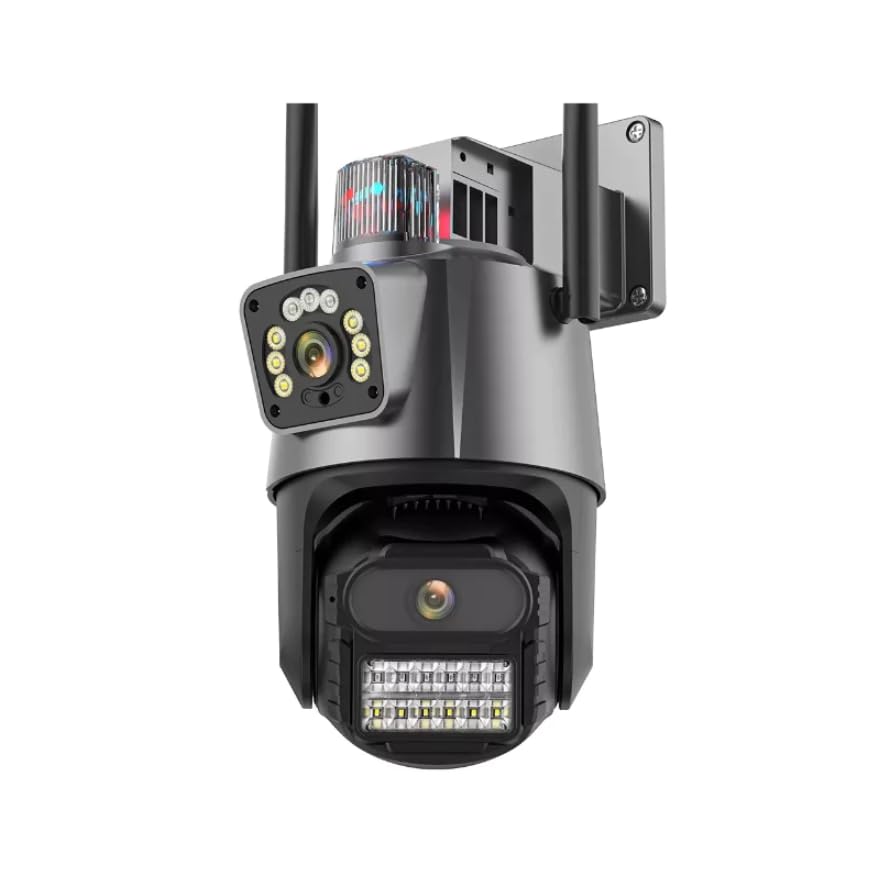
Image: The Generic P11 Dual 4K 6MP Outdoor Security Camera, showing its dual lens design and external antennas.
3. ຄູ່ມືການຕິດຕັ້ງ
3.1. ການກະກຽມເບື້ອງຕົ້ນ
- ຖອດກ້ອງຖ່າຍຮູບ: ເອົາສ່ວນປະກອບທັງຫມົດອອກຈາກການຫຸ້ມຫໍ່ຢ່າງລະມັດລະວັງ.
- ການເຊື່ອມຕໍ່ພະລັງງານ: Connect the provided power adapter to the camera and plug it into a power outlet. The camera will initiate its startup sequence.
- ດາວໂຫລດ App ໄດ້: ຊອກຫາ the recommended security camera application (refer to packaging or quick start guide for app name) on your smartphone's app store (iOS or Android) and install it.
- ສ້າງບັນຊີ: ເປີດແອັບ ແລະ ປະຕິບັດຕາມຄຳແນະນຳໃນໜ້າຈໍເພື່ອສ້າງບັນຊີຜູ້ໃຊ້ໃໝ່.
3.2. Wi-Fi Connection and Pairing
- ເພີ່ມອຸປະກອນ: ໃນແອັບ, ເລືອກຕົວເລືອກເພື່ອເພີ່ມອຸປະກອນໃໝ່.
- Select Camera Type: Choose the appropriate camera model or type from the list.
- ການຕັ້ງຄ່າເຄືອຂ່າຍ: Follow the app's instructions to connect the camera to your 2.4GHz Wi-Fi network. Ensure your smartphone is connected to the same Wi-Fi network during this process.
- ການຈັບຄູ່: ແອັບຈະແນະນຳທ່ານຜ່ານຂັ້ນຕອນການຈັບຄູ່, ເຊິ່ງອາດຈະກ່ຽວຂ້ອງກັບການສະແກນລະຫັດ QR ໃນກ້ອງຖ່າຍຮູບ ຫຼືຟັງສຽງເຕືອນ.
- ຕັ້ງຊື່ກ້ອງຂອງເຈົ້າ: Assign a name to your camera for easy identification (e.g., "Front Door," "Backyard").
3.3. ການຕິດຕັ້ງທາງດ້ານຮ່າງກາຍ
- ເລືອກສະຖານທີ່: ເລືອກສະຖານທີ່ກາງແຈ້ງທີ່ມີຄວາມຊັດເຈນ view of the area you wish to monitor, within range of your Wi-Fi signal and a power source. The camera is IP66 rated for outdoor use.
- ການຕິດຕັ້ງ: Use the provided mounting screws and wall plugs to securely attach the camera to a wall or suitable surface. Ensure the camera is mounted at an optimal height for surveillance.
- ປັບມຸມ: ປັບກ້ອງຖ່າຍຮູບໄດ້ viewing angle using the app to cover the desired area. The camera offers a 355-degree viewມຸມ ing.
4. ຄໍາແນະນໍາການດໍາເນີນງານ
4.1. ການຕິດຕາມເວລາຈິງ
Open the security camera app on your smartphone. Select your camera from the device list to view the live feed. You can pan and tilt the camera remotely within the app to adjust the viewພື້ນທີ່.
4.2. ກວດຈັບການເຄື່ອນໄຫວ ແລະການແຈ້ງເຕືອນ
The camera features an advanced motion detection system. When motion is detected, the camera will send instant notifications to your smartphone. You can customize motion detection sensitivity and alert schedules within the app settings.
4.3. ວິໄສທັດກາງຄືນ
The camera automatically switches to night vision mode in low-light conditions, utilizing powerful infrared LEDs to provide clear images up to 15 meters. This ensures continuous surveillance day and night.
4.4. ສຽງສອງທາງ
Use the two-way audio feature in the app to communicate with individuals near the camera. Press the microphone icon to speak and listen through the camera's built-in speaker and microphone.
4.5. ການບັນທຶກແລະການເກັບຮັກສາ
The camera supports local storage via an SD card (up to 128GB, 32GB installed). Recordings can also be stored on cloud services, if subscribed. Access recorded footage through the app's playback function.
4.6. Police Siren
Activate the built-in police siren through the app to deter intruders. This feature emits a high-power sound designed to draw attention and scare off unwanted visitors.
5. ຄຸນນະສົມບັດທີ່ສໍາຄັນ
- ລະບົບກ້ອງຄູ່: Equipped with two high-resolution 4K and 6MP lenses for detailed day and night monitoring.
- Integrated WiFi Connectivity: Allows real-time remote monitoring via a smartphone application.
- Powerful Alert System: Features a built-in police siren with high-power sound for effective intruder deterrence.
- Advanced Night Vision: Powerful infrared LEDs ensure clear images even in low-light conditions, with a range of 15 meters.
- ການກວດຈັບການເຄື່ອນໄຫວອັດສະລິຍະ: An advanced system that provides instant mobile notifications upon detecting movement.
- ສຽງສອງທາງ: Enables communication through the camera via the mobile app.
- ການອອກແບບທີ່ທົນທານຕໍ່ສະພາບອາກາດ: IP66 international protection rating ensures durability for outdoor installation.
6. ບໍາລຸງຮັກສາ
- ທໍາຄວາມສະອາດ: Regularly clean the camera lenses with a soft, dry cloth to ensure optimal image clarity. Do not use harsh chemicals.
- ການອັບເດດເຟີມແວ: Check the app periodically for firmware updates. Keeping the camera's firmware updated ensures optimal performance and security.
- ກວດສອບການເຊື່ອມຕໍ່: Periodically verify the power and Wi-Fi connections to ensure stable operation.
- ການຄຸ້ມຄອງບັດ SD: If using an SD card, ensure it is functioning correctly and consider formatting it periodically to maintain recording efficiency.
7. ການແກ້ໄຂບັນຫາ
| ບັນຫາ | ສາເຫດທີ່ເປັນໄປໄດ້ | ການແກ້ໄຂ |
|---|---|---|
| ກ້ອງຖ່າຍຮູບບໍ່ເປີດ | ບໍ່ມີແຫຼ່ງຈ່າຍໄຟ; ອະແດບເຕີມີບັນຫາ | Check power connection; try a different outlet; ensure adapter is working. |
| ບໍ່ສາມາດເຊື່ອມຕໍ່ກັບ Wi-Fi ໄດ້ | Incorrect Wi-Fi password; camera too far from router; 5GHz network selected | ຢືນຢັນລະຫັດຜ່ານ Wi-Fi; ຍ້າຍກ້ອງຖ່າຍຮູບເຂົ້າໃກ້ router; ໃຫ້ແນ່ໃຈວ່າທ່ານກໍາລັງເຊື່ອມຕໍ່ກັບເຄືອຂ່າຍ 2.4GHz. |
| ຄຸນນະພາບຮູບພາບບໍ່ດີ | Dirty lens; insufficient lighting; network bandwidth issues | Clean the lens; ensure adequate lighting for non-night vision mode; check Wi-Fi signal strength. |
| ການກວດຈັບການເຄື່ອນໄຫວບໍ່ເຮັດວຽກ | Settings incorrect; sensitivity too low; object too far | Adjust motion detection settings in the app; increase sensitivity; ensure objects are within detection range. |
| ບໍ່ມີສຽງ ຫຼືຄຸນນະພາບສຽງບໍ່ດີ | Microphone/speaker blocked; app volume low; network issues | Ensure microphone/speaker are clear; check app volume settings; verify stable network connection. |
8. ຂໍ້ມູນຈໍາເພາະ
| ຄຸນສົມບັດ | ລາຍລະອຽດ |
|---|---|
| ຊື່ຕົວແບບ | P11 |
| ຍີ່ຫໍ້ | ທົ່ວໄປ |
| ເຕັກໂນໂລຊີການເຊື່ອມຕໍ່ | ໄຮ້ສາຍ (Wi-Fi) |
| ຄຸນນະສົມບັດພິເສດ | Night Vision, Motion Detection, Two-Way Audio, Police Siren |
| ໃຊ້ພາຍໃນ/ນອກ | ພື້ນທີ່ກາງແຈ້ງ |
| ອຸປະກອນທີ່ເຂົ້າກັນໄດ້ | ໂທລະສັບສະຫຼາດ |
| ປະເພດການຄວບຄຸມ | ແອັບຯມືຖື |
| ປະເພດການຕິດຕັ້ງ | ຕິດຝາ |
| ສີ | ສີຂາວແລະສີດໍາ |
| ວັດສະດຸ | ພາດສະຕິກ ABS |
| ລະດັບຄວາມຕ້ານທານນ້ໍາ | ກັນນ້ຳ (IP66) |
| ປະເພດ Alert | Motion Detection with App Notification |
| ການແກ້ໄຂສຸດທ້າຍ | 6 MP (Dual 4K Lenses) |
| ຄວາມລະອຽດເຊັນເຊີຮູບພາບ | 3 MP |
| ຄວາມລະອຽດການຖ່າຍວິດີໂອ | 2048x1536 |
| ອັດຕາເຟຣມ | 30 Fps |
| Viewໃນມຸມ | 355 ອົງສາ |
| Optical Zoom | 4x |
| ປະເພດການຊູມ | Digital and Optical |
| ຂະໜາດລາຍການ | 15 x 12 x 15 ຊັງຕີແມັດ |
| ນ້ໍາຫນັກລາຍການ | 450 ກຣາມ |
| ແຫຼ່ງພະລັງງານ | ໄຟຟ້າ |
| ການບໍລິໂພກພະລັງງານ | 5 ວັດ |
| ການເຂົ້າລະຫັດວິດີໂອ | H.264 |
| ຮູບແບບການຖ່າຍຮູບວິດີໂອ | MP4 |
| ຂອບເຂດວິໄສທັດກາງຄືນ | 15 ແມັດ |
| ຈຳ ນວນໄຟ LED IR | 8 |
| Installed Flash Memory Size | 32 GB |
| ປະເພດຫນ່ວຍຄວາມຈໍາ Flash | SD ກາດ |
| Maximum Supported Flash Memory Size | 128 GB |
9. ການຮັບປະກັນແລະການສະຫນັບສະຫນູນ
9.1. ຂໍ້ມູນການຮັບປະກັນ
This product is typically covered by a manufacturer's warranty against defects in materials and workmanship. Specific warranty terms, duration, and conditions may vary by region and retailer. Please refer to the warranty card included with your purchase or contact your point of sale for detailed information. Extended warranty options may also be available from your retailer.
9.2. ການຊ່ວຍເຫຼືອລູກຄ້າ
For technical assistance, troubleshooting not covered in this manual, or warranty claims, please contact the seller or manufacturer's customer support. Have your product model number (P11) and purchase details ready when contacting support.


