ແນະນຳ
This manual provides detailed instructions for the setup, operation, and maintenance of your GUSTARD R30 Fully-Discrete R2R Network Streamer DAC. Please read this manual thoroughly before using the device to ensure optimal performance and longevity.
ບັນຊີລາຍຊື່ການຫຸ້ມຫໍ່
ເມື່ອເປີດຊຸດດັ່ງກ່າວ, ກະລຸນາກວດສອບວ່າລາຍການທັງໝົດຕໍ່ໄປນີ້ແມ່ນລວມຢູ່ແລ້ວ:
- GUSTARD R30 Mainframe
- ສາຍໄຟ
- ສາຍ USB
- ການຄວບຄຸມໄລຍະໄກ
- ບັດຮັບປະກັນ

ແຜງດ້ານ ໜ້າ ເກີນview
The front panel of the GUSTARD R30 features essential controls and a display for real-time status and operations.
- ປຸ່ມເປີດປິດ: Toggles between standby and active states. The R30 can remain in standby mode when the rear power switch is ON.
- ພື້ນທີ່ສະແດງ: Shows the current input channel, encoding format, and sampling rate. Displays menu items when in the setup menu.
- ການສະແດງປະລິມານ: Indicates the current volume level, ranging from -63.5dB to 0dB. 'FIXED' indicates bypass mode. Displays menu options during configuration.
- '-' ປຸ່ມ: Normally decreases volume. Cycles through options in the menu.
- ປຸ່ມເກຍ: Short press switches inputs. Long press enters/exits the menu. Short press navigates items in the menu.
- ປຸ່ມ '+': Normally increases volume. Cycles through options in the menu.

ກະດານຫລັງຫຼາຍກວ່າview
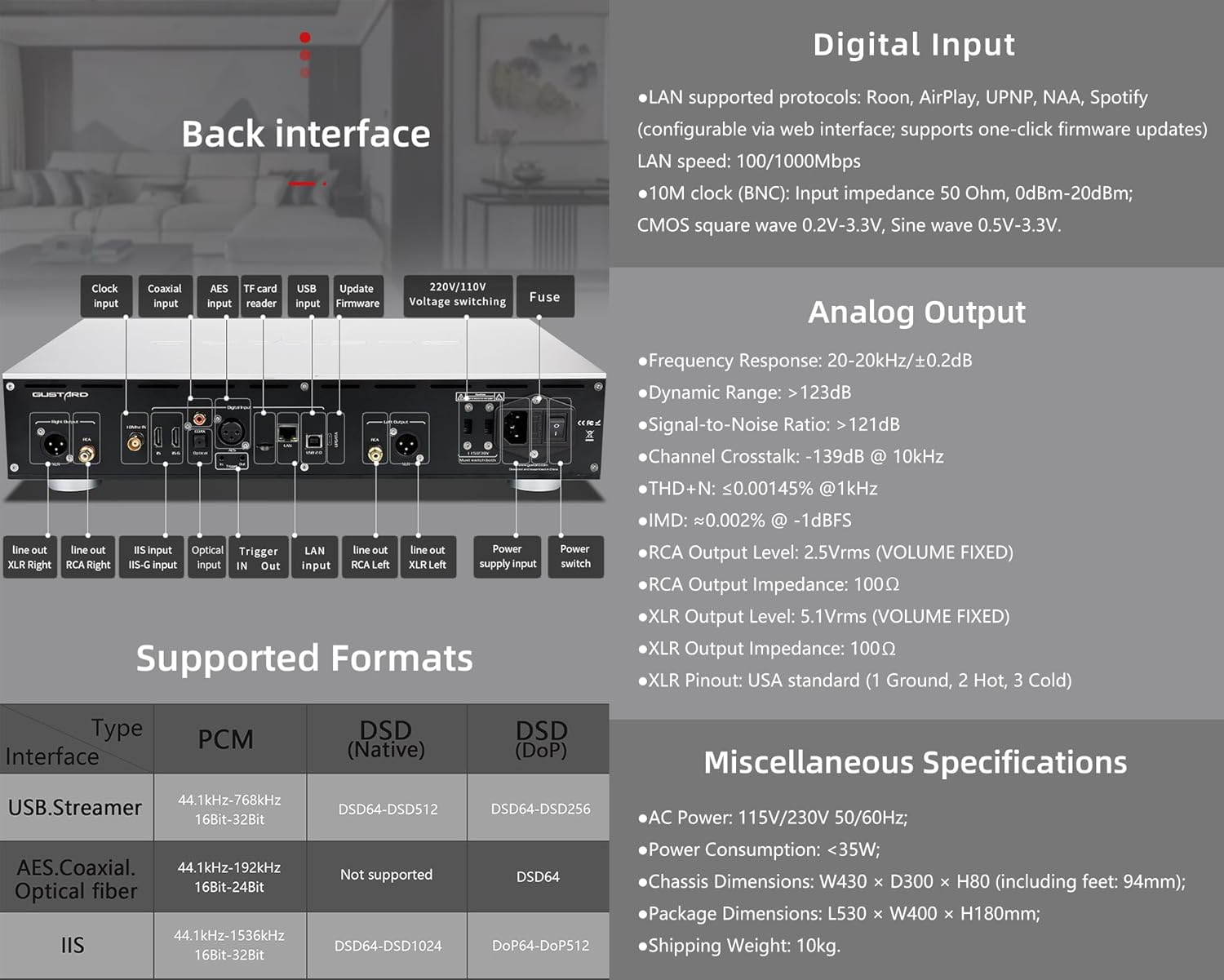
The rear panel provides various input and output connections for the GUSTARD R30.
- ການປ້ອນຂໍ້ມູນໂມງ: For external 10MHz clock synchronization.
- ການປ້ອນຂໍ້ມູນ Coaxial: ການປ້ອນຂໍ້ມູນສຽງດິຈິຕອນ.
- ການປ້ອນຂໍ້ມູນ AES: ການປ້ອນຂໍ້ມູນສຽງດິຈິຕອນ.
- ການປ້ອນຂໍ້ມູນ USB: ສຳລັບການເຊື່ອມຕໍ່ກັບຄອມພິວເຕີ ຫຼື ແຫຼ່ງສຽງ USB ອື່ນໆ.
- ອິນພຸດ LAN: For network streaming functionality.
- TF Card Reader: ສໍາລັບການອັບເດດເຟີມແວ.
- ອັບເດດເຟີມແວ: ພອດ USB ສໍາລັບການອັບເດດເຟີມແວ.
- ລຸ້ນ 220V/110Vtage ສະຫຼັບ: Selector for power voltage.
- ຟິວ: ຟິວໄຟ.
- Line Out XLR Right/Left: Balanced analog audio outputs.
- Line Out RCA Right/Left: Unbalanced analog audio outputs.
- IIS Input (IIS-G): Digital audio input with Gustard pinout.
- Optical Input: ການປ້ອນຂໍ້ມູນສຽງດິຈິຕອນ.
- ກະຕຸ້ນການເຂົ້າ/ອອກ: For 12V trigger control.
- ການປ້ອນຂໍ້ມູນການສະຫນອງພະລັງງານ: ການເຊື່ອມຕໍ່ພະລັງງານ AC.
- ສັບປ່ຽນພະລັງງານ: ສະວິດເປີດປິດພະລັງງານຫຼັກ.
Important: Ensure both voltage switches ຖືກກໍານົດເປັນ vol ດຽວກັນtage ເມື່ອປະຕິບັດການ 220V / 110V voltage switch, otherwise, it may damage the internal transformer upon powering on.
ຈໍສະແດງຜົນ & ແຜງຄວບຄຸມ
The R30 utilizes a large OLED display for real-time status monitoring and functional operations. The diagram below illustrates the main interface display states.
1. ຈໍສະແດງຜົນ OLED
The display shows the input channel, external clock indication, encoding format, sampling rate, and volume.
2. Input Channel Selection
R30 ມີ 7 ຊ່ອງປ້ອນຂໍ້ມູນ. ໃນສ່ວນຕິດຕໍ່ຫຼັກ, ການກົດແຕ່ລະປຸ່ມເກຍຈະໝູນຜ່ານຊ່ອງຕ່າງໆທີ່ມີຢູ່ໃນລຳດັບນີ້: COAX → AES → OPT → USB → STREAMER → IIS(G) → IIS(M*).
***Note: IIS(G) is for fixed Gustard pinout configuration and cannot be adjusted. IIS(M*) supports adjustable pinout configuration.
3. ການປັບລະດັບສຽງ
- When the main interface is displayed, pressing the "+" or "-" buttons directly adjusts the analog volume attenuation function of the passive preampຕົວຊີ້ບອກ. ຊ່ວງການຫຼຸດໜ້ອຍຖອຍລົງຈາກ 0dB ຫາ -63.5dB (ທັງໝົດ 63.5dB attenuation).
- Pressing "+" at 0dB activates Fixed Output mode (bypassing attenuation circuit), displaying 'FIXED' indicator.
- When 'FIXED' is displayed, pressing "-" first exits bypass mode before controlling the attenuation level.

ເມນູຕັ້ງຄ່າ
On the main screen, long press the Gear Button to enter the settings menu (hereinafter referred to as the menu button). In this state, the menu button can sequentially switch the menu items to be modified. "+" and "-" buttons are used to adjust the currently selected menu options. When the screen is in the settings menu, long press the menu button again to return to the main screen.
ໂຄງສ້າງເມນູ:
- ການກັ່ນຕອງ PCM
- ການກັ່ນຕອງ DSD
- ໂໝດ NOS
- REF CLOCK
- IIS MODE
- ໜ້າ
- TRIGGER CH.
- TRIGGER VOL.
- ຈໍສະແດງຜົນ

ຟັງຊັນເມນູ
ເຂົ້າເຖິງເມນູໂດຍການກົດປຸ່ມເມນູໃນການໂຕ້ຕອບຕົ້ນຕໍ. ແຕ່ລະຕົວເລືອກເມນູແມ່ນລາຍລະອຽດຂ້າງລຸ່ມນີ້.
1. PCM FILTER (PCM Digital Filter Adjustment)
R30 ໃຊ້ PCM ທີ່ມີປະສິດທິພາບສູງທີ່ພັດທະນາດ້ວຍຕົນເອງampling ໂມດູນການກັ່ນຕອງດິຈິຕອນທີ່ມີສາມປະເພດການກັ່ນຕອງ:
- VIVID (Default): Similar to the FAST roll-off type of traditional digital filter, but with better ringing characteristics, very small pre-ringing, and fast convergence post-ringing. It aims for a broad soundstage and sound restoration. Recommended for most music styles.
- GENTLE: Similar to the SLOW roll-off type of traditional digital filter, offering a soft listening experience.
- ບໍລິສັດ: A hybrid digital filter, balancing characteristics between Vivid and Gentle for a good listening experience.
2. DSD FILTER (DSD Digital Filter Adjustment)
ຕົວກອງ DSD ມີ 4 ທາງເລືອກແບນວິດໃນຕົວ: 47K (Default), 50K, 60K, 70K.
3. NOS MODE (ບໍ່ມີ oversampling Filter Mode)
When enabled, the PCM signal bypasses the oversampling filter entirely, decoded straight through the R-2R decoder module. This preserves micro-details and timing integrity. When enabled, there may be a slight clicking sound when the playback data format switches between PCM and DSD.
- DISABLE (Default)
- ເປີດໃຊ້
4. REF CLOCK (Reference Clock Selection)
The GUSTARD-K2, low-noise clock synthesizer, achieves ultra-low jitter performance. The R30 offers two clock options:
- INTERNAL (Default): Uses the built-in OCXO internal reference.
- EXT. 10MHz: Selects an external 10MHz reference source. It is recommended to connect to GUSTARD C16 or C18 reference 10M master clocks.
If the external clock is lost, powered off, or its frequency deviation is greater than +/-150ppm, "EXT ERR" will be displayed and flash.
5. IIS MODE (IIS Pinout Mode Selection)
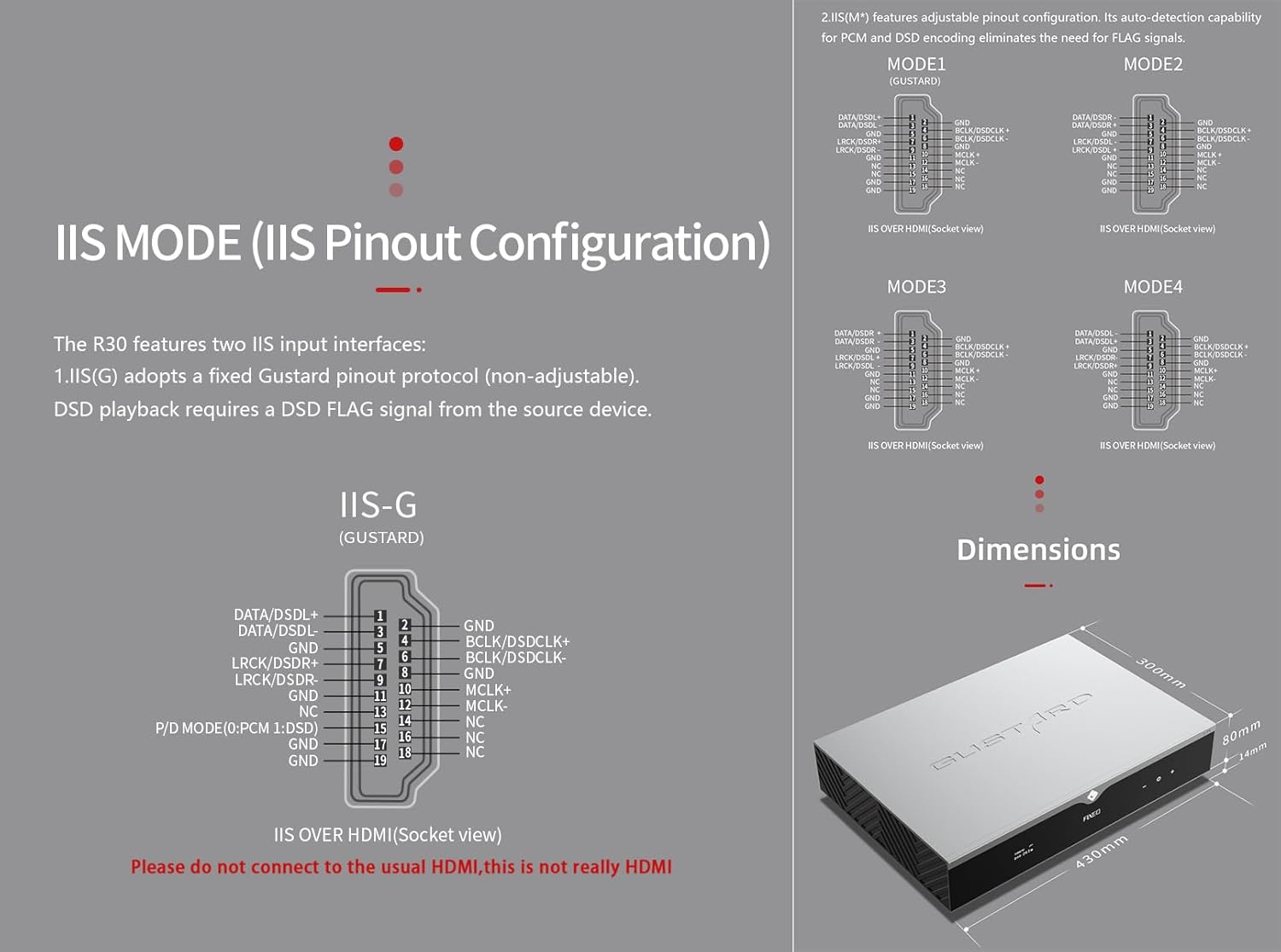
R30 ມີສອງການໂຕ້ຕອບການປ້ອນຂໍ້ມູນ IIS:
- IIS(G): Fixed Gustard pinout protocol (non-adjustable). DSD playback requires a DSD FLAG signal from the source device.
- IIS(M*): Features adjustable pinout configuration. Its auto-detection capability for PCM and DSD encoding eliminates the need for FLAG signals.
IIS(M*) adjustable Pinout mode IIS input has four Pinouts: MODE1 (Default), MODE2, MODE3, MODE4. MODE1 is compatible with the GUSTARD mode. If you are connecting to a GUSTARD front end such as U12, U16, U18, S16, S26, etc., you can match them with MODE1, which is the former works in the Gustard output mode.
Please do not connect to the usual HDMI, this is not really HDMI.
6. PHASE (Phase Setting)
ຟັງຊັນນີ້ສະເຫນີສອງທາງເລືອກ:
- NON-inverted (Default): When non-inverted, the RCA output of R30 is normal phase, and the XLR balanced output is American standard polarity output (1 ground, 2 hot, 3 cold).
- ປີ້ນ: When inverted, only the RCA output is reverse phase, and the XLR balanced output is Japanese/European standard polarity output (1 ground, 2 cold, 3 hot).
7. TRIGGER CH. (Linkage Trigger Start Channel Selection)
The R30 can be triggered by an external 12V linkage signal and automatically turn on from standby mode. When the 12V trigger signal ceases or drops to 0V, automatic standby activation occurs. When the R30 is working, it is switched to the input channel of this setting by the 12V trigger linkage signal.
- LAST (Default): The input channel that was in use before entering standby last time.
- Other options include COAX, AES, OPT, USB, STREAMER, IIS(G), IIS. Selecting any channel activates it upon receiving a 12V trigger signal.
8. TRIGGER VOL. (Link Trigger Boot Volume Selection)
R30 ສາມາດເປີດໄດ້ຈາກການສະແຕນບາຍຜ່ານສັນຍານກະຕຸ້ນ 12V ພາຍນອກ ແລະຕັ້ງອັດຕະໂນມັດເປັນລະດັບສຽງທີ່ເລືອກ. ອີກທາງເລືອກ, ໃນລະຫວ່າງການປະຕິບັດງານ, ສັນຍານຜົນກະທົບຕໍ່ 12V ປ່ຽນຜົນຜະລິດໄປສູ່ລະດັບສຽງທີ່ກໍານົດໄວ້ກ່ອນ. ຕົວເລືອກນີ້ກຳນົດຄ່າປະລິມານຜົນຜະລິດຫຼັງຈາກການເປີດໃຊ້ຕົວກະຕຸ້ນ.
- LAST (Default): The volume used before entering standby.
- ແກ້ໄຂ: Fixed full-scale output bypassing attenuation.
- -20dB: Output at a volume attenuated to -20dB.
- -30dB: Output at a volume attenuated to -30dB.
- -40dB: Output at a volume attenuated to -40dB.
9. DISPLAY (Screen Brightness Settings)
Long-term high-brightness use of OLED screens can cause screen burn-in or ghosting. Therefore, the R30 is designed to always select automatic screen off, or manually select automatic screen off, which can also reduce interference.
- AUTO (Default): Automatically reduce brightness.
- ປິດອັດຕະໂນມັດ: Automatically turn off the screen.
ການຄວບຄຸມໄລຍະໄກ infrared
ເມື່ອປະຕິບັດການຜະລິດຕະພັນ DAC, ກົດປຸ່ມ DAC ຄ້າງໄວ້ຫຼາຍກວ່າ 3 ວິນາທີເພື່ອເຂົ້າສູ່ໂໝດຄວບຄຸມ DAC. AMPໂໝດ / STREAM ຄວບຄຸມຜະລິດຕະພັນ Gustard ອື່ນໆ.
- ສະແຕນບາຍ: Press once to activate R30 from standby. Press once during operation to enter standby.
- ເມນູ: Press to access R30's setup menu.
- ແຜ່ນທີ່ມີປຸ່ມ 4 ທິດທາງ: Up/Down navigates menu items. Left/Right adjusts selected options. Center press activates/deactivates mute.
- ກັບຄືນໄປບ່ອນ: Returns to main interface.
- ລະດັບສຽງ: Decreases output volume on main interface.
- ສະບັບ+: Increases output volume on main interface.
ໝາຍເຫດ:
- Operational range varies with angle.
- Obstructions between remote and sensor may cause malfunction.
- Remove batteries if unused for more than 1 month.
- Thoroughly clean battery compartment if leakage occurs.
- May accidentally trigger other IR-controlled devices.

Network Bridge Streamer ເລີ່ມດ່ວນ
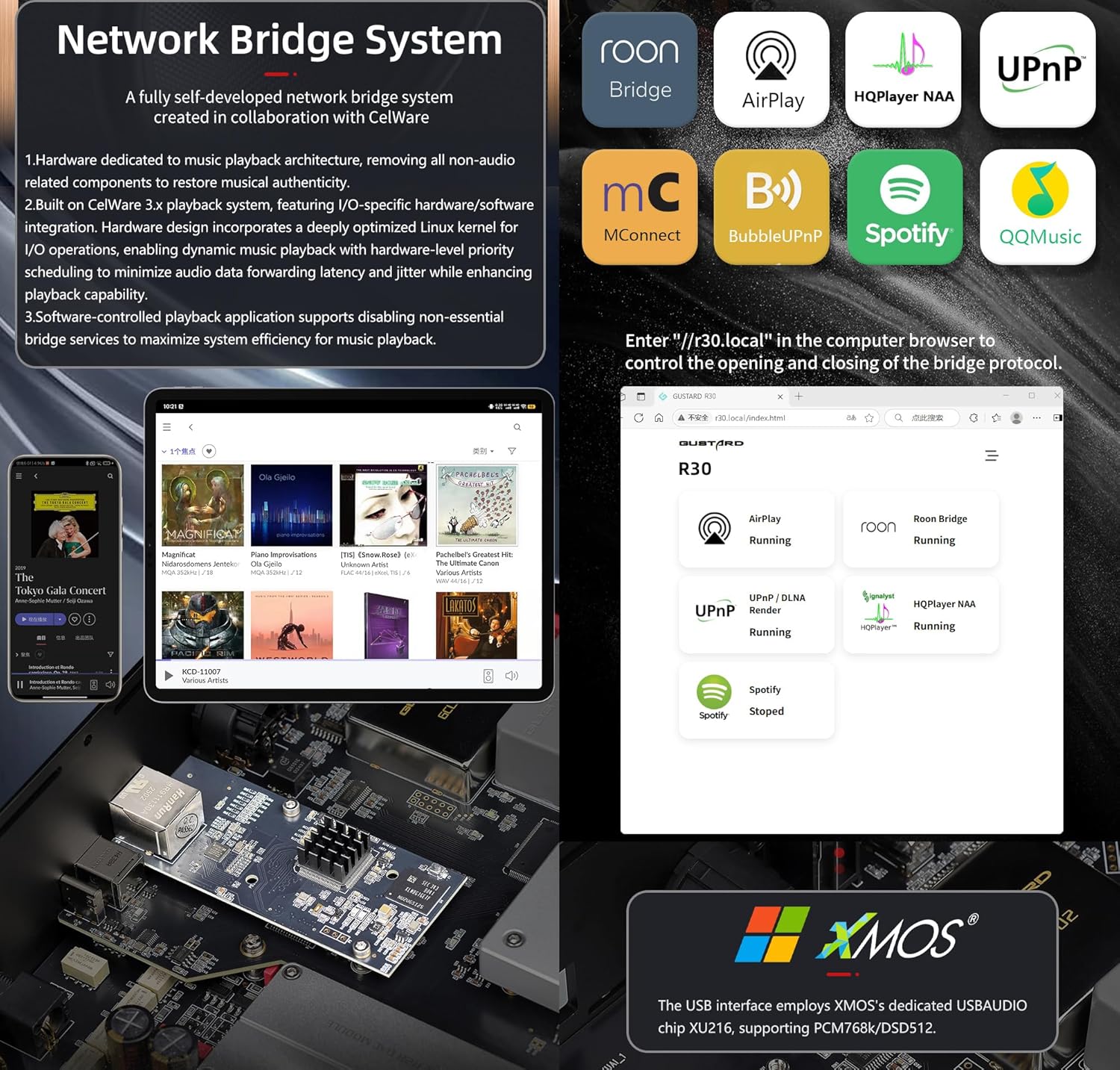
After connecting R30's RJ45 port to your local network:
- Select the STREAMER channel and await system boot (approximately 1 minute, until "DSD 24.5MHz" appears).
- Access R30's configuration page via: http://R30.local (as shown below). Disable unused streaming protocols on the web ການໂຕ້ຕອບເພື່ອເພີ່ມປະສິດທິພາບຂອງລະບົບ. ການປັບປຸງເຟີມແວຍັງດໍາເນີນການຢູ່ທີ່ນີ້.
(ການດໍາເນີນງານໂທລະສັບມືຖື / ແທັບເລັດຍັງຄົງຄ້າງຈົນກ່ວາການປ່ອຍ app ທີ່ອຸທິດຕົນ)
You can turn off streaming protocols that are not frequently used through the web page to maximize system music playback performance. At the same time, the online upgrade of the Streamer is also operated on the web ໜ້າ.
(ຫຼັງຈາກ APP Streamer ທີ່ອຸທິດຕົນໄດ້ຖືກເປີດຕົວ, ການດໍາເນີນງານຂ້າງເທິງສາມາດປະຕິບັດໄດ້ໃນ APP)
Official Product Video: GUSTARD R30 - User Manual
ຂໍ້ມູນຈໍາເພາະຂອງຜະລິດຕະພັນ
Digital Input Support Formats:
| ປະເພດ | PCM | DSD (ເດີມ) | DSD (DoP) |
|---|---|---|---|
| USB.Streamer | 44.1kHz-768kHz 16Bit-32Bit | DSD64-DSD512 | DSD64-DSD256 |
| AES.Coaxial.Optical fiber | 44.1kHz-192kHz 16Bit-24Bit | ບໍ່ຮອງຮັບ | DSD64 |
| IIS | 44.1kHz-1536kHz 16Bit-32Bit | DSD64-DSD1024 | DoP64-DoP512 |
ຜົນໄດ້ຮັບການປຽບທຽບ:
- ການຕອບສະໜອງຄວາມຖີ່: 20-20kHz/±0.2dB
- ຊ່ວງໄດນາມິກ:> 123dB
- ອັດຕາສ່ວນສັນຍານເຖິງສຽງ:> 121dB
- Channel Crosstalk: -139dB @ 10kHz
- THD+N: ≤ 0.00145% @1kHz
- IMD: ≈0.002% @ -1dBFS
- ລະດັບຜົນຜະລິດ RCA: 2.5Vrms (ປະລິມານແກ້ໄຂ)
- RCA Output Impedance: 100Ω
- ລະດັບຜົນຜະລິດ XLR: 5.1Vrms (ປະລິມານແກ້ໄຂ)
- XLR Output Impedance: 100Ω
- XLR Pinout: ມາດຕະຖານອາເມລິກາ (1 ດິນ, 2 ຮ້ອນ, 3 ເຢັນ)
ຂໍ້ມູນຈໍາເພາະອື່ນໆ:
- AC Power: 115V/230V 50/60Hz
- ການບໍລິໂພກພະລັງງານ: <35W
- Chassis Dimensions: W430 × D300 × H80 (including feet: 92mm)
- Package Dimensions: L530 × W400 × H180mm
- Shipping Weight: 10kg (with package)
- 10MHz BNC Input: Input impedance 50 Ohm, 0dBm-20dBm; CMOS square wave 0.2V-3.3V, Sine wave 0.5V-3.3V.
- Trigger: IN- 12V Typ. OUT- 12V Typ.
ເງື່ອນໄຂການຮັບປະກັນ
Thank you for choosing GUSTARD HIFI products. To safeguard your rights and interests, please read the following warranty terms carefully. You can promptly obtain comprehensive after-sales service provided by GUSTARD.
ການຮັບປະກັນຜະລິດຕະພັນ
You will enjoy a 2-year free warranty and lifetime maintenance after the date of purchasing GUSTARD's HIFI product.
* ຜູ້ຜະລິດຮັບຜິດຊອບພຽງແຕ່ການຂົນສົ່ງຈາກຈີນແຜ່ນດິນໃຫຍ່. ສ່ວນຫນຶ່ງຂອງການຂົນສົ່ງແລະພາສີທີ່ຜະລິດຈາກຕ່າງປະເທດຈະຖືກແກ້ໄຂໂດຍຜູ້ໃຊ້ກັບການເຈລະຈາຂອງຕົວແທນຈໍາຫນ່າຍ.
ບໍລິການຮັບປະກັນຟຣີ
GUSTARD R30 from the purchasinພາຍໃນໄລຍະເວລາຮັບປະກັນຟຣີ, ຜູ້ໃຊ້ໃຊ້ຜະລິດຕະພັນຕາມປົກກະຕິ, ແລະຜະລິດຕະພັນລົ້ມເຫຼວຍ້ອນຄຸນນະພາບຂອງອົງປະກອບ ຫຼື ບັນຫາການຜະລິດ.
ນອກເຫນືອຈາກການບໍລິການຮັບປະກັນ
Belonging to one of the following circumstances, products are no longer provided warranty service:
- ຜະລິດຕະພັນຈາກວັນທີຊື້ໄດ້ເກີນໄລຍະເວລາຮັບປະກັນທີ່ກໍານົດໄວ້.
- ຮູບແບບ, ບາໂຄດ ແລະວັນທີຊື້ບໍ່ກົງກັບສິນຄ້າຕົວຈິງ ແລະບັດຮັບປະກັນ.
- Without GUSTARD technician permission, unauthorized modifications to the circuit, components or self-repaired product.
- ຄວາມເສຍຫາຍທີ່ເກີດຈາກກໍາລັງທໍາມະຊາດທີ່ບໍ່ສາມາດຕ້ານທານໄດ້.
- ນອກເຫນືອຈາກການນໍາໃຊ້ທີ່ອະນຸຍາດໃຫ້ສ້າງຄວາມເສຍຫາຍຕໍ່ສິ່ງແວດລ້ອມ.
- ຄວາມເສຍຫາຍເນື່ອງຈາກການນໍາໃຊ້ທີ່ບໍ່ຖືກຕ້ອງຫຼືການເກັບຮັກສາທີ່ບໍ່ຖືກຕ້ອງ. ລວມທັງແຕ່ບໍ່ຈໍາກັດ: voltage ສູງເກີນໄປທີ່ຈະເຜົາໄຫມ້ວົງຈອນຫຼືອົງປະກອບ; ຕໍາແລະສົ່ງຜົນໃຫ້ທໍາລາຍແກະຫຼືພາຍໃນ; ຄວາມເສຍຫາຍອັນເນື່ອງມາຈາກນ້ໍາ, ນ້ໍາມັນ, ແຫຼວແລະຂີ້ຝຸ່ນຫຼາຍເກີນໄປ; ການຜຸພັງຂອງຜະລິດຕະພັນຫຼື corrosion, ແລະອື່ນໆ.
- ນອກເຫນືອຈາກໄລຍະເວລາການຮັບປະກັນ, ເຊັ່ນຄວາມເສຍຫາຍຂອງອົງປະກອບສ່ວນບຸກຄົນ, ຮູບລັກສະນະເນື່ອງຈາກຄວາມເສຍຫາຍຂອງມະນຸດ, ການແກ້ໄຂເຟີມແວເຮັດໃຫ້ບໍ່ສາມາດເຮັດວຽກໄດ້ໂດຍຜູ້ໃຊ້ທີ່ບໍ່ໄດ້ຮັບອະນຸຍາດ. GUSTARD ຫມັ້ນສັນຍາທີ່ຈະເອົາຄ່າທໍານຽມບໍາລຸງຮັກສາທີ່ສົມເຫດສົມຜົນ (ຍົກເວັ້ນອົງປະກອບພື້ນທີ່ຂະຫນາດໃຫຍ່ຫຼືແຜ່ນວົງຈອນທີ່ຖືກໄຟໄຫມ້ເກີນການສ້ອມແປງ). ຄ່າຂົນສົ່ງແລະການບໍາລຸງຮັກສາ, ຄ່າໃຊ້ຈ່າຍວັດສະດຸແມ່ນຕ້ອງການໃຫ້ຜູ້ໃຊ້ຮັບຜິດຊອບ.
ຂໍ້ມູນຕິດຕໍ່
ຜູ້ຜະລິດ: Shenzhen Goshide Technology Co., LTD
ທີ່ຢູ່: Room 302, Building 1, No. 28, Huimin 1st Road, Guanlan Sub-district, Longhua District, Shenzhen City, Guangdong Province
ໂທ: +86-18682080102
Webເວັບໄຊ: http://www.gustard.com
ອີເມວ: service@gustard.com


